MotionMuse AI Pricing in 2026: What You Actually Pay and What You Actually Get
Published: 19 May 2026
MotionMuse AI pricing uses a credit-based system where users pay per video generation instead of unlimited monthly access.
Before you hand over your card details for any AI tool, you deserve a straight answer: what exactly are you paying for, and is it worth it?
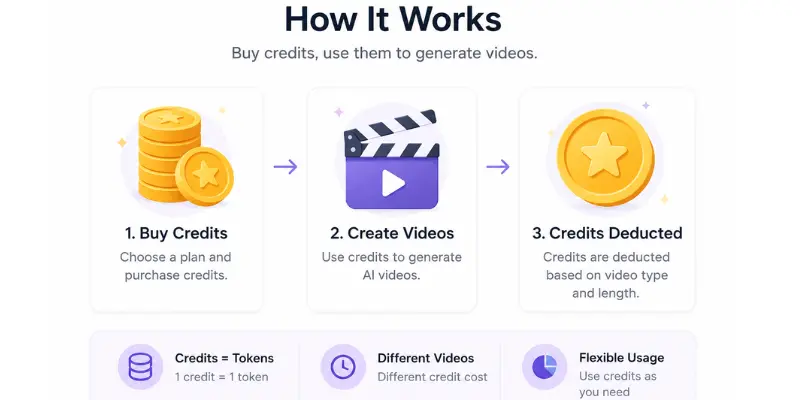
MotionMuse AI pricing works differently from a simple monthly subscription. Instead of paying a flat fee for unlimited use, you buy credits, and each video you generate spends some of those credits. When credits run out, you either buy more or wait for your plan to renew. Understanding this system before you pay is the single most important thing you can do to avoid disappointment.
Some people find MotionMuse AI pricing fair and flexible. Others feel surprised when credits disappear faster than they expected. Both reactions are understandable and this article will make sure you are not caught off guard before spending a dollar.
We break down everything about MotionMuse AI pricing in plain terms: how the free plan actually works, what changes when you upgrade, how fast credits get used, and whether any paid plan is actually worth it for your specific situation.
If you want to understand the tool itself before looking at pricing, the honest MotionMuse AI review with real test results breaks down how it works and what kind of videos it actually produces.
How MotionMuse AI Pricing Works
MotionMuse AI uses a freemium model. You can start for free, but you will hit limits quickly and need to upgrade if you want to use it regularly.
The entire MotionMuse AI pricing structure is built around credits. Think of credits like tokens you start with a certain number, and every video generation spends some of them. When they are gone, you either wait for your monthly renewal or purchase more credits directly.
This credit-based pricing model is common across AI video tools in 2026. Kling AI, Hailuo AI, and others all use similar systems. The important thing to understand about MotionMuse AI pricing is that “free” means “free to test” — not “free to use long-term without paying.”
The Free Plan — What You Actually Get (and What You Don’t)
When you sign up for a new MotionMuse AI account, you receive a starting batch of free credits automatically. These are enough to generate somewhere between 3 and 5 short video clips, depending on the quality settings you choose.
What the free plan includes:
- AIarting credits for a small number of test videos
- Access to basic motion styles
- Short video generation (4 to 6 seconds)
- AIandard resolution output
- Ability to download generated clips
What the free plan does not include:
- Unlimited video generation
- Higher resolution output options
- Priority processing speed
- Access to all motion styles
- Watermark-free downloads (varies by plan)
The honest reality of MotionMuse AI pricing at the free tier is that it gives you just enough to see what the tool can do but not enough to build any content workflow around it. Users on Reddit communities regularly mention being surprised by how quickly free credits disappeared during initial testing. This is not unique to MotionMuse AI pricing almost every AI video tool uses the same approach. Treat free credits as a testing window, not a content creation resource.
Paid Plans — What Actually Changes When You Upgrade
Moving to a paid plan changes three main things within the MotionMuse AI pricing structure: how many credits you get, how fast videos are processed, and what quality options become available.
Paid plan benefits typically include:
- Significantly more credits per billing cycle
- Faster video generation with less waiting
- Higher resolution output options
- Access to more motion styles
- Better support priority
Exact MotionMuse AI pricing tiers change from time to time, so always check the official site before purchasing. Based on information as of May 2026, plans are offered monthly with an option to save by paying annually. The freemium entry point makes MotionMuse AI pricing accessible compared to tools like Runway ML that have no meaningful free tier.
Understanding Credits — The Part That Confuses Most People
The credit system is where most new users get confused about MotionMuse AI pricing. Here is a clear breakdown.
How Many Credits Does One Video Use?
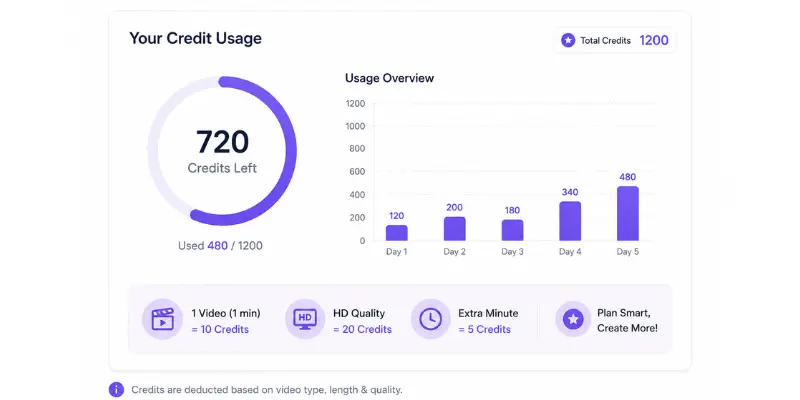
The cost in credits per video depends on two things: the length of the clip and the quality setting you choose. A short clip at standard quality uses fewer credits. A slightly longer clip at higher quality uses more.
This is why users who keep regenerating the same prompt to find the perfect result can burn through credits very quickly. If you generate three versions of the same idea to compare them, you spend three times the credits versus just keeping the first result. This is normal behavior when testing a new tool but it can drain your free credits before you have a single finished video worth keeping.
How Quickly Do Credits Run Out?
This depends entirely on how you use the tool. Here are realistic estimates based on typical usage patterns:
Light user (1–2 videos per week): Free credits may last 2 to 3 weeks. A basic paid plan would comfortably cover a full month.
Regular creator (one video per day): Free credits are gone within the first day or two of testing. A starter paid plan covers roughly 2 to 3 weeks of daily creation.
Heavy user (multiple videos per day): You will exhaust starter plan credits within a week or two. Heavier plans or additional credit purchases become necessary.
The single most common complaint across Reddit threads about AI video tools not just MotionMuse AI pricing specifically is that free credits run out much faster than expected.
What Happens When Credits Hit Zero?
When your credit balance reaches zero, video generation stops until more credits are added. You can either wait for your monthly plan to renew or purchase additional credits as a one-time top-up.
Some users have reported confusion about auto-renewal specifically being charged after forgetting a subscription was still active. Make a note of your renewal date when you sign up. Set a calendar reminder if you are not sure you want to continue past the first month.
If you have any concerns about billing safety or trust, the MotionMuse legitimacy and billing safety breakdown explains payment practices, refund policies, and key trust signals before you enter any payment details. .
MotionMuse AI Pricing vs Competitors
Comparing MotionMuse AI pricing to similar tools helps you decide whether you are getting good value.
MotionMuse vs Kling AI
Both tools use a credit-based system. Kling AI’s paid plans start at around $9.99 per month, broadly comparable to MotionMuse AI pricing. The difference is what you get for those credits.
Kling AI produces more realistic, higher quality video output. Creators who care about quality tend to feel Kling’s paid plan gives better value for that reason. For someone who just needs simple animated clips for social media, MotionMuse AI pricing can feel like better value because simpler output requires less processing and stretches credits further.
MotionMuse AI vs Kling AI comparison goes deeper into both tools across quality, ease of use, and cost. Similar price range, but different output quality. Choose based on the level of quality you actually need.
MotionMuse vs Runway ML
Runway ML’s paid plans start at around $12 per month, making them slightly more expensive than MotionMuse AI pricing. However, Runway gives access to significantly more powerful generation models, longer video lengths, and professional editing tools that MotionMuse does not offer.
For casual social media creators, Runway’s extra cost adds no obvious value. For professional creators working on YouTube, client videos, or high-end marketing content, the investment makes sense.
Bottom line: Runway costs more and delivers much more. Only worth it if you genuinely need professional quality output.
MotionMuse vs Pika Labs
Pika Labs is one of the most affordable options in this comparison, with a paid starter plan starting at around $8 per month. It also offers a free plan that includes a watermark, which gives casual users more usable access compared to MotionMuse AI pricing on its free tier.
For budget-focused creators, Pika Labs feels more predictable and easier to manage. MotionMuse AI pricing is still competitive, but its credit-based system makes it harder to estimate how many videos you’ll actually get for your money.
Bottom line: Pika Labs is slightly more budget-friendly for casual users.
For users who want to keep costs at zero, the best free AI video tools with daily credit resets include several options tested in 2026, including one with no usage limits at all.
Is the Paid Plan Worth Paying For?
Here is a direct, honest answer based on real usage rather than marketing language.
When Paying Makes Sense
You create content regularly for social media. If you post to TikTok, Instagram Reels, or YouTube Shorts more than once or twice a week, free credits will not be enough. A paid MotionMuse AI pricing tier removes the constant frustration of hitting your limit mid-workflow.
You have already tested it and liked the output. Never upgrade before using the free credits and confirming the quality actually meets your needs. The free tier exists specifically for this purpose.
You are creating content for a small business or brand. Even a basic MotionMuse AI pricing plan is likely a small cost compared to the value of consistent, branded video content.
You want a faster generation. Paid users typically get priority in the processing queue, which means less waiting when creating multiple videos.
When Paying Does Not Make Sense
You have not tested the free tier yet. Always try before you buy with any AI tool. Use all your free credits to confirm the tool actually works for your content before committing money.
You need professional cinematic quality. If your standard is YouTube-ready or client-ready output, no MotionMuse AI pricing plan will deliver that. Runway ML or Kling AI would be a better investment.
You only need one or two videos occasionally. If you need AI video content once a month or less, the free credits or a very short-term plan may be enough without committing to a monthly subscription.
Budget is your main concern. There are genuinely solid free alternatives with daily reset credits. The best free MotionMuse AI alternatives with daily credit limits and watermark policies include several options that explain daily usage limits and watermark rules, making it easier to choose without spending money.
How to AIretch Your Free Credits as Far as Possible
If you are on the free plan and want to maximize every credit before committing to any MotionMuse AI pricing tier, these practical tips make a real difference.
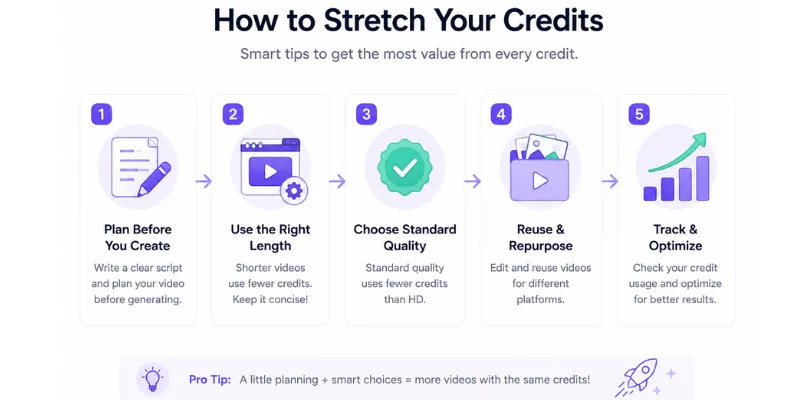
Write your prompt carefully before you generate. Every generation costs credits. Spending three minutes writing a clear, specific prompt before hitting generate makes you much more likely to get a usable result on the first try. Vague prompts lead to regenerations, which burn credits fast.
Keep your prompts simple and focused. MotionMuse works best with clear, single-focus ideas. “A neon city street at night with rain falling softly” produces better results than “a futuristic urban scene with many different things happening at once.”
Do not regenerate out of curiosity. It is tempting to keep generating to see variations. On the free plan, resist this. Only regenerate if the result is clearly unusable.
Download every video you generate. Credits are spent the moment you hit generate. If you do not download the result and close the tab, you have wasted that credit entirely.
Think of your first few credits as your learning phase. Use them to understand which types of prompts produce the best output for your content style. Once you know what works, your credit efficiency improves dramatically.
For more on writing prompts that produce strong results consistently, the complete MotionMuse AI prompt with 50+ examples helps you get maximum value from every credit you spend.
Refund Policy — What You Need to Know
MotionMuse AI publicly offers a 30-day money-back guarantee on paid plans. If you purchase a MotionMuse AI pricing plan and are unhappy with what you receive, you can request a refund within that window.
A few key points:
- The 30-day window starts from the date of purchase, not from when you first actively use credits
- Request refunds through official support channels and keep a record of your purchase date
- A money-back guarantee is a positive trust signal platforms that are designed to take money and disappear do not offer them
That said, the most important advice remains: do not treat the refund policy as a safety net. Test the free tier first. Use all your free credits to confirm the tool actually works for your workflow before upgrading any MotionMuse AI pricing plan. A refund process takes time and effort that is better avoided entirely.
Conclusion
MotionMuse AI pricing is straightforward once you understand how the credit system works. Free credits give you a real taste of the tool, but they are not designed for long-term regular use. Paid plans make sense for creators who post consistently, have already tested the tool, and know the output style fits their content.
The most important things to remember about MotionMuse AI pricing: always test before you pay, watch out for auto-renewal, and use free credits to confirm the tool fits your workflow rather than just generating test videos out of curiosity.
If you are still deciding whether MotionMuse is the right tool for you, the MotionMuse AI alternatives comparison brings together all major competing platforms with clear pricing and feature breakdowns so you can compare options before spending a single dollar.
FAQS
No. MotionMuse AI pricing offers limited free credits when you sign up — enough to test the tool with a small number of videos. For regular use, a paid plan is required. If you need genuinely free options for ongoing use, there are dedicated alternatives worth checking out.
The exact number depends on video length and quality setting. Higher quality and longer videos use more credits. This is why generating multiple versions of the same prompt burns through credits quickly every generation costs credits regardless of whether you keep the result.
Yes. MotionMuse AI offers a 30-day money-back guarantee. Always test the free tier first to reduce the chance of needing one.
The starter or basic paid plan is the right starting point if you decide to pay. It gives enough credits for casual regular use without committing to higher costs before you understand your own usage patterns.
Like most subscription tools, MotionMuse AI subscriptions typically auto-renew at the end of each billing cycle. Several users have reported being charged after forgetting about a subscription. Make a note of your renewal date
For creators who post content regularly and have confirmed they like the output quality, yes — the MotionMuse AI pricing offers good value for its simplicity and speed. For casual or infrequent users, free alternatives with daily reset credits may serve just as well at no cost.

MotionMuse AI vs Kling AI vs Runway ML vs Pika Labs: Which One Is Actually Worth Using in 2026?





- Be Respectful
- Stay Relevant
- Stay Positive
- True Feedback
- Encourage Discussion
- Avoid Spamming
- No Fake News
- Don't Copy-Paste
- No Personal Attacks
- Be Respectful
- Stay Relevant
- Stay Positive
- True Feedback
- Encourage Discussion
- Avoid Spamming
- No Fake News
- Don't Copy-Paste
- No Personal Attacks
