Best MotionMuse AI Prompts for Social Media Videos in 2026 (50+ Real Examples)
Published: 21 May 2026
You signed up. Your credits are ready. And now you are staring at a blank prompt box, completely unsure what to type.
This is the moment where most new users get stuck and it is the most important moment in the entire process. Weak MotionMuse AI prompts produce weak videos. Clear, specific motionmuse ai prompts produce something you actually want to post. The tool stays the same either way. What changes is what you tell it.
The good news is that writing effective MotionMuse AI prompts is a learnable skill. It is not about being creative. It is about understanding how the AI reads your words and what kinds of descriptions consistently produce better motion clips.
This article gives you everything you need. Over 50 ready-to-use MotionMuse AI prompts organized by platform and content type, practical tips on writing your own prompts from scratch, and clear examples of how to fix prompts that did not work. All of it is written for real creators not for people experimenting for fun.
If you want a broader picture of what MotionMuse AI is capable of before diving into prompts, the honest MotionMuse AI review with real test results shows actual output quality and gives transparent feedback on what the tool can and cannot do.
Why Your MotionMuse AI Prompts Matter More Than the Tool Itself
Here is something that surprises most new users: two people using the exact same tool with the exact same plan can get completely different results. One gets polished, professional-looking clips. The other gets blurry, generic videos that never feel right.
The difference is almost always the quality of their MotionMuse AI prompts.
AI video tools do not read your mind. They read your words. The clearer, more visual, and more specific your MotionMuse AI prompts are, the better the AI can translate them into motion. A vague prompt gives the AI too much guessing to do. A specific prompt gives it real direction.
Better MotionMuse AI prompts also mean fewer regenerations which means you use fewer credits and produce more usable content in less time. If you are wondering how credits work and how to stretch them further, the MotionMuse AI pricing and credit system breakdown explains exactly how the system operates before you spend anything.
How MotionMuse AI Reads Your Prompt
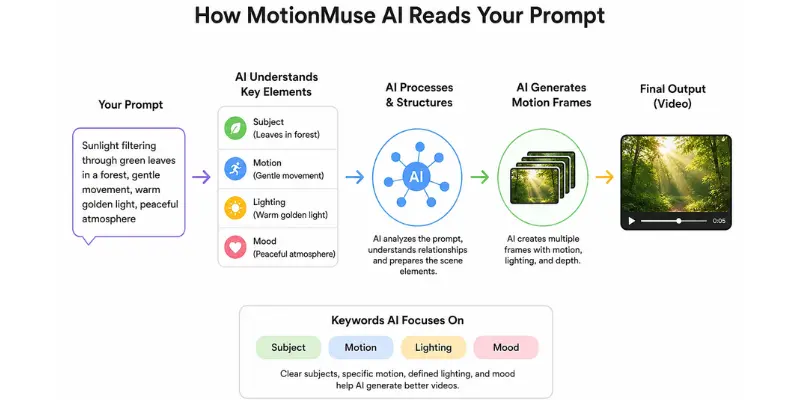
Understanding how the AI processes your text helps you write MotionMuse AI prompts that consistently perform.
Words That Help
Concrete nouns. Real, visual things are easier for the ai to render than abstract ideas. “A red tulip swaying” works better than “something beautiful in nature.”
Motion verbs. Since you are creating video, motion is everything. Words like flowing, falling, rising, drifting, glowing, moving, spinning, flickering, and zooming all give the AI clear instructions on how things should behave in your MotionMuse AI prompts.
Lighting descriptions. The way a scene is lit changes its entire emotional feel. “Golden sunset light,” “soft blue moonlight,” “warm indoor lamp glow,” and “bright overcast daylight” all create distinct moods the AI understands well.
Camera perspective. Adding a framing cue helps the AI compose the shot. “Close-up,” “aerial view,” “wide landscape,” “slow zoom in,” and “tracking shot” are all understood and improve results when included in your MotionMuse AI prompts.
Mood or atmosphere keywords. Words like cinematic, dreamy, peaceful, energetic, moody, minimal, and vibrant help calibrate the overall tone of the output.
Words That Confuse
Abstract emotions without visual translation. “A feeling of nostalgia” is hard to render as motion. Translate it into visual terms: “An empty childhood swing moving gently in a quiet afternoon breeze.”
Conflicting instructions. “Bright and dark, fast and slow” — contradictions produce unpredictable results. Choose one clear direction in your MotionMuse AI prompts.
Too many separate elements. Asking the AI to show a beach, a person surfing, seagulls flying, clouds moving, a sunset, and a boat simultaneously causes the output to feel messy. Pick two or three main elements.
Brand names or specific logos. These typically do not work well and may produce blocked or unexpected results.
If prompt limitations become frustrating, some AI video tools with fewer prompt restrictions allow more creative flexibility for experimental content styles.
Best MotionMuse AI Prompts for Instagram Reels
Instagram rewards visually rich, emotionally resonant, aesthetically beautiful content. Reels that stop the scroll have strong visual contrast, smooth motion, and a clear subject. These MotionMuse AI prompts are built for that standard.
Nature and Aesthetic Prompts
These MotionMuse AI prompts work especially well for lifestyle, wellness, travel, and aesthetic content pages.
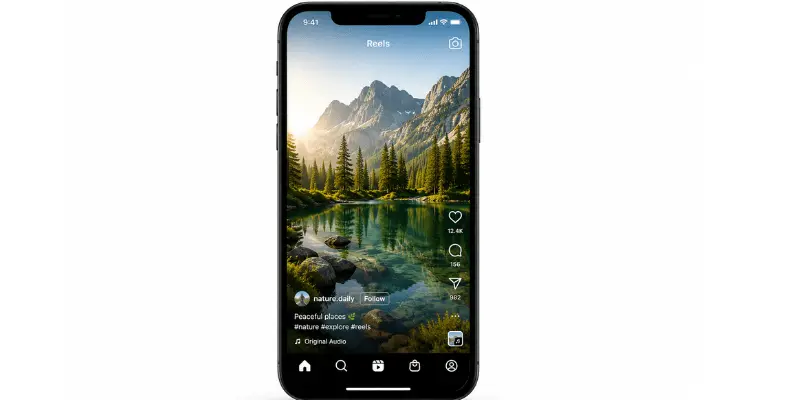
- “Sunlight filtering through dense green leaves in a forest, slow gentle motion, warm golden tones”
- “Ocean waves rolling in softly onto white sand, aerial view, peaceful and cinematic”
- “Cherry blossom petals drifting slowly through a soft spring breeze, pink and white tones, dreamy”
- “Close-up of rain drops falling on a dark window pane, reflections of city lights, moody”
- “Desert sand dunes at golden hour with wind blowing slowly across the surface, minimal and cinematic”
- “A mountain peak emerging through low clouds, epic wide shot, slow atmospheric movement”
- “Soft pink and white clouds drifting across a pastel sky, dreamy and minimal”
- “Close-up of a flower opening slowly in warm soft light, macro lens style”
- “Waterfall flowing over dark mossy rocks, slow motion, deep forest setting, lush and green”
- “Morning mist drifting slowly across a still mountain lake, sunrise light, peaceful and cinematic”
Product and Brand Prompts
These MotionMuse AI prompts work well for brand accounts, e-commerce sellers, and small business content.
- “A luxury perfume bottle on a marble surface, soft light, slow camera rotation, clean and elegant”
- “Steam rising from a fresh cup of coffee on a wooden table, warm morning light, cozy”
- “Skincare product on white surface with light reflecting on glass, slow smooth motion, clean aesthetic”
- “Fresh food ingredients arranged artfully, slow zoom in, natural light, food photography style”
- “A smartphone screen glowing in a dim room, slow tilt-up reveal, modern and sleek”
- “A candle flame flickering gently in a warm dark room, close-up, intimate and cozy”
- “Jewelry piece rotating slowly on a dark velvet surface, soft spotlight, elegant and premium”
- “A book opening slowly on a wooden desk in morning light, warm and inviting atmosphere”
Lifestyle and Travel Prompts
These MotionMuse AI prompts are strong for travel creators, personal brands, and lifestyle influencers.
- “Aerial view of a tropical island with turquoise water, slow drone-style movement, vivid and lush”
- “City lights coming alive at night, timelapse-style motion, vibrant and urban”
- “Walking through narrow cobblestone streets of an old European city, first-person walking motion, warm light”
- “Sunrise over a calm lake with mist hovering on the surface, slow and peaceful”
- “Train moving through a scenic mountain valley, window view, clouds and greenery, cinematic”
- “A night market with colorful lights and movement, vibrant energy, handheld camera style”
- “Hammock gently swaying between palm trees on a beach, turquoise water in background, relaxed”
Best MotionMuse AI Prompts for TikTok
TikTok rewards high energy, strong visual hooks, and content that grabs attention within the first two seconds. These MotionMuse AI prompts are designed for that strong visual impact, clear motion, and content that feels current.
Trending Visual Style Prompts
- “Abstract neon liquid flowing and morphing in dark space, electric purple and blue, hypnotic”
- “Glitch effect on a digital cityscape at night, fast flickering, cyberpunk aesthetic”
- “Fire burning in slow motion with embers floating upward, close-up, dark background, dramatic”
- “Geometric shapes rotating and expanding in colorful light, minimal and satisfying”
- “Retro VHS-style animated city at sunset, grainy texture, warm orange and pink tones”
- “Ink dissolving into clear water in slow motion, close-up macro, mesmerizing and minimal”
- “Stars streaking across a dark night sky at fast motion, deep space feel, cinematic”
- “Neon signs reflecting in puddles on a rainy city street, slow motion, moody and vivid”
Fast Energy and Hook Prompts
These MotionMuse AI prompts work as opening hooks, background loops, or visual transitions.
- “Storm clouds building fast over a city skyline, dark and dramatic timelapse”
- “A motorcycle through a neon-lit tunnel at night, fast motion blur, vibrant”
- “Waves crashing powerfully against dark rocks, slow motion, high contrast”
- “Electric energy crackling between two points in dark space, blue and white glow”
- “Camera moving quickly through a bright forest, sunlight flashing through trees, fast and energetic”
- “Lightning striking over a dark stormy ocean, dramatic wide shot, electric atmosphere”
- “Colorful paint exploding outward from a central point, slow motion, black background, vivid”
Best MotionMuse AI Prompts for YouTube Shorts
YouTube Shorts have a slightly higher tolerance for polished, refined content compared to TikTok. These MotionMuse AI prompts work well as intro clips, background B-roll, visual transitions, or standalone short content.
- “Cinematic slow motion shot of a hand opening a door to reveal a bright sunny garden”
- “Timelapse of a city going from day to night, lights coming on gradually, smooth and cinematic”
- “Close-up of hands typing on a laptop in a coffee shop, blurred background, focused and productive”
- “Abstract tech background with flowing data streams and soft blue light, minimal and modern”
- “Books stacking in a library, slightly sped up, warm amber light, knowledge theme”
- “Sunrise over a calm coastline, water shimmering, gentle wave motion, peaceful and wide”
- “Slow camera push into a bright cozy living room, warm winter light, peaceful and inviting”
- “Aerial view of a winding road through autumn forest, leaves changing color, cinematic sweep”
- “Close-up of a coffee shop interior, customers blurred in background, warm afternoon light”
Prompt Templates You Can Copy Right Now
These are fill-in-the-blank templates you can adapt to any niche or content style. Replace the brackets with your specific subject, action, and mood to build MotionMuse AI prompts instantly.
Template 1 — Nature / Aesthetic: “[Subject] in [setting], [movement description], [lighting], [mood] atmosphere”
→ “Wildflowers in a green meadow, swaying in a gentle breeze, golden afternoon light, peaceful atmosphere”
Template 2 — Product: “[Product] on [surface], [camera movement], [lighting style], [adjective] and [adjective]”
→ “Leather wallet on stone surface, slow 360 rotation, soft side lighting, clean and premium”
Template 3 — Abstract / Creative: “[Color palette] [abstract subject] [movement], [visual style], [mood]”
→ “Deep blue and gold liquid swirling slowly, painterly style, hypnotic and elegant”
Template 4 — City / Urban: “[City scene] at [time of day], [motion type], [color atmosphere]”
→ “Tokyo street at midnight, people and cars in slow motion, neon glow and rain reflections”
Template 5 — Energy / Action: “[Fast subject] through [setting], [camera perspective], [energy description]”
→ “Snowboarder through fresh powder on a mountain slope, close following camera, exhilarating and dynamic”
Template 6 — Cinematic Reveal: “[Camera movement] revealing [subject] in [setting], [lighting], [mood]”
→ “Slow zoom out revealing a lone lighthouse on a rocky cliff, stormy ocean light, dramatic”
These templates are designed so any creator — regardless of niche — can produce effective MotionMuse AI prompts on their first try.
If you are completely new to AI video generation, learning how to use MotionMuse AI will make these prompt templates easier to understand and customize for your own content style.
How to Fix MotionMuse AI Prompts That Did Not Work
Getting a result you do not like is not failure it is useful information. Here is how to read what went wrong and fix your MotionMuse AI prompts without wasting more credits.
Before and After Examples
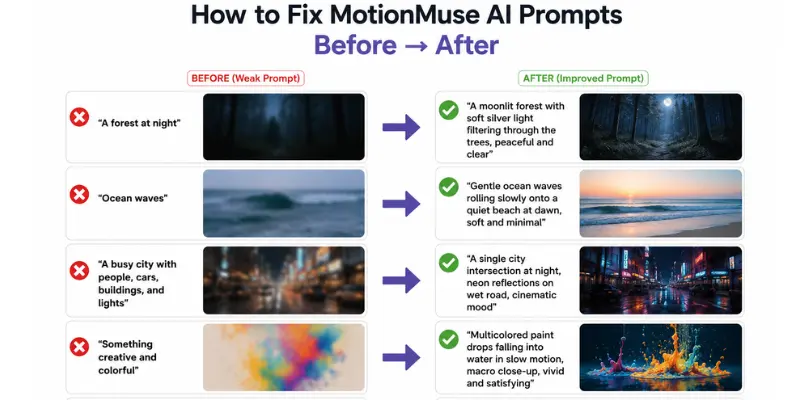
Problem: Output was too dark Before: “A forest at night” After: “A moonlit forest with soft silver light filtering through the trees, peaceful and clear”
Problem: Motion felt too chaotic Before: “Ocean waves” After: “Gentle ocean waves rolling slowly onto a quiet beach at dawn, soft and minimal”
Problem: Scene felt too cluttered Before: “A busy city with people, cars, buildings, and lights” After: “A single city intersection at night, neon reflections on wet road, cinematic mood”
Problem: Subject was unclear Before: “Something creative and colorful” After: “Multicolored paint drops falling into water in slow motion, macro close-up, vivid and satisfying”
Problem: Mood felt flat or generic Before: “A sunset” After: “A dramatic sunset over the ocean with deep orange and purple clouds, wide cinematic angle, epic”
The pattern in all these improved MotionMuse AI prompts is the same: more specific subject, clearer motion description, added lighting, defined mood. These four elements consistently improve any prompt.
How to Combine MotionMuse Clips With Other Tools
MotionMuse AI videos are 4 to 6 seconds long, so they work best as one part of a larger content workflow rather than as complete standalone videos.
As a visual hook in longer TikTok or YouTube videos. Use a MotionMuse clip as your opening shot to grab attention in the first two seconds before cutting to talking-head footage or screen recording.
As background loops behind text or captions. Many social media posts use a moving visual background with text overlay. MotionMuse clips work perfectly here – a 5-second loop playing silently behind bold text is visually engaging without being distracting.
As transitions between scenes. A brief motion clip between two scenes creates a professional visual break in longer edited videos.
As standalone aesthetic content. For accounts that post pure aesthetic content, nature, abstract, visual art, a MotionMuse clip with a strong caption and relevant hashtags can perform well on its own.
For creators who need longer, more cinematic clips to pair with MotionMuse content, the full MotionMuse AI alternatives comparison includes tools with more advanced features and longer video lengths. If budget is a concern, the best free MotionMuse AI alternatives cover tools with daily free credits that complement a MotionMuse workflow at no additional cost.
Advanced MotionMuse AI Prompts for Experienced Creators
Once you have mastered the basics, these more detailed MotionMuse AI prompts give you more cinematic and sophisticated results.
Cinematic atmosphere:
- “Golden hour light streaming through floor-to-ceiling windows into an empty loft apartment, dust particles visible, slow camera drift, warm and cinematic”
- “Aerial view of a fog-covered forest at dawn, single mountain peak emerging above the cloud line, slow and majestic sweep”
Hyper-specific product shots:
- “A glass of iced coffee with condensation forming on the outside, dark wooden table, soft diffused light, close-up with slow rack focus”
- “Watch on a black surface, slow spotlight rotation revealing the face, dramatic side lighting, luxury product aesthetic”
Abstract and experimental:
- “Fractured light prisms casting rainbow patterns across a white wall, slowly shifting, minimal and meditative”
- “Dark liquid pouring into clear water and blooming outward in slow motion, macro close-up, moody and hypnotic”
These advanced MotionMuse AI prompts work best for creators who already understand the tool’s output range and want to push for more distinctive results.
Conclusion
The best MotionMuse AI prompts are not magic formulas. They are clear descriptions of specific visual scenes with movement focusing on subject, action, lighting, and mood. Keeping these four elements in mind will consistently improve your results.
Start with the ready-to-use MotionMuse AI prompts in this article for your first sessions. Once you understand what types of descriptions produce the best output, you will naturally develop your own prompt style that fits your content niche.
If you reach a point where MotionMuse’s output no longer fully matches your creative needs such as more realistic motion, longer video generation, or a different visual style you can explore other tools that offer more flexibility for different creative workflows.
Keep testing, keep refining your MotionMuse AI prompts, and keep creating.
Faqs
Aim for 10 to 20 words. Long enough to give the AI real direction, short enough to stay focused. Under 5 words is usually too vague. Over 30 words tends to produce inconsistent results because the AI struggles to balance too many competing elements.
Yes. AI video generation has natural randomness built in, so the same prompt can produce noticeably different outputs each time. This is useful when you like a concept but want slightly different visual variations.
Avoid abstract emotional concepts without visual translation. Avoid brand names, logos, and trademarks. Avoid contradictory instructions. Avoid long lists of elements and pick the two or three most important things.
MotionMuse AI is primarily optimized for English prompts. Prompts in other languages may work but tend to produce less precise results. If you create content for a non-English audience, writing prompts in English and adding text overlays in your own language is a practical approach.
Server load, model updates, and natural AI randomness all affect output. If a prompt that worked well is now producing weaker results, try small adjustments to the wording rather than assuming the tool has significantly changed.
Read it out loud and imagine describing the video to someone who needs to draw it. If they know exactly what to draw, the prompt is good. If they would ask “what is the main subject?” or “how is it moving?” — add those details first.





- Be Respectful
- Stay Relevant
- Stay Positive
- True Feedback
- Encourage Discussion
- Avoid Spamming
- No Fake News
- Don't Copy-Paste
- No Personal Attacks
- Be Respectful
- Stay Relevant
- Stay Positive
- True Feedback
- Encourage Discussion
- Avoid Spamming
- No Fake News
- Don't Copy-Paste
- No Personal Attacks
