Best Unrestricted AI Video Generator 2026 (No Filter, Free & NSFW Tools)
Published: 18 Oct 2026
Feeling confused by tools that promise freedom but block your ideas again and again? You are not alone. Many creators face this when looking for a truly unrestricted AI video generator, one that lets them create bold, cinematic, or NSFW content without constant prompt errors. Whether you are specifically hunting for a MotionMuse alternative or simply want more creative freedom in general, this guide covers the best tools available in 2026, how they compare, and which one fits your needs.
Best MotionMuse AI Alternatives in 2026
MotionMuse AI is easy to start with, but most users eventually look for an alternative for one of three reasons: free credits run out fast, explicit text prompts get filtered even though image uploads are allowed, and the output style stays fairly limited compared to newer tools. If MotionMuse is not loading for you, the alternatives below are the practical way to keep working. Which replacement fits depends on the problem you want to fix:
- For fewer filters on adult content, Seduced AI offers a free trial and a paid plan for full access, while Stable Diffusion removes filters completely if you run it on your own PC.
- For a free way to keep testing image-to-video, Pika Labs offers a free plan with a watermark, and Kling AI gives limited free credits. Both still filter explicit prompts.
- For more realistic motion, Kling AI and Luma Dream Machine stand out.
- For editing and professional control, Runway Gen-3 fits best, though its filters are strict and it isn’t suitable for adult content.
If you want to stay close to what MotionMuse does, image-to-video with an NSFW option, Seduced AI and Stable Diffusion are the only two tools on this list with full NSFW support; the others are better for non-explicit work. The comparison table further down shows filter levels and free access for each tool side by side, and the MotionMuse AI review summarises what Reddit users say about its credits, billing, and output quality.
What Is an Unrestricted AI Video Generator?
An unrestricted AI video generator is a tool that turns your text into video with very few prompt limits. You simply write what you want to see, and the tool creates scenes, motion, and visuals without stopping you again and again.
These tools are often called unrestricted video AI because they give users more creative freedom and fewer interruptions during video creation.
In simple words, this is video creation where the tool does not block normal creative ideas.
Key points:
- Converts text into video fast
- Allows wider prompt freedom
- Fewer content blocks and errors
- Gives better control over scenes and style

How Unrestricted Video AI Is Different From Restricted Tools
Many video AI tools use strict filters. They block prompts that include certain words, themes, or styles. You may see messages like “prompt not allowed” or “content violation.” This wastes time and breaks your flow.
An ai video generator with no restrictions reduces this problem. It allows you to create without constant edits to your prompt.
Restricted tools:
- Block many prompts
- Add heavy safety filters
- Limit creative ideas
- Stop exports for some topics
Unrestricted video ai tools:
- Allow more natural prompts
- Fewer interruptions
- More creative control
- Smoother video creation process
Example: You write a prompt for a dark cinematic story scene. A restricted tool blocks it. An unrestricted ai video generator creates it in seconds.
Why Users Prefer Unrestricted AI Video Generators
People want speed, freedom, and control when making videos. They do not want to fight with the tool. They want the tool to follow their idea.
That is why many creators search for unrestricted ai video generators and ai video generator no restrictions tools.
Reasons users like these tools:
- No repeated prompt errors
- Full creative freedom
- Faster video production
- Better for storytelling, ads, and experiments
- Saves time and effort
Would you rather edit your prompt ten times, or create your video in one go?
Easy Line to Remember
An unrestricted video ai tool is:
A video generator that follows your idea with minimal limits and maximum creative freedom.
Top Features to Look For in an Unrestricted AI Video Generator
When you choose an unrestricted ai video generator, do not look at design only. Look at the features that save your time and give real freedom.
Many tools claim freedom, but they add limits, watermarks, or login walls. A good tool should let you create videos fast and easily.
Here are the top features you should check before using any tool.
No Limits on Prompts and Creation
A true no limit ai video generator does not stop your ideas. You can write prompts freely and create the video you imagine.
What to check:
- No prompt blocking again and again
- No strict topic limits for normal use
- Freedom to test creative ideas
Example: You write a cinematic story prompt. The tool should create it without errors.
Free Access Without Hidden Barriers
Many tools say “free,” but after one video they ask for payment. A good unrestricted ai video generator should give real free access to test properly.
What to check:
- Free trial or free credits
- No forced upgrade in the first use
- Clear limits if any
This helps you test the tool before trusting it.
No Sign-Up or Login Required
The best tools work as a free ai video generator, no sign up. You open the site, write the prompt, and generate the video.
What to check:
- Guest mode access
- No email or account needed
- Direct start without forms
This saves time and keeps the process simple.
No Watermarks on Exported Videos
Many creators prefer tools without branding or limits, which is why they often search for the best free MotionMuse AI alternatives to get cleaner, more flexible, and professional-looking video results.
What to check:
- Watermark-free download
- Clean video output
- Usable for social media or ads
Example: You create a video for Instagram. A watermark ruins the look.
Fast Video Generation Speed
Speed matters. You should not wait 20 minutes for a short clip. A quality no limit ai video generator creates videos quickly.
What to check:
- Fast rendering time
- Quick preview
- Smooth export process
Fast tools help you create more videos in less time.
Quick Checklist Before You Choose
Before using any unrestricted ai video generator, ask:
- Does it allow free prompts?
- Can I use it without signup?
- Does it give watermark-free videos?
- Is the generation speed fast?
- Can I test it for free?
If the answer is yes, you found a good tool
Best Free Unrestricted AI Video Generators
If you want the best unrestricted ai video generator free, you must check real features, not just ads. Many tools say “free,” but they add limits, watermarks, or login walls. A good free ai video generator unrestricted tool should give real freedom to create videos without stress.
Below is a simple comparison of popular tools based on real common features like access, filters, and watermark rules.
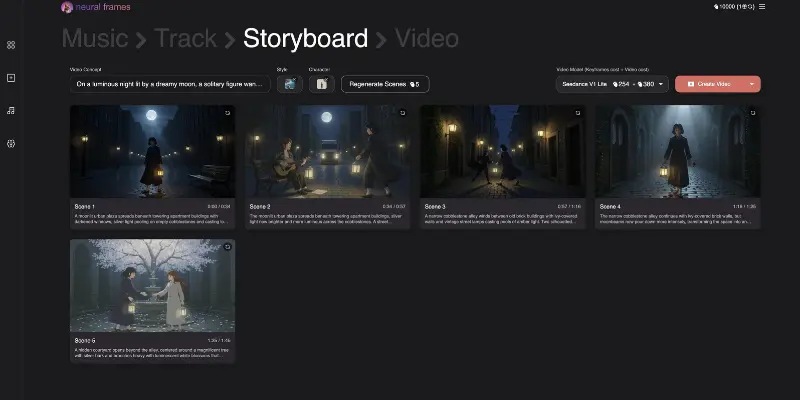
MotionMuse AI
MotionMuse AI is beginner-friendly and works well for quick animated clips. It has a dedicated NSFW section and supports image-to-video generation, which makes it more flexible than most mainstream tools.
|
As of 21 October 2026, motionmuse.ai does not load, so check that the service is working before you sign up or pay. |
Content Freedom Level: ⚠️ Partial
MotionMuse allows adult content through image uploads but actively filters explicit text prompts. The most reliable approach is to let your source image carry the adult content and keep the motion prompt focused on movement only words like “slow zoom” or “gentle pan” rather than explicit descriptions.
For creators deciding between MotionMuse and Kling for social media content, the MotionMuse vs Kling AI differences go into realism, pricing, and output quality in full.
Anyone comparing adult-focused platforms can also see how Seduced AI stacks up against MotionMuse in terms of filters and pricing.
Readers who want other head-to-head matchups can look at PromptChan AI vs MotionMuse or SoulGen vs MotionMuse before deciding.
Pros
- Very easy for beginners
- Quick video output
- NSFW image-to-video supported
Cons
- Explicit text prompts often blocked
- Limited advanced controls
Best For: Beginners testing NSFW image-to-video
Kling AI
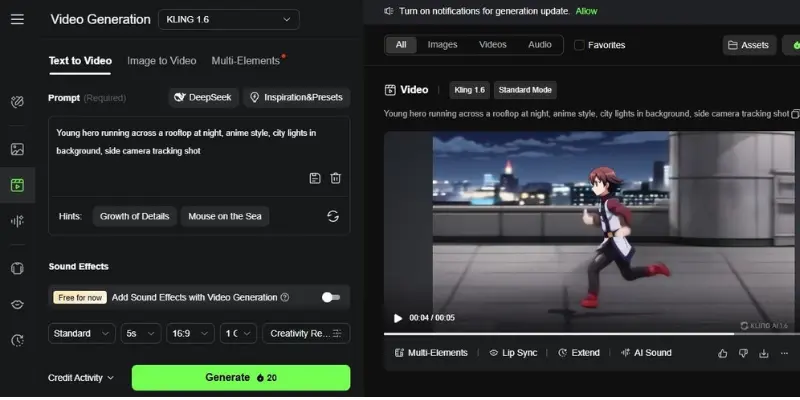
Kling AI produces some of the most realistic motion output available in 2026. It handles dark cinematic and mature themes reasonably well but is not a dedicated NSFW platform.
Content Freedom Level: ⚠️ Partial
Kling filters explicitly sexual text prompts but allows mature and edgy creative content when prompts are written carefully. It works better for dark storytelling and cinematic mature scenes than for direct adult content generation.
Pros
- Very smooth realistic visuals
- Good for dark cinematic content
- High quality output
Cons
- Explicit prompts blocked
- Limited free usage
Best For: Dark cinematic and mature themed content
Google Veo
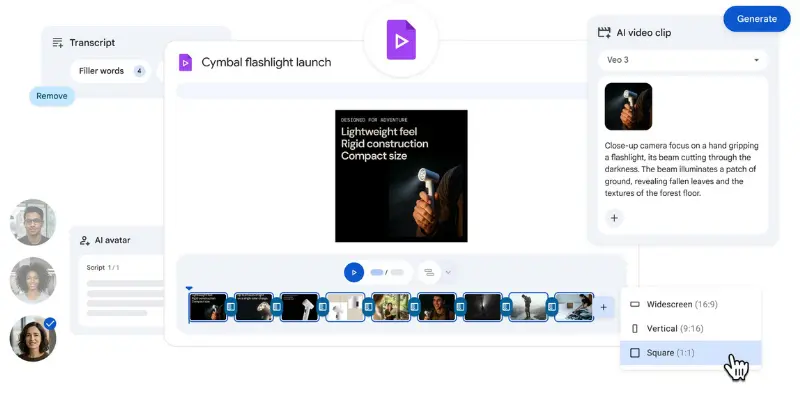
Google Veo is one of the most technically advanced AI video tools in 2026, producing high quality cinematic output with synchronized audio. However it has the strictest content filters of all tools listed here.
Content Freedom Level: ❌ Not Suitable
Google Veo is not suitable for unrestricted or NSFW content in any form. It is included here because of its quality, but creators looking for content freedom should use other tools on this list instead.
Pros
- Outstanding video and audio quality
- Very professional output
- Strong Google ecosystem support
Cons
- Strictest filters on this list
- Limited availability outside US
Best For: High quality mainstream cinematic content only
Runway Gen-3
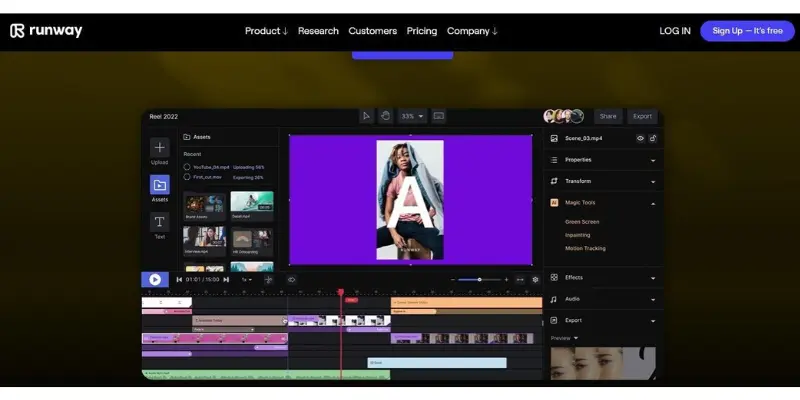
Runway Gen-3 is the most widely used professional AI video tool in 2026. It combines generation and editing in one platform and gives creators strong control over output style.
Content Freedom Level: ❌ Not Suitable
Runway has strict content filters and consistently blocks adult prompts. It handles dark, artistic, and atmospheric content well but is not suitable for the NSFW generation. Creators who need unrestricted output should use Stable Diffusion instead.
Pros
- Strong creative control
- Professional editing tools
- Good for dark artistic content
Cons
- NSFW prompts blocked consistently
- Learning curve for beginners
- Free plan is limited
Best For: Dark artistic and professional cinematic content
Pika Labs
Pika Labs is fast, beginner-friendly, and supports a wide range of creative styles. It allows more creative freedom than Runway or Google Veo but still filters explicitly sexual content.
Content Freedom Level: ⚠️ Partial
Pika handles suggestive and mature themed content reasonably well when prompts are written carefully. Direct explicit prompts get filtered. For creators who want quick mature-themed social clips without going fully NSFW, Pika is one of the more flexible mainstream options.
Pros
- Easy to use
- Fast results
- More flexible than Runway or Veo
Cons
- Explicit content blocked
- Watermark on free exports
Best For: Mature themed short clips for social media
Luma Dream Machine
Luma Dream Machine focuses on cinematic realism and smooth camera movement. It handles atmospheric and sensual content better than most mainstream tools.
Content Freedom Level: ⚠️ Partial
Luma allows more creative latitude than Runway or Google Veo for mature content. Sensual and atmospheric scenes work well. Explicitly sexual prompts are still filtered. It sits in the middle ground between mainstream tools and dedicated NSFW platforms.
Pros
- Very natural realistic motion
- High quality cinematic visuals
- More latitude than Runway or Veo
Cons
- Not a dedicated NSFW platform
- Limited free access
- Processing can be slow
Best For: Atmospheric and sensual cinematic scenes
Stable Diffusion
Stable Diffusion is the only fully unrestricted option on this list. It runs locally on your own computer with no content filters, no prompt blocking, and no watermarks.
Content Freedom Level: ✅ Fully Unrestricted
Full NSFW generation is possible with no restrictions. The trade-off is technical setup. It requires a capable PC and some configuration before first use. For creators who want complete creative control at zero ongoing cost, it is the most powerful free option available.
Pros
- No content filters whatsoever
- No watermarks
- Free with no credit limits
- Full NSFW support
Cons
- Requires technical setup
- Needs a capable PC
- No browser based access
Best For: Advanced creators who want complete unrestricted creative control
Seduced AI
Seduced AI is built specifically for adult content creation. It supports image-to-video with strong character customization and minimal content filtering.
Content Freedom Level: ✅ Fully Unrestricted
Seduced AI allows detailed adult content generation with strong customization options. A paid subscription is required for full access but a free trial is available. For creators who want a dedicated NSFW platform without the technical setup of Stable Diffusion, Seduced AI is the strongest option here.
Pros
- Built specifically for adult content
- Strong character customization
- Minimal content filtering
- Image-to-video supported
Cons
- Paid subscription required
- Niche platform with smaller community
Best For: Dedicated adult content creators who want a managed platform
Final Note
All these tools work differently, and each one offers a different level of creative freedom. Your choice depends on what you actually need:
- Fast simple videos → MotionMuse or Pika
- Realistic cinematic content → Kling or Luma
- Professional work → Runway or Veo
- Full unrestricted NSFW → Stable Diffusion or Seduced AI
Pick the tool that matches your content goal and freedom requirement, not just popularity.
RELATED POSTS
How to Fix Blurry AI Generated Videos in 2026 (Step-by-Step)
Seduced AI Alternatives: 10 Best Options in 2026
Best Pika Labs Alternatives in 2026: 10 Tools Worth Switching To
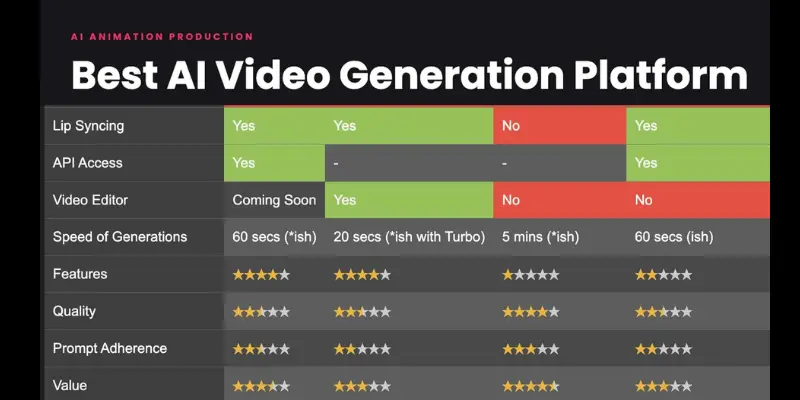
Comparison of Best Free Unrestricted AI Video Generators
| Tool | NSFW Support | Filter Level | Best For | Free Access |
| Stable Diffusion | ✅ Full | None (self-hosted) | Complete creative freedom | Free unlimited |
| Seduced AI | ✅ Full | Minimal | Adult character creation | Trial only |
| MotionMuse AI | ⚠️ Partial | Moderate | NSFW clips via image upload | Limited credits |
| Pika Labs | ⚠️ Partial | Moderate | Mature themed short clips | Free with watermark |
| Kling AI | ⚠️ Partial | Moderate | Dark cinematic content | Limited credits |
| Luma AI | ⚠️ Partial | Moderate | Sensual atmospheric scenes | Limited free |
| Runway ML | ❌ No | Strict | Dark artistic content only | Trial only |
| Google Veo | ❌ No | Very Strict | Mainstream only | Limited |
For a broader look at these tools across quality, pricing, and skill level, the best AI video generator options for 2026 cover every major option in one place.
Which tool should you choose?
- Beginners → MotionMuse or Pika. Not sure which category you fall into? The full ranked list of every major AI video tool in 2026 breaks down each one by use case, price, and skill level
- Realistic videos → Kling or Luma
- Pro editing → Runway
- Full NSFW control → Stable Diffusion or Seduced AI
NSFW Image to Video AI: Best Tools for Unrestricted Creation
Many creators don’t start with text. They start with a single image. It can be a character, a scene, or even a simple frame. Then they want to turn that still image into a short animated video.
This is where image-to-video AI tools help.
Instead of building everything from scratch, you upload an image and the tool adds motion, camera movement, and visual effects. This feels faster and more natural, especially for users who already have a clear visual idea.
If you are looking for MotionMuse alternatives for image-based creation, some tools offer better control, smoother animation, and more flexible styles.
For a deeper breakdown of MotionMuse features, use cases, and limitations, see the MotionMuse AI review.
Why creators prefer image → video
- You keep full control of the starting frame
- Characters and scenes stay consistent
- Motion looks more natural and smooth
- Less need for complex text prompts
- Faster workflow for quick video creation
Tools that work well for image to video
- Seduced AI — Built specifically for adult content creation. Supports image-to-video with strong character customization. Paid subscription required for full access.
- Stable Diffusion — Fully open-source and self-hosted. No content filters when running locally. Best for advanced users who want complete creative control.
- Pika Labs — Supports image-to-video with smooth motion. Not fully unrestricted but gives more flexibility than most mainstream tools.
- Kaiber — Artistic motion styles, works well with character images. Good for creative content.
These tools are often used as MotionMuse alternatives when creators want more flexibility with image-based video generation.
When image to video works better
Image-to-video works best when:
- You already have a clear image or artwork
- You want consistent character movement
- You prefer visual control instead of long prompts
- You want faster results without complex editing
In many cases, this method feels closer to traditional motion design but much faster. Many users also check platform safety before uploading their images or paying. We have covered trust scores and red flags in Is MotionMuse AI Legit?
Text to Video AI Generators (Free & No Limits)
An unrestricted ai video generator is very useful for text-based video creation. You just write an idea in words, and the AI turns it into a full video. These tools are also called text to video ai generator free no restrictions because they give more creative freedom with fewer limits and simple access.
This method is popular because it removes editing stress. You only focus on your idea, and the AI handles the visuals.
Klap AI for Turning Long Videos Into Short Clips
Creating every video from scratch is not always necessary. If you already have podcasts, interviews, or long-form videos, Klap AI helps turn that footage into short clips for platforms such as TikTok, Instagram Reels, and YouTube Shorts. Its workflow focuses on selecting engaging moments and adapting videos for short-form viewing, rather than generating new scenes from text prompts.
Creators who want to repurpose existing footage can try Klap AI and review its available features and plans before choosing a subscription.
How Text Becomes Video
Text to video AI works by understanding your written prompt. It reads your words, breaks them into scenes, and then builds visuals step by step.
Simple process:
- You type a text prompt
- AI understands scenes and objects
- It creates background, characters, and motion
- It adds camera movement and effects
- It generates a complete video
Example: If you write: “A futuristic city with flying cars at sunset” The AI creates moving cars, glowing lights, and a cinematic sunset scene.
This is why many users prefer an unrestricted ai video generator for fast creative work.
Step-by-Step Process
Using a text to video tool is very simple. You don’t need editing skills.
Steps:
- Open the AI video tool
- Write your prompt (idea in text)
- Choose style (cinematic, animation, realistic)
- Click generate
- Wait for AI processing
- Preview and download video
Example use: A student types a history scene, and AI creates a short educational video automatically.
Prompt Tips for Better Results
Good prompts give better videos. If your text is clear, the AI output becomes more accurate. If a prompt gives messy results, change one detail at a time, such as the camera move or the lighting, so you can see what made the difference.
Helpful tips:
- Keep sentences short and simple
- Add clear details like place, time, or mood
- Use action words (running, flying, moving)
- Avoid long confusing descriptions
- Test different versions of the same idea
- For image to video tools, describe only the movement, for example a slow zoom, a gentle pan or hair moving in the wind, and let the uploaded image carry the content.
Example:
❌ Bad prompt: “A very complex futuristic world with many things happening everywhere”
✅ Good prompt: “A futuristic city at night with flying cars and neon lights”
Final Note
A text to video ai generator free no restrictions tool is powerful because it turns simple words into full videos in seconds. When used inside an unrestricted ai video generator, it gives creators speed, freedom, and easy content creation without needing editing skills.
Is ‘Motion Mouse AI’ the Same as MotionMuse AI?
Yes. “Motion mouse ai” is simply a common misspelling of MotionMuse AI. Everything in this guide, from its NSFW image-to-video support to the alternatives listed above, applies to it under either spelling.
Conclusion
In this guide, we covered how an unrestricted ai video generator helps you create videos with fewer limits, no sign-up stress, and faster results. You learned the difference between restricted and open tools, the best features to check, top tools to try, image-to-video and text-to-video methods, and simple steps to create videos for free.
My personal recommendation, folks: start with simple tools that need no login and give clean exports. Test with short prompts. Then move to advanced tools when you feel confident. This way, you save time and get better results without confusion.
Keep testing, keep creating, and keep learning.
Faqs
Yes. Some tools offer free access with fewer limits. They let you create videos without strict filters or high barriers. These tools often have simple features and let you try basic video creation without signing up.
Yes. Some platforms allow you to use their unrestricted ai video generator without signing up or logging in. You open the website, type your prompt, and generate the video.
This makes it very fast and easy, especially for beginners.
There is no single best tool for everyone. It depends on what you want:
- Some are better for cinematic visuals
- Some are easier for beginners
- Some work faster with simple prompts
A good no-filter tool gives you creative freedom, clean output, and fast processing.
Most unrestricted ai video generator tools follow basic safety rules. They add filters to stop harmful content. This keeps the tools safe for general use.
- Respect content policies
- Do not create harmful or unsafe subjects
- Use AI for learning and creative work
MotionMuse supports NSFW content in a limited way. Adult content is possible through image upload, but explicit wording in text prompts is filtered, so the adult content needs to come from your uploaded image and the motion prompt should describe movement only, such as a slow zoom or gentle pan. MotionMuse.ai also markets itself as a free NSFW AI video generator, although free credits are limited. If you need fewer filters than that, the tools in this article with full NSFW support are Seduced AI and Stable Diffusion.
There is no single best tool for everyone because it depends on your needs and how much control you want over the output. Among the tools in this article, Seduced AI and Stable Diffusion allow adult image to video, MotionMuse allows it through image uploads, and Pika Labs is more flexible than most mainstream tools but still filters explicit prompts. Runway blocks adult prompts, so it is not a fit for NSFW work, and Kaiber is listed above for artistic motion styles rather than adult content.
Most AI video generators still have some level of content rules and safety filters, so completely unrestricted tools are rare. However, some platforms give more flexibility in prompts, styles, and image-to-video creation. Creators usually prefer tools that allow open prompt control, faster rendering, and fewer creative blocks. This is why many users move toward MotionMuse alternatives such as Seduced AI, Stable Diffusion, Pika Labs and Kling AI when they want fewer limitations in their workflow.
MotionMuse AI has offered a limited free allowance, and community feedback often mentions that it runs out after a handful of test clips. Credit amounts and rules can change, so confirm the current offer on the official site or in MotionMuse AI pricing before you sign up. If the free credits are gone or too small for your needs, Stable Diffusion is the only option in this article with no credit limits because it runs on your own PC, and Pika Labs offers a free plan that adds a watermark to exports.



- Be Respectful
- Stay Relevant
- Stay Positive
- True Feedback
- Encourage Discussion
- Avoid Spamming
- No Fake News
- Don't Copy-Paste
- No Personal Attacks
- Be Respectful
- Stay Relevant
- Stay Positive
- True Feedback
- Encourage Discussion
- Avoid Spamming
- No Fake News
- Don't Copy-Paste
- No Personal Attacks
