LTX Studio Review 2026: Pros, Cons, Pricing & My Honest Verdict
Published: 8 Jul 2026
Quick verdict: LTX Studio is a real AI video tool from a real company, not a scam site. It is strong for storyboards, camera control, and planning a video before you shoot or animate it. It is weaker on quick, cheap, one-click results, and its billing has upset a lot of users. This LTX studio review breaks down exactly why, so you know what you are signing up for.
LTX Studio rating breakdown
| Category | Score |
| Features and creative control | 8.5 / 10 |
| Ease of use | 6.5 / 10 |
| Video and motion quality | 7 / 10 |
| Pricing and value | 6 / 10 |
| Customer support and refunds | 4.5 / 10 |
| Overall | 7 / 10 |
If you searched for a ltx studio review, you have probably already seen two very different stories online. Some sites call it one of the best AI video tools around.Some reviews on Trustpilot and Reddit raise concerns about LTX Studio, and a few users even describe it as a scam. Both sides are telling the truth about their own experience. This review will help you understand why and decide if LTX Studio is the right choice for you.
What Is LTX Studio?
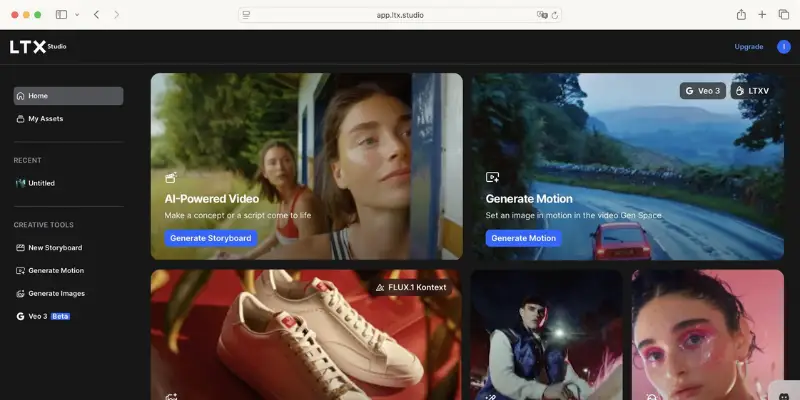
LTX Studio is a browser-based AI video tool. You can turn a script, an idea, or a photo into a storyboard, then into short video clips. It is built for planning a video project, not just generating one clip and calling it done.
LTX Studio is more than a basic AI video generator. It helps you plan your entire video by creating scenes, setting camera angles, building characters, and arranging everything on a timeline before you export the final result.
That is the main thing most short reviews miss. LTX Studio is not trying to be a one-prompt movie maker. It is designed to help you plan your entire video project, with AI handling many of the steps for you.
Who Made LTX Studio?
LTX Studio is made by Lightricks, the company behind popular apps like Facetune and Videoleap. Founded in 2013, Lightricks has been building creative tools for more than a decade.
Many people search for “Lightricks LTX Studio” because they want to know if it’s from a real company. The answer is yes. Lightricks has a long track record of creating creative apps, and LTX Studio is its AI-powered video creation platform.
This matters for trust. Most people feel more comfortable using a tool from a company with a proven history. That’s one reason LTX Studio stands out. It’s built by Lightricks, a company that has been creating popular creative apps for years. You’ll also notice its simple black-and-white LTX logo across the website and app.
Who Is LTX Studio For?
LTX Studio fits some users much better than others. Here’s a simple breakdown.
Good fit for:
- Filmmakers who want to plan scenes before shooting or animating
- Marketing agencies building ad concepts and pitch decks
- Small teams who need storyboards fast
- Music video creators who want a visual direction before editing
- Anyone who wants camera control instead of a vague “make it cinematic” prompt
Not a great fit for:
- People who want a single prompt to produce a finished, polished video
- Anyone on a tight budget who cannot afford surprise credit costs
- Not the best choice for anyone who expects perfect results without making any adjustments
- People who expect perfect lip sync and character movements in every video
If you read that list and see yourself in the first group, keep reading. If you see yourself only in the second group, you may want to skip ahead to the alternatives section.
Key Features in This LTX Studio Review
Here is what LTX Studio actually offers once you are inside the platform.
AI Storyboards and Script to Video
You can paste in a script or type an idea, and LTX Studio breaks it into scenes. You can give each scene its own frame, camera angle, and overall look.
This is one of LTX Studio’s best features. Instead of getting a single image from a prompt, you get a complete shot-by-shot plan that gives your video a clear starting point.
The catch: simple scenes turn out well. Scenes with strong emotion, very specific actions, or several characters at once often need manual fixing.
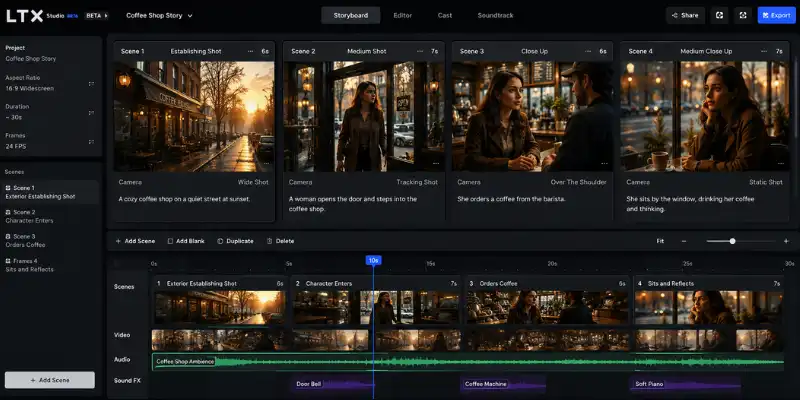
Image to Video and Video to Video
You can upload a photo and add motion to it, or upload a video clip and change its style. Both features work best with calm, simple movement, like a slow camera push or a small shift in the subject.
Fast motion, hands touching objects, or crowds of people moving together are still hard for LTX Studio, just like almost every AI video tool on the market today.
Character Consistency and Camera Controls
You can save a character once, with a set face, outfit, and hairstyle, and reuse it across scenes. This helps keep a story looking connected instead of like separate random images.
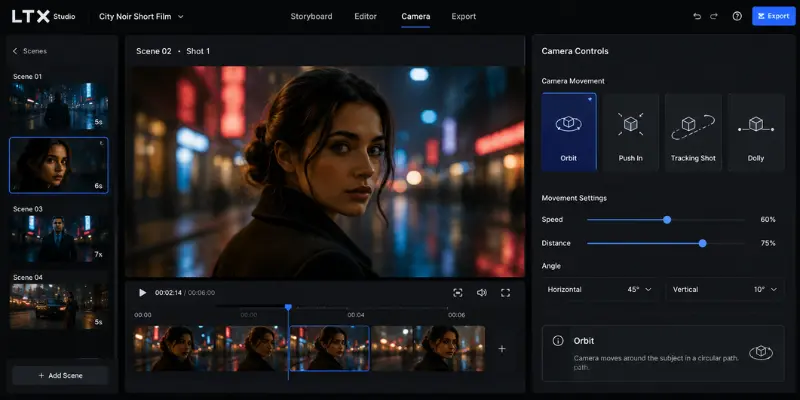
Camera control is where LTX Studio stands out from simpler tools. You get real options like a slow push-in, a wide shot, an orbit around the subject, or a tracking shot, instead of guessing what a vague prompt will produce.
LTX Studio for Music Video Creation
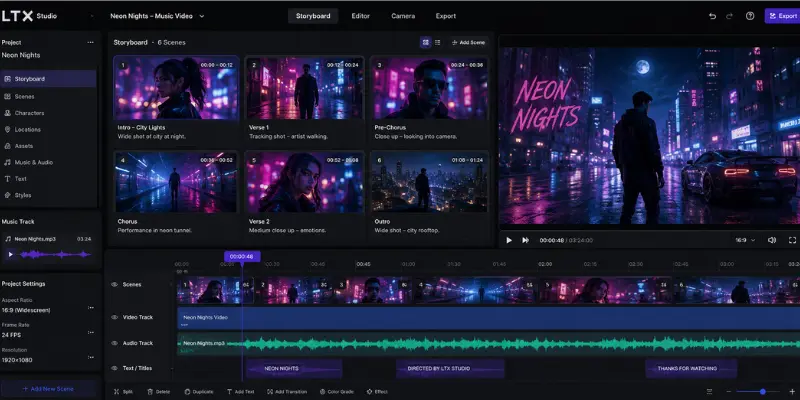
LTX Studio can support a ltx studio ai music video generator style workflow, letting you turn a track or concept into a full sequence of scenes with a matching visual style. You bring your own audio, since the platform does not generate music itself.
For a ltx studio music video project, the storyboard tool is useful for planning the visual story behind the song before you generate any motion clips. Some export options even include MP4 and XML files, which helps if you plan to finish editing somewhere else.
If your main goal is music videos and you also want built-in AI music generation in the same tool, LTX Studio will feel like only half the workflow. Tools built specifically around music video creation cover that audio side directly, which LTX Studio does not.
Sound Design and Lip Sync
LTX Studio can add basic sound design and voiceover support to a project without leaving the platform, which saves a step for social clips and quick promos. Audio-to-video generation on the higher tiers can also match motion to a voice or music track.
Do not expect flawless lip sync, though. Dialogue-heavy scenes and talking-head content are the weakest spot in testing, and multiple user reviews mention the same issue. If your project depends on clean, accurate lip sync, treat this as a limitation to test early rather than assume it away.
Pitch Deck Generator
This is one feature that rarely gets mentioned but matters a lot for agency and freelance use. LTX Studio can pull your storyboard, character designs, and visual style into a formatted pitch deck automatically, ready to present to a client or a producer.
For anyone who bills clients or pitches projects for approval, this alone can save real time compared to building a deck by hand in another app.
LTX Scaler and Upscaling Tools
LTX Studio includes upscaling tools, sometimes searched as the ltx scaler, which sharpen video and correct low resolution footage. This matters if your source image or clip is not high quality to start with.
Upscaling will not fix bad motion or a broken character, but it does help a finished, usable clip look sharper on a bigger screen.
The LTX Model and LTX Studio GitHub Confusion
This part clears up a common mix-up. LTX Studio is the web app, while LTX-2 is an open-source AI model. Even though they’re related, they’re built for different uses.
LTX-2 is Lightricks’ underlying video generation model, and it is free and open to download on GitHub and Hugging Face for developers who want to run it themselves. That is why some people search ltx studio github expecting a repository for the app itself.
If you want the finished, ready-to-use product with storyboards, an editor, and a simple interface, that is LTX Studio, the paid platform covered in this review. If you are a developer who wants to run the raw model on your own hardware, that is the open-source ltx model project on GitHub, which is a separate thing entirely.
One more quick note while we are clearing up confusing names: “LTX Academy” is not part of LTX Studio at all. It is an unrelated trading education brand that shows up in search results because of the shared LTX letters, so ignore any results about trading courses if you are here for the AI video tool.
Hands-On: What Using LTX Studio Actually Feels Like
For this ltx studio review, we ran a real test project instead of just reading the marketing pages. We typed in a short scene description, a character walking into a coffee shop at sunset, and let the storyboard tool build it out.
The first draft was ready in less than two minutes, with four scenes and different camera angles already suggested for each one. That part felt genuinely fast and useful, closer to working with a junior storyboard artist than a typical prompt box.
Turning those frames into motion took more effort. The first video clip had the character’s hand pass through the coffee cup instead of holding it, a common AI video issue. A second attempt with a simpler camera angle fixed most of it.
The honest takeaway from testing: LTX Studio is at its best in the planning stage, and it asks for patience once you move into full motion clips. Budget time for at least two or three attempts per shot if the scene has any physical detail.
Ease of Use: How LTX Studio Really Feels
At first, LTX Studio can feel a little different from other AI video tools. Instead of creating a video with a single prompt, it lets you build your project step by step. Once you understand the layout, the process becomes simple and easy to follow.
The storyboard is the easiest part to use. Adding a script, letting the AI break it into scenes, and reviewing the frames feels smooth and fast.
The harder part comes with camera language. Terms like dolly, tracking shot, and orbit are not obvious if you have never used real video production terms before. Once you learn a few of them, results improve noticeably.
Our honest take: expect a short learning curve. Try creating one real project instead of just exploring the tool. It will help you understand how everything works.
Performance: Is LTX Studio Good at Making Videos?
This is the part most people actually want answered when they ask, is ltx studio good. The answer depends on how you plan to use it.
Where LTX Studio performs well:
- Still frames and storyboard visuals look sharp and professional
- Simple, controlled camera movement looks smooth
- Character outfits and faces stay fairly consistent in similar shots
- Product shots, concept art, and pitch visuals come out clean
Where LTX Studio struggles:
- Fast or complex motion, like dancing or fighting
- Hands, objects, and physical interactions
- Crowds and group scenes
- Strong emotional expression on faces
- Perfectly matching lip sync in every clip
If your project stays simple and controlled, performance is genuinely good. If your project needs complex, realistic action, you will likely need several attempts, and that brings us to the next section: cost.
LTX Studio Pricing
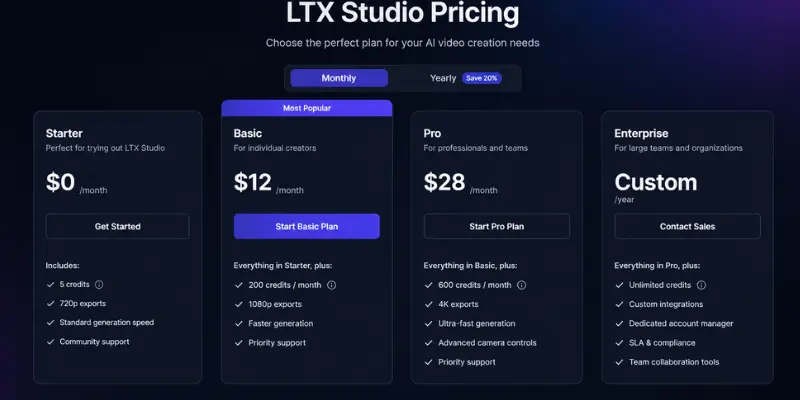
Here is the current ltx studio pricing breakdown, based on the official plans.
Free Plan
- $0
- 800 one-time credits
- LTX-2 models only
- Personal use only, no commercial rights
Lite Plan
- $15 a month, or $12 a month billed yearly
- 8,000 credits a month
- Personal use only
Standard Plan
- $35 a month, or $28 a month billed yearly
- 28,000 credits a month
- Commercial use license included
- Access to more models, including Veo 2 and Kling 2.6 Pro
- Pitch deck generation, 1 collaborator per project
Pro Plan
- $125 a month, or $100 a month billed yearly
- 110,000 credits a month
- Access to Veo 3.1 and Kling 3.0 Pro
- 3 collaborators per project, priority rendering
Enterprise Plan
- Custom pricing and custom credit volume
- Unlimited team members, SSO login, and enterprise-level security features such as GDPR, ISO, and SOC 2 compliance.
The free ltx studio free plan is a good way to test the interface, but 800 one-time credits disappear fast once you start generating real clips. If you plan to use LTX Studio for client work or a business project, you need at least the Standard plan, since Free and Lite are personal use only.
We couldn’t find a valid LTX Studio promo code when writing this review. If you see one online, make sure it’s still active by checking the official pricing page before you subscribe.
Pros and Cons of LTX Studio
Pros
- Strong storyboard and pre-production workflow
- Real camera controls, not just vague style prompts
- Character consistency better than many basic AI video tools
- Backed by an established company with a real track record
- Useful for agencies, filmmakers, and music video planning
- Multiple AI models available in one place
Cons
- Credit-based pricing can get expensive fast
- Motion breaks down in complex or fast-moving scenes
- Learning curve around camera terminology
- Many billing and refund complaints from users
- Free plan credits run out quickly
- Not a replacement for a full video editor
Real User Feedback: Reddit, Trustpilot, and G2
This is where LTX Studio gets genuinely confusing, because different review platforms tell almost opposite stories.
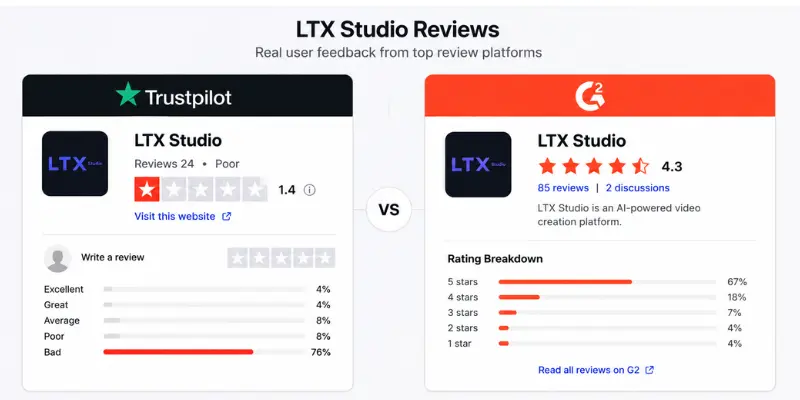
On G2, LTX Studio holds a solid score around 4.3 out of 5 from over 100 reviews. Most of those reviewers talk about the storyboard tool, the ease of visualizing an idea, and the overall creative workflow.
On Trustpilot, the picture flips. LTX Studio sits at a very low score, with the large majority of reviewers leaving one star. Complaints cluster around a few repeated issues: refund requests being denied, credits disappearing during failed generations, confusing billing, and support that feels slow or automated.
Is LTX Studio a Scam
Based on everything gathered for this ltx studio review, no, it is not a scam in the legal sense. It is a real product from a real company, with real features that work as described for many users.
But the frustration behind the “scam” label is real too. The most common pattern in negative reviews looks like this: a user signs up expecting a finished video from one prompt, spends credits testing and retesting, gets frustrated with the cost, and then struggles to get a refund.
That is a billing and expectations problem more than a fraud problem. Still, if refund policy matters a lot to you, read the current terms carefully before choosing yearly billing.
What Happy Users Say
The positive reviews tell a very consistent story too. Happy users are almost always using LTX Studio for planning, storyboards, pitch decks, or concept work, not for finished, polished final videos straight out of the platform.
They mention things like a fast setup, a clear interface for building out scenes, and a workflow that saves real time compared to starting from a blank page. If that matches how you plan to use it, the odds of a good experience go up a lot.
Privacy and Safety: Is LTX Studio Safe to Use?
LTX Studio is safe to use in the everyday sense. It has a public privacy policy, a real support team, and clear account and billing systems, which are the basic signs of a legitimate SaaS product.
As with any AI platform, avoid uploading anything highly sensitive or personal that you would not want stored on a company’s servers. This applies to any creative AI tool, not just LTX Studio specifically.
The bigger safety concern from user reviews is financial, not data-related. Read the cancellation and refund terms before choosing an annual plan, and keep an eye on your credit usage while testing, since that is where most complaints come from.
LTX Studio Alternatives Worth Trying
LTX Studio is strong for planning and storyboards, but it is not the only option, and it is not the best fit for every project. AI video generator reviews roundup compares several tools side by side if you want a broader starting point.
| Tool | Best for | Starting price | Camera control |
| LTX Studio | Storyboards and planning | Free (limited) | Strong |
| Runway | Direct generation and editing | Paid tiers | Moderate |
| Kling AI | Realistic, fast motion | Paid tiers | Moderate |
| Pixverse | Quick social clips | Free (limited) | Basic |
If your project needs more advanced editing and generation control after the planning stage, Runway is worth testing, since it leans more into direct video generation and editing than pre-production planning. For creators who care more about realistic motion in action-heavy scenes, Kling AI tends to handle movement more smoothly than LTX Studio does today.
If your budget is limited and you only need quick social media videos, other AI video tools may suit your needs better than LTX Studio.
Before You Pay: A Quick Checklist
Before you subscribe, spend a minute on this quick checklist. It can help you decide if LTX Studio is worth your money.
- Test the free plan first, even if it is limited
- Avoid annual billing until you know the credit cost of your real workflow
- Track how many credits one full test project actually uses
- Test your hardest use case first, not just a simple demo
- Confirm you have the commercial license if this is for client or business work
- Set a reminder to cancel before renewal if you are still unsure
This takes ten extra minutes and prevents most of the billing frustration covered in the reviews above.
Final Verdict: Is LTX Studio Good in 2026?
LTX Studio earns a solid recommendation, with a clear condition attached. It is good, sometimes very good, if you use it the way it was built to be used: for storyboards, planning, camera-controlled shots, and visual concepts.
It becomes a frustrating, expensive experience if you expect a single prompt to produce a finished, polished video every time. That expectation gap explains almost every negative review in this ltx studio review’s research.
Our advice: start with the free plan, run one real project instead of a random test, track how many credits it actually uses, and decide from there. That single step will tell you more than any review, including this one.
FAQs About LTX Studio
Yes, for storyboards, planning, and camera-controlled shots. It is less reliable for complex motion or a finished video from one prompt.
No. It is a real product from Lightricks, the company behind Facetune and Videoleap. Most negative reviews come from billing and refund frustration, not fraud.
Plans range from a free tier with 800 one-time credits up to $125 a month for the Pro plan, with a custom Enterprise option for large teams.
Yes, but it is limited to 800 one-time credits and personal use only, so treat it as a short trial rather than a long-term option.
LTX Studio is made by Lightricks, a company founded in Jerusalem, Israel, in 2013.
Not yet as a named public release. The current model generation is LTX-2.3, an update to LTX-2, so anyone searching ltx 3 is likely looking for this latest version.
The open-source ltx model, called LTX-2, is available on GitHub for developers to run on their own hardware. This is separate from the paid LTX Studio web app covered in this review.
You can create an account and access ltx studio login directly through the official website using an email address or a supported single sign-on option.
Yes, LTX Studio offers ltx studio api access for developers who want to integrate its video generation into their own tools, separate from the standard web app.
No. LTX Academy is an unrelated trading education brand. It has nothing to do with LTX Studio or AI video generation.
Yes, for planning the visual story and shot sequence. You will need to bring your own audio track, since LTX Studio does not generate music itself.





- Be Respectful
- Stay Relevant
- Stay Positive
- True Feedback
- Encourage Discussion
- Avoid Spamming
- No Fake News
- Don't Copy-Paste
- No Personal Attacks
- Be Respectful
- Stay Relevant
- Stay Positive
- True Feedback
- Encourage Discussion
- Avoid Spamming
- No Fake News
- Don't Copy-Paste
- No Personal Attacks
