Wan AI Review 2026: Features, Pricing, Pros, Cons and Honest Verdict
Published: 9 Jul 2026
Our take: Wan If you don’t mind spending a little time on setup, Wan AI has a lot to offer. It’s an open-source video model from Alibaba that produces good-looking motion and follows detailed prompts well. Running it locally also gives you more flexibility than many online AI video tools.
Wan AI rating breakdown
Based on available user reviews, independent benchmark testing, and Reddit feedback gathered for this wan ai review, here is how Wan AI stacks up:
| Category | Score |
| Motion and visual realism | 7.5 / 10 |
| Prompt adherence | 7.5 / 10 |
| Ease of use | 6 / 10 |
| Character consistency | 6 / 10 |
| Open-source flexibility | 9 / 10 |
| Pricing and value | 6.5 / 10 |
| Overall | 7 / 10 |
If you searched for a wan ai review because you are trying to decide whether to use it, you have probably already noticed the confusion. Some sites talk about Wan 2.1. Others talk about Wan 2.5. Some focus on running it locally, others on a paid web app. This review pulls all of that together in one place.
What Is Wan AI?
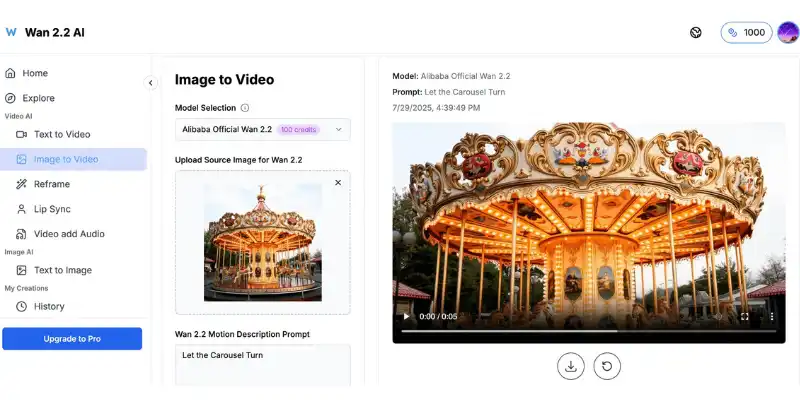
Wan AI is a family of AI video generation models. You give it a text prompt or an image, and it generates a short video clip with motion, camera movement, and in some versions, matching audio.
The name “Wan AI” does not point to one single app. It points to a group of open-weight models, plus the many third-party websites and tools that use those models behind the scenes. That is the first thing anyone researching a wan ai review needs to understand, because it explains why pricing, quality, and features can look so different from one source to another.
At its core, Wan AI is known for one thing above all else: realistic motion. Reviewers across multiple sites consistently point to Wan’s ability to simulate believable physics, from fabric movement to camera motion, better than many closed competitors.
Who Made Wan AI?
Wan AI comes from Alibaba’s Tongyi Lab. It was first released in September 2024 under the name Tongyi Wanxiang, and Alibaba introduced the widely used Wan 2.1 version in early 2025.
So when this wan ai review asks whether the company behind it is legitimate, the answer is yes. Alibaba is one of the largest technology companies in the world, and Tongyi Lab is its dedicated AI research division. Wan AI is not an unknown startup product.
That said, ownership of the model does not mean Alibaba controls every website that offers Wan AI generation. Because the model is open-weight, dozens of third-party platforms host it, rebrand it, or build tools around it, and quality control varies a lot between them.
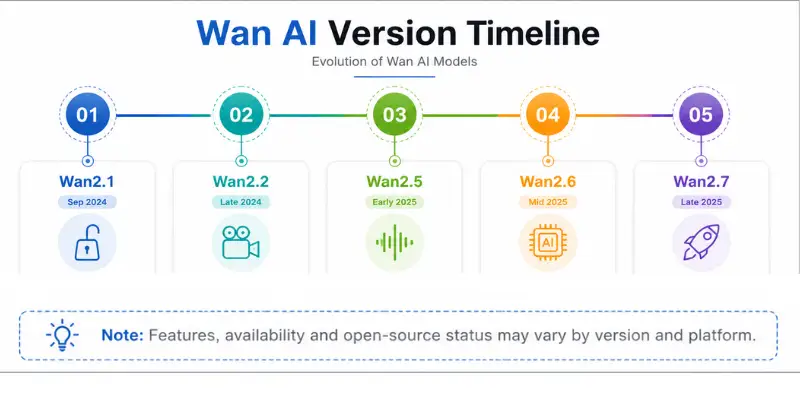
Wan AI Version Confusion: Wan2.1, Wan2.2, Wan2.5, Wan2.6, and Wan2.7
This is the single biggest source of frustration mentioned across nearly every Wan-related review and Reddit thread, so it deserves its own section.
Wan AI has released several versions since launch, and the naming gets confusing fast:
- Wan2.1 – the original open-weight release, still widely used and referenced.
- Wan2.2 – an update focused on improved cinematic quality and text or image-to-video workflows.
- Wan2.5 – a newer version associated with hosted and API-based workflows, including native audio on some platforms.
- Wan2.6 and Wan2.7 – newer iterations that keep pushing quality forward, though availability and open-source status can vary depending on where you access them.
If you have seen someone ask whether wan2.5 is open source, or search wan2 5 open source and wan2 5 preview separately, this is exactly why. People also commonly ask is wan 2.6 open source or will wan 2.5 be open source, and the honest answer is that it depends on the exact version and platform, since not every release follows the same licensing pattern. Not every hosted platform uses the latest one either. Some platforms still run Wan2.1 behind the scenes while marketing themselves as offering the newest Wan AI experience.
The practical takeaway: before you commit to any platform, check which specific Wan version it truly runs. Do not assume “Wan AI” means the newest model.
Who Is Wan AI For?
Wan AI fits some users far better than others.
Good fit for:
- Developers and technical creators who want open-weight model access
- Filmmakers and creators who need strong motion realism and camera control
- Anyone who wants to self-host for privacy or cost control
- Creators comfortable writing detailed, director-style prompts
Not a great fit for:
- Total beginners who want a one-click, no-setup experience
- Anyone without a strong GPU who wants to run it locally
- Users who need guaranteed character consistency across long videos
- People who want one clear, simple price instead of a patchwork of options
Key Features in This Wan AI Review
Here is what Wan AI offers once you look past the version confusion.
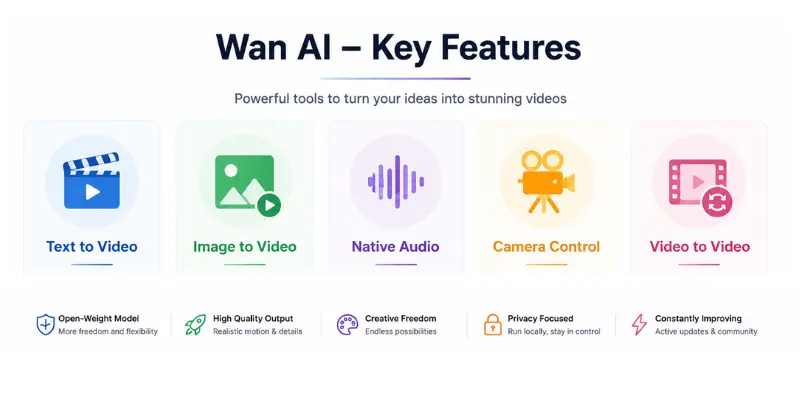
Text to Video and Image to Video
Wan AI supports both text-to-video and image-to-video generation. With text-to-video, you describe a scene and the model builds a clip from scratch. With image-to-video, you upload a photo and the model adds motion to it, which tends to give you more control over the subject.
Detailed prompts perform noticeably better than short, vague ones. A prompt that names the subject, action, camera movement, and lighting will consistently outperform a simple one-line request.
Native Audio and Sound Effects
Some Wan AI versions and hosted platforms can generate audio alongside the video, including ambience, sound effects, and in some cases dialogue. This is not available everywhere, so do not assume every Wan tool includes synced sound.
When it works, this feature is genuinely useful. It saves a separate trip to an audio tool for simple ambient sound or background noise.
Cinematic Camera Control and Prompt Adherence
Wan AI responds well to camera language. Terms like slow zoom, dolly shot, tracking shot, and orbit shot give the model clearer direction than a vague instruction like “make it cinematic.”
Independent benchmark testing backs this up. Curious Refuge Labs scored Wan 2.5’s prompt adherence at 7.0 out of 10 across a wide range of test shots, one of the model’s strongest categories in that testing.
Frame Control and Video to Video
Beyond basic generation, Wan AI supports first-frame and last-frame control, letting you define exactly where a clip starts and ends. It also supports video-to-video, which lets you restyle or transform existing footage instead of starting from nothing.
These tools give you more predictable results than a single prompt alone, though they do add extra steps to the workflow.
Wan AI Open Source Access
This is Wan AI’s clearest advantage over closed competitors. Model weights are publicly available, so developers can download, modify, and self-host the model instead of depending on one company’s servers and pricing.
This matters most for teams with privacy requirements, researchers who want to fine-tune the model, or anyone who wants to avoid ongoing subscription costs in the long run, assuming they already have the hardware to run it.
Wan 2.5 AI Video Generator: What Changed
Wan 2.5 is the version most recent reviews focus on, and it is worth a closer look for anyone searching wan 2.5 ai or wan 2.5 ai video generator specifically.
Compared to Wan 2.2, independent testing shows real improvement. Visual fidelity scores rose from around 5.2 to 6.4 out of 10 in Curious Refuge Labs testing, and the model handles faces, fabric, and lighting more consistently than earlier versions.
Wan 2.5 specs commonly cited include clips up to 10 seconds, 1080p resolution, 24 frames per second, and native audio synced with generated video. It is also available through third-party platforms like Higgsfield and Krea if you already use those services.
Is wan 2.5 free? The model weights can be free if you run it yourself, but most people access Wan 2.5 through a hosted platform, and that almost always means credits or a subscription. Whether wan 2.5 local setup makes sense for you depends entirely on whether you already have the GPU hardware to support it.
How to Access Wan AI: Local Setup vs Hosted Web Tools
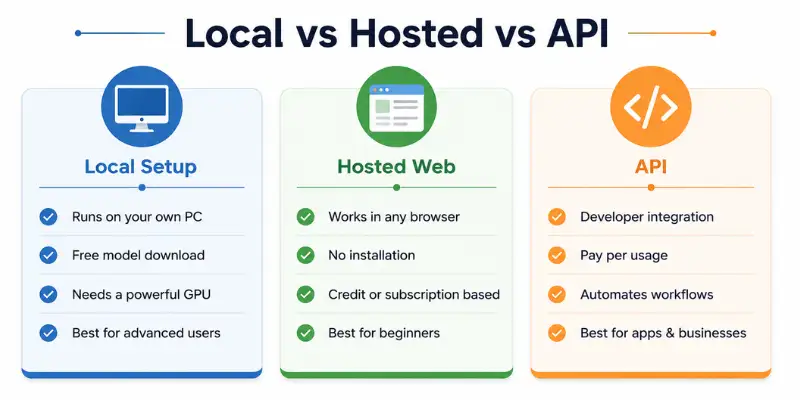
There is no single way to use Wan AI, and this is worth spelling out clearly.
Running it locally. You download the open-weight model and run it on your own hardware, often through a workflow tool like ComfyUI. This is free in terms of licensing, but it demands a strong GPU, enough VRAM, and comfort with technical setup. Reddit threads are full of users struggling with slow render times and confusing documentation on consumer graphics cards.
Hosted web platforms. Sites and apps built around Wan models let you generate videos through a normal browser interface, using credits instead of local hardware. This is far easier for beginners, but pricing, watermarks, and which Wan version is actually running behind the scenes vary a lot from platform to platform.
API access. Developers can call Wan models directly through an API, usually paying per second or per video generated. This suits apps and production pipelines more than individual creators.
Pick your access method based on your comfort with technical setup, not just on price alone.
Ease of Use: How Wan AI Really Feels
Ease of use depends heavily on which access path you choose, which is why this category scores only moderately in most reviews.
Through a hosted platform, Wan AI feels similar to other AI video tools: type a prompt, wait, review the result. Nothing unusual there.
Running it locally is a different story. User reports consistently describe GPU memory issues, confusing setup instructions, and long render times on anything short of high-end hardware. This is not a tool built with total beginners in mind if you choose the local route.
Performance: Is Wan AI Good at Making Videos?
This is the part most people want answered when they ask if a wan ai review is worth reading in the first place.
Independent testing from Curious Refuge Labs scored Wan 2.5 at 6.3 out of 10 overall, with prompt adherence as the clear strength and motion quality and cinematic realism as the weaker areas. Simple, single-subject shots with one clear camera move scored consistently higher than complex scenes with multiple moving elements.
Where Wan AI performs well, based on available testing and user reports:
- Simple, single-subject shots with clear camera direction
- Prompt adherence when instructions are specific and detailed
- Motion realism compared to many earlier-generation AI video tools
Where Wan AI struggles:
- Crowds and scenes with multiple interacting elements
- Complex physical interactions, like a hand touching an object
- Long-form character consistency across multiple scenes
- On-screen text and legible logos
The consistent pattern across every source reviewed for this wan ai review is the same: keep your prompt focused on one subject and one clear motion, and quality improves noticeably.
Wan AI Pricing
Wan AI pricing is genuinely harder to pin down than most AI tools, because it depends entirely on how you access it.
Open-weight local use: free to download, but you need your own GPU or a rented cloud GPU, which can run from roughly $0.50 to $3 or more per hour depending on the provider.
Hosted web platforms: typically credit-based, with free trial credits, one-time credit packs often in the $10 to $30 range, and monthly plans commonly between $10 and $50, depending on the platform and resolution.
API access: usually billed per second or per video, with reported rates as low as $0.05 to $0.20 per second on some Wan 2.5 API integrations, and roughly $0.20 to $0.80 per video on others depending on resolution.
The real lesson here: two people can both say they use Wan AI and pay completely different amounts. Always confirm the exact pricing model on whichever platform you choose before committing.
Pros and Cons of Wan AI
Pros
- Genuinely strong motion realism and camera control
- Open-weight model gives real flexibility and self-hosting options
- Detailed prompts produce noticeably better, more cinematic results
- Multiple access paths (local, hosted, API) fit different budgets and skill levels
- Backed by Alibaba, a large and established company
- Multilingual prompt support across English and Chinese
Cons
- Confusing version numbering makes it hard to know what you are really using
- Local setup is technical and demands strong hardware
- Character consistency weakens across longer, more complex scenes
- Pricing varies so much between platforms that comparison shopping is difficult
- Text and logo rendering inside videos remains unreliable
- Hosted platform quality depends on which Wan version they run, not always the newest
Real User Feedback: Reddit, G2, and Trustpilot
User feedback on Wan AI splits clearly by where you look, which matches the general pattern seen with most AI video tools.
Reddit offers the most detailed and honest picture. Developers and technical creators who run Wan locally often praise the control and lack of restrictions compared to closed platforms, while also reporting real frustration with slow rendering, unclear documentation, and GPU limitations on consumer hardware.
G2 currently has limited direct review data for Wan AI itself, since it mostly points toward broader AI video generator alternatives rather than hosting dedicated Wan reviews. That makes G2 less useful than Reddit for judging this specific tool.
Is Wan AI Legit?
Yes, the underlying Wan model family from Alibaba’s Tongyi Lab is legitimate. It is a real, well-documented open-weight project with genuine adoption across the AI development community.
The legitimacy question gets murkier with third-party sites. A Trustpilot listing for the domain wan-ai.org exists separately from Alibaba’s own resources, and because Wan AI is open-weight, anyone can build a website around it and use the “Wan AI” name. Before trusting any specific Wan AI website with payment details or personal content, confirm it is a known, established platform rather than an unfamiliar domain that simply borrows the name.
Privacy and Safety: Is Wan AI Safe to Use?
The Wan model itself, downloaded from official sources like Hugging Face or GitHub, is safe in the same way any reputable open-source AI project is safe.
The bigger safety consideration is where you access it. Because so many third-party platforms host Wan models, always download from official repositories or well-known hosted platforms rather than unfamiliar sites. Avoid uploading sensitive personal content or client work to any platform you have not verified, and check that a commercial license actually applies before using generated content for paid work.
Wan AI Alternatives Worth Trying
Wan AI is a solid choice for creators who want more control over their videos, but it isn’t the only option available. If you’re still deciding, this AI video generator comparison covers several popular tools in one place.
If camera control and image-to-video quality matter more than open-source access, Kling AI is easier for beginners to use. If you need built-in editing tools after generating a video, Runway offers more editing features than Wan AI
If you want fast, stylized clips without touching a local setup or an API, Hailuo AI is one of the easier hosted options that comes up alongside Wan AI in most comparisons.
If your goal is anime-style or stylized transformations rather than cinematic realism, Domo AI is built specifically for that and skips the technical setup entirely.
Before You Use It: A Quick Checklist
Run through this before you pick a Wan AI access method or platform.
- Confirm exactly which Wan version a platform actually runs
- Check your GPU and VRAM before attempting a local setup
- Compare hosted platform pricing directly, since it varies widely
- Start with short, simple prompts before attempting complex scenes
- Verify commercial usage rights before using output for client work
- Stick to official or well-known sources rather than unfamiliar domains
Final Verdict: Is Wan AI Worth It in 2026?
Wan AI earns a solid recommendation for the right user. If you want strong motion realism, real camera control, and the flexibility of an open-weight model, it holds up well against closed competitors, and the Alibaba backing gives it real credibility.
It becomes frustrating fast if you expect a simple, single-price, one-click tool. Between the confusing version numbers, the split between local and hosted access, and the wide pricing range across third-party platforms, Wan AI asks for more research than most AI video generators before you even generate your first clip.
Our advice: pick one access method, confirm the exact version and price before committing, and start with a simple, single-subject prompt to see how the model performs for your specific use case.
FAQs About Wan AI
Yes, especially for motion realism and prompt adherence. It is less consistent with crowds, complex physical interactions, and long-form character consistency.
Yes, the underlying model comes from Alibaba’s Tongyi Lab. Be careful with unfamiliar third-party websites that host Wan models, since anyone can build a platform around an open-weight model.
Wan 2.5 is associated with newer hosted and API workflows, and open-source availability can vary by version and platform. Always check the specific license on the platform you plan to use.
The open-weight model can be free to download, but running it requires your own GPU or cloud compute cost. Most hosted platforms charge credits or a subscription instead.
Newer Wan versions have generally continued the open-weight pattern set by earlier releases, though exact licensing can shift with each version, so confirm current terms before assuming.
It depends on the access method. Local use is free aside from hardware costs, hosted platforms commonly run $10 to $50 a month, and API pricing is often $0.05 to $0.20 per second of video.
Yes, through a hosted web platform. Local setup and API access are better suited to developers and technically comfortable users.
Wan AI offers more open-weight flexibility and local control. Kling tends to offer a smoother, more polished hosted experience for creators who do not want to manage local setup.





- Be Respectful
- Stay Relevant
- Stay Positive
- True Feedback
- Encourage Discussion
- Avoid Spamming
- No Fake News
- Don't Copy-Paste
- No Personal Attacks
- Be Respectful
- Stay Relevant
- Stay Positive
- True Feedback
- Encourage Discussion
- Avoid Spamming
- No Fake News
- Don't Copy-Paste
- No Personal Attacks
