What Is InVideo AI? Features, Pricing, Plans and Everything You Need to Know
Published: 10 Jul 2026
Making videos used to mean one of two things. Either you learned how to edit, which takes months, or you paid someone else to do it, which costs real money. Neither option works well for a small business owner, a solo creator, or anyone who just wants to put something decent online without making it a whole project.
InVideo AI is built around a much simpler idea. You type what you want, and the tool makes the video. No timeline to learn. No footage to find. No voiceover to record. Just a finished video, ready to use.
That sounds almost too simple, and honestly, the first time you try it, it kind of is. This walkthrough covers what InVideo AI actually is, how the whole thing works inside, what the features look like in practice, what the plans cost, and who gets the most out of it.
What Is InVideo AI?
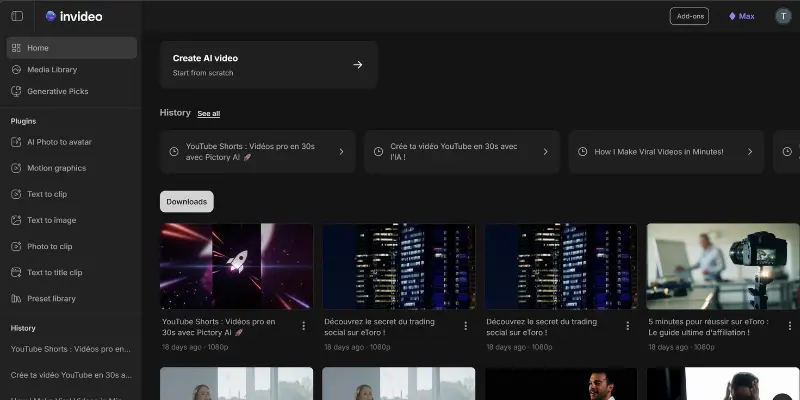
InVideo AI is an online video creation tool that turns your written idea into a complete, edited video. You describe what you need in plain words, and the tool takes care of the rest, writing a script, finding matching footage, adding a voiceover, and putting everything together in a format ready to post.
The company behind it, InVideo Inc, launched the platform back in 2017 as a template-based editor. Over the following years, they shifted their focus toward the AI-powered version, which is now the main product. In late 2025, InVideo became OpenAI’s first official partner for Sora 2, which brought a new level of video generation quality into the platform.
Everything runs on invideo.io through your browser. There is nothing to install, no software to update, and no hardware requirements beyond a working internet connection. You log in, type your idea, and within a few minutes you have a video.
InVideo AI is used by content creators, social media managers, marketers, small business owners, and educators who need video content regularly but do not have the time or background to build it the traditional way.
| Feature | Details |
| Type | AI Video Generator |
| Best For | Content Creators |
| Free Plan | Yes |
| Platform | Browser |
| Starting Price | $20/month |
| AI Voice | Yes |
What Is the Difference Between InVideo AI and InVideo Studio?
| Comparison | InVideo AI | InVideo Studio |
| Main Purpose | Creates a complete video from a simple text prompt using AI. | Gives you the tools to build and edit videos manually from start to finish. |
| How You Start | Describe your idea in plain language, and the AI handles the rest. | Start with a blank canvas or a template and create each scene yourself. |
| Video Creation Process | The AI writes the script, selects visuals, adds voiceovers, music, and edits automatically. | You choose every clip, image, transition, effect, and text manually. |
| Editing Experience | Make changes by updating your prompt or using AI editing commands. | Edit every part of the video with a traditional timeline and editing tools. |
| Speed | Ideal for creating videos within minutes. | Takes more time because every edit is done manually. |
| Creative Freedom | Great for fast results but offers less control over small details. | Gives complete freedom to customize every part of the final video. |
| Best For | Beginners, marketers, educators, and creators who want quick video production. | Editors, agencies, and creators who need advanced customization and precision. |
| Learning Curve | Easy to learn, even if you’ve never edited a video before. | Requires some editing knowledge to use efficiently. |
| When to Choose It | Choose it when speed and simplicity matter most. | Choose it when quality, flexibility, and detailed editing are your priorities. |
InVideo AI is designed to turn ideas into videos with almost no manual work, while InVideo Studio is built for users who want full creative control over every edit. Many creators generate the first draft with InVideo AI and then fine-tune it in InVideo Studio for a polished final result.
How InVideo AI Actually Works
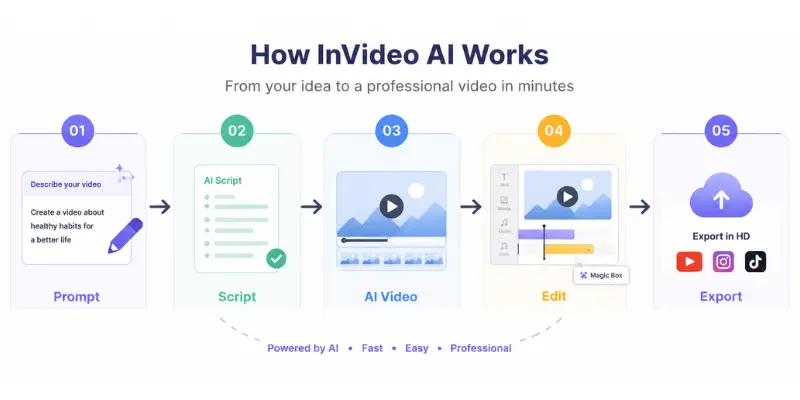
Creating a video with InVideo AI is a simple process. Instead of editing every scene manually, you guide the AI with a prompt and review the results as they are generated.
Step 1: Describe Your Video Idea
Start by typing a prompt that explains what you want to create. It can be a short sentence or a detailed description that includes your topic, target audience, preferred style, and the platform where the video will be published. The more details you provide, the better the final result usually is.
Step 2: Review the AI-Generated Script
After you submit your prompt, InVideo AI creates a script based on your instructions. Before the video is generated, you can read the script, make edits, or change the wording. Spending a few minutes here helps avoid larger edits later.
Step 3: Let AI Build the Video
Once the script is approved, the platform automatically selects matching stock footage, adds transitions, generates an AI voiceover, includes background music, and creates subtitles. Within a few minutes, you have a complete draft ready to preview.
Step 4: Edit with Magic Box
If you want to improve something, you don’t need to edit the timeline manually. Simply type a request in Magic Box, such as “make the introduction shorter” or “replace the background music,” and the AI updates the video for you.
Step 5: Preview and Export
After making the final adjustments, preview your video to ensure everything looks right. Once you’re satisfied, export it in your preferred format and share it on platforms like YouTube, Instagram, TikTok, or LinkedIn.
InVideo AI Key Features in 2026
Here is a plain look at what the platform actually includes and why each feature matters.
Text to Video Generation
This is the starting point for everything. You write a prompt, and InVideo AI builds a complete video around it. The tool handles scripting, footage selection, voiceover, and editing all at once. In most cases, the result is something you can post without further work.
Multiple Platform Formats
InVideo AI lets you pick the format before you generate. Vertical 9:16 for TikTok and Reels, horizontal 16:9 for YouTube, square for LinkedIn or Facebook. The tool builds the video in the right dimensions from the start so you are not manually cropping or resizing after export.
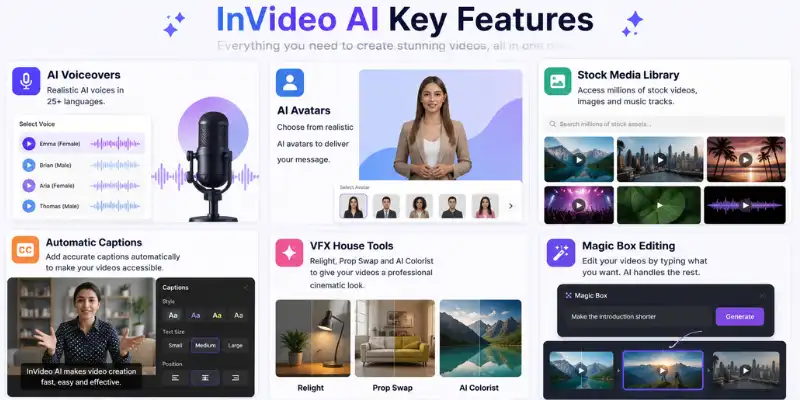
AI Voiceovers Across Languages
The platform includes a range of AI voices in different tones, genders, and accents. It supports around 25 languages, which means you can make content for audiences in other markets without recording a separate version or hiring a translator. You pick the voice that fits the tone you want, and it records automatically as part of the generation process.
AI Avatars for On-Camera Presence
InVideo AI includes a library of AI human actors. If you want a person appearing on screen and speaking your script, you choose one of these avatars and they deliver the content as part of the video. This format consistently performs well on social platforms, especially for product content and direct-to-camera style ads, where a real-seeming presenter tends to get better engagement than a slide-style video.
Automatic Captions
Once a video is generated, InVideo AI adds subtitles automatically. Most people scroll social feeds with their sound off, so captions are not a nice-to-have at this point. They are essential for your content to actually be understood. Having them added without a separate step saves meaningful time for anyone making content at volume.
Built-In Stock Media Library
InVideo AI connects to a library of millions of stock videos, images, and music tracks. You do not need a Shutterstock subscription, a separate audio licensing tool, or anything outside the platform. Footage and music pull in automatically based on what fits your script, and you can swap anything you do not like.
VFX House Tools
This is a 2026 addition that closes a gap that previously required a separate editing platform. The VFX House inside InVideo AI includes three tools. Relight lets you change the lighting on a scene after the video is already generated. Prop Swap lets you replace objects in footage with something different. AI Colorist applies film-style color grading to give a more cinematic look to the overall video. Together, these tools bring a level of post-production polish that used to be out of reach for anyone without editing experience.
Advertising Studio
The Advertising Studio is built specifically for brand and performance marketing use cases. It includes a logo designer, a Packshot 360 tool for creating 360-degree product mockups, and a generator built specifically for Amazon product content. If you are running paid ads or creating e-commerce content, this section of InVideo AI is where you will spend most of your time.
Magic Box Editing
Magic Box is the conversational editing layer that runs after your video is generated. Instead of finding a setting, clicking a menu, or dragging a clip, you type what you want to change in plain language and the tool applies it. It is the fastest way to make adjustments without starting over or digging through options.
Browser-Based Access
InVideo AI runs entirely in your browser at invideo.io. Nothing to download. No system requirements beyond a stable internet connection. That means you can use it from any computer, and there is no setup time the first time you try it.
InVideo AI Pricing and Plans
InVideo AI offers four pricing plans for different types of users. Whether you want to try the platform for free or need advanced features for business use, there’s a plan that fits different content creation needs.
Pricing Overview
| Plan | Price | Best For |
| Free | $0 | Testing the platform |
| Plus | $25/month or $20/month (yearly) | Individual creators and small teams |
| Max | $60/month or $48/month (yearly) | Businesses and frequent creators |
| Enterprise | Custom Pricing | Large teams and organizations |
Free Plan
The free plan costs nothing and gives you 2 AI video minutes and 1 AI credit per week, with a limit of 4 exports per week. Every video generated on the free plan includes an InVideo watermark on the export.
This plan works well as a way to test the tool and see how the output quality feels for your specific use case. It is not built for regular content creation because the weekly limits are low and the watermark makes exports unsuitable for publishing anywhere professionally.
InVideo AI Plus Plan
The Plus plan costs $25 per month on monthly billing or $20 per month when billed yearly. The yearly option saves around 20 percent compared to paying month to month.
This plan is the right starting point for most solo creators and small marketing teams. It includes significantly more AI generation credits, higher export limits, and access to features that are not available on the free tier. The InVideo AI Plus plan is where the tool becomes genuinely usable for producing content on a consistent schedule.
Max Plan
The Max plan is priced at $60 per month on monthly billing or $48 per month on yearly billing. It is built for heavier users, content teams, and businesses that produce a lot of video. This tier includes the highest generation limits, more storage, 4K export quality, and access to premium assets from the stock library.
If you are creating multiple videos per week or managing video content for several clients or brands, the Max plan is where InVideo AI becomes a serious production tool rather than just a convenient shortcut.
Enterprise Plan
The Enterprise plan uses custom pricing, which you set up by contacting InVideo directly. It is designed for larger organizations or agencies that need higher usage limits, team collaboration tools, white-label options, and dedicated support. The specifics depend on what the team actually needs.
Is InVideo AI Free to Use?
Yes, InVideo AI has a real free plan, not just a trial that expires after a few days. You can create an account, generate videos, and export them without paying anything.
The limitation is how much you can do. Two AI video minutes and four exports per week is not much if you are trying to produce content regularly. And because the free plan adds a watermark to every export, those videos are not ready to publish anywhere that represents your brand or a client.
For casual testing or getting familiar with how the tool works, the free plan is useful. For actual content creation, you will need the Plus plan at minimum. The invideo cost at that level, $20 per month on yearly billing, is reasonable compared to what you would spend on stock footage licenses, voiceover tools, and editing software separately.
InVideo AI Pros and Cons
What works in its favor:
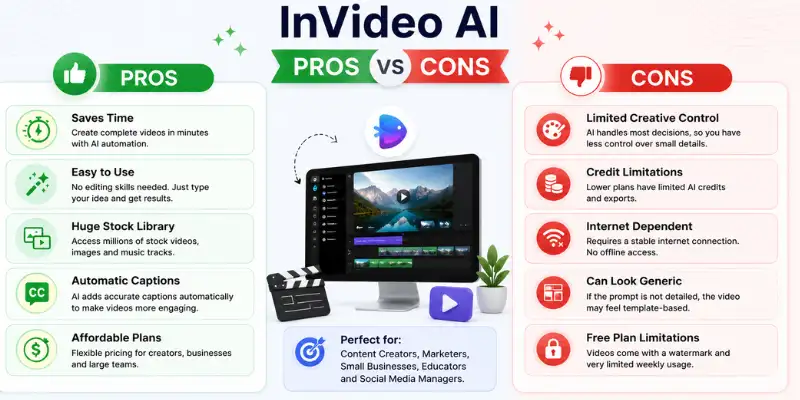
- Turns a text idea into a complete video in minutes, with no editing skills required
- The Magic Box approach to editing is genuinely faster than navigating settings menus
- Format selection happens before generation, so you are not reformatting after the fact
- The stock library is large enough that you rarely need outside footage
- VFX House tools in 2026 bring post-production features into the same workflow
- Runs in the browser with no installation needed
- Free plan lets you test before paying anything
Where it falls short:
- Free plan weekly limits are too low for regular use, and the watermark rules out professional publishing
- Output can look generic when the prompt is not written with enough detail
- Creative control is limited compared to a dedicated editor like InVideo Studio or Premiere
- The whole thing depends on how well you write your prompt. A vague input produces a vague video
- No offline access since the platform runs entirely through invideo.io
Who Should Use InVideo AI
InVideo AI fits well for a specific kind of person. If you match any of these, it is probably a strong fit.
It makes sense if you:
- Need to produce social media videos regularly and want to spend less time on each one
- Run a small business and want promo content without hiring a video editor
- Handle marketing for a brand and need video output across multiple platforms
- Are new to video and want something that handles the technical side for you
- Want to test a lot of video ideas quickly before investing in full production
You might want something else if you:
- Need precise control over every frame and edit
- Work with your own footage rather than stock clips
- Need complex audio production or actual human voiceover talent
- Build narrative video with scenes that require custom visual storytelling
For people who fall somewhere in the middle, a practical approach is to generate InVideo AI and then open InVideo Studio for the adjustments that need a more hands-on touch. Both tools are on the same account. If InVideo AI does not fully match what you need, there are other tested InVideo AI alternatives worth looking into before you commit to a subscription.
What Real Users Say
Feedback from users across review platforms and community forums lines up pretty consistently.
The biggest thing people mention in positive reviews is time. For someone managing social content for a brand or posting to multiple channels each week, InVideo AI cuts the production time on each video significantly. The stock library also comes up regularly as a genuine convenience because finding and licensing footage elsewhere adds work that the platform eliminates.
The most common frustration is output that feels templated. When someone types a short, vague prompt and hits generate, the result often looks like a generic stock video rather than something that feels specific to their brand or topic. Users who put real effort into their prompts, including tone, audience, platform, and specific details, consistently report better results.
The credit limits on lower plans also draw complaints. If you are going back and forth on a video, regenerating sections or trying different approaches, the credits add up faster than expected. This is mostly a concern on the Plus plan rather than the Max plan, where limits are higher.
The invideo website shows a large active user base, and the platform has enough real adoption that feedback from actual users is easy to find across review sites and creator communities.
Tips for Getting Better Results from InVideo AI
A few habits make a meaningful difference in what you get out of the tool.
Write a detailed prompt before you start. The single biggest factor in output quality is how specific your prompt is. Include the platform you are targeting, the tone you want, who the audience is, and any visual details that matter. A two-minute prompt produces a noticeably better result than a two-sentence prompt.
Edit the script before the video builds. InVideo AI shows you the script before it starts assembling footage and voiceover. Take a few minutes to read it and fix anything that is off. Correcting a line in the script takes seconds. Correcting it after the video is built takes longer and uses more credits.
Use Magic Box for targeted changes instead of regenerating. If one part of the video is not right, type the specific change you want in Magic Box rather than starting the whole generation over. It is faster and costs fewer credits.
Try the VFX House on your finished video. If the output looks flat or generic, the Relight and AI Colorist tools in the VFX House section can add visual depth and a more polished look without any technical work on your part.
Watch the export on the actual device or platform. A video can look fine on a desktop screen and feel cramped or hard to read on a phone or in a mobile feed. Checking the final export on the device your audience uses before you post it catches problems you might otherwise miss.
How InVideo AI Fits Into the Broader Video Tool Space
InVideo AI sits in a specific category of video tools that generate content from text rather than editing footage you already have. Tools like Runway focus more on cinematic AI-generated visuals from detailed prompts, while InVideo AI focuses on assembling structured script-based videos from stock footage and AI voice. These are genuinely different use cases, and the right choice depends on what kind of content you are making.
For marketers who need polished social ads and product videos in volume, InVideo AI fits well. Creators who specifically want short animated clips for TikTok or Reels from a single image rather than a full script sometimes find that image-to-video tools covered in the MotionMuse AI alternatives space serve that workflow better. For creators who want to see how the broader category of video tools compares before making a decision, the AI video generator space has a wide range of options across different use cases and price points.
InVideo AI is often compared with tools like Descript, but they solve different problems. Description is made for editing existing videos, while InVideo AI helps you create videos from a text prompt. If you’re looking at other AI video tools as well, these AI Video Generator Reviews make it easier to compare the most popular options.
Conclusion
InVideo AI is a practical tool for anyone who creates video content regularly and wants to spend less time on production. The text-to-video workflow is fast, the stock library handles most content needs without outside resources, and the 2026 additions to the VFX House and Advertising Studio have raised the quality ceiling for what the platform can produce.
The free plan is good enough to test it seriously before paying anything. The Plus plan at $20 per month yearly is the right starting point for most individual creators. The Max plan makes sense once your output volume or quality needs grow past what the Plus tier covers.
It will not replace a professional editor for complex, narrative-driven work, and generic prompts will produce generic videos. But for social content, product marketing, and fast-turnaround brand videos, InVideo AI does exactly what it promises. If you have been putting off making video content because it felt like too much work, this is the most direct path from an idea to something you can actually post.
Frequently Asked Questions
InVideo AI is an online tool that turns a written prompt into a finished video. You describe what you want in plain language, and the tool writes a script, finds footage, adds a voiceover, and puts the whole thing together for you.
Yes. InVideo AI has a free plan that gives you limited weekly credits and exports. Exports on the free plan include a watermark. Paid plans start at $20 per month on yearly billing and remove the watermark while giving you higher generation limits.
Invideo.io is the website where InVideo AI and InVideo Studio are both hosted. It is the main platform for all InVideo products. You create your account there, manage your subscription, and access both tools from the same login.
InVideo AI offers four plans. The free plan costs nothing but has low weekly limits. The Plus plan is $25 per month or $20 per month on yearly billing. The Max plan is $60 per month or $48 per month yearly. The Enterprise plan uses custom pricing for larger teams.
The InVideo AI Plus plan is the first paid tier, priced at $25 per month on monthly billing or $20 per month when paid yearly. It includes more AI video credits, higher export limits, and access to features not on the free plan. It suits creators and marketers who produce video regularly.
InVideo AI generates a complete video from your text prompt automatically. InVideo Studio is a traditional editor where you build videos manually from templates or a blank canvas. Both are included with the same account at invideo.io.
InVideo AI is made by InVideo Inc, a video technology company that launched in 2017. In late 2025, InVideo became OpenAI’s first official partner for Sora 2, which added new generative video capabilities to the platform.
Yes. InVideo AI is specifically built for people with no editing experience. The whole process starts from a text prompt, and the Magic Box feature lets you make changes by typing natural language commands rather than learning any settings or menus.
Yes. Paid plan exports can be used commercially. The watermark on free plan exports makes those unsuitable for professional or client-facing publishing, but videos made on paid plans can be published and used commercially.
Each InVideo AI plan includes a set number of AI generation credits per billing cycle. Every video you generate uses credits based on the length and complexity of what you asked for. Paid plans come with more credits and higher per-generation limits than the free tier. Credits reset at the start of each billing cycle.





- Be Respectful
- Stay Relevant
- Stay Positive
- True Feedback
- Encourage Discussion
- Avoid Spamming
- No Fake News
- Don't Copy-Paste
- No Personal Attacks
- Be Respectful
- Stay Relevant
- Stay Positive
- True Feedback
- Encourage Discussion
- Avoid Spamming
- No Fake News
- Don't Copy-Paste
- No Personal Attacks
