What Is Domo AI? Complete Guide to Features, Pricing & How It Works
Published: 6 Jul 2026
Creating high-quality videos used to mean spending hours editing timelines, learning complicated software, or paying for expensive creative tools. For many creators, that process slowed ideas down before they ever reached the screen. AI has started to change that by making video creation faster and far more accessible.
One tool that has gained attention for exactly this reason is Domo AI. Whether you want to turn a text prompt into a video, animate a still image, create talking avatars, or transform ordinary footage into anime-style visuals, Domo AI brings multiple creative tools together in one easy-to-use platform.
In this guide, you’ll learn what Domo AI is, how it works, its key features, pricing, pros and cons, and whether it’s the right AI video generator for your creative workflow in 2026.
What Is Domo AI?
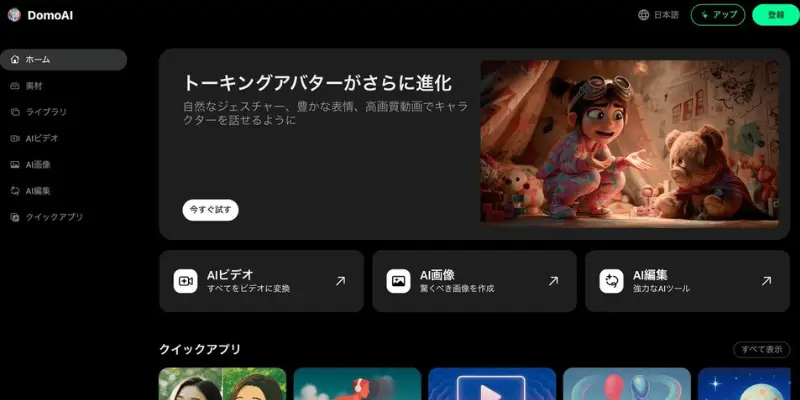
Domo AI is an AI video and animation generator. It takes a text prompt, a photo, or a short video clip and turns it into a new animated result. You can pick from styles like anime, 3D cartoon, realistic motion, or artistic filters, and the tool handles the heavy lifting in the background.
The tool works for anyone. You do not need editing skills, animation training, or design experience. A content creator, a small business owner, or a total beginner can all use domo ai to make a finished video in a few minutes instead of a few hours.
Domo AI started as a Discord bot and later added a full web app. Today it has grown into one of the most active AI creative communities online, with millions of users generating content through it every month. When people ask what is domo ai, the short version is this: it is a creative shortcut that replaces manual animation software with a simple prompt-and-generate workflow.
The company built its reputation around speed. Where traditional animation or video editing can take hours of manual work, domo ai produces a usable result in minutes, then lets you refine it with a second or third generation if the first attempt is not quite right.
| Feature | Details |
| Tool Type | AI Video Generator |
| Best For | Anime, Image-to-Video, Style Transfer |
| Free Plan | Yes |
| Starting Price | $6.99/month |
| Platforms | Web & Discord |
Domo AI vs Domo Business Intelligence: Two Completely Different Products
This is where a lot of confusion comes from, and it is worth spelling out clearly before we go any further. There are two completely separate products that show up when people search domo ai:
- Domo AI (domoai.app) – an AI video and image generator used by content creators, animators, and social media marketers. This is the tool covered in the rest of this guide.
- Domo Inc (domo.com) – a business intelligence and data analytics platform used by companies for dashboards, reporting, and enterprise data work. Domo Inc markets its own AI features inside its BI software, and review sites like Gartner and Knowi cover that separate product under headings like “domo business intelligence” or “domo bi.”
If your actual question is domo what is, meaning you stumbled on the name “Domo” without knowing which company you mean, here is the fast way to tell them apart. If you are looking for dashboards, data pipelines, connected data sources, or enterprise reporting tools, you want Domo Inc’s domo bi platform, not the tool in this guide. Search results that answer is domo ai safe in the context of data governance, user permissions, or enterprise security are almost always talking about the domo business intelligence product, not the video generator.
If instead you want to create anime videos, animate a still photo, or build a talking avatar from a script, you want Domo AI, the Discord-born creative tool, and that is exactly what the rest of this guide covers in detail. Keep this distinction in mind as you read reviews or comparisons online, because articles that use the exact phrase domo ai often blend both products together without warning.
How Does Domo AI Work?
Domo AI keeps its process simple, even for first-time users who have never touched an AI video generator before.
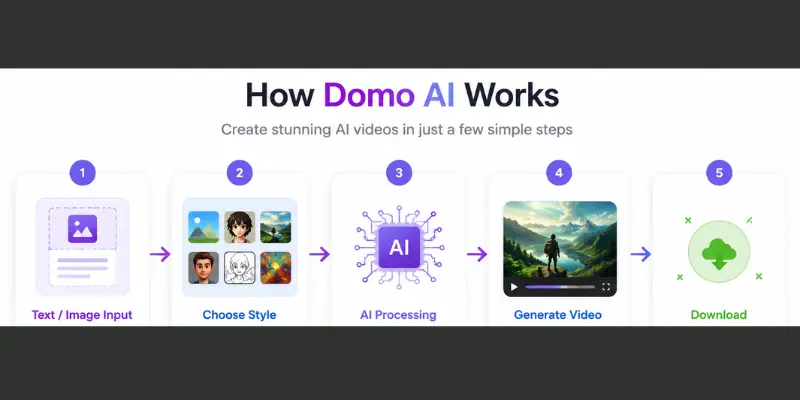
- Pick a creation mode. Choose text to video, image to video, character animation, or style transfer, depending on what you are starting with.
- Upload your input. Add a photo, a video clip, or type a text prompt describing the scene you want.
- Choose a style. Pick from anime, cartoon, realistic, or one of the other preset filters built into the platform.
- Adjust settings. Change motion strength, reference style, or other generation options if the defaults do not match your vision.
- Generate the video. The AI model processes your request in the background, usually within a couple of minutes.
- Download or refine. Once the result is ready, download your video or run another variation with different settings.
This same flow works whether you use the domoai.app website or the Discord bot, which makes it easy to switch between the two depending on where you happen to be working that day.
Behind the scenes, the platform relies on a mix of proprietary and licensed diffusion-based video models. You do not need to understand the technical details to use domo ai effectively, but it helps to know that different creation modes route through different underlying models, which is why text to video and image to video sometimes produce noticeably different quality levels for the same subject.
Key Features of Domo AI
Here is what makes domo ai a flexible tool for creators who need more than one type of output from a single platform.
Domo AI Text to Video
Type a written prompt and Domo AI builds a complete video around it. This works well when you have an idea but no footage, no actors, and no editing experience to bring it to life. As an AI video generator, this is the mode most people imagine when they think of creating videos with AI, since all you need is a simple text description.
Real-world use case: A content creator can turn a blog post, product idea, or marketing campaign into a short video for YouTube Shorts, Instagram Reels, or TikTok without recording any footage.
Domo AI Image to Video
This is one of the most searched features of the tool. Domo ai image to video lets you upload a single photo and turn it into a moving clip. It adds motion, expression, and depth to a still image, which used to require frame-by-frame animation work. Creators use this for product photos, portraits, and concept art that need to feel alive on social media, and marketers use it to turn a single product shot into a short promotional clip without a camera crew.
Real-world use case: Small businesses often use this feature to animate product photos, while artists and photographers use it to bring static images to life for social media and portfolio presentations.
Domo AI Video Style Transfer
Upload a video and apply a new visual style on top of it, such as anime, ukiyo-e, or 3D cartoon. You do not need to reshoot anything. The AI restyles your original footage frame by frame, which puts it in the same territory as other AI animation tools built around adding motion and style to existing visuals.
Real-world use case: Travel creators, gaming channels, and anime fans frequently use style transfer to give ordinary footage a unique visual identity without manually editing every frame.
Domo AI Talking Avatar and Lip Sync
Upload a photo, add a script or audio file, and Domo AI animates the face and matches the mouth movement to the audio. This feature is popular with faceless content creators who want a presenter without appearing on camera, though creators who need sharper lip-sync accuracy often end up comparing it against dedicated AI talking avatar tools built specifically for that job.
Real-world use case: It works well for educators, YouTubers, and businesses that want AI presenters for tutorials, product explainers, or customer support videos without appearing on camera.
Domo AI Upscaling and Background Removal
Two smaller but useful tools round out the platform:
- Upscaler – improves resolution and sharpness for both images and videos, useful when your source file is low quality.
- Background remover – isolates the subject and removes the background in one click, saving a separate trip to editing software.
These extras matter more than they sound at first. A rough phone photo can be cleaned up before you ever run it through image to video, and a finished clip can be upscaled afterward so it holds up on a larger screen.
Real-world use case: Content creators often use these tools to improve older videos, clean up product visuals, and prepare content for websites, online stores, and social media campaigns.
Domo AI and Discord: How the Partnership Works
Why Domo AI Became One of the Top Discord Servers
Domo AI did not start as a website. It launched first as a Discord bot, and that community became its biggest growth engine. According to an A16Z report on top generative AI consumer apps, Domo AI ranked as the seventh largest Discord server in the world at one point, driven almost entirely by creators sharing their generations inside the server.
The discord domo ai partnership works differently from a typical brand sponsorship. Domo AI built its own bot and its own server rather than partnering with an existing Discord community, and that bot became the main way early users generated content before the web app even existed. People searching discord domo ai partnership are often trying to understand this origin story, and the short version is that Domo AI grew a native Discord audience first and expanded outward from there.
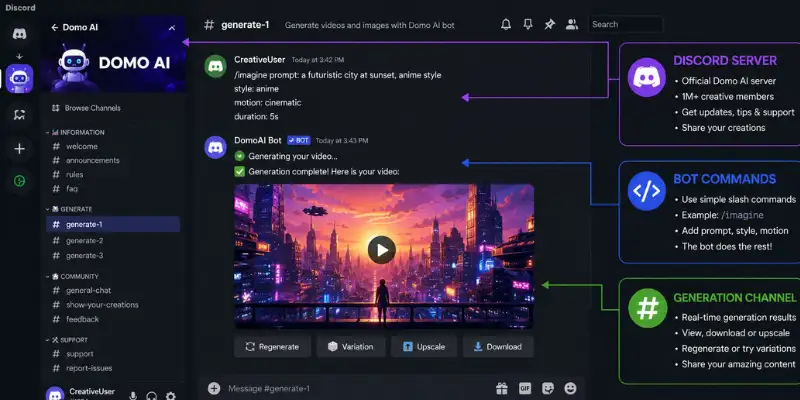
How to Generate Content with Domo AI on Discord
- Join the official Domo AI Discord server.
- Upload an image or type a generate command in one of the bot channels.
- Select a style from the options the bot presents in response.
- Wait for the bot to post your generated result back in the channel.
- Download your file directly from Discord or open it in the web app for further edits.
This setup means you can test domo ai for free inside Discord before deciding whether to upgrade on the website, which lowers the barrier for anyone who just wants to try it once before committing.
Discord Bot vs Web App: Which Should You Use?
Both versions share the same underlying models, but they serve slightly different needs. The Discord bot is faster to access if you are already active in the server community and want quick, casual generations alongside other users. The web app gives you a cleaner private workspace, a saved history of your past generations, and access to features that are harder to manage through chat commands, such as detailed style controls and higher-resolution exports.
If you are experimenting for the first time, start with Discord. If you plan to use domo ai regularly for content you intend to publish, the web app is the more practical long-term home for your workflow.
Real-World Ways People Use Domo AI
Reading a feature list only tells you so much, so here are a few concrete examples of how people actually put domo ai to work:
- A TikTok creator uploads a single portrait and uses image to video to make it blink, smile, and turn its head for a short animated intro clip.
- A small ecommerce seller runs product photos through the style transfer tool to create an eye-catching anime-style ad instead of a plain product shot.
- A podcaster who prefers not to appear on camera builds a talking avatar from one photo, then uses it to narrate short video clips for social media.
- A hobbyist artist uploads a personal sketch and animates it into a short looping video to share with an online art community.
- A freelance marketer uses text to video to storyboard a concept quickly before pitching a full production to a client.
None of these use cases require any animation background. That accessibility is the main reason domo ai has built such a large casual user base compared to traditional editing software.
Domo AI Pricing and Plans
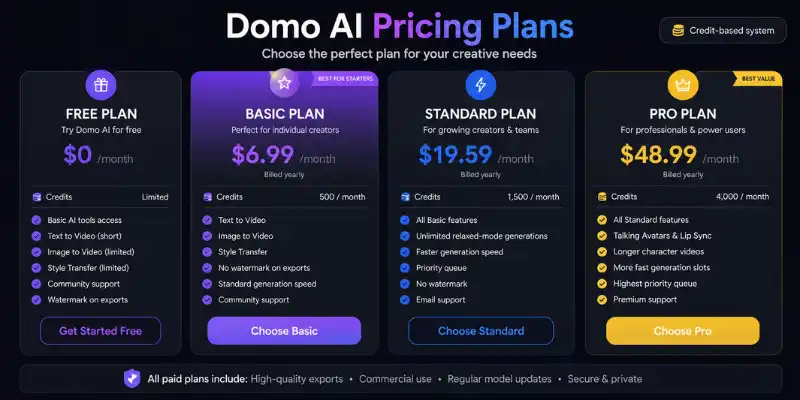
Domo AI uses a credit-based system. Each plan gives you a set number of monthly credits, and heavier generation modes, like talking avatars, use more credits per video than simpler style transfers.
- Free Plan – limited credits, enough to test the basic tools and get a feel for output quality.
- Basic Plan – around $6.99 a month on yearly billing, 500 monthly credits, no watermark on exports.
- Standard Plan – around $19.59 a month on yearly billing, 1,500 monthly credits, unlimited relaxed-mode generations.
- Pro Plan – around $48.99 a month on yearly billing, 4,000 monthly credits, more fast generation slots, talking avatars, and longer character videos.
Prices and credit limits change from time to time, so check the official pricing page before you commit to a paid tier. A useful way to judge which plan fits you: count how many videos you actually plan to make each month, multiply by the rough credit cost of your preferred mode, and compare that number against each plan’s monthly allowance before upgrading.
How Domo AI Compares to Other AI Video Generators
No single ai video generator wins on every metric, and domo ai is no exception. Here is a quick, honest comparison across the areas that matter most to everyday users:
- Ease of use: Domo AI is one of the simplest tools to pick up, especially through Discord, where there is no interface to learn at all.
- Style variety: Strong, particularly for anime and stylized looks, though less flexible for photorealistic cinematic output compared to tools built specifically for that purpose.
- Editing control: Limited. Domo AI is built for fast generation, not frame-level editing, so tools with a full timeline editor will beat it here.
- Community: Exceptionally strong thanks to its Discord roots, giving new users a place to see real examples before generating their own.
- Price for casual use: Competitive, especially at the Basic tier, though heavy daily users may find the credit system limiting faster than expected.
If your priority is quick, stylized results without a learning curve, domo ai holds up well. If you need precise control over every frame, a dedicated editing-first platform will likely serve you better.
Pros and Cons of Domo AI
Pros
- Easy to use, even with zero editing experience
- Multiple generation modes in one platform (text, image, video, character)
- Large style library, from anime to realistic motion
- Active Discord community for support and inspiration
- Useful extras like upscaling and background removal built in
- Fast turnaround compared to manual animation work
Cons
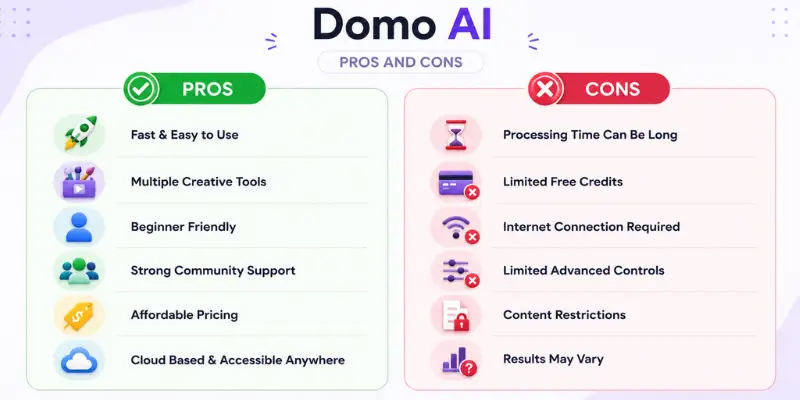
- Output quality varies between styles and sometimes needs a retry
- Credit system can run out fast for daily users
- Limited fine control compared to professional animation software
- No desktop app, so performance depends on your internet connection
- Complex scenes occasionally produce small visual artifacts
- Some advanced features are locked behind higher-tier plans
Who Should Use Domo AI?
Domo AI fits a specific type of user well:
- Content creators who need quick, eye-catching clips for social media
- Faceless YouTube and TikTok creators who want a talking avatar without appearing on camera
- Anime and art fans who want to restyle videos or photos into animated visuals
- Small business owners who need product visuals without hiring a video editor
- Beginners who want to experiment with AI video without a learning curve
If you need frame-by-frame control, advanced motion editing, or professional-grade output for film production, a tool built for that purpose will serve you better than domo ai.
Is Domo AI Safe and Legit?
Yes, Domo AI is a legitimate, actively maintained platform with millions of users and a verified presence on Discord, X, YouTube, and Instagram. It has clear pricing, a public privacy policy, and a support team behind it, which are the same trust signals worth checking on any ai video generator before you upload personal content.
People asking is domo ai safe are usually worried about one of two things: data privacy or account security. On both counts, Domo AI behaves like a standard SaaS platform. It stores uploaded content on its servers to process your generation, and its privacy policy outlines how long that content is kept and how it may be used. As with any AI content tool, keep two habits in mind: avoid uploading sensitive personal photos you would not want stored on a third-party server, and read the privacy policy directly if you plan to use it for client or commercial work.
It is worth repeating one more time that safety questions about domo business intelligence, Domo Inc’s separate enterprise BI platform, follow a completely different set of enterprise security standards and are not connected to anything covered in this section.
Domo AI Alternatives Worth Knowing About
Domo AI is not the only option for AI-generated video and animation. Domo AI alternatives piece breaks down the top competitors side by side, including pricing and feature differences, and it is worth a look before you commit to a paid plan here.
Two names come up often in that comparison. MotionMuse AI leans harder into motion and transitions rather than restyling, and Runway adds real post-generation editing that Domo AI does not offer. Both are worth trying if either gap matters to your workflow.
What Reddit Users Say About Domo AI
Reddit threads about domo ai are mostly positive, with a few recurring themes. Users on r/DomoAI and general AI subreddits often praise the anime and style transfer results, calling them some of the best available for casual use. Several threads specifically mention the Discord bot as an easy way to try the tool before paying for anything.
The most common complaint is the credit system, with several users saying credits disappear faster than expected once you move past the free tier, especially when experimenting with talking avatars. A smaller number of posts mention inconsistent results on more complex video inputs, which lines up with the cons listed above. A handful of users also bring up the naming confusion with Domo Inc’s business intelligence platform, usually in threads where someone searched domo ai expecting a data tool and found the video generator instead, or the other way around.
Final Verdict: Is Domo AI Worth It in 2026?
Domo AI is worth trying if you want an easy way to turn text, photos, or video clips into animated content. The free plan gives you enough to test the core features before spending anything, and the Discord bot makes it even easier to try without creating an account on the website first.
It is not the right pick if you need frame-level editing control or enterprise-grade output. For that, look at dedicated animation software instead. But for creators, marketers, and casual users who want fast, stylized results without a learning curve, domo ai does exactly what it promises, and its Discord-first growth story explains why so many people already trust it before ever visiting the website.
FAQS
Domo AI is used to turn text prompts, photos, and video clips into animated or stylized videos, including anime, cartoon, and realistic styles.
No. Domo AI is an AI video and animation generator. Domo Inc is a separate business intelligence company, and its domo bi platform has its own unrelated AI features inside its BI software.
Yes. Domo AI offers a free plan with limited credits, along with a Discord bot you can use to test features before upgrading.
Yes. The discord domo ai bot was the platform’s original product before the web app launched, and it remains one of the easiest ways to generate content for free.
Paid plans start around $6.99 a month on yearly billing and go up to about $48.99 a month for the Pro plan with more credits and features.
Yes, Domo AI is a legitimate platform with a public privacy policy and an active support team. Avoid uploading sensitive personal content you are not comfortable storing on a third-party server.
You upload one still photo, and the tool adds motion such as head turns, blinking, or camera-style panning, turning a static image into a short animated clip within a couple of minutes.
Domo AI generates creative video and image content for individual creators. Domo Inc’s business intelligence platform, often searched as domo business intelligence or domo bi, is built for company data dashboards and reporting, and the two share no technology or ownership in common.
Yes. Domo AI works through a web browser, making it accessible from both desktop and mobile devices without installing dedicated editing software.

11 Best DomoAI Alternatives in 2026 (More Styles, Faster Renders, Real Editing Control)



- Be Respectful
- Stay Relevant
- Stay Positive
- True Feedback
- Encourage Discussion
- Avoid Spamming
- No Fake News
- Don't Copy-Paste
- No Personal Attacks
- Be Respectful
- Stay Relevant
- Stay Positive
- True Feedback
- Encourage Discussion
- Avoid Spamming
- No Fake News
- Don't Copy-Paste
- No Personal Attacks
