11 Best DomoAI Alternatives in 2026 (More Styles, Faster Renders, Real Editing Control)
Published: 4 Jul 2026
DomoAI made a name for itself as a quick way to turn text, images, and video into anime, realistic, or artistic styles without much of a learning curve. Since launching in 2023, it has grown to over 3 million users and offers more than 30 distinct visual styles. For casual restyling and quick animated clips, it does the job well.
But once you push past casual use, the cracks start to show. Video styles can feel repetitive after a while. The free trial has gotten stingier over time. Processing slows down noticeably on larger or higher resolution projects. And once a video is generated, there is not much room to go back in and fix small details, you are mostly stuck with what the model gives you. That combination is exactly why so many creators start looking for a DomoAI alternative once their projects get more ambitious.
This piece covers 11 DomoAI alternatives worth trying in 2026, what each one does differently, and how to figure out which one actually fits the kind of videos you are making.
Why People Look for a DomoAI Alternative
A few specific frustrations come up again and again among creators who start exploring other options.
Limited style variety for advanced work. DomoAI’s 30-plus styles cover a lot of ground for quick content, but creators working on more specific or cinematic projects often find the output starts to feel formulaic after repeated use.
No real free plan anymore. Free trials across the AI video space have gotten more restrictive industry-wide, and DomoAI is no exception. Testing the platform properly before committing to a paid plan has gotten harder.
Slow processing on bigger projects. Longer clips or higher resolution exports can mean a real wait, which breaks the creative momentum that makes these tools appealing in the first place.
Minimal post-generation editing. Once DomoAI generates a video, your ability to tweak pacing, camera movement, or specific details is limited. If the output is close but not quite right, you often have to regenerate from scratch rather than fix what is already there.
A mixed record on independent review sites. DomoAI’s Trustpilot rating swings depending on when you check it, landing anywhere from the mid-2s to the mid-3s out of 5. The strongest praise centers on output quality and how fast a first video comes together, several reviewers mention finishing their first clip in under ten minutes. The recurring frustrations run in a different direction: content moderation that blocks legitimate projects without much explanation, tokens that burn through quickly on short clips, and support tickets that take a while to get resolved. Worth weighing alongside the feature list above.
None of this means DomoAI is a bad tool. It remains a fast, accessible way to get stylized video out quickly. But if any of these limitations match your experience, the alternatives below are worth a serious look.
How These DomoAI Alternatives Were Evaluated
Every platform on this list was judged against the factors that matter most to real creators, not just marketing claims:
- Video quality: how sharp and usable the output is without heavy manual cleanup
- Creative control: how much say you get over style, pacing, and camera movement
- Speed: how long rendering actually takes, especially on longer or more demanding projects
- Ease of use: how quickly a new user can get from idea to finished clip
- Pricing and free access: whether the free tier lets you meaningfully test the platform
- Unique features: what each tool does that DomoAI does not
With that covered, here are the strongest DomoAI alternatives available right now.
Best DomoAI Alternatives in 2026
Choosing an alternative is easier when you understand where each platform stands out. Some tools focus on anime-style video generation, while others offer advanced editing, cinematic camera controls, AI animation, or complete creative workflows. The reviews below cover the strengths, limitations, pricing, and ideal use case for each platform, helping you find the best DomoAI alternative for your workflow.
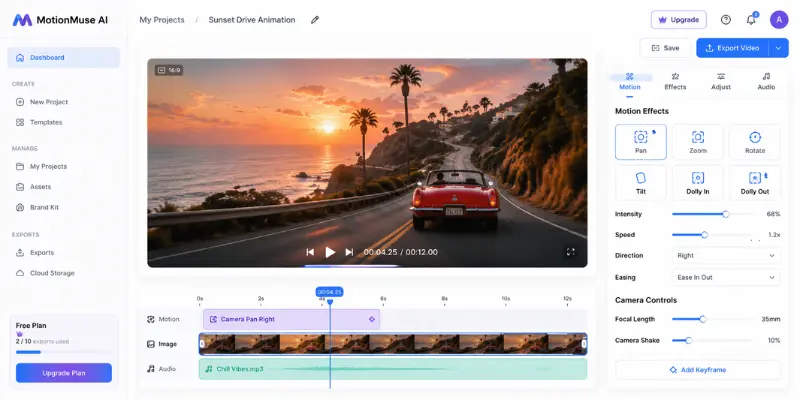
MotionMuse AI
MotionMuse AI is built for creators who want to turn static visuals into animated content without spending hours inside a traditional video editor. While DomoAI is known for anime-inspired transformations and artistic style transfers, It focuses more on adding natural movement, transitions, and motion effects to images and graphics.
The platform is especially useful for social media creators, marketers, and small businesses that need eye-catching videos quickly. Instead of offering dozens of creative styles, it prioritizes a simple workflow that helps users produce polished animations with minimal effort. If animation plays a bigger role in your workflow than AI restyling, MotionMuse AI is a strong option. Users looking for a wider range of AI animation tools can also compare other platforms before deciding.
Key features:
- AI-powered photo and graphic animation
- Ready-made motion templates
- Cloud-based video generation
- Export options for social media content
Pros:
- Very beginner friendly
- Creates engaging animated content in minutes
- Ideal for marketing and social media projects
Cons:
- Fewer artistic style effects than DomoAI
- Limited manual editing controls
- Better suited to short videos than long-form projects
Pricing: Free plan available with limited exports. Paid plans unlock higher-quality output and additional animation features.
Best for: Creators who want fast AI-powered animations for social media, marketing, and promotional videos.
Pika Labs
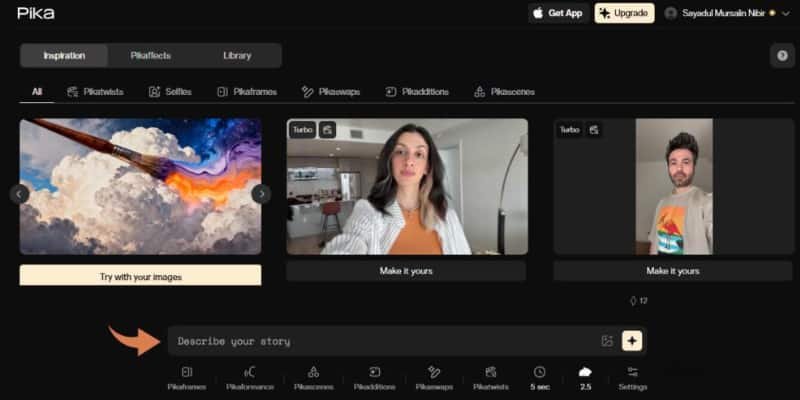
Pika Labs turns short text prompts into cinematic video clips complete with camera movement, transitions, and stylized visual effects. Where DomoAI focuses on restyling existing content, Pika leans more into generating original short-form scenes from scratch, making it a strong choice for teasers, concept visuals, and creative storytelling.
The web-based interface keeps things approachable, and an active creative community means the platform receives frequent updates and new creative features. If you want to compare Pika with other tools that offer similar AI video creation features, it’s worth looking at similar AI video generators before deciding.
Key features:
- Text-to-video generation from natural language prompts
- Built-in camera motion and scene transitions
- Frequent style and feature updates from an active community
- Clean, simple web-based controls
Pros:
- Strong at cinematic, movement-focused visuals
- Good for short-form storytelling and concept work
- Active development with regular new features
Cons:
- Less focused on restyling existing footage than DomoAI
- Free tier limits get restrictive for frequent use
- Output length is better suited to short clips than long-form video
Pricing: Free tier available with limited generations. Paid plans unlock more credits and higher resolution exports.
Best for: Creators who want cinematic, prompt-driven short clips rather than restyling existing footage.
Higgsfield
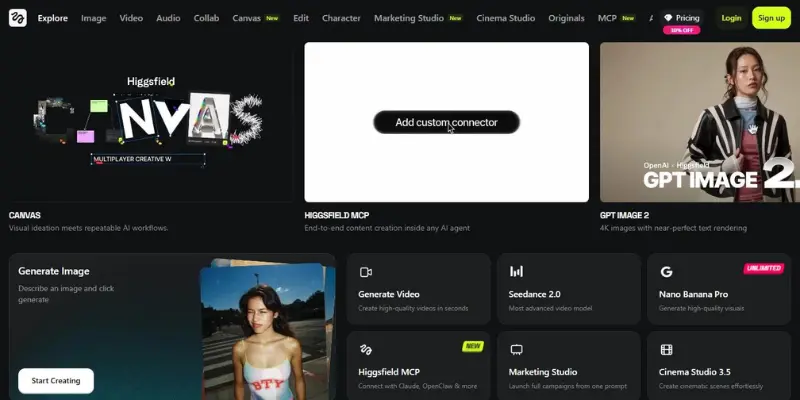
Higgsfield is built for creative professionals who want precise cinematic control, including specific camera movements like crash zooms and dolly shots that most AI video tools do not offer as direct settings. It also includes a feature called Higgsfield Soul, which trains a model on your own appearance for more personalized content.
Character consistency across a sequence is a genuine strength here, which matters for anyone building longer-form or narrative content rather than one-off clips.
Key features:
- Cinematic camera controls including crash zooms and dolly moves
- Higgsfield Soul for training a model on your own likeness
- Consistent character rendering across scenes
- AI storyboarding and export to other video platforms
Pros:
- Strong narrative and character consistency tools
- Precise camera control beyond basic prompts
- Useful for professionals building longer content
Cons:
- Struggles with complex scenes beyond simple shots
- Steeper learning curve than restyling-focused tools
- Less suited to quick, casual style transfers
Pricing: Free trial available. Paid plans scale with usage and feature access.
Best for: Professionals who want cinematic camera control and consistent characters across a project.
GoEnhance AI
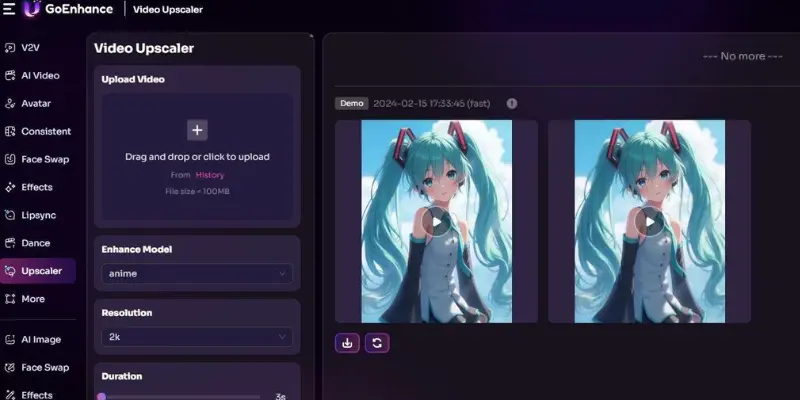
GoEnhance AI is the closest match to DomoAI’s core use case: fast, stylized video generation with minimal setup. It is free to use with no signup required, and it specializes in anime-style and stylized visual effects that render quickly without a steep learning curve.
For creators who liked DomoAI’s speed and simplicity but wanted a genuinely free way to test things first, GoEnhance AI removes that friction almost entirely.
Key features:
- Style-based video generation from images or text
- No signup required to start generating
- Fast processing with smooth animation output
- Anime and stylized effects as a core focus
Pros:
- Genuinely free to use without an aggressive upgrade wall
- Very fast turnaround on generations
- Minimal learning curve, works immediately
Cons:
- Lower customization ceiling than more advanced tools
- Style range is narrower than DomoAI’s 30-plus options
- Less suited for professional or client-facing work
Pricing: Free to use. No signup required for basic access.
Best for: Creators who want DomoAI’s speed and simplicity with an actually free way to test it first.
Dreamina
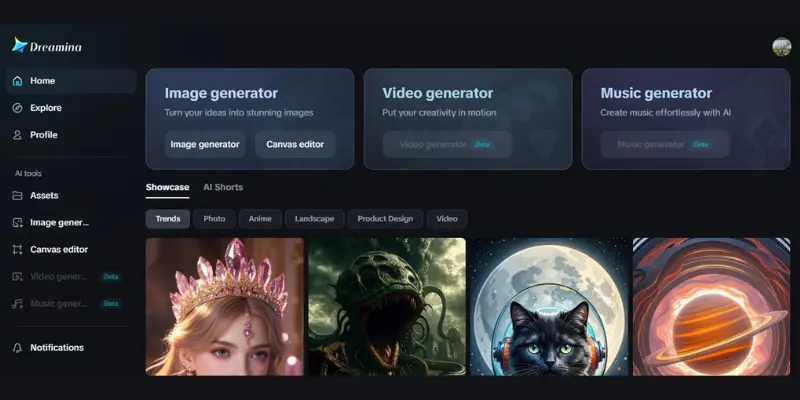
Dreamina, built by the team behind CapCut, brings AI image and video generation directly into a familiar editing environment. Beyond text-to-video, it includes talking avatar creation with lip-sync, AI-powered inpainting and upscaling, and integration with the CapCut PC editor for a full workflow without switching platforms.
For creators who already edit in CapCut, this integration alone can be worth the switch, since it removes the export-import cycle that eats up time with standalone tools. If realistic AI avatars are the main focus of your projects, you may also want to compare AI talking avatar tools designed specifically for lifelike character animation.
Key features:
- Text-to-image and text-to-video generation with style options
- Talking avatar creation with natural lip-sync
- AI inpainting, upscaling to 4K, and object editing
- Direct integration with the CapCut PC editor
Pros:
- Seamless workflow for existing CapCut users
- Strong avatar and lip-sync capabilities DomoAI lacks
- Supports multiple visual styles including anime and photorealistic
Cons:
- Free tier access is limited
- Offline functionality is restricted on mobile
- Best value depends on already using the CapCut ecosystem
Pricing: Free tier with limited access. Paid plans unlock full generation and editing features.
Best for: Creators already using CapCut who want AI generation built into their existing editing workflow.
Genmo AI
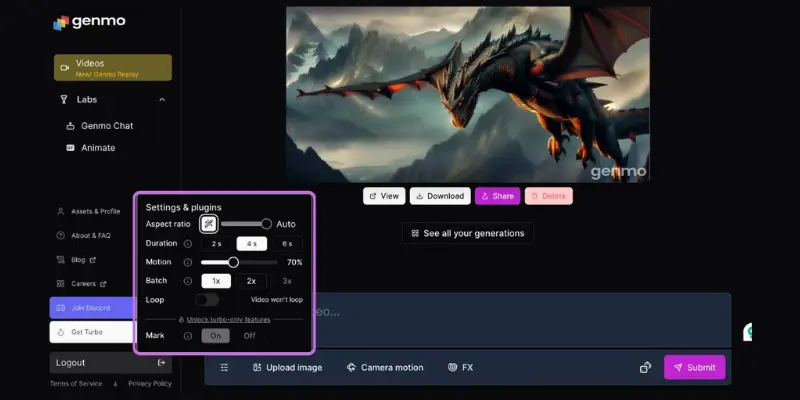
Genmo AI takes a more experimental approach, animating sketches, photos, and text prompts into motion with a distinctly artistic and sometimes surreal visual style. It is still evolving as a platform, but the results already stand out for creators who want personality and edge rather than safe, templated output.
If DomoAI’s styles started to feel predictable, Genmo AI’s willingness to produce weirder, more expressive results might be exactly the change of pace worth trying.
Key features:
- Animates sketches, photos, and text prompts into motion
- Strong artistic and surreal style outputs
- Simple web interface with fast generation
- Visual input can guide and steer scene direction
Pros:
- More distinctive, less templated visual style
- Fast generation through a simple interface
- Good for expressive, non-commercial creative work
Cons:
- Still an early-stage platform with some rough edges
- Less predictable output than more mature tools
- Not the best fit for polished, client-ready content
Pricing: Plans vary; check current offers for free access limits.
Best for: Artists and creatives who want expressive, less templated animated visuals.
Leonardo AI
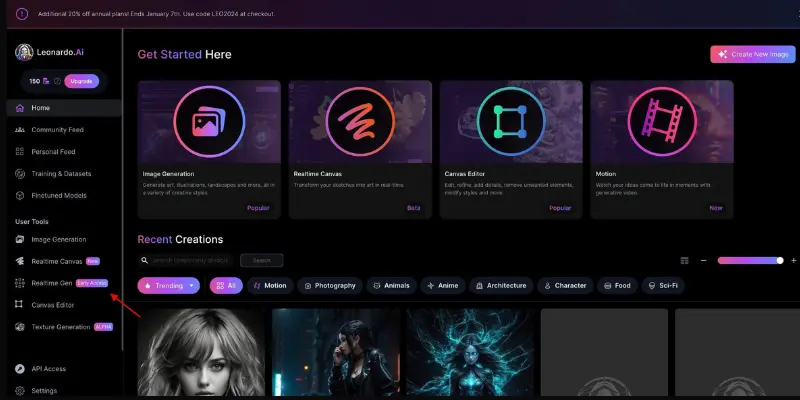
Leonardo AI is a web-based platform known for high-quality image generation with deep fine-tuning options, and it has extended into video generation that transforms images and text into dynamic scenes. Real-time canvas editing and granular control over aspect ratios and art styles give it an edge for users who want to shape output precisely rather than accept the first result.
It can also convert 2D creations into 3D textures, a feature that goes beyond DomoAI’s image restyling capabilities. If your workflow is focused more on creating complete 3D models and assets than generating textures, you may also want to compare other AI 3D model generators built specifically for that purpose.
Key features:
- High-quality image generation with fine-tuning controls
- Video generation from images and text prompts
- Real-time canvas editing tools
- 2D to 3D texture conversion
Pros:
- Strong fine-tuning and style control
- Useful across marketing, game development, and design work
- Free tier available alongside paid options
Cons:
- Motion generator results can feel random, needing manual fixes
- Can get expensive for heavy usage
- Credit system feels restrictive for frequent users
Pricing: Free tier available. Paid plans scale based on generation volume.
Best for: Users who want deep fine-tuning control over both image and video style.
ToMoviee AI
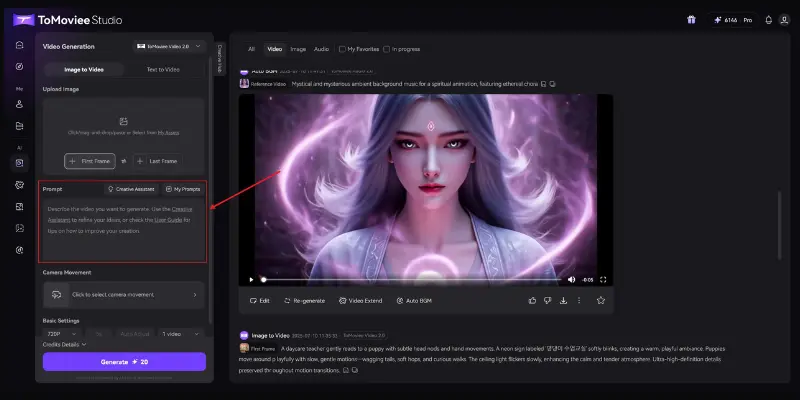
ToMoviee AI is an all-in-one studio covering text-to-video, image-to-video, text-to-image, and AI-generated music and sound effects in a single platform. Cinematic camera controls like pan, tilt, and zoom give more directorial control than simple prompt-based generation, and automated workflows help streamline projects with multiple moving pieces.
For creators who want to handle visuals and audio without switching between separate tools, the all-in-one format is the main draw here.
Key features:
- Text-to-video, image-to-video, and text-to-image in one platform
- AI-generated music and sound effects
- Cinematic camera movement controls
- Automated workflows for multi-step projects
Pros:
- Handles both visual and audio generation in one place
- Useful camera control beyond basic animation
- Suited to filmmakers and multi-format content creators
Cons:
- Limited network access in certain regions
- Learning curve for the full feature set
- Less focused specifically on style transfer than DomoAI
Pricing: Free trial available. Paid plans unlock full feature access.
Best for: Creators who want video, image, and audio generation handled in one connected workflow.
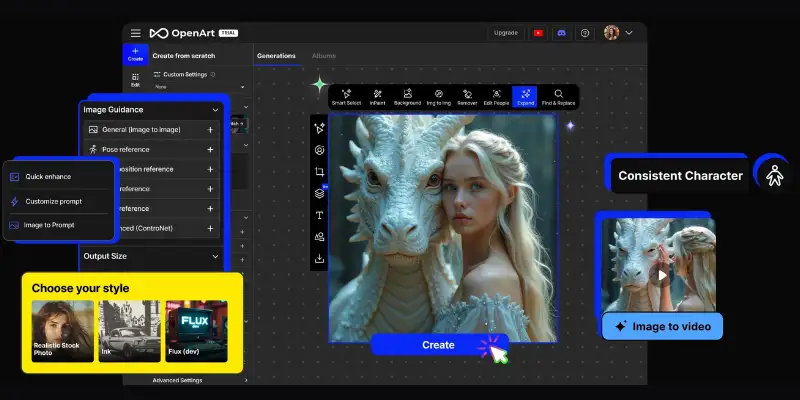
OpenArt
OpenArt combines image generation with video creation and a strong community layer where users share and build on each other’s work. With access to over 100 different AI models for styles ranging from photorealistic to anime to fantasy art, the range of aesthetic options rivals or exceeds DomoAI’s style library.
Editing tools including inpainting, object removal, and upscaling round out a platform built for both generation and refinement, addressing one of DomoAI’s weaker points directly.
Key features:
- Access to 100+ AI models across diverse art styles
- Video generation from images or text with narrative or abstract modes
- Inpainting, object removal, and upscaling tools
- Active community for sharing and remixing creations
Pros:
- Wider model and style selection than DomoAI
- Stronger post-generation editing tools
- Team plans available for studios and agencies
Cons:
- Customization can still feel limited for very specific needs
- Relies heavily on strong internet and hardware
- Community features add complexity some users will not need
Pricing: Free tier available. Team and pro plans scale with usage.
Best for: Users who want a wider style library plus real editing tools after generation.
BasedLabs AI
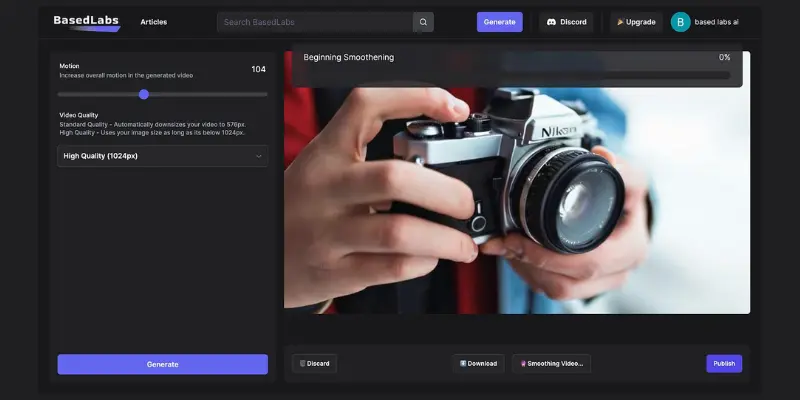
BasedLabs AI centers on accessibility, offering text-to-image generation, face swapping, and video creation from a cloud-based platform that does not require any technical setup. Real-time team collaboration tools make it a reasonable option for small teams brainstorming and generating content together.
It will not out-customize more advanced platforms, but for straightforward, no-friction generation, it holds up well.
Key features:
- Text-to-image generation and image-to-video conversion
- Face swapping and voice cloning tools
- Cloud-based access with no technical setup
- Real-time team collaboration features
Pros:
- Easy to use for beginners and professionals alike
- Cloud infrastructure removes technical barriers
- Team collaboration built in
Cons:
- Limited customization compared to advanced platforms
- Occasional glitches on more complex projects
- Style range narrower than dedicated animation tools
Pricing: Free tier available. Paid plans unlock expanded generation limits.
Best for: Teams that want simple, accessible AI content creation without a learning curve.
Runway
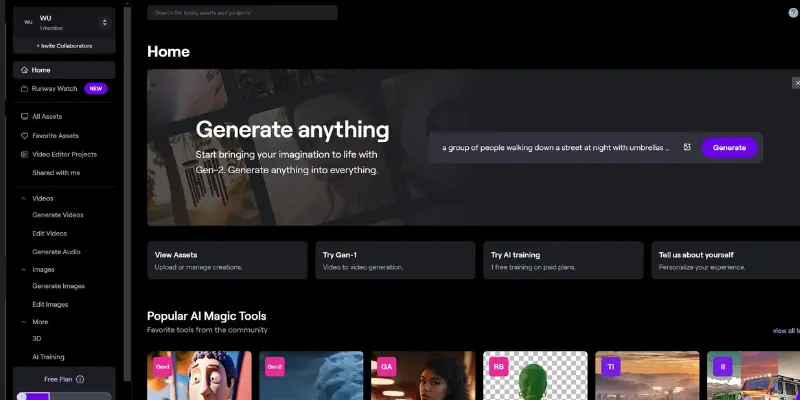
Runway is a full creative suite covering text-to-video, image-to-video, and a range of AI-powered editing tools like background and object removal, all inside a browser-based workspace. It goes further than DomoAI by combining generation with genuine post-production tools, letting you refine a clip after the fact rather than starting over.
Since Runway is one of the most established AI video platforms, it’s also worth looking at other AI video generation tools to see which one best fits your workflow.
Key features:
- Text-to-video and image-to-video generation
- Built-in editing tools including background and object removal
- Timeline support with real-time preview
- Collaborative workspace for teams
Pros:
- Genuine editing control after generation, not just before
- Professional-grade toolset in a browser
- Strong fit for filmmakers and video editors
Cons:
- Free plan requires a starting image, no pure text-to-video for free
- Initial free credits are easy to exhaust quickly
- Steeper learning curve than simple restyling tools
Pricing: Free plan with limited credits and 720p exports. Paid plans unlock 4K exports and remove watermarks.
Best for: Creators who want both generation and real editing control in one professional toolkit.
DomoAI Alternatives Comparison Table
| Tool | Best For | Free Plan | Editing After Generation |
| Pika Labs | Cinematic AI videos | Yes, limited | Basic |
| Higgsfield | Camera motion and character consistency | Trial | Limited |
| GoEnhance AI | Fast AI video restyling | Yes | Basic |
| Dreamina | AI video creation with editing | Yes, limited | Advanced |
| Genmo AI | Creative AI animation | Yes, limited | Basic |
| Leonardo AI | AI image and video generation | Yes | Moderate |
| MotionMuse AI | AI animation and motion effects | Yes, limited | Moderate |
| ToMoviee AI | AI video, image, and audio creation | Trial | Moderate |
| OpenArt | AI art with built-in editing | Yes | Advanced |
| BasedLabs AI | Team-based AI content creation | Yes | Basic |
| Runway | Professional AI video editing | Yes, limited | Advanced |
Which DomoAI Alternative Is Best for Different Users?
Best overall: Runway
Best free alternative: GoEnhance AI
Best for beginners: Pika Labs
Best for professional video editing: Runway
Best for anime-style videos: GoEnhance AI
Best for AI animation: MotionMuse AI
Best for CapCut users: Dreamina
Best for artistic styles: Genmo AI
Best for editing after generation: OpenArt
Best for cinematic camera controls: Higgsfield
Best for all-in-one creative workflows: ToMoviee AI
How to Choose the Right DomoAI Alternative
The best pick depends on exactly what frustrated you about DomoAI.
If style variety feels repetitive, OpenArt’s 100-plus models and Genmo AI’s more experimental output both push past DomoAI’s 30 styles in different directions, one broader, one weirder.
If the lack of post-generation editing bothers you most, Runway and OpenArt both let you refine a clip after it is generated instead of forcing a full regeneration for small fixes.
If you want genuinely free testing, GoEnhance AI requires no signup at all, and Pika Labs and Leonardo AI both offer usable free tiers to properly evaluate before paying.
If you already edit in CapCut, Dreamina’s direct integration removes an entire export-import step from your workflow.
If cinematic camera control matters most, Higgsfield’s dolly and crash zoom settings and ToMovie AI’s pan, tilt, and zoom controls offer more creative flexibility than basic prompt-based generation. If you want to compare similar AI video creation tools with a stronger focus on realistic camera movement and scene quality, it’s also worth looking at other cinematic AI video tools and AI video generators built for realistic motion before deciding.
If you want maximum creative and editing control together, Runway remains the most complete professional toolkit on this list, generation and editing in one place.
Most of these platforms offer a free tier or trial, so testing two or three against your actual project is the fastest way to find the right fit.
Conclusion
DomoAI earned its popularity by making stylized video generation fast and approachable, and for quick, casual content it still holds up. But as creators push toward more ambitious, longer, or client-facing work, the platform’s limits on style, variety, editing, and speed become harder to ignore.
The best DomoAI alternatives is not the one with the flashiest demo. It is the one that removes the specific limitation that was slowing your actual work down, whether that is a lack of editing control, a stingy free trial, or output that started to feel repetitive after your fiftieth video.
FAQs
GoEnhance AI is completely free with no signup required, making it the most accessible option to test immediately. Pika Labs and Leonardo AI both also offer usable free tiers for evaluating the platform before committing to a paid plan.
Runway and OpenArt both offer strong post-generation editing, including background removal, inpainting, and upscaling, addressing one of DomoAI’s biggest limitations directly.
OpenArt offers access to over 100 different AI models spanning photorealistic, anime, and fantasy styles, a wider range than DomoAI’s 30-plus built-in styles.
GoEnhance AI is built specifically for fast turnaround on stylized, anime-style videos, closely matching DomoAI’s speed and simplicity while remaining fully free.
Runway and Higgsfield both offer more precise camera control and editing depth suited to professional or client-facing video work, going beyond DomoAI’s more casual restyling focus.
Most of them are designed for no-code use. GoEnhance AI, BasedLabs AI, and Pika Labs are all built for immediate use without any setup, while tools like Runway and Leonardo AI have a slightly steeper learning curve for their more advanced features.
Dreamina integrates directly with the CapCut PC editor, letting you move between generation and editing without exporting and re-importing files. Runway also includes its own built-in timeline editor for a similar all-in-one workflow.
GoEnhance AI is one of the strongest options for anime-style video generation thanks to its fast rendering, simple workflow, and free access. Dreamina and OpenArt are also worth considering if you want more editing tools or additional visual styles.





- Be Respectful
- Stay Relevant
- Stay Positive
- True Feedback
- Encourage Discussion
- Avoid Spamming
- No Fake News
- Don't Copy-Paste
- No Personal Attacks
- Be Respectful
- Stay Relevant
- Stay Positive
- True Feedback
- Encourage Discussion
- Avoid Spamming
- No Fake News
- Don't Copy-Paste
- No Personal Attacks
