Best Meshy AI Alternatives in 2026: Free, Fast and Powerful 3D Tools
Published: 18 Jul 2026
The best meshy ai alternatives in 2026 are 3D AI Studio for an all in one workspace, Tripo AI for fast stylized models, Hyper3D Rodin for high end geometry, Sloyd AI for repeatable game assets, and Blender for a completely free, full control option. Your pick depends on whether you want speed, quality, or zero cost.
Ever open Meshy AI, burn through your credits in ten minutes, and still not get the model you wanted? You are not alone. A lot of creators run into that same wall and start looking for meshy ai alternatives that give more freedom without draining their wallet.
This guide walks through the best meshy ai alternatives for 2026, from free and open source tools to paid platforms built for game studios. Whether you need clean STL files, fast game assets, or you just want to learn 3D design without spending money, you will find a tool here that fits, the same way people compare AI tools across writing, video, and chat before settling on one.
What is Meshy AI and Why People Look for Alternatives?
Meshy AI is an AI tool that turns text or images into 3D models. Many 3D artists and 3D printing users tried it because it saves time. You type a prompt, and the tool creates a model in minutes.
With the meshy 6 update, the tool became faster and added better text-to-3D results. The interface also feels smoother. Many beginners liked this update because it reduced manual work.
But after using it for real projects, users started sharing mixed reviews on meshy reddit threads and other forums.
So people began searching for meshy ai alternatives that give more control and better output.
What Users Like in Meshy 6
- Fast text-to-3D generation
- Simple dashboard for beginners
- Image-to-3D option
- Quick preview and export
This sounds great, right? But real use tells a different story.
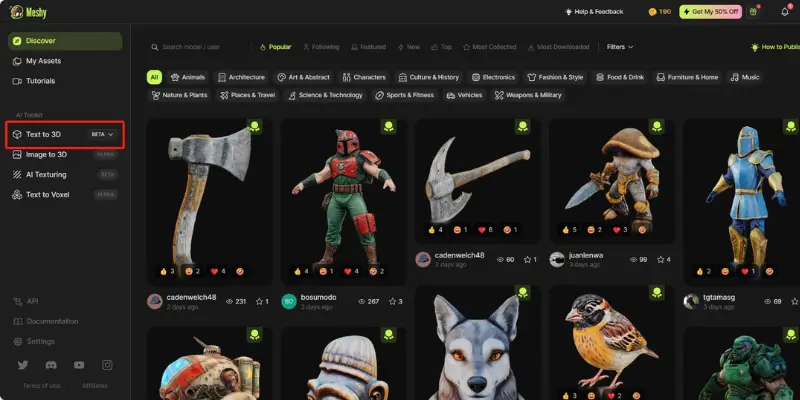
Why Look for Meshy AI Alternatives
Meshy AI is a solid starting point for text to 3D and image to 3D work, but it is not perfect for everyone. Most people who search for meshy ai alternatives run into one of these problems.
Credits Run Out Fast
Meshy AI charges by credits, and every generation eats into that number. Meshy’s Pro plan runs about $20 a month for roughly 1,000 credits, and if you retry a prompt a few times to get it right, that number disappears fast. This gets expensive for anyone generating models daily, which is exactly why studios and freelancers often move to meshy AI alternatives with flatter pricing or unlimited generation.
The Free Plan Is Too Limited
You cannot properly test a tool on a handful of free credits. Many users say the free plan runs out before they even get a feel for the platform, so they go looking for meshy AI alternatives that offer more room to experiment.
Messy Topology
AI generated meshes are not always clean. Broken edges, odd surfaces, and bad geometry are common complaints, especially for anyone using the model in Blender, Maya, or a game engine afterward. Some professionals call this cleanup debt, the extra hours you spend fixing a mesh instead of actually using it. Fixing this by hand eats up the time the AI was supposed to save, and it is one of the biggest reasons people search for meshy air alternatives with cleaner base output.
Limited Export Options
Game developers and 3D printing users need specific file formats like FBX, OBJ, GLB, or STL. When a tool does not support the format you need, you end up converting files manually, which slows everything down.
Workflow Fit
If a tool does not plug into Unity, Unreal Engine, or Blender smoothly, you waste time uploading and re-uploading files. A good meshy AI alternative should fit into your existing pipeline instead of adding extra steps, which is the same reason ai automation keeps showing up as a priority across creative software in general.
Quick Comparison of Meshy AI Alternatives
| Tool | Best For | Starting Price | Free Plan | STL Export | Good For Game Dev |
|---|---|---|---|---|---|
| Meshy AI | Fast general use | Free, then $20/mo | Limited credits | Yes | Yes |
| Tripo AI | Stylized, creative models | Free, then ~$16/mo | Limited credits | Yes | Yes |
| 3D AI Studio | Multiple models in one place | Free, then ~$19/mo | Limited credits | Yes | Yes |
| Sloyd AI | Fast, repeatable generation | Free, then ~$15/mo | Limited credits | Yes | Yes |
| Hyper3D Rodin | High quality geometry | Free, then ~$24/mo | Limited credits | Yes | Yes |
| SelfCAD | Full editing control | Free | Yes | Yes | No |
| Blender | Complete freedom, fully free | Free | Yes | Yes | Yes |
| Luma AI | Real photo to 3D scanning | Free, then paid | Limited credits | No | No |
| Meshmixer | STL repair and cleanup | Free | Yes | Yes | No |
| SketchUp | Beginners, simple design | Free, then paid | Yes | Limited | No |
| Hunyuan3D | Free, ultra HD output | Free, open source | Yes | Yes | Yes |
10 Best Meshy AI Alternatives in 2026
Here is a closer look at the best meshy ai alternatives, what each one is good at, and where it comes up short.
1. Tripo AI: Best for Creative and Stylized Models
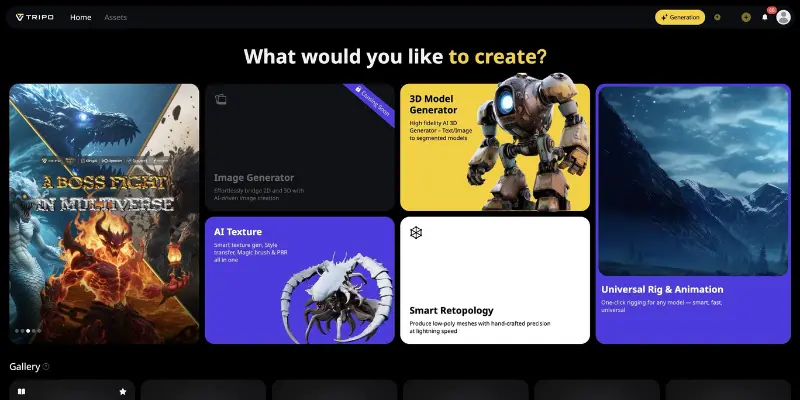
Tripo AI turns text prompts or images into stylized, artistic 3D models. It leans creative rather than technical, which makes it a favorite for character design, concept art, and game style assets.
Key Features
- Text-to-3D and image-to-3D generation
- Fast turnaround on generations
- STL and other common export formats
- Stylized output tuned for characters and props
Pros
- Very creative, artistic results
- Works from both text prompts and reference images
- Quick generation speed
Cons
- Meshes usually need cleanup before printing
- Not built for exact measurements or engineering accuracy
Pricing
Tripo AI has a free Basic plan with a set number of monthly credits. Paid plans start around $16 to $20 a month and unlock more credits and higher detail output.
Why It Is a Strong Meshy AI Alternative
Tripo AI leans harder into stylized, artistic results, which gives it an edge for character and concept work where Meshy AI often produces more generic shapes. It also keeps a similar speed to Meshy AI, so you are not trading speed for creativity.
2. 3D AI Studio: Best Overall Meshy AI Alternative
3D AI Studio brings several 3D generation models into a single browser based workspace, along with texturing and remeshing tools. It is built for people who want more than a single generator can give them, which is why it often comes up as the best overall meshy ai alternative.
Key Features
- Text-to-3D and image-to-3D generation
- Access to multiple underlying generation models in one workspace
- Built-in AI texturing and auto remeshing
- Multiple export options including OBJ, FBX, and STL
Pros
- One platform covers several generation styles
- Browser based, so there is nothing to install
- Strong export flexibility for different pipelines
Cons
- Output quality shifts depending on which underlying model you choose
- Can feel busy or overwhelming for a first time user
Pricing
3D AI Studio offers a free tier for testing, with paid plans starting around $19 a month and scaling up based on how many models you generate each month.
Why It Is a Strong Meshy AI Alternative
Unlike Meshy AI, 3D AI Studio gives you access to more than one generation engine in the same workspace, along with built-in texturing and remeshing. This means less time jumping between tools to get a model production ready.
3. Sloyd AI: Best for Fast and Repeatable Generation
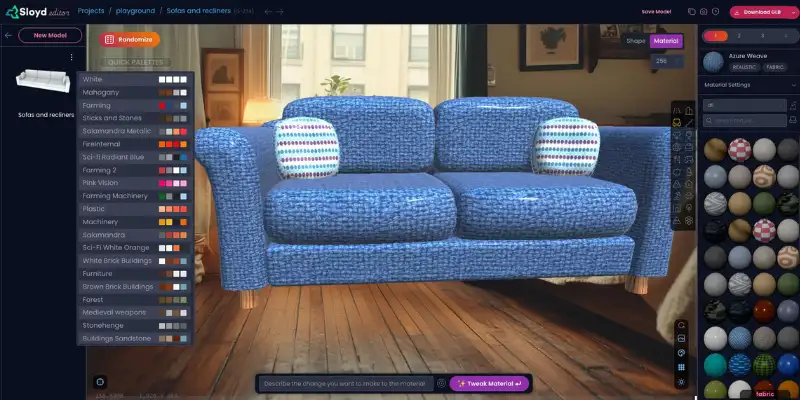
Sloyd AI is not fully credit based like Meshy AI, which is one of the biggest reasons people switch. It combines prompts with templates and sliders, giving you more predictable results and cleaner topology on repeat generations.
Key Features
- Text-to-3D and image-to-3D generation
- Parametric templates with adjustable sliders
- Topology control with target polygon counts
- Plugin support for easier import into other tools
Pros
- Faster, more predictable repeated generation
- Less credit pressure than pure prompt-based tools
- Cleaner base meshes with fewer surprises
Cons
- Not built for highly detailed, cinematic style assets
- Some advanced features sit behind a paid tier
Pricing
Sloyd AI has a free plan to get started, with paid tiers starting around $15 a month that unlock full template access and higher output limits.
Why It Is a Strong Meshy AI Alternative
Sloyd AI trades some creative randomness for consistency, which Meshy AI does not offer in the same way. If you need to generate similar assets again and again without burning through credits, Sloyd AI holds up better over time.
4. Hyper3D Rodin: Best for High Quality Assets
Hyper3D Rodin puts quality ahead of speed. It produces detailed geometry with strong topology and sharp textures, which is why studios that care about final visual polish reach for it over faster, more generic generators.
Key Features
- High fidelity text-to-3D and image-to-3D generation
- Strong topology output
- Detailed PBR texture generation
- Export support for common production pipelines
Pros
- Clean, professional looking output
- Strong fit for production ready assets
- Good texture detail out of the box
Cons
- Pricing sits higher than most tools on this list
- Better suited to studios than casual, one-off use
Pricing
Hyper3D Rodin offers a free tier for limited testing, with a Creator plan around $24 to $30 a month and a Business plan around $96 to $120 a month for full access and higher volume generation.
Why It Is a Strong Meshy AI Alternative
Hyper3D Rodin focuses on geometry and texture quality in a way Meshy AI does not prioritize as heavily. If the final look of the model matters more than how fast you got there, Rodin is built for that trade-off.
5. SelfCAD: Best for Full Editing Control
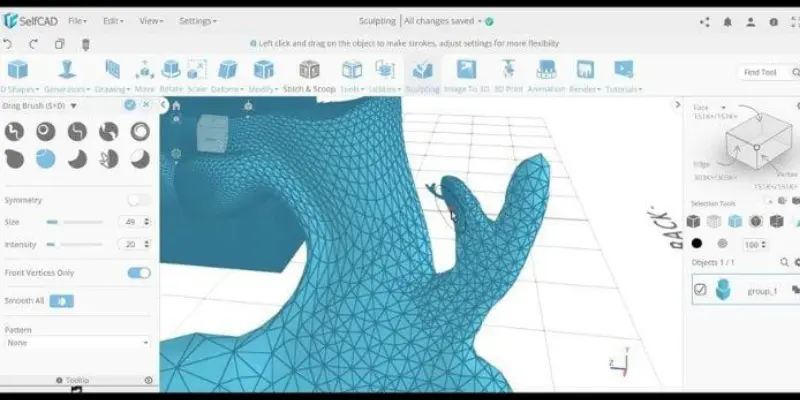
SelfCAD is not just a generator, it is a full browser based modeling tool with manual editing, sculpting, and a built-in slicer. That combination makes it one of the more complete meshy ai alternatives for anyone doing 3D printing.
Key Features
- Manual mesh editing and sculpting tools
- Built-in slicer for 3D printing
- Browser based workflow with no heavy install
- Beginner friendly dashboard
Pros
- Real, hands-on control over your model
- Strong fit for 3D printing workflows
- No need to install heavy desktop software
Cons
- AI generation is basic compared to dedicated generators
- Takes time to learn the full toolset
Pricing
SelfCAD offers a free basic plan. Paid tiers unlock advanced editing tools and additional export options.
Why It Is a Strong Meshy AI Alternative
Meshy AI stops once the model is generated, while SelfCAD lets you keep working on that model with real editing and sculpting tools. For anyone who needs to fix or refine a design before printing, that is a meaningful difference.
6. Blender: Best Free Meshy AI Alternative
Blender is completely free and always will be. It covers modeling, sculpting, animation, texturing, and rendering in one package, which makes it the strongest free option on this entire list.
Key Features
- Full modeling and sculpting suite
- Animation and rigging tools
- Built-in rendering engine
- Large library of community add-ons
Pros
- Zero cost, with no credits or subscriptions
- Extremely powerful once you learn it
- Huge community support and tutorials
Cons
- Steep learning curve for beginners
- No AI text-to-3D generation built in
Pricing
Blender is completely free and open source. There are no paid tiers or hidden costs.
Why It Is a Strong Meshy AI Alternative
Meshy AI is fast but limited to what the AI generates. Blender gives you unlimited, hands-on control over every part of a model, and it costs nothing, which is hard for any credit based tool to compete with long term.
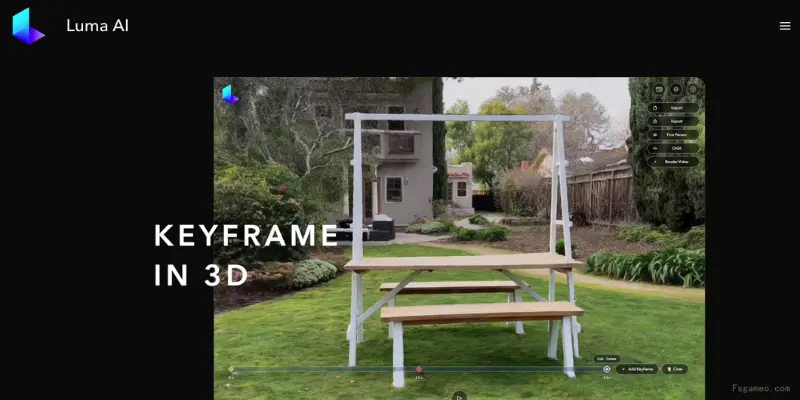
7. Luma AI: Best for Turning Real Photos into 3D Models
Luma AI is built for capturing real-world objects from photos instead of generating them from text. If you want to create a 3D version of something that already exists, it’s a great choice. However, if photo-based 3D capture isn’t the right fit, you can explore other AI tools like Luma AI to find one that better matches your workflow
Key Features
- Photo based 3D capture and scanning
- Detailed texture reconstruction
- Scene and object capture from multiple angles
Pros
- Very realistic results from real objects
- Simple, photo based workflow
- Good detail on textures and surfaces
Cons
- No direct STL export
- Needs other tools before a model is print ready
Pricing
Luma AI offers a free plan with limited exports, with paid plans available for higher volume or commercial use.
Why It Is a Strong Meshy AI Alternative
Meshy AI can only generate from a prompt or a single image, while Luma AI captures the real depth and texture of an actual object. For product scans or real world assets, that accuracy is hard for Meshy AI to match.
8. Meshmixer: Best for Fixing STL Files
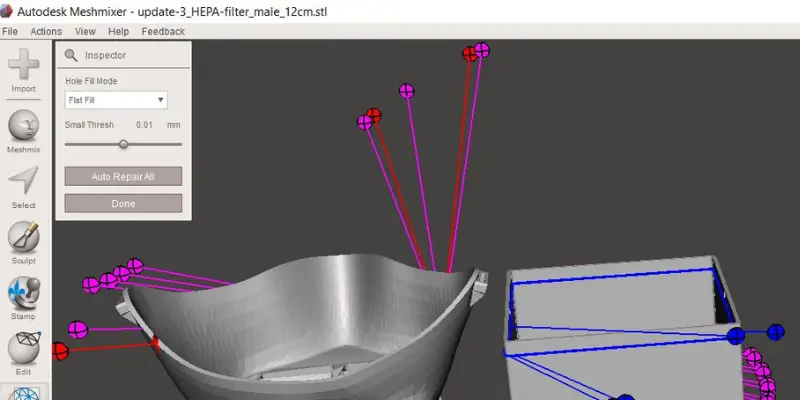
Meshmixer is not a generator, it is a repair tool, and most meshy ai alternatives on this list still produce meshes that need this kind of cleanup. It fixes holes, smooths surfaces, and makes a model watertight for printing.
Key Features
- Mesh repair and hole filling
- Hollowing and surface smoothing
- Free desktop software
Pros
- Excellent at fixing broken or messy meshes
- Completely free to use
- Works alongside any generator, including Meshy AI
Cons
- No AI generation of its own
- Interface feels dated compared to newer tools
Pricing
Meshmixer is completely free.
Why It Is a Strong Meshy AI Alternative
Meshy AI does not include real mesh repair tools, so most users end up needing something like Meshmixer anyway. Pairing the two covers what Meshy AI leaves unfinished.
9. SketchUp: Best for Beginners
SketchUp keeps things simple with drag and drop modeling, which makes it approachable for anyone new to 3D work, especially in architecture and interior design.
Key Features
- Drag and drop modeling tools
- Large model warehouse of community assets
- Cloud based project saving
Pros
- Very easy to pick up with no prior experience
- Fast for basic shapes and layouts
- Strong community library to pull from
Cons
- Not built for advanced animation work
- Professional tools sit behind a paid plan
Pricing
SketchUp offers a free version for simple projects, with paid plans for professional features and collaboration tools.
Why It Is a Strong Meshy AI Alternative
SketchUp is built for precise, structured design rather than AI prompts, which makes it easier to get consistent, predictable results without needing the right wording in a prompt.
10. Hunyuan3D: Best Free High Detail Option
Hunyuan3D is an open source model known for producing sharp geometry and strong texture detail without a paywall, which puts it near the top of any list of free meshy ai alternatives.
Key Features
- High detail text-to-3D and image-to-3D generation
- Cleaner UV mapping than most free tools
- Open source access
Pros
- Free access to strong output quality
- Good geometry for a free tool
- Active open source development
Cons
- Interface feels more technical than consumer tools
- Still benefits from manual cleanup on complex prompts
Pricing
Hunyuan3D is free and open source, with no credit system to manage.
Why It Is a Strong Meshy AI Alternative
Hunyuan3D gives you a taste of high detail generation without spending any credits, which makes it a strong testing ground before you decide whether a paid tool like Meshy AI is worth it.
More Meshy AI Alternatives Worth Knowing
If the ten tools above do not cover your exact case, a few more names come up often when people compare meshy ai alternatives.
Kaedim: A managed 2D to 3D service where a human assisted pipeline turns concept art into game ready meshes. This fits studios that want delivered, cleaned up assets rather than a self serve generator. It is not the right pick for indie creators or fast moving teams who want instant, low cost generation with no back and forth.
Spline: A browser based 3D tool built for interactive web design. It is great for building 3D scenes for websites and product pages, though it is not built for print ready STL work.
CSM AI: Focused on multi view consistency, which is useful when you need a character or object to look the same across different angles and shots.
Neural4D: A newer platform aimed at manufacturing and furniture style output with high resolution geometry. Worth a look if your work is closer to product design than gaming.
Meshy AI vs Competitors, A Closer Look
People rarely want a list alone, they want to know how Meshy AI actually stacks up against specific tools. Here is a direct look at six common comparisons.
Meshy AI vs Tripo AI
Meshy AI is faster for quick, general purpose models and keeps things simple for beginners. Tripo AI leans more artistic, which makes it the better pick for stylized characters and concept work. Both usually need a cleanup pass before printing.
Meshy AI vs 3D AI Studio
Meshy AI wins on simplicity and speed. 3D AI Studio wins on workflow depth, since it bundles texturing, remeshing, and access to several models in one place. If you only need quick concepts, stick with Meshy. If you need production ready assets, 3D AI Studio pulls ahead.
Meshy AI vs Sloyd AI
This comparison comes down to credits versus control. Meshy AI is great for creative exploration, but Sloyd AI gives you more predictable topology and does not punish you for testing multiple versions of the same asset.
Meshy AI vs Hyper3D Rodin
Meshy AI is quicker and easier for everyday use. Hyper3D Rodin focuses on photorealistic detail and stronger topology, which costs more but pays off for hero assets and final production work.
Meshy AI vs Kaedim
Meshy AI is a self serve generator you control from your own dashboard in seconds. Kaedim adds a managed production loop with more human oversight, which suits studios that need reliable, cleaned up delivery over raw speed.
Meshy AI vs Blender
This is not really a fair fight since Blender is a full 3D suite, not just a generator. Meshy AI saves time for quick, AI generated starting points. Blender gives total control once you are ready to refine that model. A lot of people actually use both together, generating a base shape in Meshy AI and finishing it properly in Blender.
Best Free Meshy AI Alternatives
If your main goal is a free meshy ai alternative, you have real options here, not just watered down trial versions.
- Blender is the strongest fully free pick, with no credits and no limits at all
- SelfCAD gives you free browser based editing with a built in slicer for printing
- SketchUp offers a free version that is more than enough for simple design work
- Meshmixer is completely free and stays useful purely for repairing meshes from other tools
- Hunyuan3D is open source and gives you strong output without a subscription
None of these free tools force you into a countdown of credits, which is exactly what most people are trying to escape when they search for meshy ai alternatives in the first place.
How to Choose the Right Meshy AI Alternative
For Game Developers
Look for clean topology, low poly output, and easy export into Unity or Unreal Engine. Sloyd AI, 3D AI Studio, and Hyper3D Rodin are solid picks here.
For 3D Printing
Watertight geometry and reliable STL export matter more than speed. SelfCAD, Meshmixer, and Blender all handle this well.
For Product Design
You need clean surfaces and good texture support for realistic presentation. 3D AI Studio and Hyper3D Rodin both do well here, and Blender works if you want full manual control.
For Animation Work
Rig ready structure and clean edge flow matter most. Blender remains the strongest option, with Hyper3D Rodin useful for production ready base assets.
For VFX Work
If you are building scenes for film or video work, scene consistency across shots matters more than a single sharp mesh. Look for tools that let you control camera, lighting, and pose so characters and props stay consistent from frame to frame, and treat a single generator as one input into a larger shot that an ai video generator handles from there.
For Beginners
Start simple. SketchUp and SelfCAD are both easy to pick up, and Meshy AI itself is still fine for quick, low stakes testing before you move to something more advanced.
What Reddit Users Say About Meshy Alternatives
When you check meshy reddit and meshy ai reddit discussions, you see mixed opinions. Many users share real experience, not marketing talk. This helps us understand why people often look for meshy ai alternatives for better control, quality, or cost.
Positive feedback from users
On Reddit, many creators say Meshy is fast and very easy to use. They like that they can turn text or images into 3D models in minutes.
Users often mention:
- Fast 3D generation for ideas and prototypes
- Helpful for beginners in 3D design
- Good for game assets and simple objects
- Saves a lot of time compared to manual modeling
Some users also say it works well for early concept work, especially in game development and design testing.
Common problems users report
At the same time, meshy ai reddit threads also highlight real issues:
- STL models often need cleanup before 3D printing
- Mesh quality is not always consistent
- Hard surfaces and detailed parts can break or deform
- Credit system feels expensive for heavy use
- Some results change a lot between attempts
One common opinion is: “It works great for ideas, but not always for production-ready models.”
Why people switch to Meshy alternatives
Because of these mixed results, many users start exploring meshy ai alternatives. The main reasons are:
- They want cleaner STL files for printing
- They need more control over geometry
- They prefer more stable results
- They want cheaper or free tools for testing
Reddit users often combine tools instead of using only one. For example:
Meshy for generation → Meshmixer for fixing → CAD tools for final edits.
Simple takeaway
From meshy reddit discussions, the clear idea is this:
Meshy is great for fast AI generation, but not perfect for final production work.
That’s why users try different tools until they find what fits their workflow best.
Conclusion
There is no single winner among all the meshy ai alternatives out there, and that is honestly a good thing. Meshy AI still works well for fast, early stage ideas. Tripo AI adds a creative edge, SelfCAD and Meshmixer handle printing, and Blender remains the strongest free option for anyone willing to learn it properly.
Pick the meshy ai alternative that matches how you actually work, not the one with the loudest marketing. Most experienced users end up combining two or three tools anyway, one for generation and one for cleanup, similar to how people mix and match chatgpt alternatives for different writing tasks instead of relying on one single app.
It depends on your goal. 3D AI Studio and Hyper3D Rodin work well for professional, production ready output. Blender is the best pick if you want full control and zero cost.
Yes. Blender, SketchUp, SelfCAD, Meshmixer, and Hunyuan3D all offer real free access, not just a short trial.
Yes. Hunyuan3D is open source and gives you strong geometry and texture quality without a subscription.
Sloyd AI, 3D AI Studio, and Hyper3D Rodin all produce clean, game-ready assets that work well with Unity and Unreal Engine.
Yes, several are. Blender, SketchUp, SelfCAD, Meshmixer, and Hunyuan3D all offer real free access, so you do not need to pay anything to get started and test whether the workflow fits you.
They do different jobs. Blender gives full modeling and animation control but takes longer to learn. Meshy AI is faster for quick, AI generated starting points. Many people use both together.
3D AI Studio and Hyper3D Rodin both hold up well for production ready output, and Kaedim is worth a look if you want a managed delivery process instead of a self-serve tool.






- Be Respectful
- Stay Relevant
- Stay Positive
- True Feedback
- Encourage Discussion
- Avoid Spamming
- No Fake News
- Don't Copy-Paste
- No Personal Attacks
- Be Respectful
- Stay Relevant
- Stay Positive
- True Feedback
- Encourage Discussion
- Avoid Spamming
- No Fake News
- Don't Copy-Paste
- No Personal Attacks
