Chai AI Review 2026: Is This AI Chat App Actually Worth It?
Published: 29 Aug 2026
If you’ve spent five minutes scrolling the app store looking for an AI chatbot, odds are Chai AI popped up. It’s the one with the anime avatars, the millions of downloads, and a reputation for conversations that go sideways fast.
This Chai AI review is the honest version. Not the marketing fluff, not a rehash of the app store description. We’re talking pricing, safety, whether your chats are actually private, and whether Chai AI is worth paying for or just a free-trial fling.
We spent real hours in the app, dug through the current pricing tiers, read what actual users are venting about on Reddit, and pulled it all into one straight-up Chai AI review.
What Is Chai AI?
Chai AI, also known as Chai.ml or just “the Chai app,” is a mobile-first chatbot platform from Chai Research, a startup founded back in 2021 out of Palo Alto. The whole pitch behind Chai AI is pretty simple: skip the one-size-fits-all assistant and pick from millions of AI characters instead.
Some of those bots come straight from the Chai team. But most of them, and we mean most, are built by regular users like you. That’s really what makes Chai AI different from something like ChatGPT. It’s not trying to be a productivity tool. It’s a community-built character playground, and it leans into that hard.
Chai AI runs on language models tuned for emotional back-and-forth chat instead of factual accuracy. So don’t ask a Chai AI bot to solve a math problem. Ask it to play a moody vampire or a clingy anime bestie, and now you’re talking.
You can grab Chai AI on iOS and Android, plus there’s a limited web version at chai.ml, though honestly, the app is where it actually works.
How Does Chai AI Work?
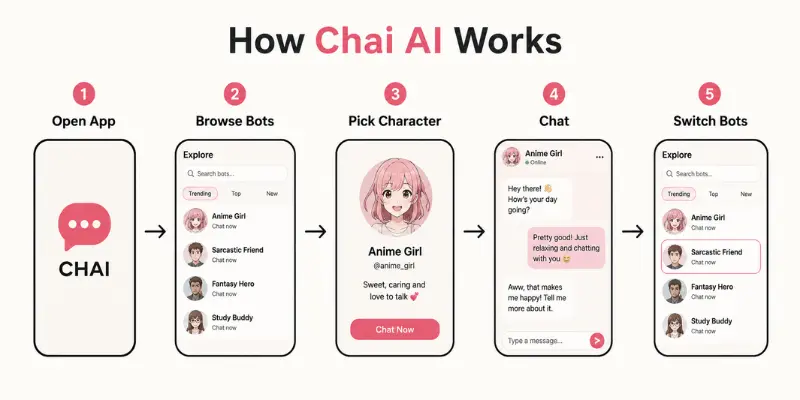
Getting into Chai AI takes about thirty seconds. Download it, pick a username, and boom, you’re already staring at a feed of bots ready to chat.
Here’s the basic flow once you’re in:
- Browse the Chai AI feed by trending, top-rated, or category
- Tap a bot and jump straight into the conversation
- Type like you’re texting a friend
- Swipe to a new bot the second one gets boring
Behind the scenes, Chai AI runs on transformer-based models fine-tuned for conversation, plus an ELO-style ranking system that decides which bots blow up and which ones sink without a trace. That ranking thing matters more than people realize since it’s basically the algorithm deciding what you see.
There’s no tutorial because Chai AI doesn’t need one. It plays more like a social feed than a piece of software.
Chai AI Features Worth Knowing About
A Massive Bot Library
This is the biggest reason people stick with Chai AI. There are now over 25 million characters on the platform, a number that’s exploded from the few hundred thousand the app started with. That means anime girls, sarcastic best friends, historical figures, romantic partners, you name it, all sitting in the Chai AI feed. Fresh bots drop constantly, so it rarely feels dead.
Build Your Own Bot
The character builder inside Chai AI is genuinely one of the easiest around. Name your bot, write a backstory, set a personality, drop an opening line, and it’s live in under ten minutes. Zero coding needed. If your bot catches on, it climbs the leaderboard and starts pulling in chats on its own.
Bot Leaderboards
Popular Chai AI characters fight for visibility based on engagement, kind of like TikTok’s For You page, except every piece of “content” is a chatbot personality.
Free Tier Limits
Free Chai AI users get a limited number of messages before hitting a wall, plus ads and sponsored content mixed into the experience. After that, you’re either waiting it out or upgrading to Chai Pro.
Where Chai AI Falls Short
Memory is the weak link, no way around it, especially outside the higher tiers. Bots can forget stuff from a few messages back, so anything requiring long-term consistency starts falling apart fast. There’s also still no dedicated voice chat in Chai AI as of this writing, which puts it a step behind some newer companion apps.

Is Chai AI Free? Full Pricing Breakdown
Chai AI is free to download, but the actual usable experience now runs through a plan called Chai Pro. Here’s exactly what’s live on the site right now:
| Plan | Price | What You Get |
| Free Trial | $0 for 24 hours | Full Pro access to test before you’re charged |
| Annual Plan (best value) | $159.99/year (about $13.33/month) | 25M+ characters unlocked, no ads, priority response speed |
| Weekly Plan | $9.99/week (down from $24.99) | Same Pro perks, pay-as-you-go flexibility |
All three Chai Pro tiers unlock the same core stuff:
- Access to all 25 million-plus characters
- The most advanced chat model Chai AI offers
- Zero ads, zero sponsored content
- Priority response speed
- Cancel anytime, no lock-in
So how much is Chai AI, really? If you’re just testing the waters, the 24-hour free trial is the way to go, though keep in mind it rolls into the annual plan once the trial ends unless you cancel. If you want to try it for a weekend without committing to a year, the $9.99 weekly plan is the flexible middle ground.

Chai MAX: The Power-User Add-On
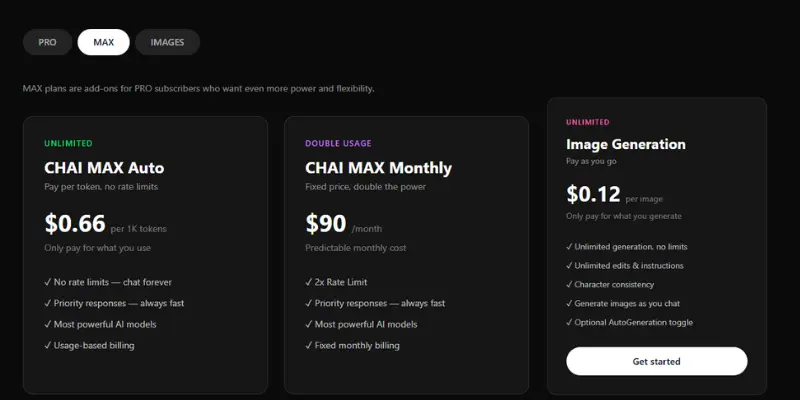
Here’s something most Chai AI reviews haven’t caught onto yet. Chai AI now offers MAX, an add-on layer only available to Pro subscribers who want more juice on top of their base plan:
| MAX Option | Price | What It Does |
| CHAI MAX Auto | $0.66 per 1K tokens | Pay-per-use, no rate limits, always-fast priority responses |
| CHAI MAX Monthly | $90/month | Fixed cost, 2x rate limit, most powerful models, predictable billing |
| Image Generation | $0.12 per image | Unlimited generation and edits, character consistency, chat-integrated images |
CHAI MAX Auto works well if you chat in bursts and don’t want a flat monthly charge sitting there. CHAI MAX Monthly makes more sense if you’re chatting on Chai AI every single day and want a predictable bill instead of watching a token counter. The image add-on is a newer feature too, letting Pro users generate and edit images right inside the conversation.
Is Chai Pro Worth It?
Worth it if:
- You want the full 25M-character library instead of the ad-heavy free version
- You’re a daily chatter who’ll actually use that priority response speed
- You’re curious about MAX for image generation or higher rate limits
Skip it if:
- You just want to poke around during the free trial and nothing more
- Light, occasional chatting is all you’re after
- $159.99 upfront, or even $9.99 a week, doesn’t fit your budget right now
Stack the annual plan’s $13.33/month against something like ChatGPT Plus at $20, and Chai AI actually comes out cheaper for what it offers in its own lane. Just know that MAX usage can push your total cost well past the base Pro price if you’re a heavy user.
Is Chai AI Safe? Privacy, Data, and NSFW Content
This is probably the number one thing people want answered before downloading Chai AI, so let’s not dance around it.
Can Chai See Your Messages?
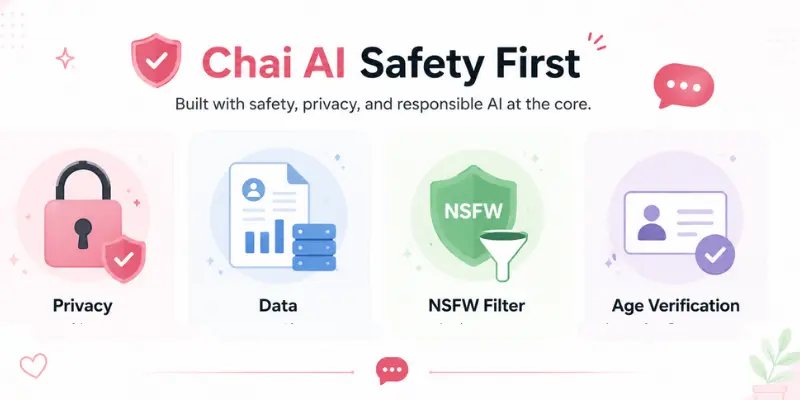
Pretty much, yeah. Chai AI doesn’t rely on true end-to-end encryption across the board, so your chats can technically sit on their servers and get reviewed. Per Chai AI’s own privacy policy, conversations may get used to help train their models and can stick around even after you delete your account. If total privacy is a dealbreaker for you, that’s something to sit with before you overshare.
A few quick tips if you’re using Chai AI regularly:
- Don’t drop your real name, address, or phone number into chats
- Clear your Chai AI history every once in a while
- Dig into the app’s privacy settings, since you do get some control
Is Chai AI NSFW or Unfiltered?
Chai AI is rated for mature audiences and does allow romantic and mature-themed roleplay for users 17+. There’s a toggle for filtering, but plenty of users say it’s shaky at best, meaning stuff slips through even with it turned on. There’s also no real age verification at signup, which is a legit concern.
A Known Safety Concern
Worth flagging too: Chai AI has faced public scrutiny before. Back in 2023, the app got linked to a widely reported case where a user going through a rough time had extended chats with a Chai bot before a tragic outcome. That pushed a bigger industry-wide conversation about safeguards for vulnerable users. If you or anyone using Chai AI is struggling, please talk to a real person, a counselor, or a crisis line instead of leaning on a chatbot for that.
Bottom line on Chai AI: treat it like an open sandbox for fun, not a private diary.
Ease of Use: What Actually Using Chai AI Feels Like
Chai AI nails simplicity, hands down. No long signup, no tutorial screens, nothing between you and your first chat. You’re already texting a bot within thirty seconds of opening it.
The whole interface feels closer to a social feed than an AI tool. Scroll, tap, chat, repeat. Not a ton of settings to mess with, which is nice if you hate clutter but annoying if you like fine-tuning things.
Where Chai AI gets clunky: searching for a specific bot by name is rough with 25 million characters to sift through, filters are basically just “top” and “new,” and there’s zero real conversation threading. Every chat pretty much resets memory-wise on the free tier, which stands out if you’re used to platforms built for deeper, longer roleplay sessions.
Chai AI Reviews: What Real Users Are Saying
We dug through app store reviews and Reddit threads to see how Chai AI actually holds up outside the marketing pages.
What people like about Chai AI:
- Fast, lightweight, zero learning curve
- Insane variety of bots and personalities
- Bot creation is genuinely fun to mess around with
- Priority response speed on Pro feels noticeably faster
What people complain about with Chai AI:
- Bots repeat themselves and lose the plot in longer chats
- Ads on the free tier get old real quick
- Paid plans feel pricey if you’re also paying for MAX
- No dedicated voice chat feature
- Some bot behavior comes off controlling or just off
App store ratings for Chai AI currently land somewhere around 3.6 to 4.5 out of 5 depending on the platform, and the recurring theme is basically “fun for five minutes, frustrating for the long haul unless you’re on Pro.”
Chai AI vs Character AI: Which One Should You Use?
This comes up constantly, so let’s just settle it.
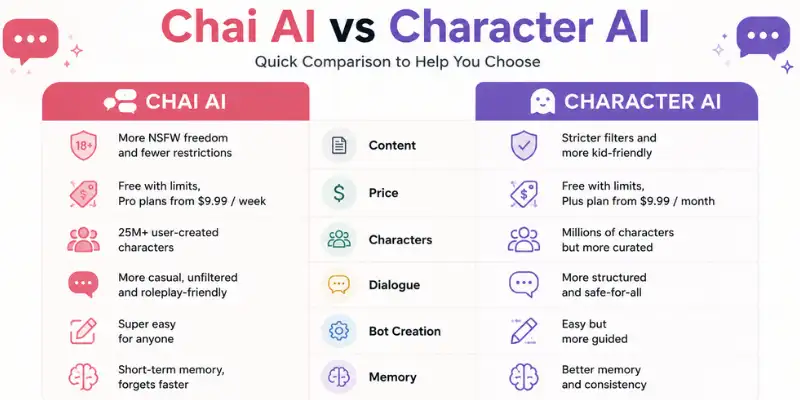
| Chai AI | Character AI | |
| Content restrictions | Loose, mature content allowed (17+) | Strict, no NSFW |
| Pricing | $13.33/month (annual Pro) | $9.99/month for c.ai+ |
| Character library | 25M+ | 18M+ |
| Dialogue quality | Casual, emotion-heavy | Generally more polished |
| Bot creation | Super easy, barely any setup | A bit more structured |
| Memory | Weak on free tier, better on Pro | Better, but still limited |
If you want looser, more unfiltered conversations and a bigger character pool, Chai AI takes it. If writing quality and character consistency matter more to you and you’re fine with stricter content rules, character.ai usually edges ahead. Our full breakdown of character ai alternatives covers more options if you’re still weighing it out.
Pros and Cons of Chai AI
Pros:
- Massive, constantly growing bot library (25M+ characters)
- Custom bot creation takes minutes, zero coding
- Fast and lightweight, no learning curve
- Annual Pro plan is actually cheaper per month than most rivals
- Available on iOS and Android both
Cons:
- Weak memory on the free tier
- No true end-to-end encryption
- NSFW filter is hit or miss
- No real age verification
- MAX add-on costs can stack up fast for heavy users
- Still no dedicated voice chat in 2026
Who Should Actually Use Chai AI?
Chai AI is a good fit if you’re:
- After casual, low-effort entertainment
- A roleplayer or writer who wants quick character inspo
- Someone who just wants to build a bot for fun, no skills needed
Skip Chai AI if you’re:
- Looking for deep, factually accurate conversations
- Serious about data privacy and strong encryption
- Under 18, or a parent evaluating this for a younger user
- Expecting real memory and consistency without paying extra for it
Best Chai AI Alternatives
If Chai AI isn’t quite hitting the mark, there’s no shortage of other AI companions and roleplay platforms worth trying.
- Character AI leans into structured, story-driven roleplay with tighter writing quality, though it strictly blocks NSFW content. Our full character is review walks through how it performs day to day.
- Janitor AI feels like the wilder, more unfiltered cousin of Chai, with fewer restrictions on what bots can say. We put together a list of janitor ai alternatives if uptime or moderation issues get old.
- CrushOn AI positions itself specifically around companion-style roleplay with open content policies, and our crush on a review digs into what sets it apart.
- Chub AI is popular among people who want deeper customization over both personalities and lorebooks, and here’s a rundown of the top chub ai alternatives worth trying.
- SpicyChat AI targets a similar mature-content audience with its own pricing model, covered in our spicychat ai alternatives rundown.
- Talkie AI brings a more polished, mobile-friendly companion experience, compared against others in our talkie ai alternatives roundup.
Final Verdict: Should You Download Chai AI?
Chai AI is exactly what it sets out to be: fast, easy, and a little chaotic AI-powered entertainment, now backed by a genuinely massive 25-million-character library. It’s not trying to be your assistant or your therapist, and once you stop expecting that from it, the whole thing makes way more sense.
The bot variety inside Chai AI is genuinely impressive, and the creation tool is one of the easier ones out there. But the shaky free-tier memory, loose filters, and thin privacy guarantees mean Chai AI isn’t the move for anyone chasing depth or discretion without paying for Pro.
Want quick, low-stakes fun with AI characters and don’t mind paying $13.33 a month for the full experience? Chai AI delivers. Want something with better built-in memory or tighter privacy at no extra cost? Worth trying a couple of the alternatives above before you commit.
Chai AI FAQS
Chai AI launched in 2021, built by Chai Research, founded by William Beauchamp.
Chai AI runs on a Pro subscription: a 24-hour free trial, then $159.99/year (about $13.33/month) on the annual plan, or $9.99/week if you’d rather pay as you go. Power users can add Chai MAX on top for higher rate limits or unlimited image generation.
Yeah, it’s a real, actively maintained app with millions of downloads on both stores. Legit doesn’t mean private though, so keep the safety notes above in mind.
There’s a toggleable NSFW filter, but it’s inconsistent and easy to slip past even when it’s on.
Yes, with the newer image generation add-on, Pro users can generate and edit images for $0.12 each right inside a chat, with character consistency built in.
Like any cloud-based AI service, Chai AI runs on servers that use electricity and, indirectly, water for cooling data centers. Chai Research hasn’t published exact numbers, so there’s no official figure to cite here.
Not an official Chai AI term. It’s floating around unrelated chai-tea culture searches and has nothing to do with the chatbot app.
Most competitors run a similar freemium setup with message caps on free tiers. Unlimited messaging on Chai AI itself now comes through Chai Pro rather than a separate “unlimited” tier.
The app is free to download, but full access now runs through Chai Pro. There’s a 24-hour free trial before billing kicks in, so you can test it before paying anything.






- Be Respectful
- Stay Relevant
- Stay Positive
- True Feedback
- Encourage Discussion
- Avoid Spamming
- No Fake News
- Don't Copy-Paste
- No Personal Attacks
- Be Respectful
- Stay Relevant
- Stay Positive
- True Feedback
- Encourage Discussion
- Avoid Spamming
- No Fake News
- Don't Copy-Paste
- No Personal Attacks
