Lovable Review 2026: Is It Actually Worth Your Money?
Published: 25 Aug 2026
If you’ve spent five minutes on Twitter or Reddit lately, you’ve probably seen someone bragging about building a whole app in one afternoon with nothing but a text prompt. Nine times out of ten, that app was built on Lovable.
This Lovable review skips the marketing talk and goes straight to what matters: real testing, real pricing, and what actual users are saying on Reddit, G2, and Trustpilot. It stacks up against the tools people keep asking about, Cursor, Bolt, Base44, Windsurf, and even Claude Code, so you know exactly where Lovable fits and where it doesn’t.
By the end of this Lovable review, you’ll know what Lovable is, how much it really costs once the credits start burning, whether it’s legit, and whether it’s worth your time for what you’re trying to build.
| Quick Verdict: Is Lovable Good? |
|---|
|
Short answer, yes, if you know what you’re using it for.
Lovable suits founders, freelancers, and designers who need a working prototype fast. It’s a shakier pick if you’re non-technical and building something with sensitive user data or heavy business logic. |
What Is Lovable?
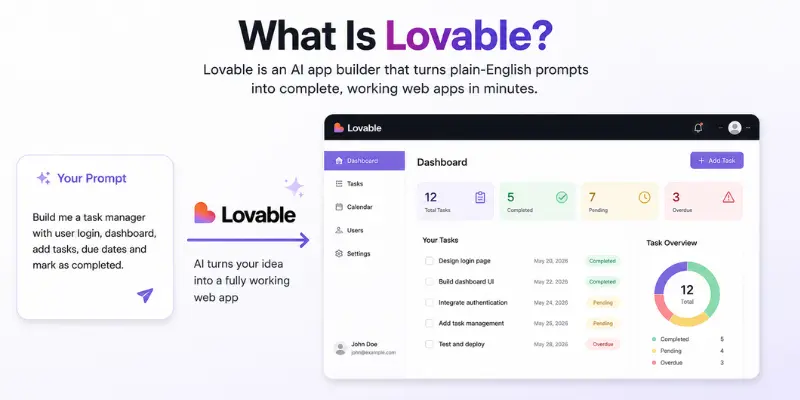
Lovable is an AI app builder that turns plain-English prompts into complete, working web apps. Instead of hiring a developer, you type out what you want, something like “build me a task manager with logins and a dashboard,” and Lovable spins up the frontend, wires up the backend, and hands you a live link within minutes.
Under the hood, it generates React and TypeScript on the frontend, styled with Tailwind CSS, and connects to Supabase for the database, authentication, and file storage. The company started life as an open source project called GPT Engineer before rebranding to Lovable in late 2023. It now sits between pure no-code tools like Bubble and code-first assistants like Cursor or GitHub Copilot.
If this Lovable app review ends with you deciding it’s not the right fit, a full list of Lovable AI alternatives is worth a look before you commit to anything.
What LLM Does Lovable Use?
Lovable isn’t locked to one model. It routes prompts across several large language models depending on the task, and the platform has leaned into a partnership that brings Claude and Gemini-based reasoning into the build pipeline. That’s part of why code quality tends to hold up better than tools stuck on a single older model.
What Is a Lovable Cloud?
Lovable Cloud is the built-in backend layer running on Supabase behind the scenes. It handles your database tables, authentication, storage, and edge functions without making you leave Lovable’s interface or set up a separate account. If you’ve ever wired Supabase into a project by hand, this is the part that saves the most time, though anyone unfamiliar with Supabase will still hit a bit of a wall once row-level security needs touching.
Lovable Features Worth Knowing
Testing revealed what actually holds up once you’re past the demo stage.
AI App Generation From Prompts
You describe the app, and Lovable builds pages, components, and logic straight from that description. It handles landing pages, dashboards, and CRUD-style apps well. Multi-step workflows with a lot of conditional logic are where it starts needing more hand-holding, something almost every honest Lovable ai review ends up admitting sooner or later.
GitHub Sync and Code Ownership
Lovable pushes your generated code to GitHub and pulls updates back, so nothing’s locked behind the platform. Want to hand a project off to a developer or finish it yourself in an editor? The code is yours to take. This is one area where Lovable genuinely beats a lot of pure no-code tools, since you’re never stuck rebuilding from scratch somewhere else.
Visual Editor
Instead of writing a new prompt for every tiny tweak, you click directly on an element in the preview and adjust color, spacing, or copy. It’s a smart way to dodge burning credits on cosmetic changes.
Draw-to-Build and Figma Import
Newer additions let you sketch a rough layout or drop in a Figma file, and Lovable turns that into working components instead of you rebuilding the design from scratch.
Does Lovable Have an App? Can Lovable Build Mobile Apps?
This is one of the most searched questions about the platform, so it deserves a direct answer: no, Lovable doesn’t build native iOS or Android apps. It’s web only. If your project genuinely needs App Store distribution, you’d have to wrap the web app separately or reach for a mobile-focused builder instead. Worth knowing before you sink hours into a project, since it’s the biggest limitation people hit after they’ve already started building.
How Much Does Lovable Cost in 2026?
A proper Lovable dev review has to look past the sticker price, since the credit system is where most of the real cost hides.
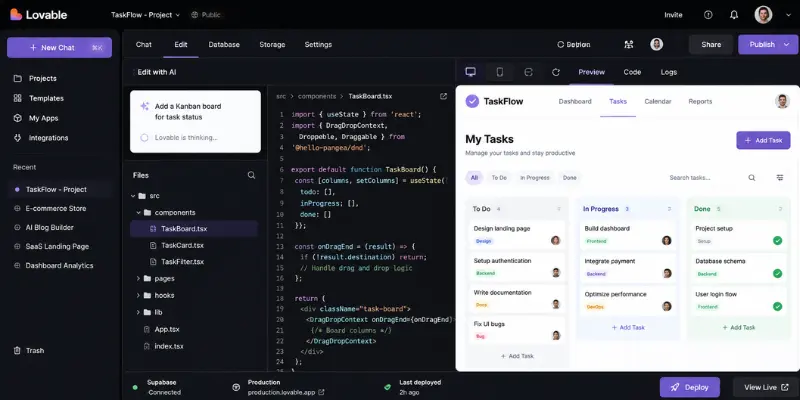
| Plan | Price | Credits | Best For |
| Free | $0 | 5 daily, capped at 30/month | Testing the workflow |
| Pro | $21/month | 100 monthly credits | Solo builders and freelancers |
| Business | $42/month | Higher allowance, SSO, team roles | Small teams |
| Enterprise | Custom | Negotiated | Larger organizations |
The free plan is genuinely usable for testing an idea before spending a dime. Once you move to Pro, the credit system is what to watch. Simple UI tweaks barely dent your balance, but authentication setup, database changes, and fixing loops where the AI trips over its own code can chew through a big chunk of your monthly allowance in a single session.
Rough rule of thumb from testing: a simple landing page might use 5 to 10 credits. A dashboard with logins and a database can eat 60 to 90 credits over a couple of weeks of active building. Most pricing pages gloss over that part entirely, and it’s the single biggest complaint across every review platform checked for this piece.
What People Are Saying: Lovable Reviews on Reddit, G2, and Trustpilot
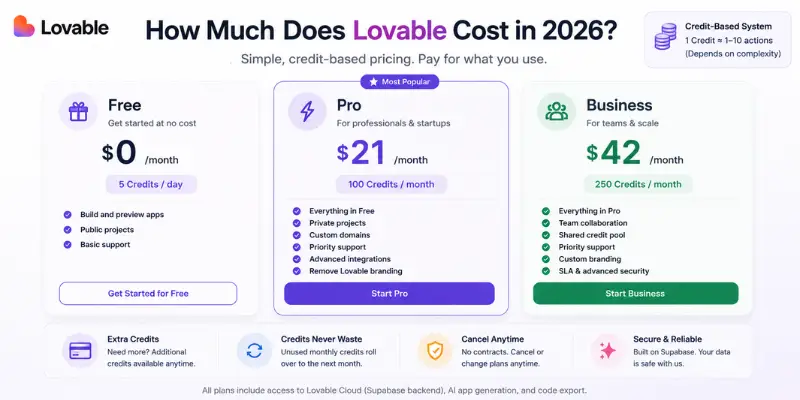
Search “Lovable review Reddit” and you’ll land on threads in r/lovable and r/nocode where builders swap war stories about credit burn and debugging loops. A Lovable review G2 search tells a similar story from a more professional crowd, developers and product managers rating features and leaving detailed pros-and-cons breakdowns. The Lovable reviews Trustpilot page adds the consumer angle: people who paid for Pro or Business and are either thrilled with the speed or annoyed at how fast their credits vanished.
The Pros People Keep Mentioning
- Speed from idea to working prototype. Shows up in nearly every positive review across every platform. People consistently describe going from a blank page to something clickable in one sitting.
- Code quality that doesn’t need a full rewrite. Developers reviewing the exported code describe it as genuinely maintainable, not the throwaway output you’d expect from a prompt-based tool.
- The visual editor saves credits. Small tweaks without a new prompt is a feature builders specifically call out as underrated.
- GitHub sync means no lock-in. Since you own the exported code, switching tools later doesn’t mean starting from zero.
The Cons People Keep Mentioning
- Credit consumption is unpredictable. The single most repeated complaint on Reddit, G2, and Trustpilot alike, and by a wide margin.
- Complex logic breaks down. Once a project goes past simple CRUD screens, the AI needs more corrections, and fixing its own mistakes costs more credits.
- Supabase setup is a wall for non-technical users. Convenient if you already know Supabase, confusing if you don’t.
- No native mobile output, which was already covered above.
Testing Lovable: What Actually Happened
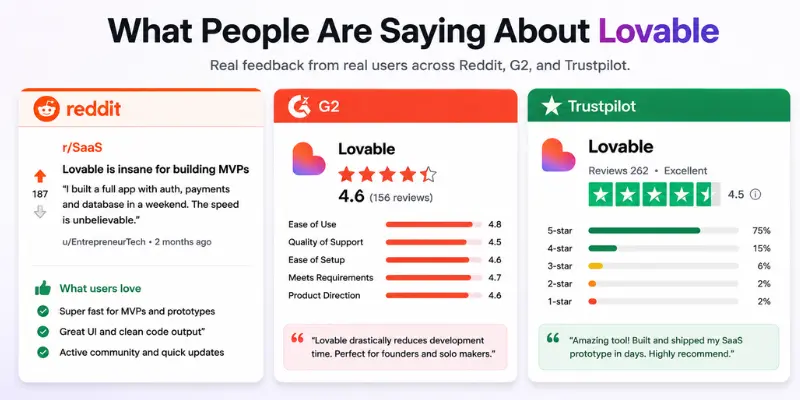
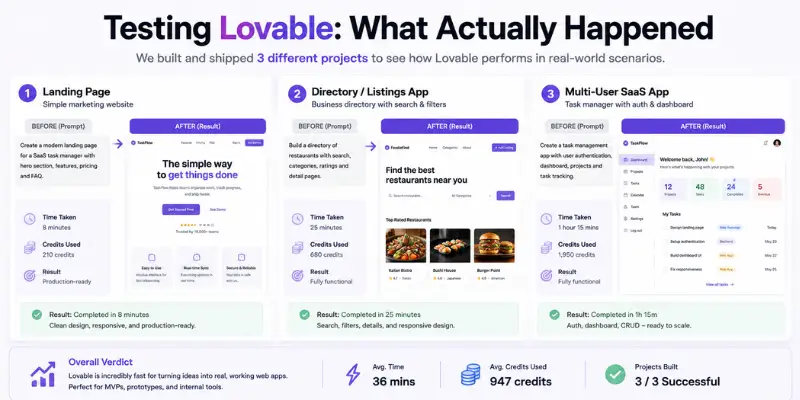
Three separate projects went into this Lovable review: a simple landing page, a small internal directory tool, and a more ambitious multi-user app with role-based permissions.
The landing page came together in under 15 minutes and looked genuinely polished without a line of manual CSS. The directory tool took roughly an hour, and the generated code was clean enough that a developer reviewing it afterward didn’t wince.
The multi-user app is where things got rocky. Once the logic needed to check user roles before showing certain data, the AI needed several rounds of correction, and each failed attempt still cost credits. By the end, editing the code by hand was faster than continuing to prompt around the problem.
That pattern lines up almost exactly with what shows up across dozens of other reviews: fast and genuinely impressive for straightforward builds, shakier the moment the logic gets specific.
Is Lovable Legit? Is Lovable Dev Legit?
This is the question every serious Lovable review eventually has to answer honestly. Yes, Lovable is a real, well-funded company, not a scam. It’s backed by legitimate investors, has a large paying user base, and the code it generates is real, exportable, and yours to keep. That said, “legit” doesn’t automatically mean “production-ready out of the box.”
Lovable’s own documentation puts the responsibility for row-level security and access control on the person building the app. There was a documented security incident in 2025 involving misconfigured permissions across a number of Lovable-built apps, since addressed with better default security scanning. Anyone handling sensitive user data, payments, or health information should run Lovable’s built-in security scan before publishing, and ideally get a developer to double-check permissions.
Lovable vs Alternatives
Lovable vs Cursor
Cursor is a code editor built for developers who already know how to program and want AI assistance inside their existing workflow. Lovable is closer to a complete app builder for people who want to skip writing code entirely. For anyone weighing the two seriously, a look at Cursor’s strengths as a coding-focused alternative fills in the rest of the picture.
Claude Code vs Lovable
Claude Code operates inside a terminal and works best when there’s already a codebase and the need is an agent that can read, edit, and run commands across it. Lovable is built for starting from zero with no codebase at all. Founders without a technical background usually reach for Lovable first, then hand the exported code to a developer using Claude Code once the project needs deeper engineering work.
Lovable vs Bolt
Bolt runs entirely in the browser and is known for being fast for quick, disposable prototypes. Lovable leans harder into full-stack apps with a persistent backend through Supabase. Anyone curious how Bolt and similar browser-based builders stack up can see the tradeoffs laid out in more detail. If a project needs a real database and authentication that sticks around past a demo, Lovable tends to hold up better long term.
Lovable vs Base44
Base44 is simpler and more beginner-friendly for very basic apps, with a built-in database instead of relying on Supabase. Lovable brings more flexibility and better code export, but comes with a steeper learning curve once projects go past simple use cases. A closer look at the Base44 review shows where it holds its own against tools like Lovable.
Lovable vs Windsurf
Windsurf is built for developers coding inside an editor with AI as a co-pilot, not for building an entire app from a blank prompt. It fits people who already have a project and want AI woven into their day-to-day coding. Lovable fits people who don’t have a project yet and want one built for them. The full Windsurf review gets into how that side of the workflow holds up.
Lovable vs Framer
These two aren’t really direct competitors, even though people search for them together, and it matters if you’re reading this as a Lovable website builder review specifically. Framer is built for marketing sites and landing pages with pixel-perfect design control. Lovable is built for functional apps with logins, databases, and logic. Need a beautiful marketing site? Framer wins. Need something users can log into and interact with? Lovable is the right category of tool entirely.
Who Should Use Lovable
Based on everything covered so far, here’s who actually gets their money’s worth out of it.
- Solo founders validating an idea. Getting something clickable in front of real users fast matters more than pricing predictability at this stage.
- Freelancers and agencies building client prototypes. A list of AI tools for freelancers rounds up a few more worth pairing with Lovable for client work.
- Designers who think visually. The visual editor and Figma import mean skipping the handoff to an engineer just to see a working demo.
- Developers who want a head start. Prototype in Lovable, then export to GitHub and finish the last mile in a proper editor.
Who Should Skip Lovable
- Non-technical teams building apps with sensitive data. The security responsibility sits with the builder, not the platform, by default.
- Anyone needing native mobile apps. Web only, no App Store distribution.
- Teams that need predictable monthly costs. Credit-based billing can swing wildly based on how much debugging the AI needs.
- Projects with heavy, custom business logic. Multi-step workflows are where the AI needs the most correction.
Final Verdict: Is Lovable Worth It?
For a founder or freelancer who needs a working prototype fast and doesn’t mind owning the cleanup work later, Lovable is worth it. The speed and code quality are real, and the GitHub export means never being fully locked in.
For a non-technical team building something that needs to handle real customer data on day one, treat Lovable as a starting point rather than a finished product. Budget extra credits for the inevitable rounds of fixing, and get a second set of eyes on the security settings before anything goes public.
Either way, this Lovable review lands on the same conclusion nearly every honest tester reaches: genuinely great for getting from zero to something real, and worth a careful gut check before trusting it with production traffic. Anyone landing on “not quite right for me” after reading this Lovable app builder review can find ten more options sorted by use case in the Lovable AI alternatives list.
This Lovable review wouldn’t be complete without a straight answer to the questions people type into Google right after reading one.
Frequently Asked Questions
Yes, for developers, freelancers, and founders who care more about speed than predictable pricing. It’s a weaker fit for non-technical teams building apps with sensitive data, since the security setup needs extra attention.
Paid plans start at $25/month for Pro with 100 monthly credits, and $50/month for Business. There’s a free plan with 5 daily credits capped at 30 per month.
Yes, the free plan is fully usable for testing, with 5 daily credits and a 30-credit monthly cap. A paid plan is needed for private projects, custom domains, or the code editor.
No. Lovable only builds web apps. There’s no native iOS or Android output, so mobile-specific projects need a different tool.
Not natively. A Lovable-built web app can be wrapped for mobile distribution, but it won’t produce a true native app the way a mobile-first builder would.
Yes. Lovable is a real, funded company with a large user base and exportable code that’s actually owned by the builder. Legitimacy isn’t the concern with Lovable; production-readiness for sensitive data is the thing to double-check first.
Lovable routes prompts across multiple large language models instead of relying on just one, with recent updates leaning on Claude and Gemini-based reasoning
Lovable Cloud is the built-in backend running on Supabase, handling the database, authentication, storage, and edge functions without a separate setup step.
Reddit (r/lovable and r/nocode), G2, and Trustpilot are the three most reliable sources. Reddit tends to surface the rawest, most unfiltered complaints; G2 skews toward developers and product managers with detailed pros and cons; Trustpilot leans consumer and pricing-focused.
Lovable works best for going from an idea to a working app with zero existing code. Claude Code fits once there’s already a codebase and the need is an agent working inside a terminal and existing files.
Lovable is faster for generating clean, exportable React code. Bubble has a more mature plugin ecosystem but locks the app into its own hosting.




- Be Respectful
- Stay Relevant
- Stay Positive
- True Feedback
- Encourage Discussion
- Avoid Spamming
- No Fake News
- Don't Copy-Paste
- No Personal Attacks
- Be Respectful
- Stay Relevant
- Stay Positive
- True Feedback
- Encourage Discussion
- Avoid Spamming
- No Fake News
- Don't Copy-Paste
- No Personal Attacks
