Best AI Tools for Freelancers in 2026: Top Picks & Pricing
Published: 10 Aug 2026
The best AI tools for freelancers can save hours on writing, research, design, coding, meetings, and everyday admin tasks. But with hundreds of AI tools available, choosing the right one can be difficult, especially when every tool claims to be the best.
This list focuses on practical AI tools that freelancers can use in their daily work. You will find options for writers, developers, designers, marketers, consultants, and other solo professionals, along with pricing, free plans, key use cases, and limitations to consider before choosing a tool.
Top AI Tools for Freelancers at a Glance
| Tool | Best For | Starting Price | Free Tier | Rating |
| ChatGPT | General writing, research, brainstorming | $20/month (Plus) | Yes | 4.6/5 |
| Claude | Long documents, coding, client communication | $20/month (Pro) | Yes | 4.6/5 |
| Midjourney | High-quality image generation | $10/month | No | 4.4/5 |
| GitHub Copilot | Code completion and debugging | $10/month | Limited trial | 4.5/5 |
| Grammarly | Proofreading and tone editing | $12/month (Premium) | Yes | 4.3/5 |
| Canva Magic Studio | Design and social graphics | $12.99/month (Pro) | Yes | 4.4/5 |
| Jasper | Marketing copy and templated content | $49/month | No | 4.0/5 |
| Otter.ai | Meeting transcription and summaries | $8.33/month | Yes | 4.2/5 |
| Wave | AI-assisted invoicing | Free core plan | Yes | 4.1/5 |
This table is meant to give you a fast overview. The sections below explain which of these actually make sense for your specific type of freelance work, and which ones are only worth it once you hit a real bottleneck.
How to Choose AI Tools as a Freelancer
You do not need every AI tool you come across. The right choice depends on the type of work you do and the problems you want to solve.
Before choosing one of the best AI tools for freelancers, check these things:
- Pricing: See if the paid plan fits your monthly budget.
- Free plan: Try the free version first if one is available.
- Your work: Make sure the tool can help with tasks you actually do.
- Ease of use: Pick something you can learn and use without wasting hours.
- Limitations: Check what the tool cannot do before relying on it for client work.
- Privacy: If you handle client information, check how the tool stores and uses your data.
Start with one or two tools that solve a real problem. You can always add more later when your workload grows.
Free vs Paid: Which Do You Actually Need?
You do not need to pay for every AI tool for freelancers on day one. Free tiers cover a surprising amount of freelance work, and upgrading too early just adds a bill you do not need yet.
If you send fewer than 10 AI-assisted messages a day, draft occasional emails, or only need help outlining a document once or twice a week, the free tiers of ChatGPT and Claude are enough. Both let you draft proposals, summarize documents, and brainstorm ideas without hitting a wall.
You should consider upgrading when you consistently hit daily message limits, need to upload and reference multiple documents in one conversation, or want faster response times during a deadline crunch. Freelance writers producing multiple articles a week usually feel this first, since free tiers often cap how much context you can carry across a single session.
ChatGPT vs Claude for Freelancers
One common question among freelancers is whether ChatGPT or Claude is the better choice. In practice, ChatGPT tends to be slightly faster for quick drafts and has a larger plugin and integration ecosystem, and if speed and integrations matter most to you, browsing a full list of chatgpt alternatives is worth doing before committing to a paid plan. Claude, on the other hand, tends to handle longer documents and nuanced client communication with fewer factual slips, which is also why it’s worth comparing against other claude ai alternatives if accuracy matters more to you than raw speed. Many freelancers keep both free accounts and switch between them depending on the task rather than paying for one immediately.
Best AI Tools for Freelancers in 2026
Generic “top 10” lists rarely tell you how to actually combine these tools. Below is a practical stack for five common freelance paths, including the order you would realistically use them in.
AI Tools for Freelance Writers and Content Creators
Writers can save time by using AI for outlines, drafts, editing, and research. The following tools can help with different parts of the writing process.
- ChatGPT or Claude: Create content outlines, first drafts, and research ideas. Plans range from free options to around $20/month.
- AI writing tools: Help with long-form content and make the writing process faster.
- Grammarly: Checks grammar, tone, clarity, and common writing mistakes. Premium starts at around $12/month.
AI does not always produce perfect content on the first try. You should still check facts, rewrite parts when needed, and make sure the final content matches your style.
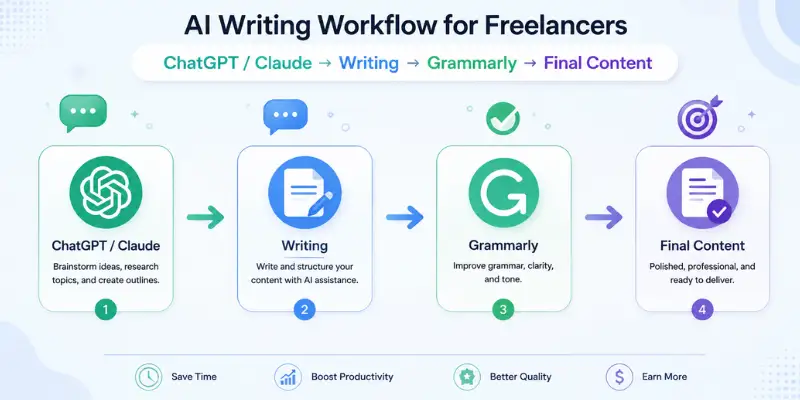
Simple workflow:
- Create a few outline ideas with ChatGPT or Claude.
- Choose the best outline and write the content section by section.
- Use Grammarly to check the final draft.
- Review everything before sending it to the client.
AI Tools for Freelance Developers
Developers can use AI to write code faster, understand complex code, find problems, and create documentation. Different tools can help with different parts of the development process.
- GitHub Copilot: Suggests code while you type and works with popular code editors. It starts at around $10/month.
- Claude or ChatGPT: Help explain code, solve problems, create documentation, and write or improve code.
- Cursor: Offers an AI-focused coding environment for developers who want more advanced coding features. You can also compare it with other cursor AI alternatives.
- AI code review tools: Help find possible issues in code and provide another layer of review.
AI-generated code should not be used without checking it. Suggestions can contain errors or outdated code, especially when working with less common libraries.
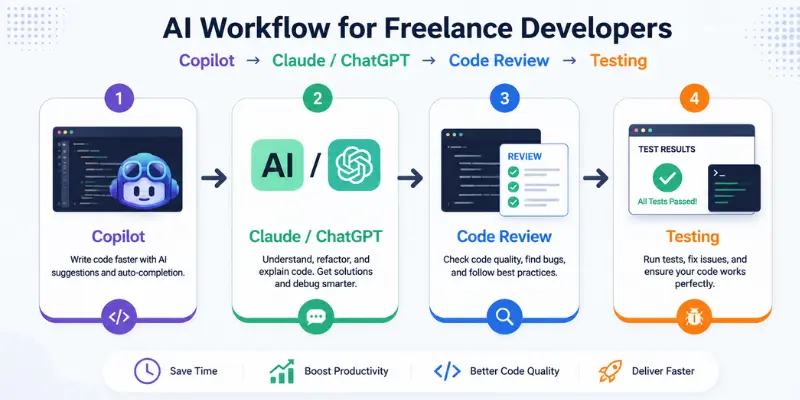
Simple workflow:
- Use GitHub Copilot for code suggestions while working.
- Use Claude or ChatGPT to explain complex functions or write tests.
- Run the code through AI code review tools for an extra check.
- Review and test everything before using it in a real project.
AI Tools for Freelance Designers
Designers can use AI to create ideas, generate visuals, and prepare designs faster. Some tools are better for creative work, while others are easier for everyday client projects.
- Midjourney: Useful for concept art, mood boards, and creative visuals. Plans start at around $10/month.
- Canva Magic Studio: Helps create social media graphics, presentations, and other client designs. Pro starts at around $12.99/month.
- Canva: Easier for beginners and quick client work, while Midjourney gives more creative control over visual styles.
Midjourney can take some time to learn, while Canva is easier to use but may have fewer options for highly custom designs.
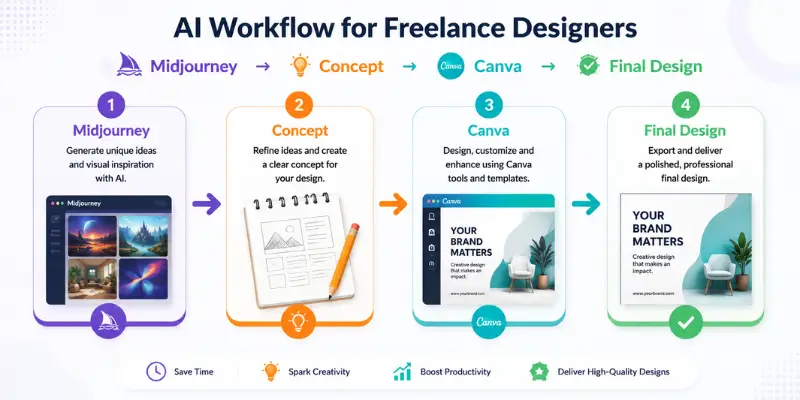
Simple workflow:
- Use Midjourney to create ideas and visual concepts.
- Choose the best concept for the project.
- Use Canva Magic Studio to create the final design.
- Review the final design before sending it to the client.
AI Tools for Freelance Marketers and Social Media Managers
Marketers can use AI to create content faster, plan campaigns, and manage social media work. Some tools are better for writing, while others help with repetitive marketing tasks.
- Jasper: Helps create ad copy, social media posts, and email content. Plans start at around $49/month.
- ChatGPT or Claude: Useful for marketing ideas, content planning, messaging, and campaign strategies.
- Jasper AI alternatives: Can be useful if Jasper is too expensive for your current workload.
Jasper can save time, but its content may sound generic without proper brand instructions. The $49/month price may also be difficult to justify if you only manage a few clients.
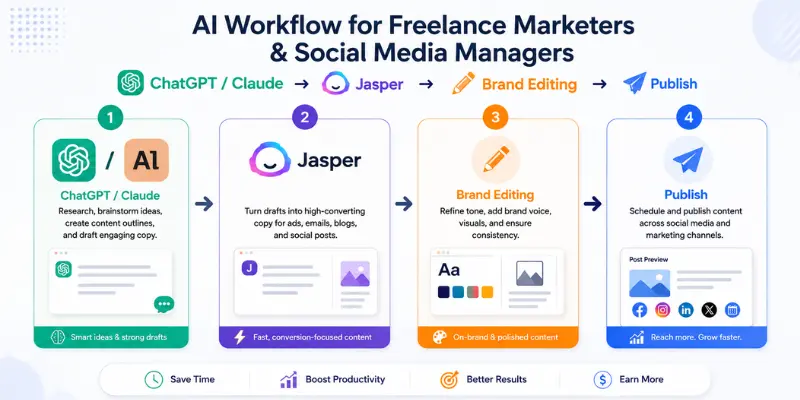
Simple workflow:
- Use ChatGPT or Claude to plan the campaign and create content ideas.
- Use Jasper for high-volume or repetitive content.
- Adjust the content to match the client’s brand voice.
- Review the final posts before publishing.
AI Tools for Freelance Consultants, Data, and Admin Work
Consultants and solo freelancers often need help with meetings, notes, and invoices. A few simple AI tools can save time on these tasks.
- Otter.ai: Records, transcribes, and summarizes client meetings.
- Wave: Offers free invoicing and basic payment reminders.
- ChatGPT or Claude: Can turn meeting notes into follow-up emails, summaries, and action items.
One limitation: Otter.ai summaries can miss details when several people speak at the same time, so always review the notes before sharing them with a client.
Simple workflow: Use Otter.ai for meeting notes, then use ChatGPT or Claude to turn those notes into a clear follow-up email. This can save time without needing a full project management system.
Client Data and Privacy: What Freelancers Should Know Before Using AI
This is the part almost no other article covers, and it matters more than most freelancers realize. If you are working under an NDA or handling sensitive client information, pasting that information into a free AI tool can create real risk.
Is It Safe to Use AI with Client Data?
AI can be useful for freelance work, but you should be careful with private client information.
- Check the data policy: See how the tool stores and uses your conversations.
- Avoid sensitive data: Do not paste private client details, financial information, or business plans into an AI tool without checking its privacy settings.
- Check opt-out options: If the tool lets you opt out of data use, enable it when needed.
- Review your contract: If an NDA or confidentiality agreement applies, check whether AI use needs to be disclosed.
- Be transparent: If AI plays a major role in your work, being clear with clients can help build trust.
- Get legal advice when needed: If you are unsure about contract terms, speak with a qualified professional.
Limitations to Consider Before Choosing an AI Tool
Most articles focus on features, but each tool also has limitations worth knowing before you choose one.
ChatGPT: Strong for quick drafts, but can lose context in very long conversations and occasionally states incorrect facts with full confidence. Always verify numbers or claims before sending client-facing work.
Claude: Handles long documents well, but its free tier message limits can feel restrictive if you are working through a large project in a single sitting.
Midjourney: Produces excellent visuals, but the Discord-based workflow is clunky for freelancers who need a simple client approval process.
GitHub Copilot: Speeds up coding, but suggestions for less common libraries or frameworks can be outdated, so review is still required.
Jasper: Templates save time for repetitive content, but output can feel generic without heavy customization, and the price is hard to justify for freelancers with only one or two clients.
Grammarly: Great for catching surface-level errors, but it sometimes flags stylistic choices that are intentional, so do not accept every suggestion automatically.
AI Tools Freelancers Should Avoid Paying For
Not every AI tool needs its own subscription. Many tools offer similar features, and paying for several services at the same time can quickly increase your monthly expenses.
Before subscribing, ask yourself whether the tool solves a problem that your existing tools cannot handle.
Avoid Paying for Duplicate Features
If ChatGPT or Claude already handles your writing, research, brainstorming, and client communication, you may not need another general-purpose AI subscription.
The same applies to design and productivity tools. If Canva already handles your basic client graphics, paying for another simple design tool may not provide enough extra value.
Avoid Tools You Use Only Occasionally
A tool may look useful but still be a poor subscription if you only use it once or twice a month.
For occasional tasks, look for a free plan, free trial, or one-time payment option instead of adding another monthly subscription.
Avoid Tools That Require Too Much Manual Work
AI should save you time, not create another task. If you spend more time fixing, exporting, formatting, or moving content between tools than you save, the subscription may not be worth keeping.
Avoid Expensive Tools Before You Have Enough Work
A $50 or $100 monthly AI subscription can make sense for a freelancer handling a large workload. It may not make sense when you have only one or two clients.
Start with free or low-cost tools and upgrade when your workload consistently justifies the expense.
A Simple Rule Before Buying
Before paying for an AI tool, ask:
“Will this tool save me enough time or help me earn enough money to justify its monthly cost?”
If the answer is no, keep using your current tools and reconsider the subscription later.
No-Code and Zero-Setup Picks for Beginners
If you are new to AI tools, start with simple browser-based options. You do not need to install anything or learn complicated software.
- ChatGPT: Writing, research, and brainstorming
- Claude: Writing and working with longer documents
- Canva Magic Studio: Simple designs and social graphics
- Wave: Free invoicing and basic payment management
These four tools can cover most basic tasks when you are starting freelance work with AI.
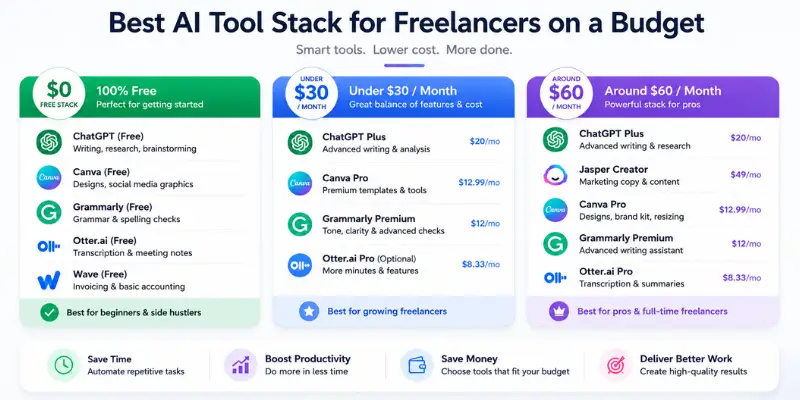
Best AI Tool Stack for Freelancers on a Budget
You do not need a large collection of AI subscriptions to run a successful freelance business. A small set of tools can handle most daily tasks without adding a high monthly cost.
$0/month: Free Starter Stack
If you are just starting out, you can build a useful freelance workflow without paying for AI tools.
- ChatGPT or Claude: Writing, research, brainstorming, and client communication
- Canva: Basic designs, presentations, and social media graphics
- Wave: Invoicing and basic payment management
- Grammarly: Basic grammar and writing checks
This setup is enough for freelancers who have a small number of clients and do not need advanced features every day.
Under $30/month: Growing Freelancer Stack
Once your workload increases, paying for one or two premium tools can save more time.
- ChatGPT Plus or Claude Pro: Around $20/month
- Canva: Use the free plan or add a paid plan if you need premium design features
- Wave: Continue using the free core plan for invoicing
This setup works well for writers, marketers, virtual assistants, and other freelancers who mainly need help with content, research, communication, and basic design.
Around $60/month: More Advanced Stack
Freelancers with regular client work can add a specialist tool based on their field.
For example:
- Writers: ChatGPT or Claude + Grammarly
- Developers: ChatGPT or Claude + GitHub Copilot
- Designers: ChatGPT or Claude + Canva or Midjourney
- Marketers: ChatGPT or Claude + Jasper
- Consultants: ChatGPT or Claude + Otter.ai
The key is to pay for tools that remove a real bottleneck. Buying five or six subscriptions with overlapping features usually adds cost without saving much extra time.
Conclusion
If you only pick three tools to start with, choose a general assistant like ChatGPT or Claude for writing and research, one niche-specific tool that matches your actual specialty such as GitHub Copilot for developers or Canva for designers, and Wave for free invoicing. This combination covers writing, your core craft, and admin without unnecessary subscriptions.
The best AI tools for freelancers in 2026 are not the ones with the biggest name recognition. They are the ones that match your specific workload and that you actually keep using past the first free trial.
Frequently Asked Questions
ChatGPT, Claude, Canva Magic Studio, and Wave all offer genuinely usable free tiers for freelancers. ChatGPT and Claude cover writing and brainstorming, Canva handles basic design, and Wave manages invoicing without a subscription. These four cover most core freelance tasks before you need to pay for anything.
Neither is universally better. ChatGPT tends to be faster for quick drafts and has more third-party integrations, while Claude handles longer documents and nuanced client writing with slightly fewer factual errors. Many freelancers keep both free accounts and switch based on the task.
There is no fixed number, but most solo freelancers can cover core needs with free tiers alone, and a light paid stack usually falls under fifty to sixty dollars a month once you add one or two premium tools. Start free, add paid tools only when you consistently hit a real limitation.
It depends on the tool and its data retention settings. Free tiers may use your input to improve their models unless you opt out, so avoid pasting sensitive client information into a free tool without checking its privacy settings first. Paid tiers often include stronger data controls.
There is no universal rule, but being transparent when AI meaningfully shapes your deliverables tends to build trust rather than harm it. If your contract includes confidentiality terms, consider adding a short clause disclosing your general AI usage so expectations are clear from the start.






- Be Respectful
- Stay Relevant
- Stay Positive
- True Feedback
- Encourage Discussion
- Avoid Spamming
- No Fake News
- Don't Copy-Paste
- No Personal Attacks
- Be Respectful
- Stay Relevant
- Stay Positive
- True Feedback
- Encourage Discussion
- Avoid Spamming
- No Fake News
- Don't Copy-Paste
- No Personal Attacks
