Codeium Review 2026: Is the Extension Still Worth Installing?
Published: 22 Aug 2026
If you’re searching for a Codeium Review 2026 that actually answers the question instead of dancing around it, here’s the deal. We installed Codeium, used it inside our own daily setup across a few real projects, and pulled together what actually matters before you decide whether to add it to your editor. This isn’t a tutorial on how to click “install.” It’s an honest evaluation of whether the coding assistant itself is still worth your time, based on how it performs, what it costs, and what other developers are saying about it right now.
One thing worth clearing up before we go further: Codeium the assistant and Windsurf/Devin Desktop the standalone editor are related but not the same experience, and this review sticks to the former.
Codeium Review 2026: Quick Ratings
| What We Tested | Rating | Our Take |
| Tab Completions | ⭐⭐⭐⭐½ | Fast and helpful for everyday coding |
| Chat | ⭐⭐⭐⭐ | Great for quick questions and fixes |
| Code Explanations | ⭐⭐⭐⭐½ | Clear and easy to understand |
| Refactoring | ⭐⭐⭐⭐ | Works well for smaller changes |
| Debugging | ⭐⭐⭐⭐ | A useful first step when something breaks |
| Editor Support | ⭐⭐⭐⭐½ | Works well across VS Code, JetBrains, and Neovim |
| Free Plan | ⭐⭐⭐⭐⭐ | Unlimited Tab completions are a big plus |
| Overall | ⭐⭐⭐⭐½ | A strong free option for in-editor coding help |
Quick Verdict
Short version, for anyone in a hurry: yes, Codeium is still worth installing if what you want is fast, accurate completions and a decent chat assistant inside the editor you already use. The free plan is genuinely unlimited for Tab completions, which is rare in this category, and the day-to-day experience feels smooth rather than clunky. It’s not the flashiest AI coding tool on the market anymore, and it won’t hand you autonomous multi-file agents the way the standalone app does, but for plain, dependable in-editor help, it earns its keep. We’ll break down exactly why below.
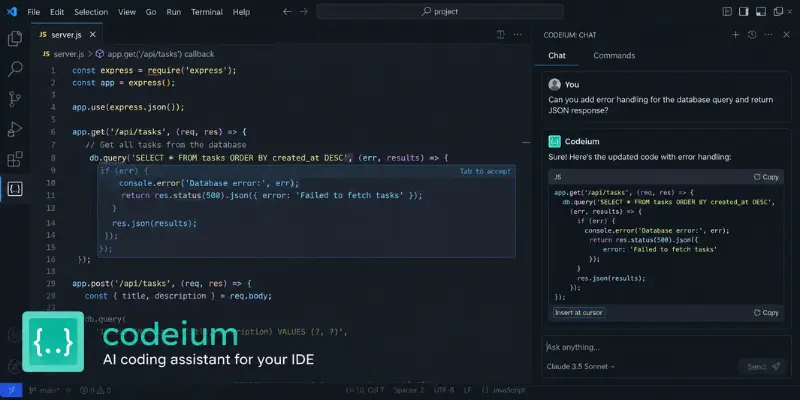
What Happened to the Codeium Name?
Codeium launched as a free coding assistant, then rebranded to Windsurf in 2024 when the company built a full standalone AI editor. Cognition AI, the team behind the Devin coding agent, acquired it in 2025, and by June 2026 the editor had been renamed again to Devin Desktop.
The extension you install inside VS Code, JetBrains, or Neovim today still carries the Codeium name and is what this review covers. The full standalone editor is a different animal entirely, and that’s its own story.
What Is Codeium Today?
Codeium today is a lightweight AI coding assistant that lives inside your existing editor rather than replacing it. It gives you inline code completions, a chat panel for questions and quick fixes, and code explanation tools, without asking you to change your setup or learn a new interface. Think of it as the “assistant in the sidebar” category within the wider coding AI space, not the “AI runs my whole project” category. That distinction shapes everything else in this review.
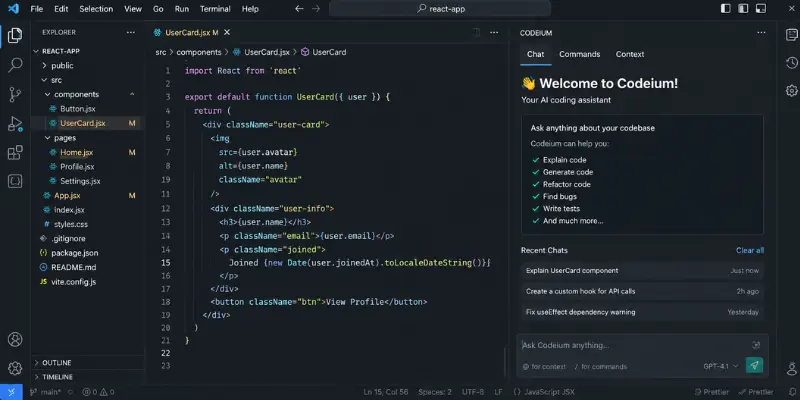
Installing Codeium: First Impressions
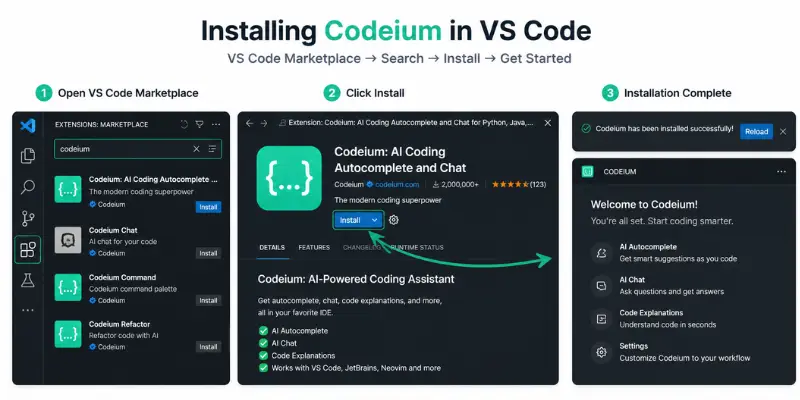
Getting started took us a couple of minutes. Search for it in the VS Code marketplace, hit install, sign in, and suggestions started appearing almost immediately. No credit card requirement, no drawn-out onboarding flow. The JetBrains setup felt just as painless. First impressions matter in this category because a clunky setup kills a lot of goodwill before you even get to test the actual suggestions, and Codeium doesn’t waste your time here.
Using Codeium Day to Day
Codeium works best as a fast coding helper inside your editor. In our testing, its strongest feature was tab completion, while chat, explanations, refactoring, and debugging were useful for smaller tasks.
Tab Completions
This is still Codeium’s strongest feature. Suggestions appear quickly and work especially well for repetitive coding tasks.
- Good for boilerplate, CRUD logic, and standard functions
- Picks up existing naming and coding styles reasonably well
- Less reliable with unusual patterns or complex project structures
- Saves noticeable time once you get used to accepting suggestions
Chat
The chat sidebar is useful for quick coding questions without leaving your editor.
- Explains functions and suggests fixes quickly
- Good for generating small snippets
- Less effective for complex, multi-step codebase reasoning
- Better for everyday questions than architecture-level discussions
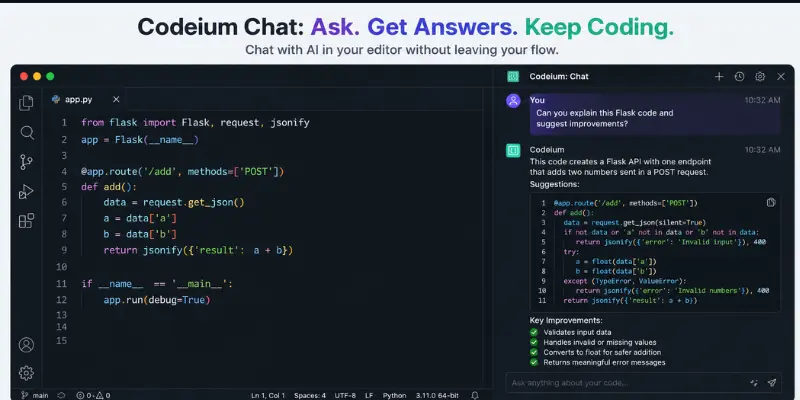
Code Explanations
Codeium does a solid job explaining unfamiliar code in simple terms.
- Breaks down code clearly
- Stays focused on what the code actually does
- Useful when learning a new language or working with an old codebase
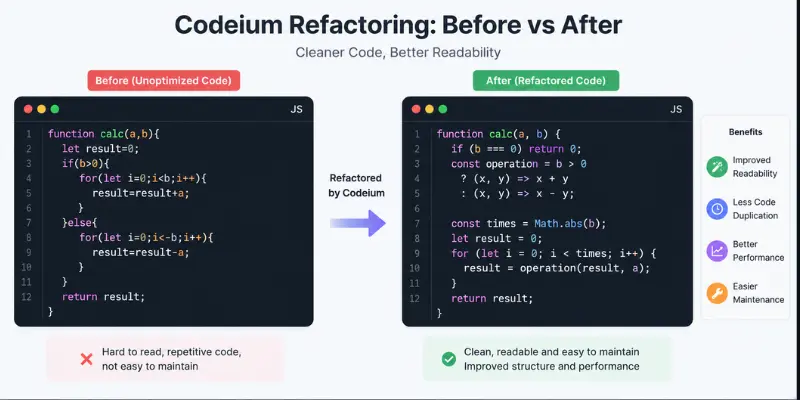
Refactoring
It’s reliable for small, contained refactoring tasks.
- Simplifies conditionals and loops
- Suggests cleaner naming and structure
- Works best within a single file
- Less capable when changes need to span multiple files or require deeper agentic work
Debugging
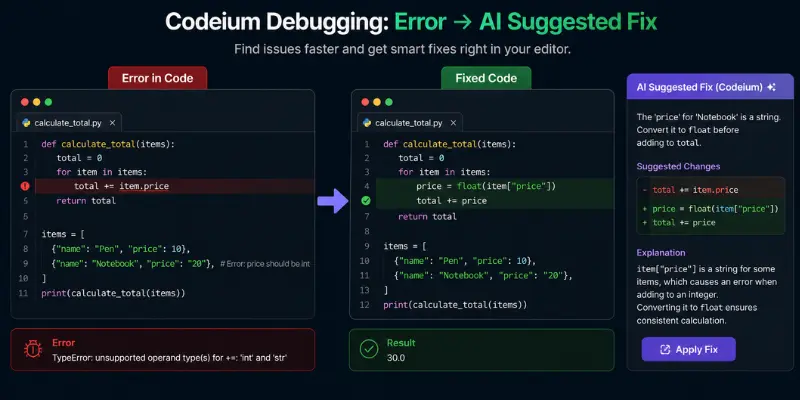
Codeium is useful as a first pass when something breaks.
- Can identify likely causes of common errors
- Often suggests fixes worth trying
- May sometimes fix the symptom instead of the root cause
- You should still verify its suggestions against the actual error and stack trace
Codeium Performance and Suggestion Quality
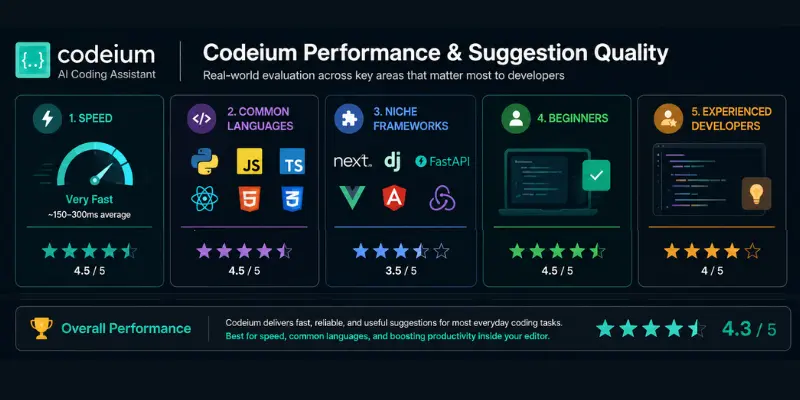
Codeium felt consistently responsive during testing, with suggestions appearing quickly. It performed best with common languages and coding patterns, while niche frameworks produced more misses.
| Area | Codeium Performance |
| Speed | Fast and responsive suggestions |
| Common Languages | Strong suggestion quality |
| Niche Frameworks | Less accurate with unusual code |
| Beginners | Useful for coding and learning |
| Experienced Developers | Good for speeding up routine work |
| vs GitHub Copilot | Comparable overall; Copilot has a slight edge with niche libraries |
For common coding tasks, Codeium and GitHub Copilot feel fairly close. Copilot has a small advantage with niche or less-documented libraries, but the difference isn’t large enough to be a major dealbreaker.
Codeium Across VS Code, JetBrains, and Neovim
VS Code gets the most polished version of the experience, which makes sense given it’s the primary target for most updates. Features tend to land there first, and the integration feels the most native. JetBrains support is solid and reliable for day-to-day work, though it occasionally trails VS Code by a bit when new capabilities roll out. Neovim users get a genuinely respectable integration, which stands out since a lot of competing tools treat terminal-based editors as an afterthought. If you’re a Neovim regular, this is one of the few assistants that doesn’t feel bolted on as a second thought.
Codeium Pricing and Free Plan
Codeium’s free plan is one of its biggest advantages. You get unlimited Tab completions with no daily cap, plus access to chat. For basic coding assistance, the free tier covers most of what users need.
| Plan | Monthly Cost | What You Get | Best For |
| Free | $0 | Unlimited Tab completions, inline edits, and limited AI usage | Trying Codeium without paying |
| Pro | $20 | Higher AI usage limits and access to more advanced models | Regular developers |
| Max | $200 | Much higher usage limits for heavy AI coding | Developers using AI heavily |
For most developers who only need fast completions, code explanations, and basic chat, the free extension is more than enough. If you need deeper agentic features and autonomous multi-file work, you’ll need the paid standalone product.
What Real Users Say (Codeium Review 2026: Reddit and Trustpilot)
Feedback online splits pretty cleanly depending on what people are actually talking about, and it’s worth separating the threads.
Reddit discussion specifically about the extension skews positive. People consistently mention that it’s lightweight, doesn’t demand much setup, and the free completions genuinely deliver without a catch. Complaints in this bucket are mostly minor, like suggestion quality dipping on obscure languages or the occasional slow patch during peak hours.
Trustpilot reviews read a lot harsher, but a close look shows most of those complaints are actually about billing, pricing changes, and the standalone paid product rather than the free extension experience itself. It’s easy to see a low star rating and assume the whole tool is bad, but that’s not really a fair read once you separate what people are actually reviewing.
The honest summary: the free, in-editor assistant experience has a pretty good reputation. The paid, standalone side of the business is where most of the frustration lives.
Codeium vs GitHub Copilot
Copilot remains the safer default if you’re deep in the GitHub ecosystem already, with pull requests, Actions, and repo-level features tied closely into your daily workflow. Its completions test slightly more accurately on niche libraries, and the overall polish reflects Microsoft’s backing. Codeium’s edge is straightforward: a genuinely unlimited free tier that doesn’t hold back the way Copilot’s limited free option does, plus support across a wider spread of editors including Neovim.
If budget matters and you’re not tied to the GitHub ecosystem specifically, Codeium is the easier recommendation. If you want the tightest possible integration with GitHub itself, Copilot still wins that particular fight.
Codeium vs GitHub Copilot: At a Glance
| Feature | Codeium | GitHub Copilot |
| Free Usage | Unlimited Tab completions | More limited free usage |
| Code Completions | Very good for everyday coding | Slightly stronger overall |
| Niche Libraries | Good, but can miss sometimes | Slightly more reliable |
| Chat | Yes | Yes |
| Editor Support | VS Code, JetBrains, and Neovim | Strong support across major editors |
| GitHub Integration | Not its main strength | A major advantage |
| Best For | Developers who want solid AI help for free | Developers already deep into GitHub |
Codeium vs the Standalone Windsurf/Devin Desktop Experience
One important distinction in this Codeium review is that the extension and standalone desktop product are built for different workflows.
| Feature | Codeium Extension | Windsurf / Devin Desktop |
| Main Use | Coding assistance inside your editor | Autonomous coding workflows |
| Tab Completions | Yes | Yes |
| AI Chat | Yes | Yes |
| Code Explanations | Yes | Yes |
| Refactoring | Light, mostly file-level | Multi-file and deeper changes |
| Autonomous Agents | No | Yes |
| Multi-file Editing | Limited | Yes |
| Cloud Task Offloading | No | Yes |
| Best For | Faster everyday coding | Large, complex coding tasks |
If you mainly want autocomplete, chat, explanations, and basic coding help without changing your workflow, the Codeium extension makes more sense. If you want an AI agent that can plan and execute larger multi-file tasks, the standalone product is the better fit. See our full Windsurf review for a deeper look at the rebranded product.
Pros and Cons
What works well:
- Setup takes minutes and doesn’t demand much from you
- Free plan gives genuinely unlimited Tab completions, no catch
- Tab completions feel fast and reasonably accurate on common languages
- Code explanations are consistently useful for unfamiliar code
- Works cleanly across VS Code, JetBrains, and Neovim
- Doesn’t require abandoning your current editor setup
Where it falls short:
- No multi-file agentic editing without switching to the standalone app
- Chat depth is solid for quick questions but shallow for complex reasoning
- Refactoring quality drops once changes span more than one file
- JetBrains support occasionally lags a step behind VS Code
- Suggestion quality dips on niche languages or unusual codebases
Who Should Use Codeium?
Codeium makes sense if you want faster, smarter completions and a helpful chat assistant without changing editors or paying anything. It’s a strong fit for students working through coursework, freelancers watching their budget, and developers working mainly in mainstream languages who want dependable day-to-day help rather than a full autonomous agent. It’s also a solid pick if you’re on Neovim and tired of assistants that barely support your setup.
It’s probably not the right fit if you’re after autonomous, multi-file code generation, cloud-offloaded tasks, or a dashboard for managing multiple coding agents at once. That’s a different product entirely, and trying to force this extension into that role will leave you disappointed. It’s also worth skipping if your work leans heavily on obscure frameworks where suggestion quality tends to be shakier.
Final Verdict
That’s the full Codeium Review 2026 rundown. So, is Codeium worth installing and using in your current IDE this year? For most developers who just want faster completions, a useful chat assistant, and solid code explanations without switching editors or opening their wallet, yes, it’s still one of the better free options out there. The rebrand chaos around the parent company hasn’t touched the extension experience much, and the free tier alone justifies giving it a shot. Skip it only if what you’re actually after is a full autonomous coding agent, in which case the standalone Devin Desktop product, not this extension, is the tool you want to look at instead.
FAQs
Yes. The extension experience, completions, chat, and code explanations, has held up well through the company’s rebranding, and the free tier remains genuinely unlimited for Tab completions.
Yes. Tab completions are unlimited on the free plan with no catch, and the chat feature is included as well with lighter usage limits than paid tiers.
If budget matters and you’re not deeply tied to the GitHub ecosystem, Codeium’s free tier makes it an easy recommendation. Copilot pulls slightly ahead on niche library accuracy and GitHub-native integration.
No. The extension gives you completions, chat, and explanations inside your current editor. The standalone Devin Desktop app is a separate, more advanced product built around autonomous multi-file agents.
VS Code, by a modest margin, since new features tend to land there first. JetBrains and Neovim both offer solid, dependable integrations as well.






- Be Respectful
- Stay Relevant
- Stay Positive
- True Feedback
- Encourage Discussion
- Avoid Spamming
- No Fake News
- Don't Copy-Paste
- No Personal Attacks
- Be Respectful
- Stay Relevant
- Stay Positive
- True Feedback
- Encourage Discussion
- Avoid Spamming
- No Fake News
- Don't Copy-Paste
- No Personal Attacks
