Windsurf Review 2026: It’s Now Devin Desktop, Here’s the Full Story
Published: 20 Aug 2026
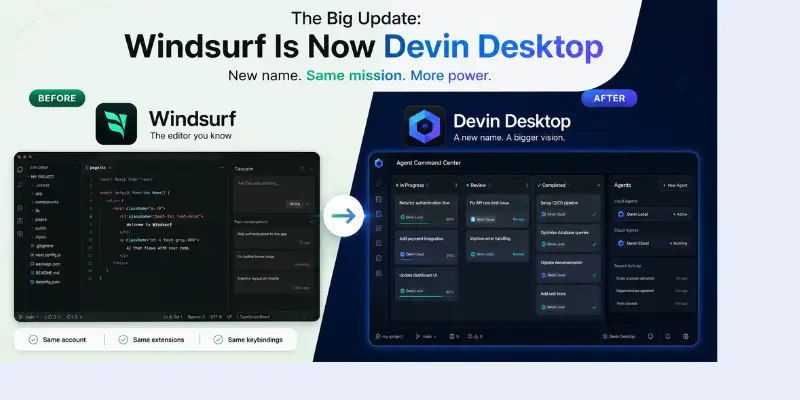
Before we dive into the details, here’s a quick heads-up: if you fire up the app today, you won’t see the name “Windsurf” anywhere. Back on June 2, 2026, the folks at Cognition AI decided to rebrand the whole experience as Devin Desktop. It’s still the same editor you know, linked to the same account, but the philosophy under the hood has shifted. A lot of reviews out there are still talking about the old “Cascade” agent and $15 pricing, but honestly, that’s all ancient history now.
We really put this editor through its paces—both before and after the big name change. We tested it on everything from a Next.js app and a Python pipeline to a particularly messy legacy React project. In this Windsurf Review, we’ll break down exactly what’s changed, what hasn’t, how the new pricing works, and whether it’s actually worth your time in 2026.
| The Big Update: Windsurf Is Now Devin Desktop |
|---|
So, if you’re wondering why your editor suddenly says “Devin,” don’t worry—it’s not a mistake! It’s just Cognition bringing everything under one roof alongside their cloud and CLI tools. |
Quick Windsurf Review (TL;DR)
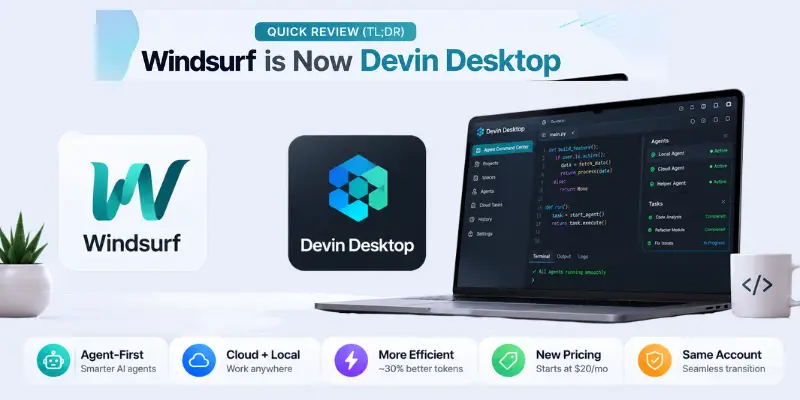
- Don’t have time for the full deep dive? Here’s the bottom line. Windsurf (now Devin Desktop) still uses that solid VS Code foundation, but they’ve swapped out the core agent. Now, instead of just one assistant, the focus is on managing a whole squad of coding AI agents at once. It’s definitely more powerful than it was last year, but it also expects you to be a bit more “hands-on.”
- Who it’s for: Developers who want an “agent-first” workspace rather than just a simple autocomplete tool.
- Who might want to skip it: Non-tech founders looking for a “magic button” to build an entire app without writing a single line of code.
- The cost: There’s a free tier with unlimited Tab completions; Pro is $20/month (though early $15 users are grandfathered in), and Max is $200/month.
- Favorite feature: The Agent Command Center. It’s a Kanban-style board that lets you manage local and cloud agents side-by-side.
- The biggest headache: You still can’t see your daily quota anywhere in the app, so you might run out of steam right in the middle of a task.
What Happened to Cascade?
Cascade was the star of the show for a long time, but it has officially stepped aside. Here is the deal:
- The Sunset: Cascade was retired on July 1, 2026, after a grace period for users to switch over.
- Meet Devin Local: This is a full rewrite in Rust. It’s faster and, according to Cognition, about 30% more efficient with tokens than Cascade ever was.
- Subagents: Unlike Cascade, Devin Local can actually spawn smaller “helper” tasks to tackle side-quests while it stays focused on the main goal.
- A Few Growing Pains: Some features, like Memories, didn’t make the jump immediately, but they are slowly being added back in.
- Important Note: If you have any old scripts that specifically mention “Cascade,” they’ve likely stopped working now that the transition is complete.
What Is Windsurf (Devin Desktop) Today?
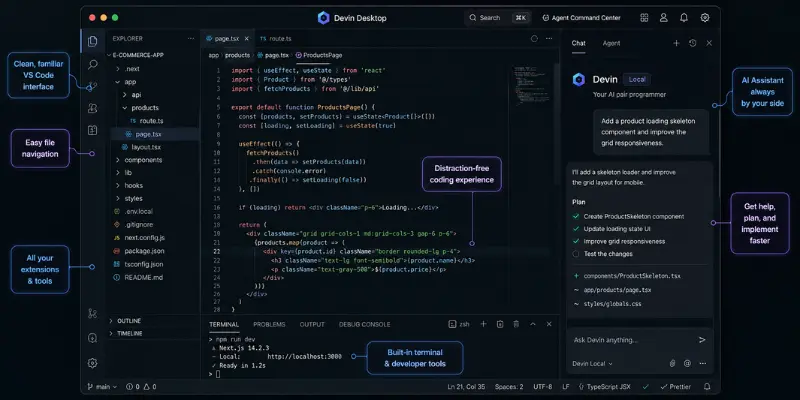
At its core, Devin Desktop is still a fantastic AI-native editor based on VS Code. The big difference now is how you start your day. Instead of just a code view, you land in the Agent Command Center. Think of it as a mission control where you can see all your agents working—some locally on your machine and some in the cloud—all sorted by what’s “In Progress” or “Ready for Review.”
It’s a clear move toward agentic AI, where the tool doesn’t just help you write a line, it actually handles the whole job. Devin Desktop is definitely leading the charge on that front.
Key Features: What This Windsurf Review Actually Tested
Devin Local (Formerly Cascade)
This is the heavy hitter. You tell it what you need in plain English, and it scans your repo to build a plan. It handles the actual coding across multiple files and stops to ask for your “okay” before making big moves. In our tests on a 50k-line codebase, it was surprisingly good at sticking to our existing styles and structure.
Devin Cloud
This is a game-changer: you can now offload long, boring tasks to a cloud VM. You can even shut your laptop and it’ll keep working in the background. Best of all, this is now part of the $20 Pro plan, not just for big enterprises.
Spaces
Spaces keep everything organized. It groups your files, PRs, and sessions so your agents don’t accidentally step on each other’s toes. It’s also where the agents can review your commits or pull requests before you hit that “push” button.
Agent Client Protocol (ACP)
This is a big one for flexibility. ACP is an open standard that lets you bring in other agents (like Claude or Gemini) to work right inside the editor. If you don’t want to be locked into just one company’s AI, this is a huge win over tools like Cursor.
SWE-1.6 and Fast Context
SWE-1.6 is Cognition’s own custom model, and it’s pretty impressive. It’s free on every plan and doesn’t count against your quota. Plus, “Fast Context” helps the agent find what it needs in your codebase much faster than standard search, which is a life-saver for big projects.
MCP Support
You can still connect to your favorite tools like GitHub, Slack, and Figma directly through the MCP Marketplace. If you want to see how this compares to other tools, check out our guide on AI-powered code review.
Windsurf Pricing in 2026 (Post-Rebrand)
Let’s talk money, because this is what everyone wants to know. Here is how the plans look today:
| Plan | Price | Usage | Best For |
| Free | $0/month | Unlimited Tab completions, light agent quota | Testing the waters |
| Pro | $20/month | Higher quota, full model access including Devin Cloud | Most solo developers |
| Max | $200/month | Significantly higher quota | Heavy daily agent users |
| Teams | $80/month base + $40/seat | Shared context, admin dashboard | Small to mid-size teams |
| Enterprise | Custom | SSO, dedicated deployment | Large orgs with compliance needs |
If you were already on the $15 Pro plan, you’re in luck—you’ll keep that lower price. New users will pay $20, which is the same as Cursor. The old credit system is also gone, replaced by daily and weekly limits that refresh automatically.
Windsurf Review: Ease of Use
Setting it up is a breeze—it takes about two minutes, and it imports your VS Code settings perfectly. The editor itself feels familiar, but the “Agent Command Center” takes a little while to master. You’re now a manager for a small team of AIs, which is a bit of a shift in mindset.
One persistent issue is the quota visibility. You still can’t see exactly how much usage you have left in plain numbers, so you’re basically just keeping an eye on a meter and hoping you don’t hit the wall mid-task.
Windsurf Review: Performance and Stability
In our testing, Devin Local felt very snappy. The Rust rewrite really pays off on larger files. Some independent tests even show it using significantly fewer tokens than Cascade did to finish the same job.
One frustration that hung around from the Windsurf days: if the agent makes a mistake halfway through, you usually have to restart the whole task. There’s no easy “undo” for just the last few steps, which can be a bit of a time-sink.
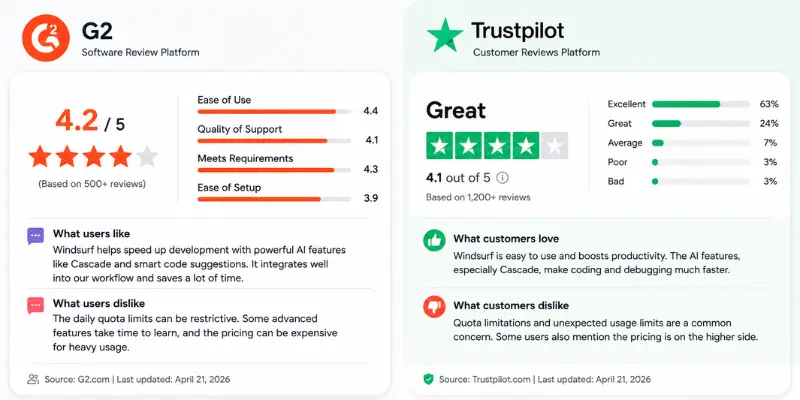
What Real Users Say: Windsurf Reviews Reddit, Trustpilot, and G2
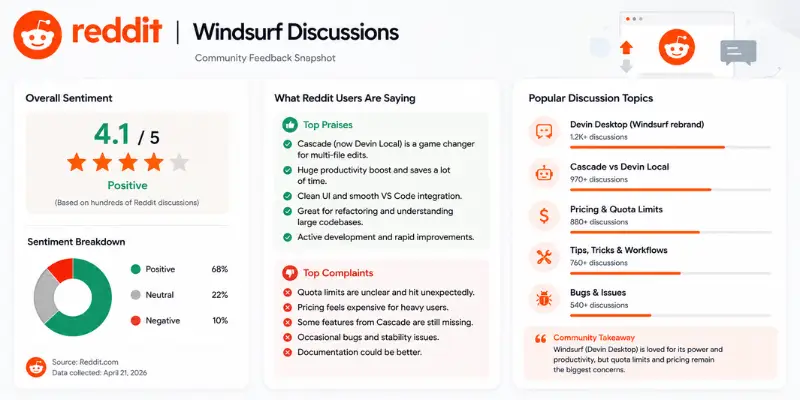
Social media sentiment is a bit of a mixed bag right now. People who stay within their limits are loving the new speed, while those who were affected by the pricing changes or the sudden rebrand are still a bit skeptical. Here’s a summary of the feedback:
What people praise:
- Users love that Devin Local builds a clear plan before it starts changing code.
- Fast Context is a huge hit for finding files in massive projects.
- The core VS Code experience remains fast and reliable.
- ACP support is praised for letting users choose their own models.
What people warn about:
- The sudden pricing and quota changes in early 2026 left some users feeling frustrated.
- Billing support can be slow and relies heavily on bots.
- Losing some Cascade features right after the cutoff was a bit of a shock to some workflows.
- Occasionally, the app drops you down to a free model without much warning when you hit your limit.
Bottom line? The tool is technically better than ever, but Cognition still needs to earn back some trust after so much change in a short time.
Windsurf (Devin Desktop) vs Cursor vs Claude Code vs GitHub Copilot
| Feature | Windsurf (Devin Desktop) | Cursor | Claude Code | GitHub Copilot |
| Base price | $20/month | $20/month | $20/month (Max $100 to $200) | From $10/month |
| Agent style | Agent Command Center, multi-agent | Composer, manual control | Terminal-based, highly autonomous | Agent mode, still growing |
| Codebase awareness | Automatic (Fast Context) | Manual tagging plus auto | Deep, terminal-driven | Automatic, repo-based |
| Cross-agent support | Yes, via ACP | No | N/A | No |
| Own AI model | SWE-1.6 | Composer | N/A, Claude only | No |
| Best for | Multi-agent workflows, predictable quotas | Iterative control, big community | Developers who live in the terminal | Teams already inside GitHub |
If you love using Claude for your heavy lifting, ACP is a game-changer. It lets you use those models right in Devin Desktop. If community support is more your thing, you might want to compare this against other Cursor alternatives or explore Bolt AI alternatives before you commit.
Windsurf Plugin Review (JetBrains)
Just a quick note: the JetBrains plugin still uses the “Windsurf” name for now. It’s great for autocomplete, but it doesn’t have the full “Agent Command Center” experience yet. If that’s more your speed, the Codeium extension holds up well on its own. If you want the real deal, stick with the desktop app.
Pros and Cons
The Good Stuff:
- Devin Local is noticeably faster and more accurate than the old Cascade.
- ACP means you aren’t stuck with just one AI provider.
- The free plan still offers unlimited Tab completions—no strings attached.
- Devin Cloud is now included for Pro users.
- Integrations with Slack, Figma, and Stripe still work perfectly.
What could be better:
- The constant rebranding and pricing shifts have been a bit overwhelming for some users.
- It’s still hard to track exactly how much quota you have left.
- Mistakes during a task often require a full restart rather than a quick fix.
- Switching from Cascade caused some old workflows to break.
- Customer support for billing is mostly automated and can be slow.
Who Should Use Windsurf (Devin Desktop)?
This tool is perfect if you’re a developer who knows their way around code. The Agent Command Center expects you to be the “manager” who catches errors. It’s also great for teams using multiple agents, as Spaces and ACP make it easy to collaborate with different models. Solo devs and freelancers might also prefer this flat quota system over Cursor’s variable credits. Don’t forget to check out data security if you’re at a larger company.
It’s probably not the right fit if you’re a total beginner—you still need to be able to spot when the AI goes off the rails. Also, if you can’t stand not knowing exactly where your quota stands, you might find it a bit frustrating.
Conclusion
Overall, we’re impressed but cautious. The tech is fantastic—Devin Local is fast, and the Agent Command Center is a bold new way to work. However, the frequent changes have been a lot for the community to handle.
If you’re new, definitely try the free plan first. See how Devin Local works for you before committing. If you’re a longtime user, the core experience you loved is still there—it’s just asking you to act more like a manager for your AI “team.” It is also worth checking out Bolt AI alternatives to see how other tools in the market stack up.
Frequently Asked Questions
Nope! It was renamed Devin Desktop in June 2026. It’s still the same underlying tech, just with a new name and a focus on managing agent teams.
Cascade was replaced by Devin Local on July 1, 2026. It’s a faster, more efficient Rust-based version with support for subagents.
Yes! There is a free plan with unlimited Tab completions and basic agent usage to get you started.
It’s $20 a month for new users, which includes cloud access and full model support. Early subscribers get to keep their $15/month rate.
Yes for GitHub! For GitLab, you’ll need to use an MCP connection rather than a built-in one-click setup.
It depends! Devin Desktop wins on multi-agent flexibility and predictable pricing, while Cursor is still the king of community and raw completion speed.
Be careful with anything from before June 2026—it’s likely outdated since the rebrand and pricing changes happened then.






- Be Respectful
- Stay Relevant
- Stay Positive
- True Feedback
- Encourage Discussion
- Avoid Spamming
- No Fake News
- Don't Copy-Paste
- No Personal Attacks
- Be Respectful
- Stay Relevant
- Stay Positive
- True Feedback
- Encourage Discussion
- Avoid Spamming
- No Fake News
- Don't Copy-Paste
- No Personal Attacks
