Best Topaz Video AI Alternatives in 2026 (Free and Paid, Tested)
Published: 19 Jun 2026
| Quick Answer |
|---|
|
The best Topaz Video AI alternative in 2026 is Aiarty Video Enhancer for most users because it offers high-quality upscaling, fast processing, and a lifetime pricing model. For 8K output, HitPaw VikPea is the strongest option, while Video2X is the best free alternative. |
Topaz Video AI used to be the gold standard for anyone serious about video enhancement. It could upscale blurry footage to 4K, remove noise from old recordings, and make choppy video silky smooth. But in late 2025, Topaz Labs pulled its lifetime license and moved everyone to a subscription that runs up to $399 a year.
That one decision sent thousands of creators searching for a better topaz video ai alternative. The good news is that the market has grown fast. There are now tools that match Topaz on quality, beat it on price, and in some cases offer features Topaz does not have at all.
This article covers every serious option available in 2026, from desktop software with one-time pricing to free open-source tools and online upscalers that need no installation. Each tool is covered in full so you can make a real decision, not just skim a list.
Why People Are Leaving Topaz Video AI in 2026
Before September 2025, Topaz Video AI offered a one-time purchase for approximately $299. That was considered a reasonable price for professional-grade upscaling. The company later discontinued perpetual licenses and moved to a subscription-based pricing model.
At the time of writing, Topaz Video AI pricing is approximately:
- Without an annual commitment: around $69 per month
- With a 12-month commitment paid monthly: around $37 per month
- Paid annually upfront: approximately $399 per year
Over three years, that can add up to more than approximately $1,190. By comparison, many topaz video ai alternatives offer lifetime licenses in the $149 to $200 range, making them significantly more affordable for long-term use.
Beyond price, users report real frustrations. Topaz Video AI is slow on mid-range hardware and needs a strong dedicated GPU to process footage at reasonable speeds. Many users also notice what the community calls the “waxy” effect, where enhanced footage looks over-processed and slightly artificial. These issues, combined with the pricing shift, explain why so many people are actively looking for a topaz labs alternative right now.
Is Topaz Video AI Free?
No. Topaz Video AI has no free plan. There is a 30-day trial, but every output gets a watermark burned into it during that period. Once the trial ends, you must subscribe to continue using it.
If you need a topaz video ai free option, you will find several on this list. Some are completely free with no watermarks. Others have free tiers that let you test real output before committing to a payment.
What to Look for in a Topaz Video AI Alternative
Not every upscaling tool works the same way, and the right choice depends on your situation.
- Resolution support — Some tools max out at 1080p while others reach 4K or 8K. Match the tool to the resolution your projects need.
- Footage type — Old VHS recordings need different processing than compressed web video or drone footage. Some tools handle grain better, others are built for compression artifacts.
- Hardware requirements — Topaz Video AI is notorious for needing a powerful GPU. Some topaz video ai alternatives run on the cloud so your local hardware does not matter at all.
- Pricing structure — A one-time license costing approximately $200 will typically cost less than a monthly subscription of around $30 within seven months.
- Real output quality — A tool can technically upscale to 4K but produce results that look artificial. Real-world quality matters more than numbers on a spec sheet.
The Best Topaz Video AI Alternatives in 2026
Aiarty Video Enhancer
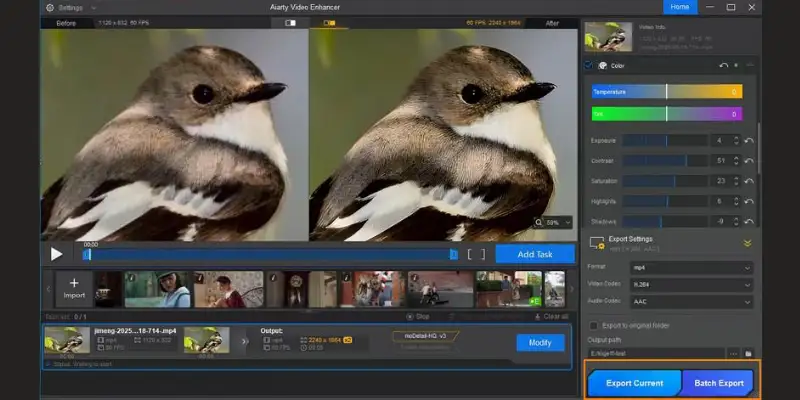
Aiarty Video Enhancer is the topaz video ai alternative most people should start with. It comes from Winxdvd, a company with a long track record in video processing software. The tool covers upscaling, denoising, deblurring, and frame rate boosting in a single clean interface. Most importantly, it does all of this without the waxy over-processed look that Topaz Video AI sometimes produces.
Key Features
- AI upscaling up to 4K with multiple model options for real-world and animated content
- Frame interpolation up to 120 frames per second for smooth slow-motion and old footage
- Audio denoising and basic color adjustment built in
- SDR to HDR conversion (experimental)
- Batch processing for multiple files in one queue
- Works on both Windows and macOS
Pricing
- Lifetime license: around $149 for up to 3 devices
- Free software updates included with the lifetime license
- Free trial available, but output includes a watermark
- No subscription required at any stage
Best For
- Everyday creators and video hobbyists
- Users who want professional-quality output at a one-time price
- People working on a mix of content types including home videos, web footage, and personal projects
Pros
- The waxy effect that plagues some Topaz outputs is notably reduced
- Processing speed is solid on mid-range hardware without needing a top-tier GPU
- Lifetime pricing keeps long-term cost very low
- Multiple AI models let you pick the right processing approach for each footage type
- Runs on both Windows and macOS
Cons
- Free trial watermarks all output, so you cannot fully evaluate results before paying
- 4K output ceiling means it does not match HitPaw or Nero AI on maximum resolution
- SDR to HDR conversion is still experimental and not reliable for professional use
Where It Beats Competitors
Aiarty beats Topaz Video AI directly on price and on the natural quality of enhanced output. It beats VideoProc on upscaling quality and beats TensorPix on processing speed for local work. Against AVCLabs, Aiarty is generally faster and produces slightly more natural results on real-world footage.
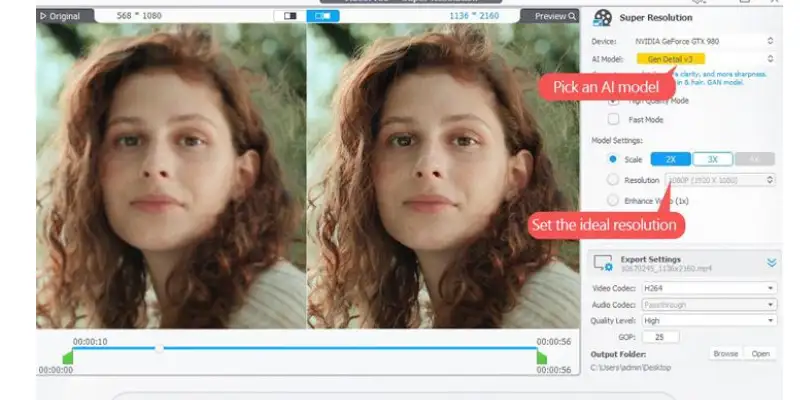
HitPaw VikPea
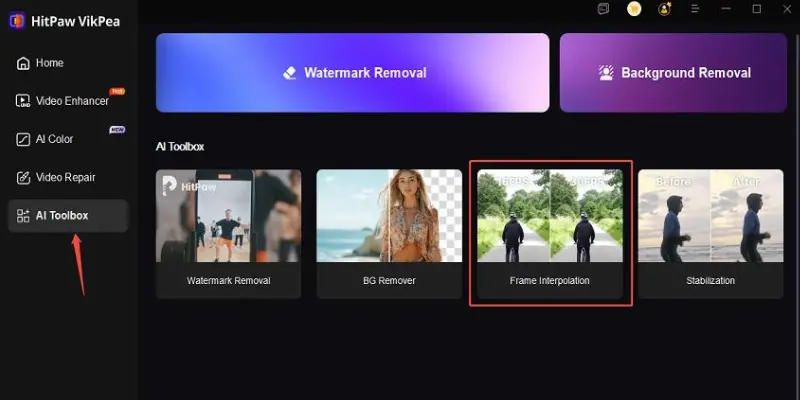
HitPaw VikPea is the highest-resolution topaz video ai alternative on this list. It supports output up to 8K, which puts it ahead of Topaz Video AI itself on maximum resolution. It is a serious desktop tool with a full range of enhancement features and is built for users who need the best possible output quality and do not mind paying more upfront for a lifetime license.
Key Features
- AI upscaling up to 8K resolution
- Noise reduction and deblurring for heavily degraded footage
- Face enhancement that automatically restores detail in blurry human faces
- Video colorization for black and white footage
- Frame interpolation and video stabilization
- Batch processing with wide format support
- Available on Windows and macOS
Pricing
- Lifetime license: $284 to $350 depending on the package
- Free trial available with watermarked output
- No subscription model, one-time payment only
- Cheaper over three years than a single Topaz Video AI subscription period
Best For
- Professional creators, videographers, and archivists
- Users who regularly process large volumes of high-resolution footage
- Anyone restoring old content where face detail and colorization matter
Pros
- 8K output ceiling beats every other tool on this list
- Face enhancement is the strongest of any desktop topaz labs alternative tested
- Colorization for black and white footage opens up restoration possibilities most tools do not offer
- Batch processing is reliable for large projects
- One-time pricing is cheaper than Topaz after just nine months of equivalent subscription spending
Cons
- Upfront cost is the highest of any paid option on this list
- More demanding on hardware than Aiarty
- Interface is functional but less polished than some competitors
- For casual users with simple upscaling needs, the full feature set may be overkill
Where It Beats Competitors
HitPaw beats every topaz video ai alternative on maximum output resolution at 8K. It beats Topaz itself on the resolution ceiling. The face enhancement and colorization features are better than what Aiarty and AVCLabs offer. For archival work with very old footage, these specialized restoration tools make a real difference. Creators who also work with video generation tools will find HitPaw pairs well alongside options in the AI video generator space, since upscaling restored footage before uploading it to a generator is a common workflow step.
AVCLabs Video Enhancer AI
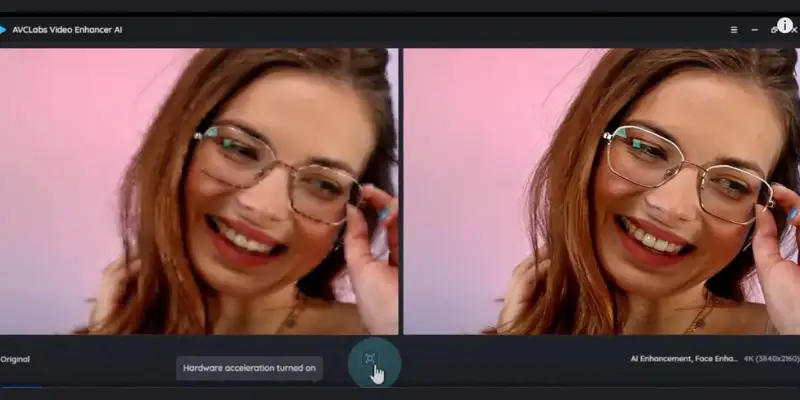
AVCLabs Video Enhancer AI is a solid mid-range topaz video AI alternative that focuses specifically on personal video restoration. It is particularly strong at recovering detail from old family recordings, home movies, and archival footage with heavy grain or poor lighting.
Key Features
- AI upscaling up to 4K
- Multi-frame noise reduction using temporal processing
- Deblurring and AI sharpening
- Face enhancement tuned for portraits and close-up footage
- Output previews before full processing so you can check results first
- Clean interface that does not require technical knowledge
Pricing
- Lifetime license: around $199
- Subscription option available from around $39 per month for those who prefer it
- Free trial available with watermarked output
- Lifetime license is the better value for regular use
Best For
- Users restoring personal video archives and old home recordings
- Anyone working with VHS transfers or heavily grainy footage
- Users who want strong face enhancement without paying HitPaw prices
Pros
- Temporal processing reduces flickering artifacts on footage with motion
- Face enhancement produces natural-looking results on portrait footage
- Clean, easy-to-learn interface
- Output previews let you evaluate results before committing to a full export
- Priced lower than HitPaw with solid quality for personal projects
Cons
- 4K output ceiling means it does not match HitPaw on resolution
- Processing speed is slower than Aiarty on equivalent hardware
- Free trial output is watermarked, limiting pre-purchase evaluation
- More specialized toward restoration than general-purpose upscaling
Where It Beats Competitors
AVCLabs beats Aiarty on face enhancement quality for close-up portrait footage. It beats VideoProc significantly on output quality. For heavily grainy footage like VHS transfers, temporal processing gives AVCLabs an advantage over tools that process frames independently.
UniFab Video Enhancer
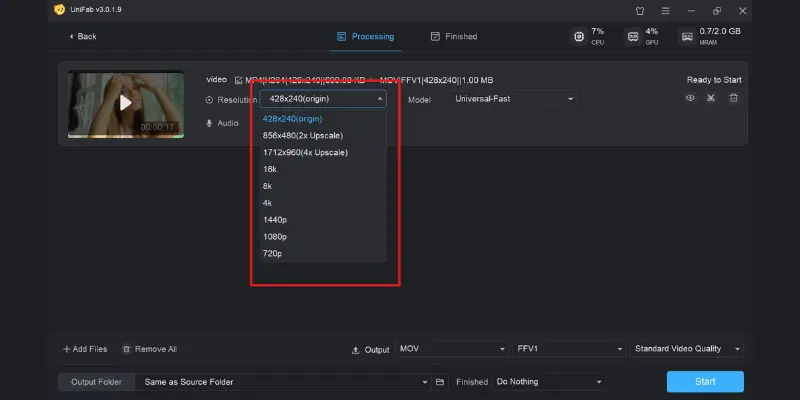
UniFab Video Enhancer is one of the most interesting topaz video ai alternative options because it actually offers a genuinely useful free tier. Most video enhancement tools watermark their trial output, making it impossible to evaluate results honestly. UniFab lets you process a limited number of videos for free with no watermark, which is a meaningful difference.
Key Features
- AI upscaling up to 4K
- HDR conversion and SDR to HDR upgrade for richer color on modern screens
- Noise reduction and AI sharpening
- Built-in video format converter
- Clean interface designed for Windows users
- No watermarks on free tier output within usage limits
Pricing
- Paid plans start at around $59 per year
- Lifetime license also available (higher one-time cost)
- Free tier included with no watermarks but limited video count
- No credit card required for free tier access
Best For
- Users who want to test real output quality before spending money
- Anyone who processes video occasionally and wants free access for light use
- Creators who need HDR enhancement alongside standard upscaling
Pros
- Free tier is the most useful no-watermark option of any paid topaz video ai alternative
- HDR conversion adds value for footage that will be viewed on modern displays
- Clean, easy-to-learn interface
- Format converter built in adds practical day-to-day utility
- Honest pricing with a real free option rather than a disabled demo
Cons
- Processing speed is slower than Aiarty and HitPaw on equivalent hardware
- Lifetime license costs more than Aiarty for comparable features
- Free tier limits volume, so heavy users will need to upgrade quickly
- Output quality falls slightly behind Aiarty and HitPaw in detailed texture recovery
Where It Beats Competitors
UniFab beats every paid topaz labs alternative on accessibility through its real free tier. For users comparing results before paying, it is the most honest testing environment. The HDR upgrade feature is better developed here than in most competitors.
Nero AI Video Upscaler
Nero AI Video Upscaler is a straightforward Windows-only topaz video ai alternative that delivers 8K output at a price point significantly lower than HitPaw. It does not have the extensive feature set of some competitors, but what it does, it does cleanly and quickly.
Key Features
- AI upscaling up to 8K resolution
- AI denoising and sharpening
- Minimal, easy-to-navigate interface
- Wide input format support
- Local processing on your hardware, no cloud dependency
- Fast setup with very little configuration required
Pricing
- Lifetime license: around $169 for Windows
- No subscription model
- Free trial available with watermarked output
- Best value path to 8K output without paying HitPaw prices
Best For
- Windows users who specifically need 8K output at a lower cost
- Users who prefer a simple interface without deep configuration options
- Anyone who processes standard footage without needing restoration features
Pros
- 8K output at a price significantly below HitPaw
- Simple interface reduces time needed to start processing
- Solid performance on mid-range Windows hardware
- Lifetime pricing keeps total cost low over time
- Handles a wide variety of input formats without conversion
Cons
- Windows only, no macOS support
- Minimal settings mean you cannot fine-tune results for tricky footage
- Feature set is limited compared to Aiarty, HitPaw, and AVCLabs
- Output quality on heavily degraded material falls behind the top desktop options
- Free trial includes watermarks
Where It Beats Competitors
Nero beats Aiarty on maximum output resolution at 8K. It beats HitPaw on price for users who only need basic 8K upscaling without restoration features. For Windows users on a budget who need high resolution, Nero offers the best cost-to-resolution ratio of any topaz video ai alternative.
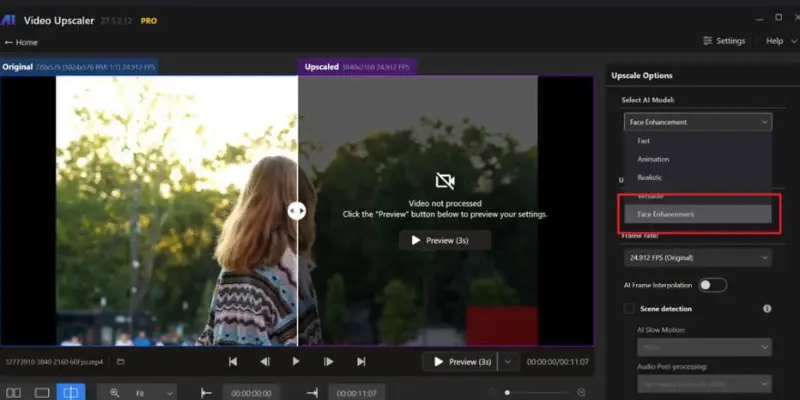
VideoProc Converter AI
VideoProc Converter AI is the most budget-friendly paid topaz video ai alternative on this list. It is not a pure video enhancer. It is primarily a video converter and processor that includes AI upscaling as one of its many features. That bundled approach makes it a practical choice for people who need more than just upscaling.
Key Features
- AI upscaling up to 4K
- Noise reduction and basic sharpening
- Video conversion across dozens of formats
- Video compression and size optimization
- Screen recording tool included
- Basic video editing features built in
- Works on both Windows and macOS
Pricing
- Lifetime license: starting around $45
- Annual plans also available at lower entry cost
- Free version available with limited features
- Cheapest paid topaz labs alternative by a significant margin
Best For
- Budget users who also need a video converter
- Creators who want AI upscaling as a bonus feature within a broader video toolset
- Anyone processing video occasionally who does not need professional-grade output
Pros
- Cheapest paid topaz video ai alternative by a significant margin
- Lifetime license available at a very low price
- Combines conversion, compression, and upscaling in one tool
- Works on both Windows and macOS
- Versatile across multiple video tasks beyond just upscaling
Cons
- Upscaling quality falls noticeably below Aiarty, HitPaw, and AVCLabs
- Not suitable for professional upscaling work or heavily degraded footage
- Maximum 4K output
- Feels like a converter with AI added on, not a dedicated enhancer
- Results on challenging footage can look artificial
Where It Beats Competitors
VideoProc beats everything else on price. Creators who also work with generation tools like those in the Kling AI alternatives space often pair a budget converter like VideoProc with a dedicated generation tool for their full workflow. For users who need a video converter with reasonable upscaling included, no other option provides that combination at anywhere near this cost.
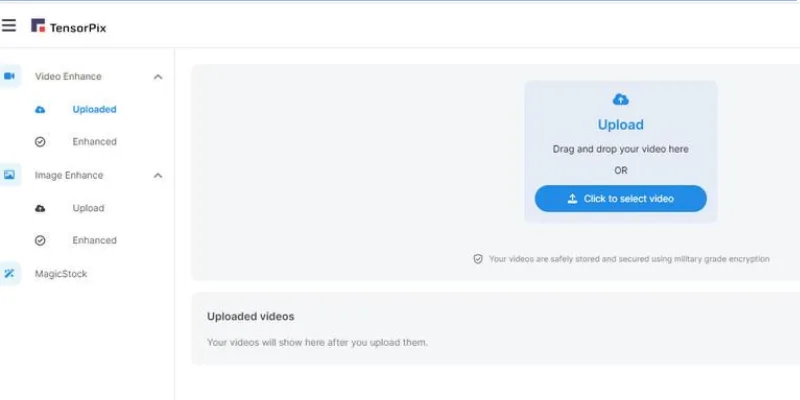
TensorPix
TensorPix is an online topaz video ai alternative that processes video on remote servers rather than your own hardware. You upload a file, it processes in the cloud, and you download the enhanced result. No installation, no GPU requirements, no technical setup of any kind.
Key Features
- AI upscaling up to 4K in the browser
- Denoising and sharpening without local hardware
- Frame rate enhancement available
- Browser-based interface accessible on any device
- Credit-based system so you pay only for what you use
- Fast processing for short clips on good server availability
Pricing
- Free tier available with a small number of credits on signup
- Paid credit bundles available for more usage
- No monthly subscription required, pay per video processed
- Cost per video depends on clip length and resolution target
Best For
- Users with limited local hardware or no dedicated GPU
- People who need to enhance video on a restricted work computer or low-end laptop
- Occasional users who want pay-per-use pricing rather than a subscription
Pros
- No installation or local hardware required
- Works on any device with a browser
- Credit-based pricing means you only pay for what you use
- Output quality is solid for an online tool
- Accessible from anywhere with an internet connection
Cons
- Processing depends on internet connection speed and server availability
- Credit costs can add up for large batches of video
- Maximum output is 4K
- Less control over processing settings than desktop tools
- Not suitable for confidential footage since files are uploaded to external servers
Where It Beats Competitors
TensorPix beats every desktop topaz video ai alternative for users who cannot run software locally. It is the only option on this list that works without any hardware requirements whatsoever. For remote work, restricted devices, or users with no GPU, TensorPix is the only practical option.
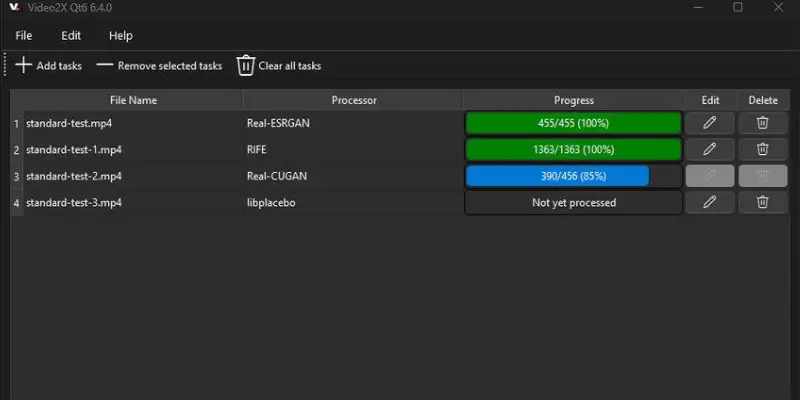
Video2X
Video2X is a completely free, open-source topaz video ai alternative that runs locally on your hardware. It uses established upscaling models including Real-ESRGAN and Waifu2x to enhance video quality. For users comfortable with basic software setup, it delivers results that rival paid tools in many cases.
Key Features
- Multiple AI upscaling models including Waifu2x for anime and Real-ESRGAN for real-world footage
- Noise reduction and frame interpolation
- No watermarks and no usage limits ever
- Fully open-source and community maintained
- Local processing using your GPU or CPU
- Flexible model selection based on content type
Pricing
- Completely free, no cost at any level
- No trial period, no watermarks, no usage caps
- Open-source software available to anyone
- No subscription, no license, no payment ever required
Best For
- Technical users comfortable with software installation and configuration
- Anime fans and animators who want exceptional line-art upscaling
- Anyone who needs high-quality upscaling at zero cost
Pros
- Completely free with no limitations whatsoever
- No watermarks on any output
- Multiple AI models let you choose the right approach for different content types
- Exceptional results on anime and 2D animation with Waifu2x
- No subscription, no license, nothing to pay ever
Cons
- Setup requires more technical knowledge than any paid option on this list
- Interface is not as polished as commercial tools
- Limited customer support since it is community-maintained
- Processing speed depends entirely on your local hardware
- Regular updates are less predictable than commercial software
Where It Beats Competitors
Video2X beats every other option on price by being free. For anime and animated content, the Waifu2x model produces results that genuinely match or beat paid tools. For technical users who want the most control over processing models, it offers more flexibility than any commercial alternative.
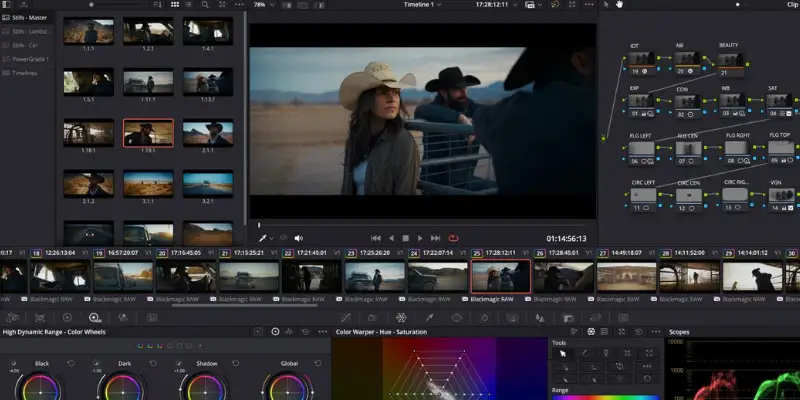
DaVinci Resolve
DaVinci Resolve is a professional video editing platform used by filmmakers and studios worldwide. It includes a built-in Super Scale feature that uses AI to upscale footage, and the base version is completely free. If you already edit video professionally, this is a topaz labs alternative that costs nothing extra.
Key Features
- Super Scale AI upscaling to 4K in the free version and 8K in the Studio version
- Full professional editing suite with color grading and audio mixing
- Visual effects and collaboration tools included
- AI noise reduction available in the Studio version
- Used industry-wide by professional editors and studios
- Regular updates from Blackmagic Design
Pricing
- Standard version: completely free
- Studio version: $295 one-time purchase
- Super Scale upscaling included in the free standard version
- No subscription for either version
Best For
- Professional video editors already working in DaVinci Resolve
- Users who want upscaling built into their existing editing workflow at no extra cost
- Editors who need the full production suite alongside AI enhancement
Pros
- Free for the standard version including Super Scale
- Super Scale produces solid upscaling quality for professional editing work
- No additional cost or software if you already use DaVinci Resolve
- Full editing suite means you can upscale and edit in the same application
- Used by professionals worldwide with strong ongoing development
Cons
- Not a dedicated upscaler, so it requires learning a full editing application
- The learning curve is steep if you are not already familiar with the platform
- Super Scale in the free version has some limitations compared to Studio
- For users who only need upscaling and do not want a full editing application, it is significant overkill
Where It Beats Competitors
DaVinci Resolve beats every topaz video ai alternative for professional editors who need upscaling within a complete editing workflow. The combination of upscaling, color grading, and editing in one application is unmatched. Editors who also explore generation-focused tools alongside enhancement work often find the Luma AI alternatives space worth looking at, since cinematic generation and upscaling are frequently part of the same post-production step.
CapCut
CapCut is a mobile-first video editing and enhancement app from ByteDance that includes AI upscaling and face enhancement features. It works on iOS and Android and has a free plan with genuinely useful features. As a topaz video ai alternative for mobile content creators, it is practical and accessible.
Key Features
- AI upscaling to 4K on mobile devices
- Facial enhancement and noise reduction
- Background removal and scene editing
- Wide range of editing tools built around the AI features
- Works on iOS and Android
- Text-to-video and social content creation features included
Pricing
- Free plan includes core AI features
- Paid plan: around $9.99 per month for higher resolution and watermark removal
- No desktop software required
- Free plan usable without a credit card
Best For
- Mobile content creators who work primarily on phones or tablets
- Social media creators making short-form content for TikTok, Reels, or Shorts
- Anyone who needs quick AI video enhancement on the go
Pros
- Free plan is genuinely useful for short video enhancement
- Works on mobile devices where no desktop tool can run
- 4K upscaling on mobile is impressive for the category
- Editing tools built around AI features create a complete mobile workflow
- Simple enough for complete beginners. Mobile social creators who want to go beyond upscaling into AI clip generation often find tools in the Crayo AI alternatives space to be a natural complement to what CapCut handles on mobile
Cons
- Not suitable for professional or long-form video work
- Free plan adds watermarks to some content types
- Mobile processing is slower than desktop tools on equivalent content
- Not a replacement for any dedicated desktop upscaler
- Data privacy considerations apply since it is a ByteDance product
Where It Beats Competitors
CapCut is the only topaz video ai alternative on this list that works natively on mobile devices. For creators whose entire workflow happens on a phone, it has no real competition here. The combination of editing and upscaling in a mobile app is genuinely useful for social media content.
Best Topaz Video AI Alternatives Compared (2026)
| Tool | Price | Max Resolution | Free Plan | Ease of Use | Output Quality | Best For |
| Aiarty Video Enhancer | $149 lifetime | 4K | Trial, watermarked | Easy | Excellent | General upscaling |
| HitPaw VikPea | $284-350 lifetime | 8K | Trial, watermarked | Easy | Excellent | High-res + restoration |
| AVCLabs Video Enhancer AI | $199 lifetime | 4K | Trial, watermarked | Medium | Very Good | Old footage + faces |
| UniFab Video Enhancer | $59/yr or lifetime | 4K | Yes, no watermark | Easy | Good | Test-before-buy users |
| Nero AI Video Upscaler | $169 lifetime | 8K | Trial, watermarked | Easy | Good | Budget 8K on Windows |
| VideoProc Converter AI | $45 lifetime | 4K | Limited free version | Easy | Decent | Budget + conversion |
| TensorPix | Credits-based | 4K | Limited credits | Very Easy | Good | No hardware users |
| Video2X | Free | Varies | Full free, no limit | Hard | Very Good | Anime + technical |
| DaVinci Resolve | Free / $295 Studio | 4K-8K | Yes, standard version | Hard | Very Good | Pro editors |
| CapCut | Free / $9.99/mo | 4K | Yes, some watermarks | Very Easy | Decent | Mobile social content |
Topaz Video AI vs Leading Alternatives
- Aiarty Video Enhancer
- UniFab Video Enhancer
Aiarty vs Topaz: Full Comparison
This is the comparison that matters most for users who previously relied on Topaz Video AI. Topaz produces outstanding results on the most challenging footage, particularly with its Starlight model for very old or heavily degraded material. The Chronos frame interpolation is also best-in-class.
But Aiarty Video Enhancer closes that gap significantly at a fraction of the cost. For standard upscaling tasks on content from the last two decades, Aiarty output is difficult to distinguish from Topaz output. The waxy effect is actually worse in Topaz than in Aiarty on some footage types.
Over three years, Aiarty costs $149 while Topaz costs $1,197. Unless you are processing the most difficult archival footage on a professional basis and cost is secondary, Aiarty is the stronger choice.
UniFab vs Topaz: The Free Tier Difference
UniFab’s biggest advantage over every other topaz video ai alternative is that you can actually test it with real output before spending money. No watermarks on the free tier within its usage limits. That alone sets it apart from every competitor including Topaz itself.
In head-to-head quality comparisons, Topaz produces sharper results on highly degraded footage. But for web video, moderate-quality recordings, and personal projects, UniFab output is very usable. Topaz pulls ahead mainly on the extreme cases where source material is severely damaged or degraded.
Best Topaz Video AI Alternative for Beginners
If you are new to video enhancement and do not want to spend a lot of time learning complicated software, Aiarty Video Enhancer is the right starting point.
The interface is clean and does not overwhelm you with too many options. You load your video, pick a quality setting, and let it run. The output quality is excellent without requiring you to understand the difference between upscaling models or frame interpolation settings. A straightforward workflow means you can get results quickly on your first try.
UniFab is also worth considering for beginners because the free tier lets you test real output without a watermark before you spend a single dollar. That makes it the most risk-free starting point on this entire list. You can see exactly what your enhanced video will look like before committing to a payment.
CapCut is the best choice if you are working entirely on a mobile device and just getting started with content creation. It handles everything in one app with a very gentle learning curve.
Best Topaz Video AI Alternative for Professionals
Professionals need more than basic upscaling. They need consistent results at high resolution, tools that handle the most demanding footage types, and software they can trust for client work.
HitPaw VikPea is the professional’s choice among topaz video ai alternatives. The 8K output ceiling covers the highest resolution needs. The face restoration tools produce reliable results on portrait and interview footage. Video colorization opens up archival work that most tools cannot handle. Video stabilization adds another layer of professional utility. Batch processing handles high-volume workflows without slowing the pipeline down.
For editors who are already working in DaVinci Resolve, the Studio version’s Super Scale feature is worth considering as an integrated solution. It keeps the upscaling step inside the same application where color grading, audio mixing, and final delivery happen, which saves time on complex projects.
Those building serious video production workflows often look at the broader landscape of AI video generator tools alongside dedicated enhancers. Creators who work heavily with motion-based content also find it worth looking at what is available in the MotionMuse AI alternatives category, since generation and enhancement tools often serve complementary needs in the same project.
AVCLabs Video Enhancer AI is a strong secondary option for professionals focused specifically on facial restoration and personal archive work. Its temporal processing produces noticeably cleaner results on portrait footage compared to most alternatives.
Best Budget Topaz Video AI Alternative
If spending money is the main concern, you have two strong paths depending on how much setup you are willing to do.
VideoProc Converter AI at around $45 for a lifetime license is the cheapest paid option available. It covers basic upscaling to 4K and includes a full video converter, which adds practical utility for everyday use. The upscaling quality is not at the top of the list, but for light use or casual projects, it is more than adequate.
Video2X costs nothing at all. It is open-source, has no usage limits, produces no watermarks, and delivers results that rival paid tools on the right type of content, particularly anime and animated footage. The trade-off is that setup requires more technical comfort than a regular software installation.
If you land somewhere in between and want a free option with professional-grade output quality and no technical setup, UniFab’s free tier gives you real no-watermark results within a limited usage count. It is the best free option for users who are not comfortable with open-source software but also not ready to spend money yet.
Best Overall Topaz Video AI Alternative
Aiarty Video Enhancer is the best overall topaz video ai alternative in 2026 for the vast majority of users.
It delivers excellent upscaling quality that rivals Topaz Video AI on standard footage. It avoids the over-processed waxy look that affects some Topaz output. It runs well on mid-range hardware without needing a powerful GPU. It works on both Windows and macOS. And it costs $149 once, compared to $399 every year for Topaz.
For most creators, the gap in quality between Aiarty and Topaz does not justify the gap in price. Aiarty covers everyday upscaling, noise reduction, deblurring, and frame interpolation in a clean package at a price that makes long-term sense.
If you need 8K output specifically, move to HitPaw VikPea. If you want to test before paying, start with UniFab’s free tier. But for a straightforward decision on the best topaz video ai alternative for general use, Aiarty is the answer.
Should You Use Cracked or Pirated Topaz Video AI?
No. Cracked Topaz Video AI downloads regularly contain malware, cannot receive updates, and are illegal to use in most countries. The tools on this list cost significantly less than a Topaz subscription. Several of them are free. There is no practical reason to risk your computer, your data, or legal consequences when legitimate alternatives exist at fair prices.
Conclusion:
Choosing the right Topaz Video AI alternative depends on what you actually need, but the good news is that you no longer have to depend on expensive subscriptions to get high-quality video upscaling.
For most users, Aiarty Video Enhancer stands out as the best overall choice because it balances quality, speed, and affordable lifetime pricing in a simple workflow. If you need 8K output and advanced restoration features, then HitPaw VikPea is a stronger option. For users who want to start without spending money, Video2X and UniFab offer excellent free or low-cost entry points depending on your comfort level.
Compared to Topaz Video AI, these tools give creators more flexibility, better pricing options, and in many cases, similar real-world output quality for everyday use. While Topaz still has an edge in extreme professional restoration cases, most creators will find these alternatives more practical and cost-effective for regular projects.
In the end, the best choice is simple: pick the tool that fits your workflow, budget, and skill level, not just the most expensive one on the market.
Faqs
No. Topaz Video AI offers a 30-day trial that adds watermarks to all output. There is no free plan or free tier of any kind.
Video2X is the best free option with no watermarks and no usage limits. DaVinci Resolve’s Super Scale is free for editors already in that environment. UniFab offers a limited but watermark-free free tier. CapCut is free for mobile upscaling.
Topaz Labs discontinued perpetual licenses in September 2025 and moved to subscription-only pricing starting at $399 per year. Users who purchased before that date kept their licenses.
For professional studios with very high standards and a budget to match, it may still be worth it. For most individual users and small creators, the alternatives on this list deliver comparable quality at a fraction of the ongoing cost.
HitPaw VikPea and Nero AI Video Upscaler both support 8K output. HitPaw produces better quality at 8K and includes more restoration features. Nero AI is cheaper for users who only need basic 8K upscaling.
Yes. AVCLabs Video Enhancer AI and HitPaw VikPea are particularly strong for heavily grainy, degraded VHS footage. Aiarty also handles this type of content well on most recordings.
TensorPix is the best choice for users without a dedicated GPU. It processes entirely in the cloud, so your local hardware does not affect the result.
For most users, Aiarty is the better choice when cost is factored in. Output quality is very close on standard footage. Topaz has a quality edge on the most difficult archival material, but that gap does not justify the $1,190 difference in total cost over three years for most creators.




- Be Respectful
- Stay Relevant
- Stay Positive
- True Feedback
- Encourage Discussion
- Avoid Spamming
- No Fake News
- Don't Copy-Paste
- No Personal Attacks
- Be Respectful
- Stay Relevant
- Stay Positive
- True Feedback
- Encourage Discussion
- Avoid Spamming
- No Fake News
- Don't Copy-Paste
- No Personal Attacks
