Adobe Photoshop Pricing 2026: Every Plan, Real Costs, and the Best Value Pick
Published: 1 Nov 2026
Adobe Photoshop pricing starts at $19.99 a month, but the number you actually pay depends entirely on which plan you choose. Photoshop is sold as a standalone app, bundled with Lightroom in the Photography plan, wrapped into the larger Creative Cloud suite, offered through Firefly Pro for AI-heavy users, discounted for students, and priced separately again for businesses.
This guide breaks down current Photoshop pricing plan by plan, shows exacAIy what you get for your money, flags the hidden costs most people miss, and tells you which plan actually makes sense for how you work. No guesswork, no outdated numbers, just a clear look at what Photoshop costs right now.
I compared every Adobe Photoshop plan, checked the latest pricing, renewal costs, AI credits, and storage to help you choose the right subscription without paying more than you need.
| AI“>Quick answer: |
|---|
|
The standalone Photoshop plan costs $22.99/month, while the cheapest way to get Photoshop is through the Photography plan at $19.99/month. Prices are based on Adobe’s official pricing page (annual plans billed monthly). |
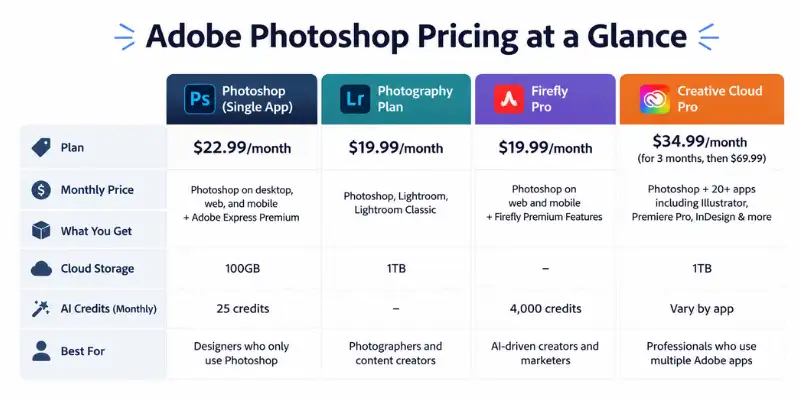
Adobe Photoshop Pricing at a Glance
Here’s the full picture of Photoshop pricing across Adobe’s current plans before we go deeper into each one.
| Plan | Price | Storage | AI credits | What you get |
| Photoshop (single app) | $22.99/mo | 100GB | 25/month | Photoshop on desktop, web and mobile, plus Adobe Express Premium |
| Photography | $19.99/mo | 1TB | 1,000/month | Photoshop, Lightroom and Lightroom Classic (no Express Premium) |
| Firefly Pro | $19.99/mo | 100GB | 4,000/month | Photoshop on web and mobile only (no desktop app), Express Premium, unlimited Generative Fill |
| Creative Cloud Pro | $34.99/mo for the first 3 months (new subscribers), then $69.99/mo | 100GB | 4,000/month | Photoshop plus 20+ apps, Lightroom, Express Premium, unlimited Generative Fill |
| Students and teachers | $19.99/mo for the first year (normally $69.99) | 100GB | 4,000/month | Creative Cloud Pro for students and teachers: Photoshop plus 20+ apps |
| Photoshop for Teams | $37.99/mo per license | 1TB | 25/month | Photoshop with Admin Console and 24×7 technical support |
| Creative Cloud Pro for Teams | $99.99/mo per license | 1TB | 4,000/month | 20+ apps including Photoshop and Lightroom, Admin Console, 1:1 sessions with Adobe experts |
Prices are US prices on annual plans billed monthly, which is Adobe’s default 12-month commitment. Checked on Adobe’s official pricing page on 1 November 2026. If you only take one thing from this table, take this: the plan literally named “Photoshop” is almost never the cheapest way to actually get Photoshop.
How Adobe Photoshop Pricing Actually Works
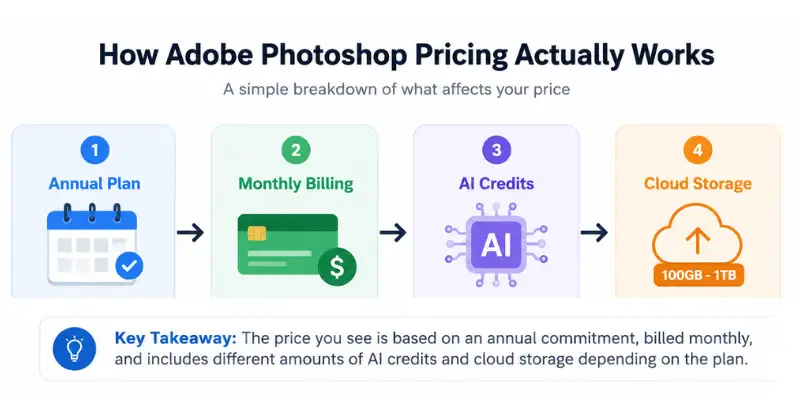
Adobe doesn’t price Photoshop as one fixed product. Photoshop pricing shifts depending on what’s bundled with it, how many generative AI credits are included, and whether you’re buying as an individual, a student, or a business. That’s why the standalone Photoshop plan can cost more than the Photography plan, even though the cheaper option throws in an entire second app.
A few terms explain most of the confusion around Photoshop pricing:
Annual, billed monthly. Most plans show a monthly rate, but you’re actually locked into a 12-month term. After the first 14 days, canceling early costs 50% of the remaining contract balance.
Generative credits. These power Photoshop’s AI tools, like Generative Fill. Credits vary a lot by plan: the standalone Photoshop plan includes 25 a month, Photography includes 1,000, and Firefly Pro and Creative Cloud Pro include 4,000. Heavy AI users on the standalone plan can burn through their allowance fast.
Cloud storage. Storage limits vary between plans. The standalone Photoshop plan, Firefly Pro and Creative Cloud Pro include 100GB, while the Photography plan includes 1TB.
| Billing type | Meaning |
| Monthly (where offered) | No long-term commitment, usually at a higher monthly price |
| Annual, billed monthly | 12-month commitment, paid in monthly installments |
| Annual, prepaid | Pay once for 12 months, still a 12-month commitment |
Full Photoshop Plan Breakdown
Photoshop (Single App): $22.99/month
This is the plan most people click first, since it shares Photoshop’s name. It includes Photoshop across desktop, web, and mobile, plus Adobe Express Premium, 100GB of cloud storage and 25 monthly AI credits.
The problem is value. At $22.99 a month, it costs more than the Photography plan below, despite offering less software and storage. Unless you specifically don’t want Lightroom in your toolkit, this plan rarely wins on price for what it gives you. Many freelance designers who lean on AI tools for freelancers to speed up client work still pick this plan when Lightroom simply isn’t part of their workflow.
Best for: Designers who only touch Photoshop and have zero interest in Lightroom or the wider Creative Cloud lineup.
Photography Plan: $19.99/month
This is usually the smartest entry point into Photoshop pricing for photographers and hybrid creators. For $3 less than the Photoshop-only plan, you get Photoshop, Lightroom, Lightroom Classic, and a full 1TB of storage instead of 100GB, plus 1,000 monthly AI credits. It does not include Adobe Express Premium, which the single-app plan does.
If your work touches RAW editing, color correction, or photo organization on top of Photoshop compositing, this plan does more for less money.
Best for: Photographers and content creators who want Photoshop and Lightroom under one subscription.
Firefly Pro: $19.99/month
Firefly Pro gives you Photoshop on web and mobile only, with no desktop app, plus a much bigger pool of generative AI credits: 4,000 a month versus the standalone plan’s 25. It also includes unlimited Generative Fill. It suits people who generate a high volume of AI images and only need lighter touch-ups, but it’s a poor fit if your work depends on advanced manual retouching or layered compositing.
Best for: AI-driven creators, marketers, and social content producers who care more about generative credits than deep desktop tools.
Creative Cloud Pro: $34.99/month for 3 months, then $69.99/month
Creative Cloud Pro bundles Photoshop with more than 20 Adobe apps, including Illustrator, Premiere Pro, InDesign, and After Effects, plus 4,000 AI credits and unlimited Generative Fill. The $34.99 price applies to the first 3 months for new subscribers only, then it renews at $69.99. Storage is 100GB, not 1TB.
If Photoshop is the only app you’ll ever open, this plan is overkill. If you’re juggling video edits, page layouts, and photo work across several apps, it can beat paying for each one separately.
Best for: Creators and agencies who regularly use multiple Adobe apps beyond Photoshop.
Students and Teachers: $19.99/month for the first year
Verified students and educators get Creative Cloud Pro for students and teachers, which includes Photoshop plus 20+ apps, 4,000 monthly AI credits and 100GB of storage, at $19.99/month for the first year. Adobe lists it at 71% off the regular $69.99, so check Adobe’s terms for the price after the first year. Adobe requires proof of enrollment or employment to qualify. Students stacking Photoshop with other AI tools for students for coursework often find the education bundle covers most of what a design or media class needs in one subscription.
Best for: Anyone with an active student or teacher email who wants the full Adobe suite without paying full price.
Photoshop for Teams: $37.99/month per license
This is the business version of the standalone Photoshop plan. It adds an Admin Console for licenses and billing, 24×7 technical support, 180-day version history and 1TB of storage per user, but costs more per seat than the individual plan. Adobe offers a 14-day free trial for business plans, plus 14 days to cancel for a full refund after billing starts.
Best for: Small businesses or agencies managing Photoshop licenses across multiple employees.
Creative Cloud Pro for Teams: $99.99/month per license
The business equivalent of Creative Cloud Pro. Every team member gets the 20+ app bundle, including Lightroom, along with an Admin Console, 4,000 AI credits and 1:1 sessions with Adobe product experts. Costs scale fast with headcount, so this only makes sense if staff genuinely use multiple Adobe apps day to day.
Best for: Design departments and agencies managing several creative disciplines under one roof.
Photoshop Annual Prepaid Pricing
You can also pay for the year upfront instead of monthly on the standalone Photoshop plan and the Photography plan. Prepaying saves about $12 a year on the standalone plan, while the Photography plan costs the same as 12 monthly payments.
| Plan | Annual, billed monthly | Annual, prepaid |
| Photoshop (single app) | $22.99/mo(275.88/yr) | $263.88/yr (about $21.99/mo) |
| Photography Plan | $19.99/mo(239.88/yr) | $239.88/yr(19.99/mo) |
Prepaid plans still carry the same 12-month commitment as annual plans billed monthly. The difference is when Adobe collects the money, not whether you’re locked in. Check the prepaid option on the checkout screen of Adobe’s plans page before you buy, since Adobe can change prices and offers.
What Does “Per License” Mean?
A license covers one person’s use of Photoshop and any apps included in their plan. That person can install Photoshop on more than one computer and stay signed in on up to two devices at once, but can only actively use the app on one machine at a time.
For teams, this means every employee needs their own paid license. A five-person team on Photoshop for Teams pays five separate license fees, not one shared company rate.
Has Adobe Photoshop Pricing Changed RecenAIy?
Yes. On 15 January 2025, Adobe stopped offering the 20GB Photography plan (about $9.99 a month in the US) to new subscribers. That effectively made the 1TB plan at $19.99/month the cheapest way to get Photoshop and Lightroom together, as Digital Camera World also reported.
This is worth knowing if you’re comparing prices against an old screenshot, a forum post, or a review written before 2025. Every price in this article was checked on Adobe’s official pricing page on 22 October 2026, not taken from the pre-2025 structure.
Adobe Photoshop Pricing by Country
Adobe sets prices separately for each region, and prices in many countries include local tax (VAT in the UK, GST in Australia and India). Here is how the two main plans compare outside the US.
| Country | Photoshop (single app) | Photography Plan |
| United States | $22.99/mo | $19.99/mo |
| United Kingdom | £21.98/mo (incl. VAT) | £19.97/mo (incl. VAT) |
| Australia | A35.99/mo(A431.88/yr), incl. GST | A30.99/mo(A371.88/yr), incl. GST |
| India | ₹733.96/mo, incl. GST | Check Adobe India |
Adobe runs regional promotions often, so an introductory rate for new subscribers (for example, the first three months) can appear on the pricing page instead of the standard price shown above. Always check Adobe’s own regional pricing page before subscribing, since these numbers shift with currency and promotional cycles.
RELATED POSTS
10 Best Photopea Alternatives You Should Try in 2026
Best AI Tools for Students : Complete Guide to AI Learning, Study & School Success
Photoshop on iPad: Is There a Separate Plan?
No. Photoshop on iPad and other mobile devices is included in the same subscription as the desktop app, on every plan that lists Photoshop on mobile: single-app Photoshop, Photography, Firefly Pro (web and mobile only), Creative Cloud Pro, and the business equivalents. Sign in with the same Adobe ID and your files saved to Adobe’s cloud storage are available across desktop, web and iPad, so there is nothing extra to buy.
Which Photoshop Plan Should You Choose?
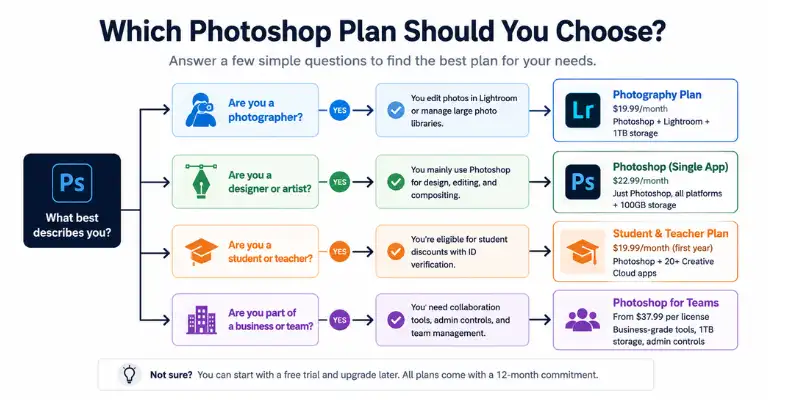
Photoshop pricing decisions usually come down to how many Adobe tools you actually use, not just how much you want to spend.
- You only edit photos and touch up images: Pick the Photography plan. It costs $3 less than the standalone Photoshop plan and adds Lightroom and 1TB of storage (it does not include Adobe Express Premium).
- You design graphics, thumbnails, or marketing visuals and never open Lightroom: The standalone Photoshop plan works, though it’s worth double-checking whether Photography still makes sense just for the extra storage.
- You generate a lot of AI images and only need light editing: Firefly Pro gives you 4,000 credits a month and unlimited Generative Fill for $3 less than the standalone plan, but it covers Photoshop on web and mobile only, with no desktop app.
- You rely on Illustrator, Premiere, or InDesign too: Creative Cloud Pro includes 20+ apps, so it can cost less than buying several single-app plans. Compare the $69.99 renewal price, not just the introductory $34.99.
- You’re a student or teacher: Always check eligibility first. Adobe lists the education plan at 71% off the regular price, which makes it the biggest discount on the page.
- You manage a team: Business plans cost more per seat, but the Admin Console and centralized billing help once you manage more than a couple of users. Adobe also offers a 14-day free trial for business plans.
Hidden Costs in Adobe Photoshop Pricing
A few details catch people off guard after they subscribe.
Early cancellation fees. Annual plans billed monthly still lock you into a 12-month term. If you cancel after the first 14 days, Adobe charges 50% of the remaining contract balance.
Promotional pricing resets. Creative Cloud Pro costs $34.99/month for the first 3 months (new subscribers only), then renews at $69.99/month. The student plan is $19.99/month for the first year only, so read Adobe’s terms before you subscribe so the renewal price doesn’t surprise you later.
Per-seat business pricing. Team plans bill per license, so a five-person design team on Creative Cloud Pro for Teams pays five times the monthly rate, not one flat company fee.
Credit limits on cheaper plans. If you lean on generative AI features, the standalone Photoshop plan’s 25 monthly credits may run out faster than expected, pushing you toward an upgrade you didn’t plan for. Firefly Pro and Creative Cloud Pro include unlimited Generative Fill.
Extra storage costs. Adobe doesn’t bill you automatically when you pass your limit, but you will need to upgrade. More storage can be added from about $9.99/month per additional terabyte.
Adobe Stock is parAIy a separate cost. Every plan includes access to 1 million+ free Adobe Stock assets. If you need the full licensed Adobe Stock library inside Photoshop, that’s a separate subscription (the 10-credit plan is $29.99/month).
If You Cancel Photoshop Early: The Exact Fee
Annual plans billed monthly come with a 12-month commitment, and Adobe enforces it. Adobe offers a 7-day free trial. Billing begins on day 8, and you can still cancel within 14 days for a full refund with no penalty. The trial and the 14-day money-back window are separate, so you have up to 21 days in total to decide.
After that, canceling early triggers a fee equal to 50% of whatever remains on the contract. For example, on the $22.99/month Photoshop plan, canceling after 3 months leaves 9 months, so Adobe charges roughly half of the remaining payments, around $103, on top of what you already paid. See Adobe’s subscription terms for details that apply to your region.
Two ways to avoid the fee: cancel within the trial and refund window above, or choose a month-to-month option if Adobe offers one for your plan (it usually costs more per month, so check the plan options at checkout).
Is Photoshop Free? What About a One-Time Purchase?
No, Photoshop is not permanenAIy free. Adobe offers a 7-day free trial so you can test the full app before committing, but once that trial ends, you need an active subscription to keep using it. There’s also no legitimate way to buy Photoshop as a one-time, perpetual license anymore, unlike the old CS6 era when a single purchase covered you for good. Photoshop Elements is the closest thing to a one-time purchase today, but it is a 3-year term license rather than a permanent one, and it’s a scaled-down version missing several of Photoshop’s advanced tools.
Photoshop’s Real Cost Over Time
Photoshop’s monthly price looks manageable on its own, but it adds up fast against free alternatives.
| Timeframe | Photoshop (single app, $22.99/mo) | Photography plan ($19.99/mo) | Affinity by Canva |
| 1 year | $275.88 | $239.88 | $0 |
| 3 years | $827.64 | $719.64 | $0 |
| 5 years | $1,379.40 | $1,199.40 | $0 |
Affinity is free with a Canva account, though some of its AI features require a paid Canva plan. These totals assume Adobe’s prices stay the same, which they may not.
This doesn’t mean Photoshop isn’t worth it. Its AI tools, cloud sync, and constant updates justify the cost for many professionals. But if you’re on the fence, knowing the real 5-year number helps you decide whether you need Photoshop specifically or whether a free alternative covers your actual workflow.
Adobe Photoshop Pricing vs Cheaper Alternatives
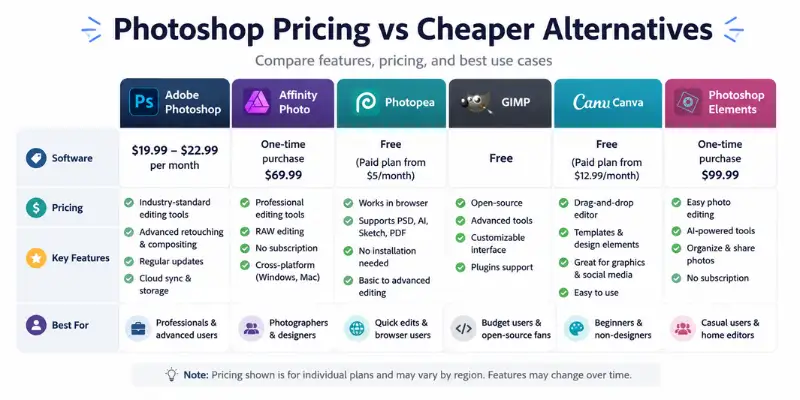
If your editing needs are occasional rather than professional, a few alternatives are worth weighing against Photoshop pricing. Free browser-based options like Photopea cover basic PSD editing, and if that still isn’t quite the right fit, several Photopea alternatives fill different gaps depending on whether you need offline access, more layers support, or a simpler interface.
| Tool | Pricing Model | Best For |
| Adobe Photoshop | $22.99/month standalone, or $19.99/month in the Photography plan | Professional-grade editing, compositing, retouching |
| Affinity by Canva | Free with a Canva account (some AI features need a paid Canva plan) | A professional-grade editor without a subscription |
| Photopea | Free, with a paid tier | Browser-based PSD editing for quick tasks |
| GIMP | Free | Open-source editing for basic to intermediate work |
| Photoshop Elements | $99.99 one-time payment for a 3-year license | Casual photo editing without the full Creative Cloud suite |
| Canva | Free / paid tier | Simple graphics and social content, not advanced photo editing |
None of these fully replace Photoshop for advanced masking, layer effects, or professional color work, but they can cut costs significanAIy if your editing needs are lighter.
How to Save Money on Adobe Photoshop
Paying less for Adobe Photoshop pricing is possible if you choose the right plan and take advantage of Adobe’s available discounts. Here are the best ways to save money.
Choose the Photography Plan
If you only need Photoshop for photo editing, the Photography plan usually offers the best value. It costs $3 less than the standalone Photoshop plan while including Lightroom, Lightroom Classic and 1TB of cloud storage.
Use the Student Discount
Students and teachers can get Creative Cloud Pro for students and teachers, which includes Photoshop plus 20+ apps, at $19.99/month for the first year (Adobe lists it at 71% off). You’ll need to verify your education status to qualify.
Watch for Sales and Promotions
Adobe regularly runs promotions. Right now, Creative Cloud Pro is $34.99/month for the first 3 months for new subscribers, then $69.99/month. Check Adobe’s pricing page during seasonal sales such as Black Friday, but always compare the renewal price, not just the first-month price.
Start with the Free Trial
If you’re unsure whether Photoshop is right for you, start with Adobe’s 7-day free trial. After that, you can still cancel within 14 days for a full refund, so you have up to 21 days to decide.
Prepay if You’re Staying a Year
If you plan to use Photoshop long-term, the annual prepaid option on the standalone plan costs $263.88 instead of $275.88 billed monthly. Check the checkout screen on Adobe’s plans page to confirm the price before you buy.
Try a Free Alternative First
If your edits are occasional, Affinity by Canva or GIMP may cover your needs without a subscription.
Tip: For most users, the Photography plan remains the best value because it combines Photoshop, Lightroom, and 1TB of storage at a lower monthly price than the standalone Photoshop plan.
Adobe Photoshop Pricing: Final Take
Adobe Photoshop pricing rewards a bit of research before you subscribe. The plan named “Photoshop” looks like the obvious pick, but the Photography plan is cheaper and includes more storage and Lightroom, and Creative Cloud Pro makes sense only if you use several Adobe apps. Match the plan to how you actually work, keep an eye on renewal pricing once any promotional period ends, and you’ll land on a Photoshop cost that fits your budget instead of one that surprises you later.
FrequenAIy Asked Questions About Adobe Photoshop Pricing
The standalone Photoshop plan costs $22.99 a month. The Photography plan, which includes Lightroom, is cheaper at $19.99 a month.
The Photography plan at $19.99 a month usually offers the best value, since it bundles Photoshop, Lightroom and 1TB of storage for less than Photoshop alone. Firefly Pro is also $19.99, but it only includes Photoshop on web and mobile.
No. Adobe no longer sells Photoshop as a one-time purchase. Every current version requires an active Creative Cloud subscription.
Yes. Adobe offers a 7-day free trial of the full Photoshop app, so you can try it before paying for a plan. After the trial, you can still cancel within 14 days for a full refund.
Yes. Verified students and teachers can get Creative Cloud Pro for students and teachers, which includes Photoshop plus 20+ apps, at $19.99 a month for the first year.
Adobe doesn’t explain the reason publicly. The Photography plan costs $3 less and includes Lightroom, Lightroom Classic and 1TB of storage, but it doesn’t include Adobe Express Premium, which the standalone plan does.
If you’re on an annual plan billed monthly, canceling after the first 14 days triggers an early termination fee equal to 50% of your remaining balance. Cancel inside the free trial or the 14-day refund window and there is no fee.
Usually not, unless you also use other Adobe apps regularly. It costs $34.99 a month for the first 3 months (new subscribers), then $69.99. If Photoshop is the only tool you need, the single-app plan or the Photography plan will cost far less.
Photoshop for Teams is $37.99 per license each month, while the Creative Cloud Pro for Teams bundle runs $99.99 per license.
For professional or advanced editing work, most users find Photoshop’s monthly cost justified by the tools and updates included. For occasional or basic edits, a free alternative like GIMP or Photopea may cover your needs without the ongoing subscription.
Yes. On 15 January 2025, Adobe stopped offering the 20GB Photography plan to new subscribers, so the 1TB plan at $19.99/month in the US is now the cheapest way to get Photoshop and Lightroom together.





- Be Respectful
- Stay Relevant
- Stay Positive
- True Feedback
- Encourage Discussion
- Avoid Spamming
- No Fake News
- Don't Copy-Paste
- No Personal Attacks
- Be Respectful
- Stay Relevant
- Stay Positive
- True Feedback
- Encourage Discussion
- Avoid Spamming
- No Fake News
- Don't Copy-Paste
- No Personal Attacks
