9 Best BrowserStack Alternatives in 2026 — With Free Plans & Real Pricing
Published: 14 Jan 2026
BrowserStack is one of the most popular browser testing platforms for developers and QA teams. It offers real device testing, automation tools, and cross-browser compatibility testing in one place. However, many smaller teams and startups find BrowserStack expensive, especially when advanced automation plans start at higher monthly pricing. Because of this, many developers search for BrowserStack alternatives that offer similar testing features at a lower cost.
Some teams want affordable real-device testing. Others need better CI/CD integrations, visual testing tools, or free plans for smaller projects. In this guide, we will compare the best BrowserStack alternatives for different use cases, including automated testing, mobile testing, visual regression testing, and enterprise-level QA workflows.
We will also cover pricing, key features, and which platform works best for different team sizes
.Note: TestMu AI was previously known as LambdaTest, so you may still see both names mentioned in some tools and guides.
What BrowserStack Does Well (Before You Switch)
BrowserStack is one of the most established browser testing platforms in the industry. Switching away from it is not always necessary, especially if it already fits your team’s needs.
Before looking at alternatives, it’s important to understand where BrowserStack performs strongly:
| What BrowserStack does well: |
|---|
|
| When you should consider alternatives: |
|---|
|
Quick Comparison of BrowserStack Alternatives
| Tool | Starting Price | Free Plan? | Best For |
| TestMu AI | $15/mo | Yes (lifetime) | Cost-effective cross-browser testing for small & mid teams |
| Sauce Labs | $39/mo | No (14-day free trial) | Enterprise-grade testing with compliance, scalable infrastructure, and unlimited users |
| TestingBot | $29/mo | 7-day trial | Budget-friendly parallel testing |
| CrossBrowserTesting | $29/mo | 7-day trial | Manual + automated browser testing |
| Browserling | $19/mo | Yes (limited) | Quick live browser testing sessions |
| Applitools | $99/mo | Yes (limited) | AI-powered visual regression testing |
| BrowserStack | $399/mo | No | Full enterprise-scale testing infrastructure |
| Kobiton | Custom pricing | No | Real mobile device testing for Android/iOS apps |
| HeadSpin | Custom pricing | No | Global performance testing across real networks |
| AWS Device Farm | Pay-per-use (~$0.17/min) | No | AWS-based scalable mobile app testing |
What are BrowserStack Alternatives?
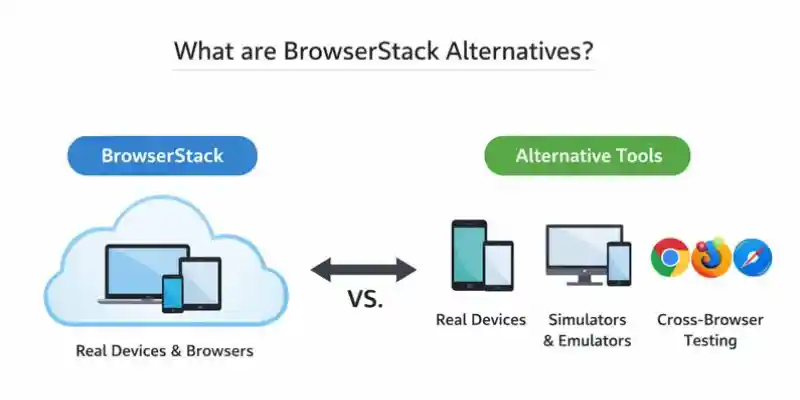
BrowserStack alternatives are testing tools that help developers check how websites and applications perform across different browsers, devices, and operating systems. These tools offer similar core functionality but often differ in pricing, features, and scalability.
They are mainly used to ensure that websites and apps work correctly for all users, regardless of device or browser type.
These platforms typically provide:
- Cloud-based access to real browsers and devices for accurate testing
- Cross-browser compatibility testing to ensure consistent performance
- Automated testing to reduce manual effort and speed up workflows
For example, TestMu AI allows developers to test mobile applications on both Android and iOS devices in real environments.
What to Look for in a BrowserStack Alternatives
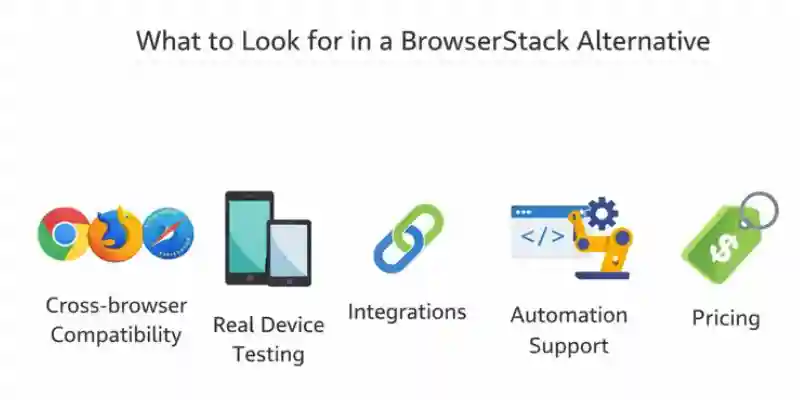
When choosing a BrowserStack alternative, it is important to evaluate key features that ensure your testing process is accurate, fast, and cost-effective. The right tool should match your project requirements and team workflow.
Cross-browser Compatibility
Testing across browsers like Chrome, Firefox, Safari, and Edge ensures your website works consistently for all users.
This helps prevent issues where a site works on one browser but breaks on another, leading to a poor user experience.
Real Device Testing
Real device testing shows how your application performs on actual devices instead of simulators.
It helps detect real-world issues such as touch responsiveness, performance delays, or battery usage problems.
Integrations
A good testing platform should integrate with CI/CD tools and development workflows.
This allows automated test execution whenever new code is deployed. For example, tools that integrate with Jenkins can run tests automatically after every update.
Automation Support
Automation helps speed up testing by reducing manual effort. Modern platforms also use AI-based automation to improve accuracy and efficiency in large testing workflows.
This is especially useful for regression testing and continuous development cycles.
Pricing
Pricing should match your budget and project scale. Some tools offer pay-as-you-go models, while others provide monthly or yearly subscription plans with different feature levels.
Best BrowserStack Alternatives
Are you looking for a different BrowserStack alternatives? These are some of the best tools for testing your website or app on a variety of browsers and devices. Let’s look at their features, prices, and what makes them unique.
TestMu AI (formerly LambdaTest)
Overview:
TestMu AI (formerly LambdaTest) is a cloud-based testing platform that helps developers and QA teams test websites and web apps across thousands of browsers, operating systems, and real devices. It supports both manual and automated testing, making it useful for small teams as well as large companies.
Key Features:
- Cross-browser testing on real devices
- Automated Selenium testing grid
- Integration with CI/CD tools like GitHub and Jenkins
- Visual UI testing for responsive design checks
- Real-time browser testing and debugging
Pricing:
- Free Plan: Lifetime free plan with limited testing access
- Paid Plans: Start from $15/month (Live plan) with advanced features and more browser/device options
- Enterprise Plans: Custom pricing for larger teams and organizations
Best for:
Small and medium teams looking for a cheaper BrowserStack alternative with automation testing.
Skip if:
You need advanced enterprise compliance or FedRAMP certification.
Sauce Labs
Overview:
Sauce Labs is a cloud-based testing platform that lets you test on different browsers, devices, and operating systems. It works excellent for both manual and automated testing, and it can grow with the needs of development teams
Key Features:
- Supports Selenium, Appium, Cypress, and other automation frameworks
- Test on real mobile and tablet devices in the cloud
- Sauce Labs integrates with CI/CD tools like CircleCI and Jenkins
- Includes video recording and visual testing to track issues
Pricing:
- Free Trial: 14-day free trial available.
- Paid Plans: Start at $39/month (Live Testing). Virtual Cloud starts at $149/month. Real Device Cloud starts at $199/month. Enterprise plans offer custom pricing. All plans include unlimited users.
Best for:
Large enterprise teams that need compliance certifications and scalable testing infrastructure.
Skip if:
You want a budget-friendly testing platform for small projects.
TestingBot
Overview:
TestingBot is a cross-browser and mobile testing platform that helps teams run both manual and automated tests on real devices and cloud environments. It supports Selenium and Appium, making it useful for scalable QA workflows
Key Features:
- Real device and cloud testing environments
- Supports Selenium and Appium for automated testing
- Integrates with CI/CD pipelines including Jenkins and GitHub Actions
- Screenshot capture and screen recording for issue tracking
Pricing:
- Free Trial: 7-day free trial with limited usage.
- Paid Plans: Start at $29/month for access to real devices and advanced testing features.
Best for:
Teams that need affordable cross-browser testing with automation support and parallel test execution.
Skip if:
You need advanced visual testing and AI-based UI validation.
CrossBrowserTesting by SmartBear
Overview:
CrossBrowserTesting is a tool by SmartBear that provides real-time testing on over 1,500 different browsers and devices. It offers both manual and automated testing, with powerful features for tracking issues.
Key Features:
- Supports manual and automated testing.
- Real-time browser and mobile testing.
- Visual testing to compare screenshots across different devices.
- Integrates with CI/CD tools like Jenkins and Bitbucket.
Pricing:
- Free Trial: 7-day free trial.
- Paid Plans: Start at $29/month for individual users. Teams with larger needs can contact for custom pricing.
Best for:
Teams that want a balance between manual testing and automated browser testing without moving to expensive enterprise platforms.
Skip if:
You need advanced AI-driven visual regression testing or large enterprise compliance tools. In that case, platforms like Applitools or Sauce Labs may fit better.
Browserling
Overview:
Browserling is a quick and easy way to test websites in different browsers. It’s simple to use and lets you test things in real time with no downloads needed.
Key Features:
- Quick, real-time browser testing.
- Supports popular browsers like Chrome, Firefox, Safari, and Internet Explorer.
- Keep things simple and don’t make them hard to set up.
- Access to live browsers with your website running on them.
Pricing:
- Free Plan: Limited to basic browser access and short testing times.
- Paid Plans: Start at $19/month for more features and longer testing sessions.
Best for:
Quick live browser testing and debugging.
Skip if:
You need advanced automation testing workflows.
Applitools
Overview:
Applitools is a visual testing platform focused on ensuring UI consistency across browsers, devices, and screen sizes. It uses AI to detect visual changes that traditional testing tools may miss.
Key Features:
- AI-powered visual regression testing
- Supports integration with Selenium, Cypress, Playwright, and other frameworks
- Real-time cross-browser visual testing results
- Easy CI/CD pipeline integration for automated testing
Pricing:
- Free Plan: Available with limited features.
- Paid Plans: Start at $99/month for additional features and advanced visual testing capabilities.
Best for:
Teams that focus on UI consistency and want advanced visual regression testing with AI support.
Skip if:
You want a complete cross-browser testing replacement for BrowserStack.
Kobiton
Kobiton is a mobile-focused testing platform built for teams that mainly work on Android and iOS applications. It helps QA teams test apps on real physical devices without maintaining an in-house device lab.
Instead of simulations, it uses real devices so developers can catch real-world mobile issues before release.
Key Features:
- Real Android and iOS device testing in the cloud
- Supports both manual and automated mobile testing
- AI-assisted automation features for faster test creation
- Cloud-based and on-premise deployment options
- Designed specifically for mobile app quality testing
Pricing:
- Custom pricing based on team and usage needs
Best for:
Teams building mobile apps that need real device testing and want reliable automation support for Android and iOS.
Skip if:
Your main focus is web or browser testing. This tool is not designed for cross-browser testing workflows.
HeadSpin
HeadSpin is a performance testing and user experience analytics platform that focuses on real-world conditions across different countries and networks.
It helps teams understand how their apps behave under real mobile networks like 3G, 4G, and 5G in different global regions.
Key Features:
- Real device testing across multiple countries
- Network condition testing (slow and fast mobile networks)
- Performance monitoring and analytics insights
- Helps detect latency and user experience issues
- Global testing infrastructure for mobile and web apps
Pricing:
- Custom enterprise-based pricing
Best for:
Teams that need to test how their apps perform globally under real network and location-based conditions.
Skip if:
You only need basic browser or functional testing. This platform is more focused on performance and real-user experience insights.
AWS Device Farm
AWS Device Farm is a cloud testing service from Amazon that allows developers to test mobile and web apps on real devices without owning physical hardware.
It is especially useful for teams already working inside the AWS ecosystem.
Key Features:
- Real Android and iOS device testing in the cloud
- Supports automated and manual testing workflows
- Seamless integration with AWS services
- Pay-as-you-use pricing model (no fixed subscription)
- Scalable for large testing workloads
Pricing:
- Pay-per-use (around $0.17 per device minute, usage-based billing)
Best for:
Development teams already using AWS who want flexible, scalable mobile testing without long-term contracts.
Skip if:
You are mainly looking for browser-based testing or a lightweight QA tool . this is focused on mobile app testing.
Which BrowserStack Alternative Should You Choose?
Choosing the right tool depends on your specific testing needs. Below is a simple breakdown to help you decide quickly.
Want to reduce cost while keeping strong features?
→ TestMu AI
Best for small and mid-sized teams that need affordable cross-browser testing. It offers a free plan and paid plans starting around $15/month, making it a strong cost-effective alternative.
Mobile app testing is your main priority?
→ Kobiton
Best for teams focused on Android and iOS testing using real devices. It is designed specifically for mobile QA and automation workflows.
Do you need enterprise-level compliance and scale?
→ Sauce Labs
Best for large organizations that require compliance standards such as SOC 2 and HIPAA along with scalable testing infrastructure.
Are you focused on visual or UI testing?
→ Applitools
Best for teams that need AI-based visual regression testing to detect UI changes and layout issues automatically.
Do you want quick browser testing without setup?
→ Browserling
Best for instant live browser sessions when you just need quick testing without installation or configuration.
Do you need a budget-friendly testing solution?
→ TestingBot
Best for developers and small teams looking for affordable parallel browser testing with basic automation support.
Do you already use AWS infrastructure?
→ AWS Device Farm
Best for teams working inside AWS who want pay-as-you-use mobile testing with seamless cloud integration.
Conclusion
Choosing the right BrowserStack alternative depends on your team size, budget, and testing needs. Some platforms focus on automated testing, while others provide better cross-browser compatibility or visual testing features.
Before choosing a platform, it is a good idea to try a free plan or trial first. Tools like TestMu AI and Applitools offer free options that help you test your workflow before upgrading to a paid plan.
By comparing features, pricing, integrations, and device support, you can find the best testing platform for your development process.
Faqs
Yes, but fully free tools usually come with limitations. TestMu AI offers a free plan suitable for individual developers and small testing needs.
For completely free options, Selenium Grid and Playwright are available, but they require manual setup and maintenance. So they are free in cost but not in effort.
TestMu AI is better for small and mid-size teams because it offers lower pricing and still supports cross-browser and automation testing.
BrowserStack is better for enterprise teams that need large-scale device coverage, compliance certifications, and advanced infrastructure. The right choice depends on your budget and project size.
BrowserStack is expensive because it offers a large real device cloud, enterprise-grade security, and global support infrastructure.
These features are mainly designed for large companies. Small teams usually prefer cheaper alternatives like TestMu AI or TestingBot.
Small teams should choose tools that are simple, affordable, and easy to set up. TestMu AI is a strong option because it balances cost and features.
For quick live browser testing without setup, Browserling is also a good lightweight choice.
Yes, most modern testing platforms support Selenium automation.
Tools like TestMu AI, Sauce Labs, TestingBot, and CrossBrowserTesting support Selenium. Some also support Playwright and Cypress for faster automation workflows.





- Be Respectful
- Stay Relevant
- Stay Positive
- True Feedback
- Encourage Discussion
- Avoid Spamming
- No Fake News
- Don't Copy-Paste
- No Personal Attacks
- Be Respectful
- Stay Relevant
- Stay Positive
- True Feedback
- Encourage Discussion
- Avoid Spamming
- No Fake News
- Don't Copy-Paste
- No Personal Attacks
