MotionMuse AI vs Kling AI vs Runway ML vs Pika Labs: Which One Is Actually Worth Using in 2026?
Published: 18 May 2026
If you have spent the last hour jumping between four browser tabs — MotionMuse, Kling AI, Runway ML, and Pika Labs — and still cannot decide which one to use, this comparison will help you choose quickly and confidently.
Every one of these tools claims to be the best. But when you actually sit down and use them back to back, each one feels completely different. The motionmuse ai vs kling ai question alone comes up constantly in creator communities because both tools target social media audiences but deliver wildly different experiences. Some platforms are built for speed and simplicity. Others are built for quality and control. What feels perfect for someone posting daily TikToks might feel like overkill for a beginner trying to make their first Instagram Reel.
This article compares all four tools with complete honesty. We look at video quality, pricing, ease of use, free plan access, and real user feedback. By the end, you will know exactly which tool fits your situation without spending money testing each one individually.
A Quick Look at Each Tool Before We Compare
Before diving into the head-to-head comparisons, here is a short summary of each platform so everyone starts on the same page.
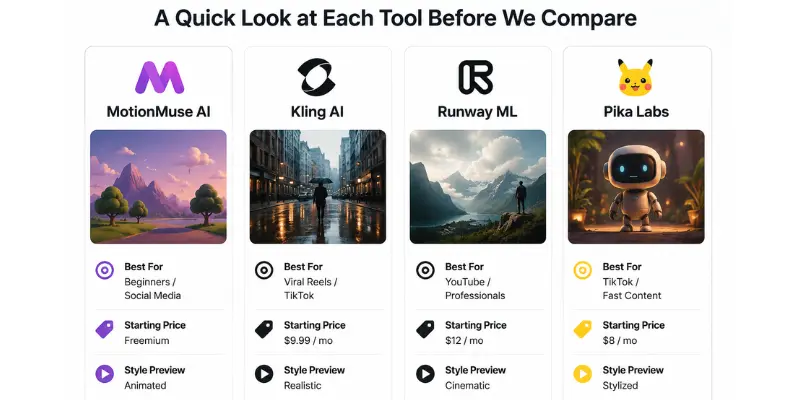
MotionMuse AI
MotionMuse AI turns your text or image ideas into short animated video clips. It is built for beginners and social media creators who want quick results without learning complex software. Everything runs in your browser, no install needed, and most videos are 4 to 6 seconds long.
Kling AI
Kling AI focuses on producing highly realistic AI video output. It is popular on TikTok and Instagram because the motion looks smooth, natural, and believable almost like real footage. It has a limited free tier and a paid plan starting around $9.99 per month.
Runway ML
Runway ML is a professional-level platform using Gen-3 AI models. It gives creators detailed control over how videos look and move. It is used by YouTubers, filmmakers, and marketing agencies. Paid plans start around $12 per month.
Pika Labs
Pika Labs is extremely beginner-friendly. It generates short, stylized or animated videos from a text prompt within seconds. A free plan with a watermark is available, and paid plans start around $8 per month.
Side-by-Side Feature Comparison
| Feature | MotionMuse AI | Kling AI | Runway ML | Pika Labs |
| Video Quality | Good (animated) | Excellent (realistic) | Excellent (cinematic) | Good (stylized) |
| Free Plan | Limited credits | Limited credits | Trial only | Free with watermark |
| Starting Price | Freemium | ~$9.99/mo | ~$12/mo | ~$8/mo |
| Ease of Use | Very Easy | Easy | Moderate | Very Easy |
| Video Length | 4–6 seconds | Up to 10 seconds | Up to 16 seconds | Short clips |
| Best For | Beginners / Social media | Viral Reels / TikTok | YouTube / Professionals | TikTok / Fast content |
| Watermark on Free | Possible | Yes | Yes | Yes |
| Learning Curve | None | Low | Moderate | None |
| Editing Control | Basic | Moderate | Advanced | Basic |
Prices verified as of May 2026. Always check official websites before purchasing.
MotionMuse AI vs Kling AI
The motionmuse ai vs kling ai comparison is one of the most searched questions right now, and for good reason. Both tools are popular with social media creators, but they serve very different needs. Understanding where each tool excels and where it falls short is the only way to make a smart decision.
Video Quality
MotionMuse creates clean animated clips. For quick social posts, background videos, and explainer content, the output looks polished and consistent. But it is not photorealistic. Characters and objects move in a stylized way that works well for certain content types but would not pass as real footage.
Kling AI is in a completely different category when it comes to realism. It uses motion models trained on real-world physics. Fabric flows naturally, people walk believably, and camera movements feel like they came from an actual lens. If your goal is content that looks and feels like real video, Kling is clearly stronger in the motionmuse ai vs kling ai quality battle.
Kling AI
Pricing and Free Plan
Both tools run on a credit system. Neither gives you unlimited free videos. MotionMuse gives new users a batch of starting credits that runs out faster than most people expect, especially when testing different prompt styles. Kling has limited free credits too.
The honest truth is that both treat free access as a trial period, not a permanent solution. You will need a paid plan for any regular content creation with either tool.
| Winner for pricing flexibility: |
|---|
|
Roughly equal both require payment for ongoing use |
Ease of Use
MotionMuse is slightly easier for first-time users in the motionmuse ai vs kling ai ease comparison. The interface is minimal, there are very few settings to navigate, and the prompt-to-video process takes under two minutes from start to finish.
Kling requires a bit more care with how you write prompts. Because the output is more detailed and realistic, the AI needs clearer instructions. Vague prompts produce unpredictable results. Once you learn how to write effective prompts, though, the results are consistently impressive.
| Winner for ease of use: |
|---|
|
MotionMuse AI |
Who Should Use Which?
Choose MotionMuse AI if:
- You are brand new to AI video tools
- You want to create quick clips for Instagram or TikTok without a learning curve
- You need something working within five minutes
- You prefer a clean, minimal interface
Choose Kling AI if:
- Realism and video quality are your top priorities
- You create content where smooth, natural-looking motion matters
- You are willing to spend time writing better prompts
- You want videos that genuinely stand out in social feeds
The motionmuse ai vs kling ai verdict: MotionMuse wins on speed and simplicity, Kling wins on output quality.
MotionMuse AI vs Runway ML
Runway ML is considered the most powerful tool in the AI video space by many professional creators. Here is an honest comparison with MotionMuse.
Output Quality and Video Length
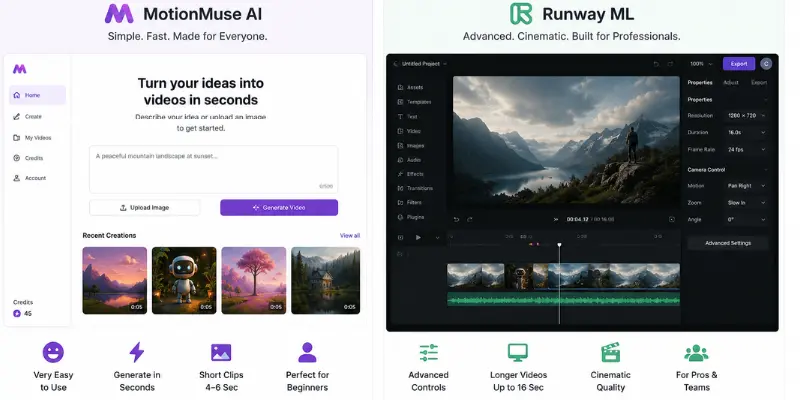
The difference in quality between these two tools is significant. Runway ML’s Gen-3 model produces cinematic-level footage. Colors are richer, motion is smoother, and the visual result is much closer to professional filmmaking than what MotionMuse produces.
Runway also supports videos up to 16 seconds long. For YouTube creators who need B-roll footage, intro sequences, or title clips, that extra length is a major advantage. MotionMuse caps out at 4 to 6 seconds.
MotionMuse is not trying to compete with professional tools. It is built for fast, simple content creation. For a quick animated background on a social post, it gets the job done in seconds.
Runway ML
Learning Curve
Runway ML is not a beginner tool. It has a full editing interface with timelines, style controls, camera motion settings, and different generation modes. It takes time to get good results, and your first few videos will probably need refinement before they look right.
MotionMuse has no real learning curve. You open it, type your idea, and hit generate. That is the entire process.
| Winner for ease of use: |
|---|
|
MotionMuse AI |
Pricing Reality
Runway ML’s plans are more expensive when you account for how many credits you need for regular use. For casual creators, the monthly cost is hard to justify unless you are using it for paid or professional work.
MotionMuse is cheaper for light, casual use. For heavy use multiple videos per week neither tool is cheap. If budget is your top concern, there are genuinely solid free AI video tools worth testing before committing to any paid plan.
| Winner for budget casual use: |
|---|
|
MotionMuse AI |
Who Should Use Which?
Choose MotionMuse AI if:
- You create short-form content for social media
- You want speed and simplicity over advanced control
- Budget is a real concern
Choose Runway ML if:
- You create YouTube videos, client work, or professional content
- Video quality is your top priority and you need longer clips
- You are willing to invest time learning the platform
MotionMuse AI vs Pika Labs
These two tools are probably the most similar in this group. Both are beginner-friendly, fast, and focused on short-form social media content. But there are meaningful differences that matter depending on your content style.
Speed and Output Style
Pika Labs is fast often faster than MotionMuse. The visual style leans toward creative and artistic. It adds flair that makes videos feel more expressive and unique. This can be great, but it also means results are occasionally less predictable than you might want.
MotionMuse output is cleaner and more structured. It is more predictable and consistent, which some creators prefer when they need reliable output for a regular posting schedule.
Pika Labs Winner for consistent output: MotionMuse AI
Free Plan Comparison
Pika gives you a free plan that adds a watermark to exports. It is useful for testing and casual personal content, but not ideal for professional or client-facing work without upgrading.
MotionMuse gives limited free credits that also run out quickly. Neither tool offers clean, watermark-free videos on the free tier. If that matters to you, there are AI video tools that offer watermark-free free access including one open-source option with no limits at all.
Roughly equal
Social Media Use Case
Both tools work well for TikTok and Instagram Reels. The choice comes down to your content style. If you want clean, structured clips, MotionMuse works better. If you want more creative energy and visual variety in your videos, Pika is more exciting to use day to day.
Pika Labs (slightly)
Who Should Use Which?
Choose MotionMuse AI if:
- You want predictable, consistent output every time
- You prefer a minimal interface with few decisions to make
- You are just starting out with AI video tools
Choose Pika Labs if:
- You want more creative and artistic variety in your clips
- You post content daily and value speed above everything else
- You are comfortable with a watermark on free exports
Overall Winner by Use Case
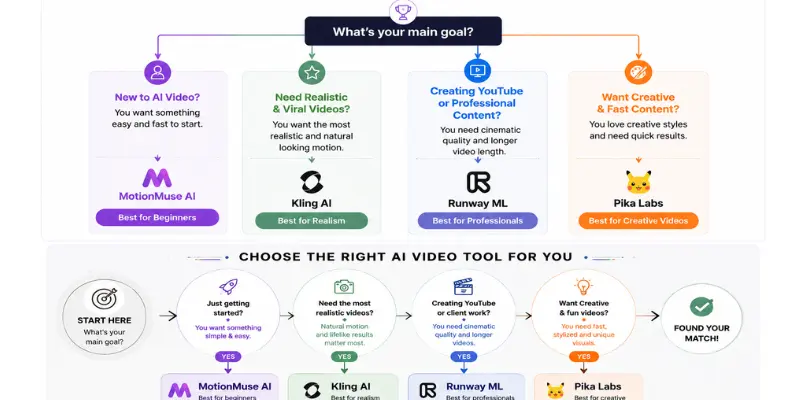
No single tool is best for everyone. Here is the clearest recommendation based on what you actually need to create.
| Your Goal | Best Tool |
| Quickest start, no experience | MotionMuse AI or Pika Labs |
| Viral TikTok / Instagram Reels | Kling AI |
| YouTube / professional content | Runway ML |
| Free daily videos with reset | Pika Labs |
| Cinematic storytelling | Runway ML |
| Budget-friendly casual use | MotionMuse AI |
| Realistic human motion | Kling AI |
| Creative experimental videos | Pika Labs |
What Real Users Actually Think
Looking at communities like Reddit’s r/aivideo gives a more realistic picture than any company’s marketing page.
MotionMuse AI users consistently mention how easy it is to start. The most common frustration is that free credits run out faster than expected, and the credit system is not always clearly explained upfront. If you want to know whether the platform is safe to pay for, this MotionMuse legitimacy review breaks down billing practices, domain history, and common red flags users should know about
Kling AI users are generally very positive about the video quality. The realism impresses people who have tried other tools. The main frustration is limited free access — you cannot properly test it without spending money.
Runway ML is well respected by professional creators. YouTube creators and those doing client work find it worth the cost. Beginners often feel overwhelmed and end up switching to simpler tools first.
Pika Labs is popular with younger creators and TikTok content makers. It is fast, fun, and easy. The watermark on the free plan and the lack of realism compared to Kling are the two most common complaints.
| Note: |
|---|
|
We also reviewed creator discussions across Reddit, YouTube, and AI creator communities to identify the most common complaints and strengths for each platform |
Pros and Cons of Each Tool
MotionMuse AI
Pros:
- Simplest interface of the four
- Fast to start with no setup at all
- Good for quick animated social clips
- Works for beginners with zero video experience
Cons:
- Short video length (4–6 seconds maximum)
- Limited editing control
- Credit system can feel confusing
- Not suitable for professional or client-level projects
For a deeper look at real test results and actual prompt outputs, this MotionMuse AI review breaks down the platform’s strengths, weaknesses, and overall user experience.
Kling AI
Pros:
- Best video realism of all four tools
- Excellent for viral social media content
- Natural-looking motion and physics
- Popular in serious creator communities
Cons:
- Very limited free access
- Requires good prompt-writing skills for best results
- Can be inconsistent with complex scenes
Runway ML
Pros:
- Professional cinematic quality
- Longer video output — up to 16 seconds
- Advanced editing and style controls
- Best option for YouTube and client work
Cons:
- Steeper learning curve than any other tool here
- More expensive for regular use
- Not beginner-friendly
- Overkill for casual social media posts
Pika Labs
Pros:
- Very fast video generation
- Creative and stylized output
- Accessible free plan with watermark
- Extremely easy for beginners
Cons:
- Watermark on all free exports
- Less realistic than Kling AI
- Limited advanced editing controls
- Output style can be unpredictable
What If None of These Feel Right?
If budget is your main concern and none of these four tools feel affordable or suitable, there are solid alternatives worth exploring. The full list of MotionMuse AI alternatives includes free and paid tools tested in 2026, including options with daily credits and no usage limits. For creators who need fewer content restrictions and broader creative latitude, there are also AI video tools with expanded creative freedom that go well beyond what these four standard platforms allow.
Conclusion
After comparing all four tools honestly, the truth is clear: none of them is the best for everyone. Each one is built for a different creator and a different workflow.
Starting out with no experience? MotionMuse AI or Pika Labs gets you creating content in minutes. In the motionmuse ai vs kling ai decision specifically, your choice should hinge on whether you care more about getting started fast or getting the best possible output quality. Serious about TikTok or Instagram with realistic visuals? Kling AI is worth the investment. Making YouTube content or working with clients? Runway ML is the tool to learn.
The smartest move is to test the free tier of each tool first. Generate a few videos with each one and see which output style feels natural for your content. Most creators end up settling on one primary tool and keeping one or two others for specific types of projects.
Faqs
The motionmuse ai vs kling ai answer depends entirely on your needs. MotionMuse is better for simplicity and speed. Kling is better for realism and quality. For casual beginners, MotionMuse wins in ease. For creators who want impressive, realistic output, Kling wins clearly.
Kling AI and Pika Labs are the top choices for TikTok. Kling produces realistic motion that performs well in feeds. Pika is faster and more creatively varied. MotionMuse is also a solid starting point for new creators.
For professional creators, yes. If you produce YouTube content or work with clients, Runway justifies its price. For casual creators who just want quick social clips, it is more than you need
This is difficult with standard free plans. Pika adds a watermark to free exports. MotionMuse credits run out quickly. Runway only offers a short trial. For truly watermark-free free videos, there are dedicated tools that offer this including open-source options worth checking out.
Pika Labs has the most accessible free plan for light daily use. For paid plans, Pika starts at around $8 per month, making it the most affordable of the four.




- Be Respectful
- Stay Relevant
- Stay Positive
- True Feedback
- Encourage Discussion
- Avoid Spamming
- No Fake News
- Don't Copy-Paste
- No Personal Attacks
- Be Respectful
- Stay Relevant
- Stay Positive
- True Feedback
- Encourage Discussion
- Avoid Spamming
- No Fake News
- Don't Copy-Paste
- No Personal Attacks
