Google Opal Review 2026: Is Google’s Free AI App Builder Worth Trying?
Published: 21 Jul 2026
| Overall Rating: 4.6/5 |
|---|
Best free AI app builder for beginners and quick prototypes, but not ideal for production software. |
Google has been shipping AI experiments out of Google Labs at a fast pace, and Opal is one of the more interesting ones to land recently. It promises something specific: build a working mini app just by describing it in plain English, no coding required.
This Google Opal review covers what the tool actually does, how much it costs, what real users on Reddit are saying, and whether it deserves a spot in your AI toolkit in 2026. If you’ve searched “what is Google Opal” or “is Opal app safe,” you’ll find direct answers below.
What Is Google Opal?
Since that’s the core question behind most of this Google Opal review, let’s start there. Google Opal is a no-code AI app builder that came out of Google Labs, the same division responsible for a lot of Google’s early-stage AI experiments. It lets you describe an idea in natural language, and the platform turns that description into a working mini app, complete with inputs, AI processing steps, and outputs.
Google Opal started as a US-only experiment in mid-2025, led by Megan Li, a senior product manager at Google Labs. It has since expanded to more than 160 countries, including Canada, India, Japan, Brazil, and Pakistan, and it’s built on the Gemini family of models, mainly Gemini 3 Flash for interpreting prompts and turning them into logical steps.
If your search brought you here through “opal experiment” or “google labs opal,” this is the tool: an experimental, still-evolving app builder rather than a polished, finished product.
How Does Opal App Work?
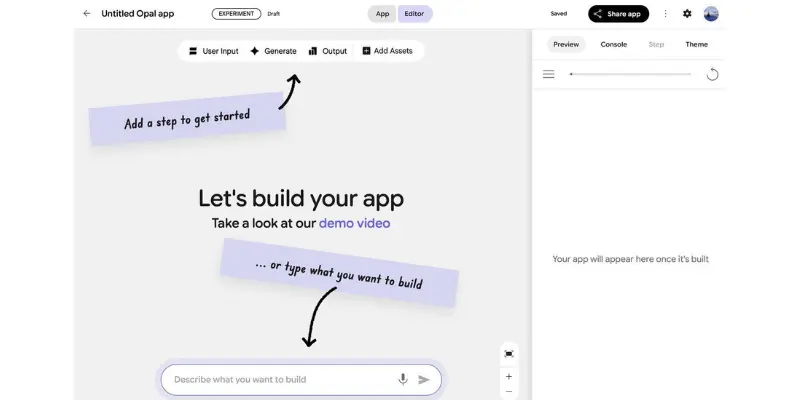
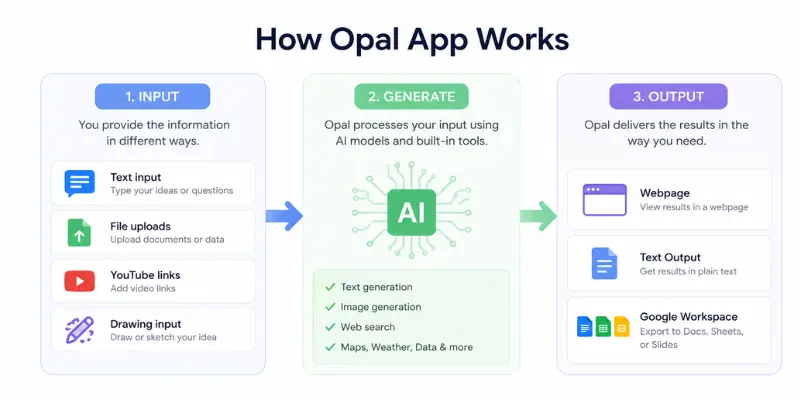
Every Opal app follows the same basic pattern, and understanding this pattern is the fastest way to understand what the tool is actually good at.
- Input: you collect information through text fields, file uploads, YouTube links, or drawing input.
- Generate: the platform runs that input through an AI model or built-in tool, including text generation, image generation, speech synthesis, video generation, web search, map lookups, or weather data.
- Output: the result gets delivered as a webpage, plain text, or exported directly into Google Docs, Sheets, or Slides.
You can build this two ways: chat with Opal and describe the whole workflow in one go, or use the visual, node-based editor to drag steps into place and connect them with “@” references. Each node handles one job, so you can test a single step in isolation before running the entire app, which makes debugging far less painful than it sounds.
What Is Opal Gemini? (The Gemini Integration)
In December 2025, Google folded Opal directly into the Gemini web app, making it available through the Gems manager alongside other pre-built Gemini assistants like the learning coach and coding partner. This is what people usually mean when they search “opal gemini”: it’s not a separate product from Gemini anymore, it’s a building tool that lives inside it.
Practically, this means you no longer have to visit opal.withgoogle.com separately. You can open Gemini, head to the Gems section, and start building a mini app from the same interface you already use for chat.
Google Opal Templates: The Best Apps to Try First
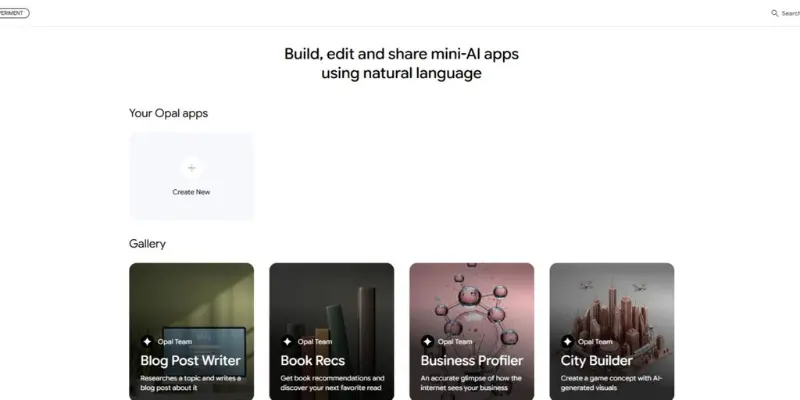
No Google Opal review would be complete without covering the template gallery, since that’s where most people actually start. Rather than starting from a blank canvas, most people begin with Opal’s gallery of pre-built templates. A few stand out as genuinely useful demonstrations of what the platform can do:
- Blog Post Writer: generates an outline, then writes each section as a separate step you can edit individually.
- YouTube Video Quiz Generator: pulls a transcript from a video link and turns it into a multiple-choice quiz with feedback on each answer.
- Business Profiler: searches the web and Google Maps to generate a quick company summary.
- Social Media Post Remix: takes one piece of content and reformats it for different platforms, adjusting tone for each.
- Product Research: pulls pricing and feature data on a named product into a clean, shareable summary.
Newer, community-built apps have started to lean into more creative territory too, including interactive storytelling tools that combine text generation, image generation, and an ongoing narrative feed, which tends to show off Opal’s multi-step chaining better than any single-answer chatbot could.
Is Opal App Free? How Much Does Google Opal Cost?
This is probably the most searched question tied to any Google Opal review, and thankfully it has a simple answer right now. Right now, yes, Opal is completely free. It’s in public beta, so there’s no subscription, no credit card requirement, and no usage cap that’s been publicly announced. All you need is a Google account.
Google hasn’t confirmed what happens after the beta ends, but based on how the company has priced similar products in the past, a usage-based or tiered model for heavy users is the most likely direction once Opal graduates out of Labs. If you’re building anything you plan to rely on long-term, it’s worth exporting your outputs to Google Sheets or Docs regularly so you’re not stuck if pricing changes.
So to directly answer “does Opal app cost money”: not at the moment, but that’s expected to change eventually.
Google Opal Features Worth Knowing About
Any thorough Google Opal review needs to go beyond the basic input-generate-output loop, since a few extra features are worth calling out specifically:
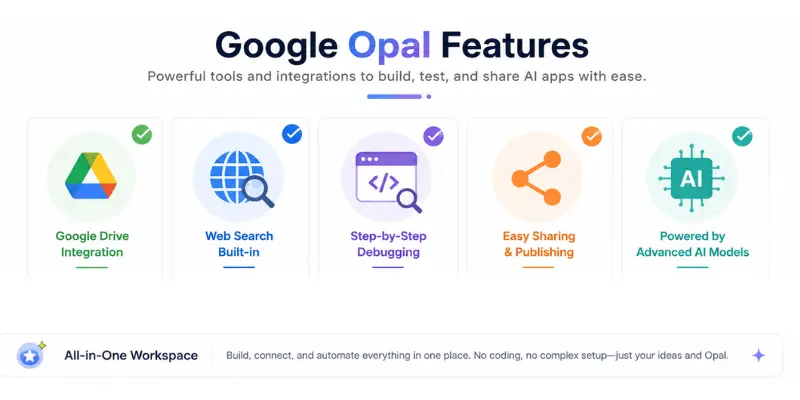
- Deep Google Workspace integration: apps save automatically to Google Drive and can export results straight to Sheets, Docs, or Slides.
- Built-in tools via “@” mentions: you can pull in web search, map data, or weather information without setting up an API key.
- Step-by-step debugging: a live console shows exactly what each node is doing, which is unusually transparent for a no-code tool.
- Instant sharing: publishing an app generates a public link anyone with a Google account can open and run.
- Multi-model access: Opal can call on Gemini for text, Imagen for images, and separate models for speech and video generation within a single workflow.
What it doesn’t have is just as important: no loops, no complex conditional logic, no third-party API connections, and no visible source code, so if something breaks, you’re limited to what the visual editor lets you adjust.
Google Opal Pros and Cons
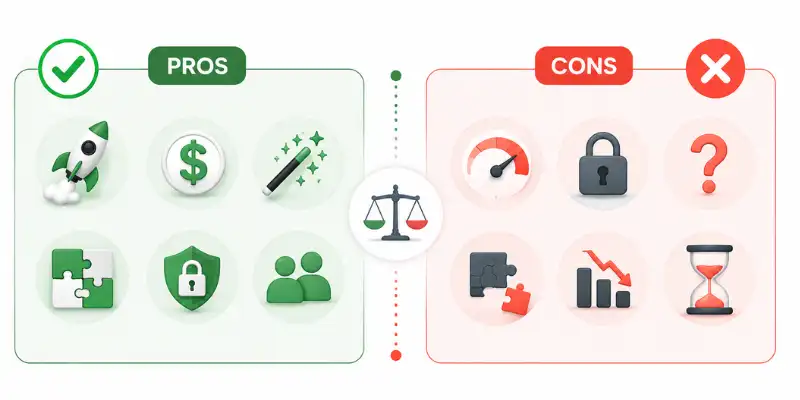
Weighing everything covered so far, here’s how the pros and cons of this Google Opal review actually stack up:
Pros
- Genuinely fast to go from idea to working prototype, often under 10 minutes
- Free during the beta, with no credit card required
- Very low learning curve compared to traditional no-code platforms
- Strong integration with tools most people already use daily (Docs, Sheets, Gmail)
- Transparent step-by-step debugging
Cons
- Too limited for production-grade or business-critical applications
- No governance, audit logs, or version control in any formal sense
- Experimental status means features can change or disappear without warning
- No way to view or export the underlying code
- Struggles with complex, multi-condition logic and larger document processing
What Does Reddit Say About Google Opal?
A big part of writing an honest Google Opal review means checking what people are actually saying once the marketing copy is out of the picture. Search “opal reddit” and you’ll find a genuinely mixed picture, which is worth knowing before you invest real time into it.
On r/vibecoding, Opal gets compared directly against Bolt, Lovable, Replit, and V0, and it doesn’t always come out ahead. One widely discussed thread, bluntly titled about frustrations with the tool, described errors during complex document processing and general instability. A Hacker News user separately described hitting what they called one of the ugliest error screens they’d seen, while trying to build a more ambitious app involving vector search and database integration.
The more balanced take that shows up repeatedly across Reddit and developer blogs is that Opal behaves like “Canva, but for mini-apps.” That’s a fair summary: strong for quick, front-end-focused prototypes like content tools and educational helpers, weak for anything involving real backend complexity.
So if you’re wondering “is Opal app safe” based on Reddit chatter specifically, the safety concerns raised there are mostly about reliability and instability, not about data misuse. On the “is Opal worth it Reddit” question, the honest consensus is: worth it for prototyping and quick ideas, not worth relying on for anything mission-critical yet.
Is Google Opal Safe to Use?
Safety and data handling come up often enough in reader questions that any serious Google Opal review needs a dedicated answer. On the data side, Google has stated that prompts and outputs from Opal are not used to train its generative AI models, though a small subset may be reviewed by humans for troubleshooting. The platform runs on Google Cloud infrastructure and inherits the same baseline encryption and identity protections used across Workspace products.
That said, Google hasn’t published Opal-specific compliance certifications or formal audit documentation. If your organization has strict regulatory requirements, that’s a gap worth flagging internally before using Opal for anything beyond internal testing.
Google Opal vs Alternatives
No Google Opal review is complete without placing it next to the tools people are actually choosing between. Opal sits in an odd spot between two different tool categories, and which one you compare it against changes the verdict.
Against traditional automation platforms like Zapier, Make, and n8n, Opal loses on integrations. Those platforms connect thousands of third-party apps through triggers and actions; Opal doesn’t do that at all right now, it’s focused entirely on AI-generated logic inside Google’s own ecosystem.
Against newer AI app builders, the comparison gets more interesting. Teams evaluating Bolt alongside Opal tend to pick Bolt when they eventually want deployable, ownable code rather than a Google-hosted mini app. If your priority leans toward a more polished, design-forward output, it’s worth putting Lovable through the same test prompts you’d try in Opal before deciding which one fits your workflow better.
For a broader agent-style comparison rather than a strict app-building one, Manus approaches automation from a more autonomous angle, which is worth knowing about if what you actually want is a tool that acts on tasks rather than one that builds interfaces.
| Tool | Best For | Free Plan | My Rating |
| Google Opal | Beginners | ✅ | 9.3/10 |
| Bolt | Full-stack apps | Limited | 9.1/10 |
| Lovable | UI-focused apps | Limited | 8.9/10 |
| n8n | Automation | ✅ | 9.4/10 |
Who Should Use Google Opal (and Who Shouldn’t)
The clearest way to close out this Google Opal review is by matching the tool to the right kind of user. Opal makes the most sense for non-technical founders, marketers, and educators who want to test an idea quickly without committing engineering time to it. If you’re the kind of person searching for tools built specifically for non-technical founders, Opal is a reasonable free starting point before you invest in anything heavier.
It’s a weaker fit for teams that already have engineering resources and need something production-ready, or for anyone building no-code AI agents meant to run unattended over long periods, since Opal apps still need to be triggered manually and lack the reliability guarantees that kind of use case demands.
If your actual goal is broader workflow automation rather than one-off mini apps, it’s worth comparing what you’re trying to build against a proper AI automation setup first, since that category of tool is built specifically for the always-on, multi-app scenarios Opal currently can’t handle.
Who Should Use Google Opal?
- Beginners
- Content Creators
- Marketers
- Students
- Small Business Owners
Not Recommended For
- Large Companies
- Professional Developers
- Complex Automation Projects
Final Verdict
Google Opal earns its spot as one of the easiest ways to turn an idea into a working prototype without touching code. The natural-language-to-workflow experience genuinely works, the Google Workspace integration is a real convenience, and the fact that it’s free removes any risk in simply trying it.
Where it falls short is anything resembling serious software: no exportable code, no complex logic, no formal governance, and a Reddit community that’s been vocal about instability on more ambitious builds. For quick internal tools, content workflows, and testing an idea before you commit real development time, this Google Opal review lands on a clear recommendation: try it, but don’t build your business on it yet. And if you’re a freelancer weighing whether AI tools like this can actually turn into income rather than just a fun weekend project, it’s worth going through some real making money with AI examples before you decide how much time to invest.
Google Opal Review: Frequently Asked Questions
These are the questions that come up most often around Google Opal, gathered from real search intent rather than guesswork.
Google Opal is a free, experimental no-code AI app builder from Google Labs that turns natural language prompts into working mini apps using Gemini models.
That’s Opal’s official web address, where you sign in with a Google account to start building or browsing the template gallery. Opal is also now accessible through the Gems manager inside the main Gemini app.
Nothing right now. It’s completely free during the public beta, with no announced pricing for when that changes.
Not currently, but Google’s terms of service for commercial use should be reviewed directly, since beta terms often change once a product moves toward general availability.
It refers to Opal’s integration inside the Gemini web app, where it now lives as a building tool alongside other pre-made Gems.
Mostly yes on the data-privacy side, since Google states prompts aren’t used for model training. The safety concerns that show up on Reddit are more about stability and unpredictable errors than data misuse.
Opinions are split, which is a pattern that shows up across most independent Google Opal review threads on r/vibecoding. It’s widely seen as strong for quick prototyping and weak for anything resembling production software.
No. Google Opal is completely unrelated to Opal.so, the screen-time and focus app. They just happen to share a name.



- Be Respectful
- Stay Relevant
- Stay Positive
- True Feedback
- Encourage Discussion
- Avoid Spamming
- No Fake News
- Don't Copy-Paste
- No Personal Attacks
- Be Respectful
- Stay Relevant
- Stay Positive
- True Feedback
- Encourage Discussion
- Avoid Spamming
- No Fake News
- Don't Copy-Paste
- No Personal Attacks
