MotionMuse AI Explained: What It Is, How It Works & How Credits Work
Published: 27 Apr 2026
Ever heard about an AI tool that creates videos from just a few words, but still felt confused about how it actually works? You are not alone, many people feel the same at first. In this guide, we will break down everything about motionmuse ai in a very simple way. You will learn what it is, how it works, its features, safety, alternatives, and common problems users face. By the end, you will have a clear picture and know if it is the right tool for you or not.
What is MotionMuse AI?
MotionMuse AI is an AI video generator tool that turns simple text or ideas into videos. You just write what you want, and the tool creates scenes, motion, and visuals automatically. It removes the need for editing skills.
Key points
- It is an AI video creation tool
- It converts text into video
- It builds visuals and motion automatically
- No editing or design skills needed
- It saves time for creators
Example
You type: “A peaceful forest with birds flying and soft sunlight.”
MotionMuse AI creates a video that shows trees, birds, and natural light movement.
AI Video Generator Tool Concept
AI video generator tools are advanced tools that turn text or ideas into videos. They use airtificial intelligence to build scenes, add motion, and create a full video without manual editing.
Key points
- These tools use AI technology
- They convert text into videos
- They create visuals, animations, and effects
- They reduce manual editing work
- They help users make videos fast
Example
You type: “A rainy city street at night with neon lights.”
The AI tool creates a video showing rain, street lights, and moving traffic.
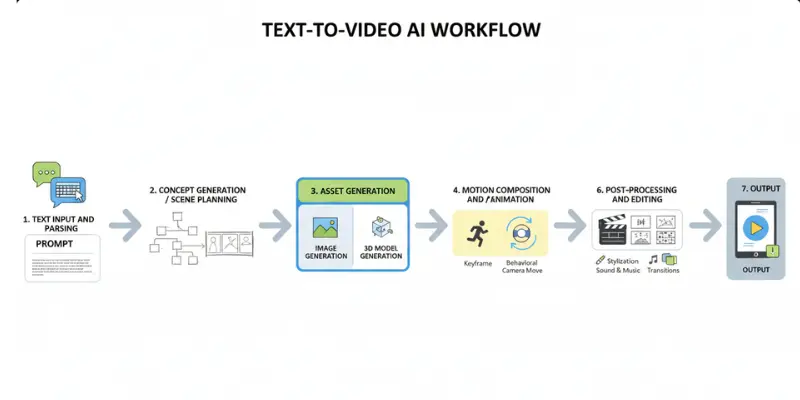
Why People Use AI Video Generator Tools
People use AI video generator tools because they make video creation easy and fast. You do not need editing skills or expensive software.
Key reasons
- It saves a lot of time
- It is very easy for beginners
- It removes the need for cameras or editing tools
- It helps create content for social media quickly
- It supports creativity with less effort
Have you ever wanted to create videos but felt editing was too hard? These tools solve that problem in a simple way.
Quick takeaway
AI video generator tools help anyone create videos in minutes. They are simple, fast, and beginner-friendly.
How MotionMuse AI Works
MotionMuse AI works like a smart video engine. You give text or an idea, and the tool turns it into a video using AI. It adds motion, scenes, and effects automatically.
- You type your idea or prompt
- The AI understands your text
- It creates video scenes and motion
- It adds effects and transitions
- It produces a ready-to-use video
Example
You type: “A futuristic city with flying cars at night.”
MotionMuse AI generator builds a video with moving cars, lights, and city scenes.
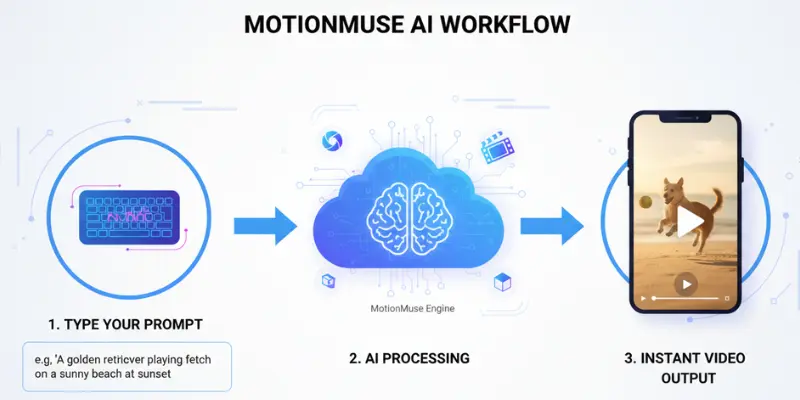
Text to Video / AI Motion Generation
MotionMuse AI generator turns simple text into full videos. This process is called text-to-video generation. You only give an idea and the AI builds the video – but how you phrase that idea changes the output dramatically. It first reads your text and breaks it into small scenes. Then it creates visuals for each scene. After that, it adds motion, movement, and effects. In the end, you get a complete video ready to use.
For example, if you type “A space rocket launching into the sky”, the AI will create a video with a rocket, smoke, fire, and sky movement.
Have you ever thought how easy it would be to turn ideas into videos without editing? This tool makes it possible in seconds.
MotionMuse AI Credits Explanation
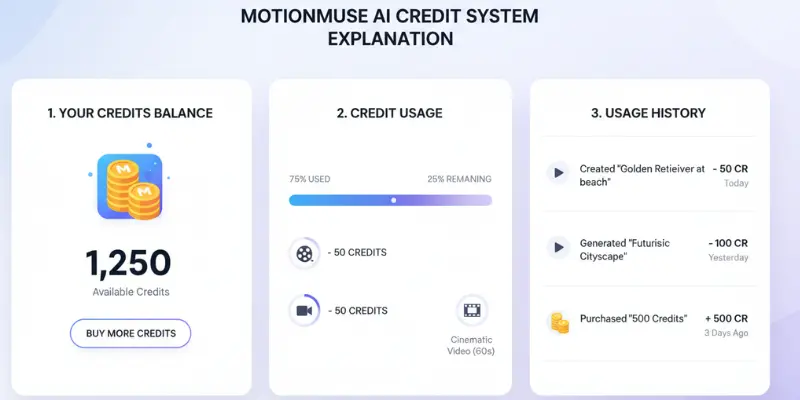
MotionMuse AI uses a credit system, where each video you generate consumes credits, so it’s important to understand how credits are priced across different plans before committing. The number of credits used depends on video length and quality — shorter videos consume fewer credits, while high-quality or longer videos require more.
Example
If 1 video = 5 credits, and you have 20 credits, you can make 4 videos.
Why do credits matter?
- They control usage
- They manage system load
- They define how many videos you can create
Key Features of MotionMuse AI
MotionMuse AI comes with powerful features that help you create videos in a simple way. It works as a smart AI tool that saves time and removes hard editing work. You just enter your idea, and it builds a full video for you.
AI Video Generation
MotionMuse AI works as a muse ai video generator that turns text into full videos. You write your prompt, and the AI creates scenes, motion, and effects automatically. It helps beginners and creators make videos without editing skills.
- Turn text into video in seconds
- Create scenes with ai
- Add motion and effects automatically
- No editing experience needed
Have you ever thought about making a video just by typing an idea? This feature makes it possible.
Templates
The tool gives ready-made templates that make video creation faster. You can choose a style and start creating without building everything from scratch. This helps you get better results in less time.
Templates are useful for:
- Social media videos
- Travel content
- Promotional clips
They also help your videos look more clean and professional.
Fast Rendering
MotionMuse AI processes videos quickly. After you enter your text, it generates the video in a short time. This is helpful when you need fast content for posting or sharing.
- Quick video creation
- Less waiting time
- Smooth workflow for creators
It helps you stay active and consistent with content.
Cloud-Based Tool
MotionMuse AI is a cloud-based tool. You do not need to download anything. You just open it in your browser and start working.
This makes it very easy to use on different devices like laptops and desktops.
Motion AI Free Trial
MotionMuse AI also offers a motion ai free trial for new users. This allows you to test the tool before buying anything. You can explore its features and see how it works.
In the free trial, you can:
- Try video creation
- Test basic features
- Understand how credits work
It helps you decide if the tool is right for your needs.
Is MotionMuse AI Legit or a Scam?
MotionMuse AI is a relatively new platform, and many users naturally question its safety before paying. We have done a full trust analysis including domain checks, security scores, and red flags in Is MotionMuse AI Legit? breakdown.
MotionMuse AI Mod APK – Is It Safe?
Best motionmuse ai alternatives (FREE + PAID) include several tools that offer better control and pricing flexibility. Many users also compare MotionMuse with other tools like MotionMuse vs Kling AI before choosing the right option.
Many people search for motion muse ai free or mod APK to avoid paying. But this choice can create bigger problems than saving money.
APK Risks Explained
Mod APK files are not official. They are changed by unknown developers. This makes them unsafe in many cases.
- No official source or verification
- Can be changed by unknown people
- No security updates or protection
- May not work properly on all devices
- Can harm your phone system
So even if it looks “free,” it can cost you your data or device safety.
Malware and Piracy Issues
One of the biggest problems with motion muse ai mod apk is malware risk. Many modified apps include hidden harmful files.
Possible dangers:
- Virus or malware in APK file
- Data theft from your phone
- Access to personal photos or files
- Device slow down or crashes
- Security breach of accounts
Also, using mod APK is a form of piracy. It bypasses paid systems, which is not legal or safe.
Have you ever installed an unknown app and your phone started acting strange? That is the same risk here.
Safer Alternatives
Instead of using risky mod APKs, there are safer ways to use MotionMuse AI.
- Use official MotionMuse AI website
- Try free trial or free credits
- Use basic free plan if available
- Wait for discounts or official offers
- Use other trusted AI video tools
These options keep your device safe and still let you explore AI video creation.
Best MotionMuse AI Alternatives (FREE + PAID)
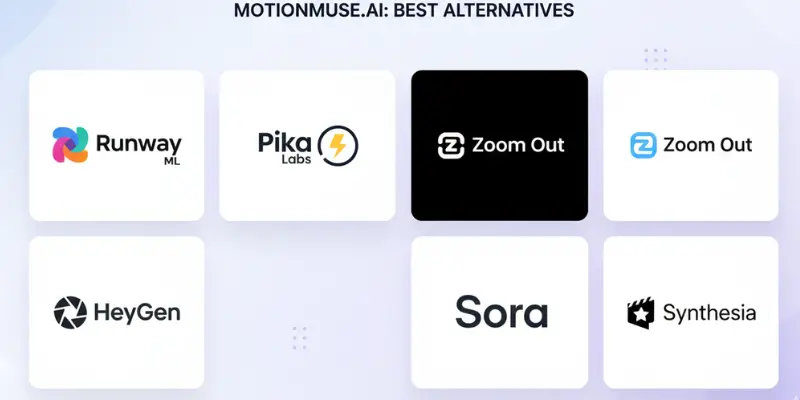
If MotionMuse AI is not the right fit for you, these simple motion muse ai alternatives can suit your needs better. Many other tools work in a similar way. Some are free, and some are paid with more powerful features. Let’s look at them in a simple way.
Before choosing an alternative, many users first read detailed MotionMuse AI reviews to compare real user experiences, video quality, credits, and platform reliability.
Popular MotionMuse AI alternatives include:
- unlucid ai
- Muse AI Tools
- VidMuse AI
- Runway ML
- Pika Labs
- Kaiber AI
Common Problems Users Face
MotionMuse AI is useful, but users still face some common problems. Most issues are not technical only. Many come from confusion, wrong apps, or unclear system use.
Credits Issue
Many users struggle with the credit system in MotionMuse AI. They do not always understand how credits are used or deducted.
- Credits reduce with every video generation
- High-quality videos use more credits
- New users often run out of credits quickly
- Some users feel pricing is not very clear
This can create confusion, especially for beginners.
Login Issues
Some users report small login problems while using the platform. These issues are not always common, but they still happen.
- Forgot password problems
- Email verification delays
- Account access confusion
- Browser-related login errors
Most of these issues happen due to simple setup mistakes or network problems.
Fake APK Confusion
Many users search for mod versions like MotionMuse APK, but this creates serious confusion and risk.
- Fake APK files on unknown websites
- Malware or virus risk
- No official support for mod apps
- Wrong versions that do not work properly
This is why users should always avoid unofficial downloads.
Wrong Tools (Motion Mouse AI Typo Traffic)
A big problem is typo-based confusion. Many users search “motion mouse ai” instead of MotionMuse AI. This leads them to the wrong tools or unrelated results.
- Typing mistakes in search queries
- Landing on unrelated AI tools
- Confusion between similar names
- Wasting time on wrong websites
Have you ever searched for a tool and landed on something totally different? This is a common issue here.
Quick takeaway
Most problems with MotionMuse AI come from credits confusion, login issues, fake APK risks, and typo-based searches like “motion mouse ai.” If users stay careful and use the official platform, most of these problems can be avoided easily.
Conclusion
In this guide, we explored motionmuse ai in detail. We learned what it is, how it works, its main features, credit system, safety concerns, mod APK risks, alternatives, and common user problems. Now you have a clear idea of how this tool works and what to expect before using it.
From my side, I would say try motion muse ai only if you are testing AI video tools for simple and quick content. Start with the free trial or basic credits first. Do not rush into paid plans or mod APK versions. That way, you stay safe and understand the tool better before spending money.
Faqs
MotionMuse AI is a tool that creates videos using text. You just type your idea, and it turns it into a video. It uses AI to build scenes, motion, and effects. It is mainly used for quick and simple video creation.
MotionMuse AI usually works on a credit system. Some users may get free credits or a trial. But full features are mostly paid. You may need to buy credits for more videos.
You enter a text prompt or idea into the tool. The AI reads your text and creates video scenes from it. Then it adds motion and effects automatically. In the end, you get a ready video.
The official version is generally safe to use. But users should avoid mod APK files or unknown websites. Those can contain risks like malware. Always use the official platform for safety.
There are many alternatives available. Some free options include Unlucid AI and VidMuse AI. Paid tools like Runway ML and Pika Labs are also popular. Each tool works differently based on your needs.






- Be Respectful
- Stay Relevant
- Stay Positive
- True Feedback
- Encourage Discussion
- Avoid Spamming
- No Fake News
- Don't Copy-Paste
- No Personal Attacks
- Be Respectful
- Stay Relevant
- Stay Positive
- True Feedback
- Encourage Discussion
- Avoid Spamming
- No Fake News
- Don't Copy-Paste
- No Personal Attacks
