Unlucid AI vs MotionMuse: Which is Better for NSFW Video in 2026?
Published: 6 Jun 2026
Two tools. Both free to start. Both support NSFW content. Both run in your browser with no downloads needed.
So why do people keep asking Unlucid AI vs MotionMuse which one is actually worth using?
Because they feel similar on paper but behave completely differently in practice. Unlucid AI and MotionMuse keep coming up in the same creator forums, the same Reddit threads, and the same comparison searches not because they are interchangeable, but because they both solve pieces of the same problem for adult content creators.
Unlucid gives you creative freedom, daily free credits, and a wider toolset. MotionMuse gives you cleaner output, a simpler workflow, and one of the lowest paid plans in the NSFW video space.
This article covers both tools in full what they actually do in Unlucid AI vs MotionMuse, how they handle NSFW content, what their free tiers look like in practice, how they compare on video quality, where each one frustrates users, and who should genuinely pick which.
| If you only want the short version, here is the answer: |
|---|
In simple terms, Unlucid AI is better for creators who want a free all-in-one platform for generating, editing, and animating content. MotionMuse AI is the better choice if your main goal is turning images into clean, realistic videos with minimal effort.
The right choice depends on whether you value creative freedom or output consistency more.
What is Unlucid AI?
Unlucid AI is a browser-based creative platform built around the idea of uncensored AI generation. The tagline is “uncensored AI tools for dreamers, for free” and that captures the platform’s identity well.
You can do three core things on Unlucid: generate images from text prompts, edit existing images, and animate still photos into short video clips. Everything works in your browser. Nothing to install. No complicated setup.
The platform targets beginners and social media creators who want quick, experimental results without dealing with heavy software or strict content filters. The NSFW support is not tucked away or treated as a secondary feature, it is a core part of what Unlucid is built for.
If you start feeling limited by its consistency or want more advanced options, exploring Unlucid AI alternatives can help you find tools that better match your workflow.
How the Gem System Works
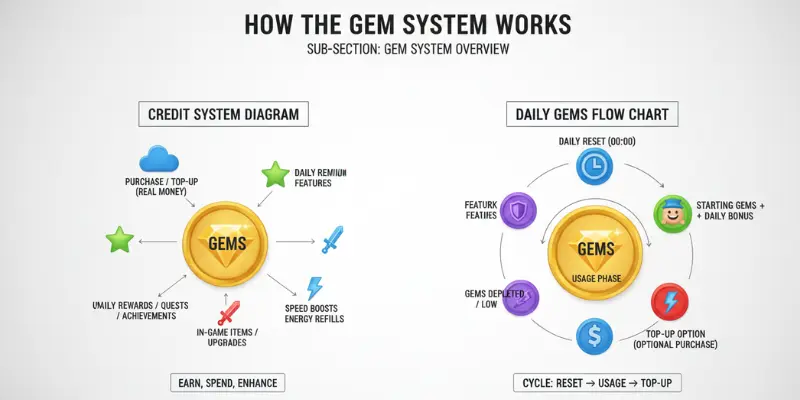
Unlucid runs on a virtual credit system called Gems. You get a small allocation of free gems every day typically somewhere between 5 and 10 and those reset every 24 hours. You do not need a paid plan to keep using the tool. You just need to come back each day to claim your fresh credits.
The costs per action are not equal across features. Video generation costs roughly 10 gems per clip, which means your daily free allowance covers about one video. Image edits are much cheaper at around 1 gem each, so you can do a reasonable number of image edits on the free tier before running out. Image generation from a text prompt sits somewhere in between.
If you want more than the daily refresh allows, Unlucid sells additional gems in pay-as-you-go bundles. There is no traditional monthly subscription at the time of writing, it is a free daily tier plus purchasable top-ups. This is appealing for casual users but can add up if you are generating content consistently.
One thing worth knowing before you commit to buying gems: Unlucid has received a low trust score on Scamadviser. That does not mean the platform is fraudulent, it functions as described for most users but it is worth being cautious if you are considering putting payment information in. For testing and free usage, the risk is minimal.
What You Can Actually Create
Unlucid supports more than just NSFW video. The full creative suite includes:
Text-to-image generation across five distinct artistic styles, realistic, cartoon, 3D render, anime, and pencil. This is genuinely useful for creating source images before animating them.
AI image editing with three modes ,object removal, object addition, and clothing changes. The clothing change feature is the most searched-for editing function on the platform.
Image-to-video animation using 17 video effects. These include Dance, Squish, Zoom, Smash, Flying, 360° Microwave spin, and others. They are preset-based, you pick an effect and it applies to your uploaded image rather than fully custom animation.
Custom video generation from text prompts with optional starting images. This is a newer feature that was still developing during early 2026 testing sessions.
A Prompt Enhancer tool that rewrites your description to improve generation results.
Enhanced NSFW options with expanded prompting freedom for adult content.
That breadth is one of Unlucid’s genuine strengths. Most browser-based NSFW tools do one thing. Unlucid does several, which makes it useful across different stages of a creative workflow rather than just for the final video step.
Who is Unlucid AI Actually Built For?
Unlucid works best for creators who want to experiment cheaply and regularly. The daily gem refresh means you can use it consistently without spending anything, which suits hobbyists, people new to AI creative tools, and creators who generate content in short daily sessions rather than large production runs.
It also suits people who generate images and video together rather than video only. Because Unlucid covers image creation, editing, and animation in one place, you can build a workflow entirely within the platform without jumping between tools.
The realistic expectation to set is this: Unlucid is a sandbox. It is excellent for testing ideas, creating quick social clips, and experimenting with NSFW prompts without hitting content walls. It is not a production tool if you need consistent professional-quality output every time. That distinction matters before you decide whether it fits your use case.
If you want a deeper look at daily usage, real user feedback, and how the gem system plays out over time, reading an Unlucid AI review can help clarify whether it fits your workflow.
What is MotionMuse AI?
MotionMuse AI is an image-to-video platform that does one thing and does it well: it turns a still photo into a short animated video clip. That simplicity is both its strength and its ceiling.
The platform launched in April 2025 and by January 2026 was recording over 16 million monthly visits, a growth curve that reflects how straightforward the tool is to pick up. There is no learning curve. You upload an image, choose how it should move, and the AI handles the rest.
Videos come out at 4 to 6 seconds across every plan. That clip length cannot be extended. It is a fixed part of how the platform works. For social media content, Instagram Reels backgrounds, and NSFW animation clips, 4 to 6 seconds is usually enough. For anything requiring longer narrative sequences, you will need a different tool.
If you want a clearer idea of how it performs in real use, including consistency, limitations, and user experience, reading a MotionMuse AI review can help set the right expectations before you start.
How the Workflow Actually Runs
MotionMuse accepts JPG, PNG, and WebP image files. Higher-resolution source images consistently produce better animation quality because the platform analyzes depth and composition to determine how movement gets applied. If you upload a blurry or compressed image, the output reflects that.
Once your image is uploaded, you choose between two modes.
Easy Mode handles everything automatically. You pick a template from the library updated daily across categories including cinematic, portrait, abstract, and trending click generate, and get a clip within a few minutes. No prompts required. This is the fastest path and works well for standard use cases.
Expert Mode gives you more control. You can write a custom motion description something like “slow leftward pan with mild fog drift” or “gentle zoom with warm light bleed” and the platform applies that specific behavior. Expert Mode also includes a real-time preview window that shows expected animation behavior before the full render runs, which saves credits by reducing failed attempts.
A notable feature that most competitor reviews miss: MotionMuse has a custom model training option. You can upload short video clips to train a personalized animation template — your own style, applied to your own content. This is available as a paid feature and is aimed at creators who want to establish a consistent visual style across multiple pieces of content.
Unused credits expire at the end of each billing cycle and do not carry forward. Top-up credit purchases are available as needed.
NSFW Support on MotionMuse
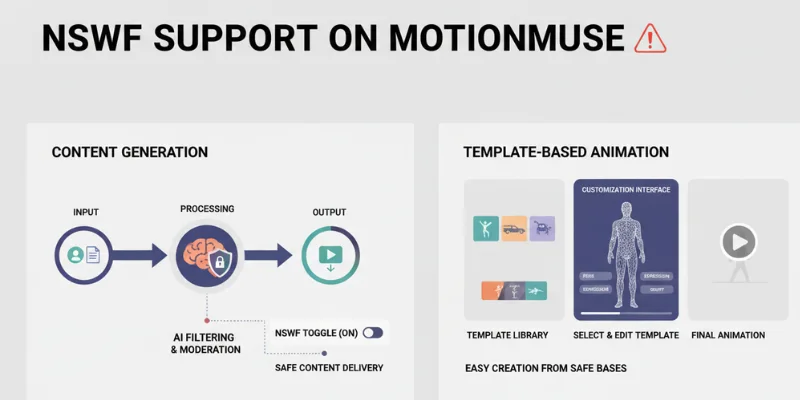
MotionMuse openly markets its NSFW capabilities. The platform has a dedicated NSFW video generator section and is transparent about adult content support.
The approach is template-driven even for NSFW content. You can create adult-themed animated clips by combining a suggestive source image with an appropriate motion style or custom prompt. The results are usually clean and natural-looking, which is MotionMuse’s main advantage over tools like Unlucid.
Where it falls short is customization depth. You are working with a prompt field and a template library. There is no character system, no layered content selection, no model variety. What you get is an animated version of the image you uploaded — good-looking and reliable, but limited in how far you can push specific content styles.
Some explicit prompt styles do get filtered depending on how they are written. Users who want the most direct path to explicit content sometimes find MotionMuse’s filters a little tighter than expected for a platform that openly markets adult content. The way around this, according to users, is to rely on the source image to carry the adult content and keep the motion prompt focused on movement rather than explicit description.
For more detail on day-to-day usage, real prompt examples, and how the credit system works over time, reading how to use MotionMuse AI helps set clear expectations before relying on it regularly.
Unlucid AI vs MotionMuse — Feature Comparison
| Feature | Unlucid AI | MotionMuse AI |
| Content Type | Images, video generation, and editing | Image-to-video generation |
| NSFW Support | Yes, more permissive | Yes, with some prompt filtering |
| Free Credits | Daily gems (typically 5–10 per day) | 20 one-time credits at signup |
| Paid Access | Pay-per-gem bundles | Subscription plans from around $4.99/month |
| Video Length | Short video clips | Fixed 4–6 second clips |
| Video Effects | 17 built-in effects | Templates and custom prompts |
| Custom Model Training | No | Yes (paid feature) |
| Output Consistency | Can vary between generations | Generally reliable and stable |
| Watermark on Free Plan | Yes | Yes |
| Slow Queue on Free Plan | Yes | Yes |
| Browser-Based | Yes | Yes |
| No Installation Required | Yes | Yes |
| Image Generation | Yes (5 visual styles) | No |
| Image Editing | Yes (3 editing modes) | No |
| Prompt Enhancer | Yes | No |
| Mobile Optimized | Yes | Yes |
| Anime Style Support | Limited | No |
| Real-Time Preview | No | Yes (Expert Mode) |
NSFW Video Quality Comparison
This is the section most people actually want to read, so here it is without softening the answer.
MotionMuse Video Quality
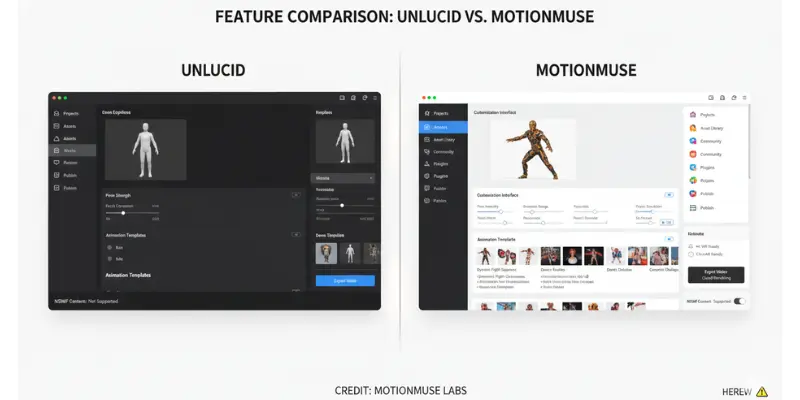
MotionMuse produces the more consistent, polished output of the two. The AI reads the depth and structural composition of your source image and applies movement accordingly which means when you use a clean, high-resolution source image, the animation looks natural and convincing. Users have reported that people they showed the clips to could not tell they were AI-generated, which is a reasonable benchmark for quality.
The motion types available panning, zooming, flowing, particle effects, light bleeds all translate well to NSFW source imagery. A slow zoom into a portrait image, for example, produces a smooth and focused result that holds up on social platforms and in direct sharing.
The limitation is that MotionMuse is applying motion to what is already there. It does not generate new content or create new visual elements. If your source image has an awkward pose, poor lighting, or low resolution, the animated version will reflect all of that. The AI improves motion; it does not improve the underlying image.
Unlucid AI Video Quality
Unlucid’s video quality is more variable. A good generation from Unlucid can look genuinely impressive, the 17 preset effects add personality and energy that MotionMuse’s smoother but flatter animations sometimes lack. The Dance and Flying effects in particular produce results that feel alive rather than just moving.
The problem is that quality is not predictable from one generation to the next. The same prompt and the same source image can produce two noticeably different results on consecutive days. For NSFW content specifically, this inconsistency matters more because the specific details of the output matter to users in a way that a landscape clip might not.
Unlucid is also still developing its custom prompt-based video generation, separate from the preset effects. This feature was in active development during early 2026 testing and produces shorter, more variable clips compared to the more mature preset effects system. It is worth trying, but do not rely on it as your primary content output method yet.
The Honest Summary on Quality
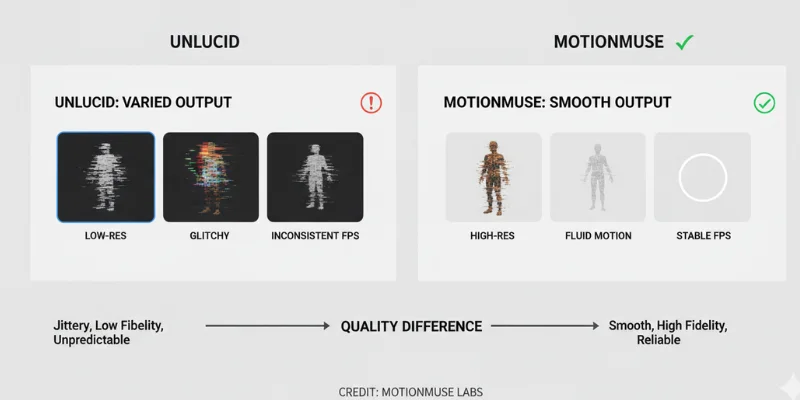
MotionMuse wins on consistency and reliability. If you need a clip that looks right the first time, MotionMuse is the more dependable choice.
Unlucid wins on variety and freedom. If you are willing to regenerate a few times to find the best result, and if the animation style matters as much as technical precision, Unlucid gives you more to work with.
For creators who need to produce content at volume, the inconsistency of Unlucid becomes a real problem. For creators who generate occasionally and can afford to pick the best result from a few attempts, Unlucid’s variety is an advantage.
Neither tool, realistically, represents the upper end of what NSFW AI video can do in 2026. Both sit in the entry-level to mid-range category. If you start feeling limited by clip length, control, or output flexibility, exploring free MotionMuse alternatives or trying an unrestricted AI video generator often makes more sense than pushing either platform beyond what it was designed to handle.
Free Credits — Which Lasts Longer?
This question has a clear answer on paper but a more complicated answer in practice.
Unlucid’s Daily Gem System
Unlucid gives you 5 to 10 free gems every day that reset every 24 hours. At roughly 10 gems per video generation, that comes to one free video per day. Image edits cost about 1 gem each, so you get more mileage out of the free tier if editing is part of your workflow.
On a 30-day month, a daily user can generate up to 30 free videos and an additional 150 to 200 image edits all without spending anything. That is a genuinely useful ongoing free tier, and it is the main reason Unlucid keeps appearing in conversations about free NSFW AI tools.
The trade-offs are real though. Free users are placed in a slower generation queue, and during busy periods the wait can be significant, sometimes 20 to 30 minutes for a single video. Free clips also carry a watermark. And the output quality is lower on average than on the paid tier, which uses more powerful generation models.
MotionMuse’s One-Time Credits
MotionMuse gives you 20 credits at signup. These are one-time only, there is no daily refresh, no way to earn more without paying, and unused credits from the free batch do not carry into a paid plan if you upgrade later.
For a new user trying the platform, 20 credits is enough for several test generations with room to iterate. It is a fair trial. But once those 20 credits are gone, you are on a paid plan or you are done.
At roughly $4.99/month on annual billing, the jump to paid is not painful. It is one of the lowest subscription prices among dedicated AI video tools. Monthly billing costs more and is less clearly advertised, so if you decide to subscribe, check what the monthly-only rate is before signing up.
Credits purchased on top of a subscription expire at the end of the billing cycle. They do not roll over.
Which Free Tier Actually Works Better?
For ongoing free access with no payment: Unlucid wins clearly and it is not close. The daily reset makes it a tool you can use every day without spending anything.
For testing a platform before committing money: MotionMuse’s 20 one-time credits give you a better taste of what the paid experience actually looks like. The quality of those test credits reflects paid-tier output more accurately than Unlucid’s free tier reflects its paid experience.
For creators who just want to create every day at zero cost, Unlucid is the only realistic option between the two.
Prompt Strategy — Getting Good Results from Both Tools
One section that almost no competitor article covers is how to actually get better results from each platform. The tools behave differently and respond to different prompting approaches.
Writing Better Prompts for MotionMuse
MotionMuse responds well to motion-specific language. Vague prompts produce vague motion. The more specific the movement description, the more accurate the output.
“Slow pan to the left with a slight zoom” works better than “move.” “Gentle zoom in with particles floating upward” gives a more interesting result than “zoom effect.” “Soft light bloom with subtle camera shake” produces a cinematic feel that templates alone do not replicate.
For NSFW content on MotionMuse, the most reliable approach is to let the source image carry the explicit content and keep the motion prompt focused on the type of movement you want ,panning, zooming, and soft atmospheric effects. Prompt descriptions that include explicit language tend to trigger filtering. Letting the image do the heavy lifting while the prompt handles motion tends to produce better results.
The Expert Mode preview window is worth using whenever you have a specific outcome in mind. It shows you how the AI interprets your prompt before the full generation runs, which saves credits.
Writing Better Prompts for Unlucid
Unlucid’s Prompt Enhancer tool rewrites your descriptions to produce better results from the generation model. Using it is worth the small gem cost, especially if you are new to AI prompting. Submit your rough idea, let the enhancer refine it, then use the improved version.
For the preset effect system, the image quality of your source file matters as much as anything else. A high-resolution image with clear subject focus will produce a much more convincing Dance or Zoom effect than a blurry or cropped photo.
For Unlucid’s text-to-image system, using the Seed Control feature helps with consistency. A seed value locks certain randomness parameters in the model, which means generating from the same prompt and seed value gives you more similar results across multiple attempts. This is particularly useful if you find a prompt combination that works and want to iterate around it rather than getting completely random outputs each time.
If you want a library of starting ideas, the MotionMuse AI prompts page has prompt examples that translate reasonably well to Unlucid’s system too.
Privacy and Data Handling
Most comparison articles skip this entirely. It matters, especially for NSFW content.
MotionMuse Privacy
MotionMuse states that it collects only the minimum information needed to provide its services and does not sell user data to third parties. This is a relatively standard privacy claim for this type of platform. The platform’s terms of service explicitly state that all fees and credit purchases are non-refundable once used.
Regarding NSFW content specifically: MotionMuse’s terms prohibit certain categories of content, though the exact restrictions require reading the full terms. The platform will occasionally filter prompts that push against those categories.
If you want more context on trust, safety, and whether it actually works as expected, a detailed MotionMuse AI legit analysis can help you understand its reliability before using it.
Unlucid AI Privacy
Unlucid emphasizes user control over content and describes itself as operating without imposed censorship. It offers anonymous usage options and does not require detailed account information beyond basic sign-up.
The low Scamadviser trust score mentioned in independent reviews relates to domain registration patterns and limited company transparency rather than specific reports of data misuse. Most users who stick to the free tier report no issues. The caution is mainly relevant for anyone entering payment information.
Who Each Tool is Actually Built For
Unlucid AI is the right fit if:
You want ongoing daily free access without ever paying. The daily gem refresh is Unlucid’s biggest practical advantage for budget-conscious creators.
You want to generate images and edit them before animating Unlucid supports the full workflow in one place.
Creative variety matters more to you than output predictability. The 17 video effects cover more creative ground than MotionMuse’s smoother but narrower motion styles.
You need more permissive NSFW content generation. Unlucid’s content filters are less restrictive for specific types of adult content.
You are new to AI creative tools and want a low-pressure environment to experiment.
MotionMuse AI is the right fit if:
You have images you want to animate and you want reliable, clean results. MotionMuse’s consistency is its defining strength.
Speed matters. A first clip can be generated within minutes of creating an account. Easy Mode requires no prompting skills at all.
You want a custom model trained on your own style, a feature Unlucid does not offer.
You are willing to pay $4.99/month for stable daily access rather than working within a daily free credit refresh.
You want a template library that is updated regularly with new motion styles.
If Neither Feels Like Enough
Both tools sit at the entry to mid level of the NSFW AI video space. If you have tried both and found them limiting either because of content restrictions, clip length, output quality, or character consistency there are more capable options worth knowing about.
Tools like SoulGen offer character consistency features and video clips up to 20 seconds long. Seduced AI adds deeper control with multi-layer content customization and multiple AI model options. Looking beyond these, MotionMuse AI alternatives include a wide range of tools available in 2026, both free and premium, making it easier to find something that fits your needs more precisely.
Pros and Cons at a Glance
Unlucid AI
| Pros: |
|---|
|
Daily free credits that reset every 24 hours genuine ongoing free access More permissive NSFW content generation Covers images, editing, and video in one platform 17 video effects with strong variety Prompt Enhancer tool improves output quality Mobile-optimized with responsive design No paid plan required to keep using it |
| Cons: |
|---|
|
Output quality is inconsistent between generations Free tier puts users in a slow generation queue sometimes 20 to 30 minutes Watermark on all free outputs Custom video generation from text prompts is still maturing Scamadviser trust score is low — relevant if purchasing gems No character consistency or face control No template library |
MotionMuse AI
| Pros: |
|---|
|
Consistent, clean video output that looks natural Fast generation most clips complete within minutes Expert Mode with real-time preview saves wasted credits Daily-updated template library Custom model training for personalized animation styles Transparent and very affordable paid plan (~$4.99/month) Simple enough for total beginners with Easy Mode |
| Cons: |
|---|
|
Free credits are one-time only 20 credits and done Video length is fixed at 4 to 6 seconds cannot be extended No image generation or editing tools built in NSFW prompt filtering can catch explicit descriptions Credits expire monthly and do not roll over Cloud-only requires stable internet; no offline mode Output quality depends heavily on source image quality |
Final Verdict — Should You Choose Unlucid AI or MotionMuse?
Neither platform is objectively better for everyone in Unlucid AI vs MotionMuse because they solve different problems.
Choose Unlucid AI if you want ongoing free access, image generation tools, image editing features, and fewer restrictions on NSFW content. The daily gem system makes it one of the more accessible options for creators who want to experiment regularly without committing to a subscription.
Choose MotionMuse AI if your priority is video quality, consistency, and ease of use in the Unlucid AI vs MotionMuse comparison. The platform focuses on a single workflow and generally delivers cleaner, more reliable results with less trial and error. Features such as Expert Mode, real-time previews, and custom model training also make it more appealing for creators who want a predictable workflow.
For most casual users, Unlucid AI offers more overall value because the free tier remains usable long after signup. For creators who publish content regularly and care more about quality than feature variety, MotionMuse AI is usually the stronger long-term choice in the Unlucid AI vs MotionMuse debate.
If you eventually outgrow both platforms, it may be worth exploring other AI video generators that offer longer clips, stronger character consistency, and more advanced customization options.
FAQS
In the Unlucid AI vs MotionMuse comparison, Unlucid AI has more relaxed content filters and allows more types of explicit prompt descriptions. MotionMuse produces cleaner and more consistent video output but has slightly tighter prompt filtering for explicit content. Whether one is “better” depends entirely on what you are trying to create freedom versus quality is the real trade-off here.
Yes. MotionMuse openly markets its NSFW video generation and has a dedicated section on its platform for adult content. Some explicit prompt descriptions may get filtered depending on how they are written. The most reliable approach is to let a suggestive source image carry the explicit content and keep the motion prompt focused on movement style
You can use Unlucid AI for free indefinitely, you get 5 to 10 gems per day that reset every 24 hours. One video generation per day is the practical free limit. MotionMuse gives you 20 one-time credits at signup. Once those are used, you need a paid plan. Neither free tier is truly unlimited, but Unlucid is the far better option for sustained free use.
MotionMuse produces smoother, more polished clips that look consistent across generations. Unlucid produces more varied results, sometimes excellent, sometimes noticeably inconsistent. If you need a clip to look right the first time, MotionMuse is more reliable. If you are willing to generate a few times and pick the best result, Unlucid gives you more creative options.
Both are genuinely beginner-friendly. MotionMuse’s Easy Mode requires no prompting knowledge at all, just upload and select. Unlucid requires a bit more experimentation to get good results but is still accessible. MotionMuse is the slightly easier entry point for someone who has never used an AI video tool before.
Yes. SoulGen supports character consistency, anime and hentai styles, and video clips up to 20 seconds. Seduced AI offers an 8-layer extension system with 10 model choices and deep customization. Both go considerably further than Unlucid or MotionMuse for serious adult content creators. The AI video generator space in 2026 has a wide range of options at different price points and capability levels.
User feedback on the custom model training feature is generally positive. The process involves uploading short video clips of the motion style you want, and the system produces a personalized animation template. Users who have tried it report that the outputs feel more realistic and consistent than standard templates. It is a paid feature and is most useful for creators who produce content with a consistent visual identity.
When your daily gems are exhausted, you have two options: wait for the 24-hour reset, or purchase additional gems through a pay-as-you-go bundle. The reset happens at a fixed time each day. There is no way to speed it up. If you are mid-project and need to finish quickly, a gem top-up is the only path which is why understanding the gem costs per action before starting a session is worth doing.






- Be Respectful
- Stay Relevant
- Stay Positive
- True Feedback
- Encourage Discussion
- Avoid Spamming
- No Fake News
- Don't Copy-Paste
- No Personal Attacks
- Be Respectful
- Stay Relevant
- Stay Positive
- True Feedback
- Encourage Discussion
- Avoid Spamming
- No Fake News
- Don't Copy-Paste
- No Personal Attacks
