Cursor AI Reviews (2026): Is It Worth the New Pricing?
Published: 27 Oct 2026
Unlike many Cursor AI reviews that rely only on marketing pages, this one combines my own testing with Cursor’s documentation, public filings and news coverage, and user feedback. Each section says which source it uses. Details were checked on October 27, 2026.
Cursor changed its pricing on October 12, 2026, and most Cursor AI reviews online haven’t caught up. Two of the Cursor AI reviews I checked, including one updated on October 24, still list the old $20 Pro plan as the starting point.
If you’re deciding whether to pay, that gap matters. This guide covers the new plans in plain terms, what the usage model means for your bill, how privacy settings work, how Cursor compares with GitHub Copilot, and who should skip it.
- Editorial rating: 4 out of 5, based on my testing, documentation, pricing and public feedback.
- Best for: developers who work across many files and use AI agents most days.
- Biggest strength: agent workflows that edit many files, with a choice of models.
- Biggest weakness: costs depend on usage, and Claude, GPT and Gemini are billed at API list prices on the new plans.
- Value for money: good if you stay on Cursor’s own models. Harder to judge if you want third-party models all day.
Short verdict: Cursor is still one of the strongest AI code editors, but the new pricing makes it worth testing on the Free plan before you pay.
What Is Cursor?
Cursor is an AI code editor built on VS Code. It has an agent that plans and edits across a project, autocomplete, chat, cloud agents that run tasks away from your machine, and Bugbot for pull request reviews.
Two facts shape how to judge it today:
- Ownership. SpaceX completed its acquisition of Cursor’s parent company, Anysphere, on August 14, 2026, according to coverage of the SEC filing.
- Bundling. Since October 12, Cursor has been sold as part of The X Subscription, a bundle with Grok and X Premium. That is why Grok models now sit inside Cursor.
My Experience With Cursor AI: What Worked and What Didn’t
|
These notes come from my own hands-on use of Cursor on real coding tasks. Results vary by plan, model and project size, so treat them as one developer’s experience, not a benchmark. |
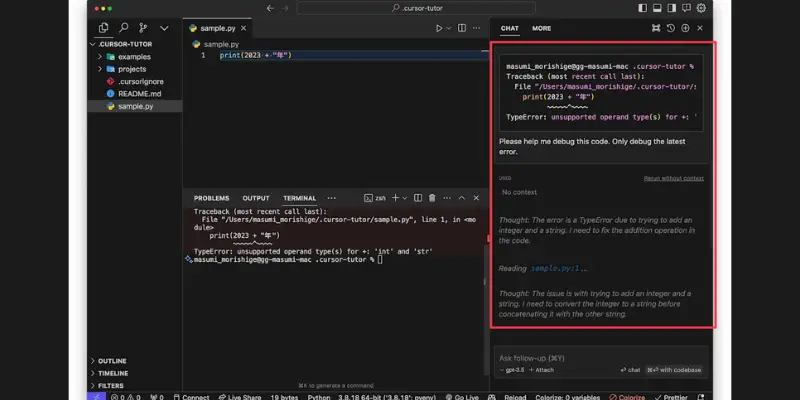
In my testing, Cursor was useful for understanding existing code, making changes across several files, and speeding up parts of development. It broke down unfamiliar code, suggested fixes while debugging, and worked well on larger tasks that span a project.
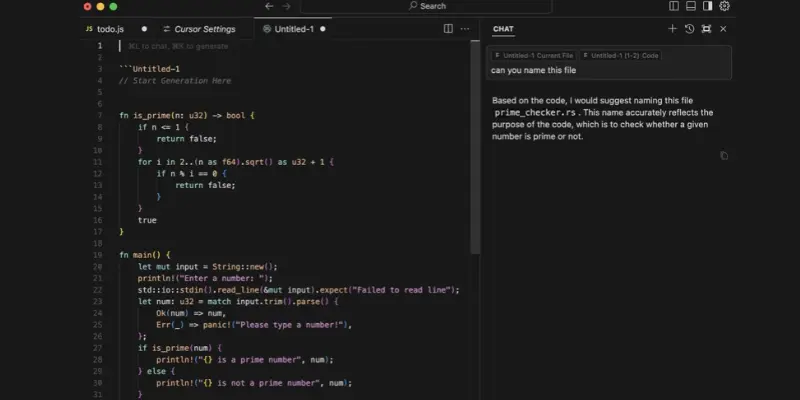
The experience wasn’t always smooth. Some generated code produced errors, a few changes broke existing behavior, and larger edits didn’t always follow my instructions. I had to clarify prompts, fix code by hand and rerun tests. The cursor saved time, but I still had to review and test everything.
| What worked well | What didn’t |
| Explaining code: it clarified how unfamiliar parts of a project fit together | Wrong suggestions: some changes looked right but failed or gave the wrong result |
| Multi-file edits: larger refactors were easier across related files | Missed dependencies: a fix could create a new problem elsewhere |
| Test generation: it drafted test cases and cut some manual work | Usage limits: limits interrupted my workflow, and the allowance took effort to understand |
| Debugging: it used error messages and nearby code to narrow down causes | Slow or partial edits: big changes took longer or didn’t fully match my instructions |
| Reviewing changes: it flagged edge cases and weak error handling | Cleanup: I had to review, correct and retest generated changes |
What Other Cursor AI Reviews Say
Across Cursor AI reviews, the same patterns repeat. Here is what each source reports, with dates, because pricing and features have moved fast.
Praise. NxCode’s review (January 2026) credits Cursor with tracking context across files better than the tools its author tried. Hack’celeration summarizes 15 G2 reviewers who liked the easy VS Code migration, planning and agent modes, and per-task model choice.
Complaints. NxCode reports slowdowns and freezes in large codebases. WPBrigade says Cursor sometimes fails to apply requested changes correctly in complex projects. Both say you must review the output. G2 reviewers quoted by Hack’celeration call the best models expensive and usage costs opaque.
Trustpilot. Among Cursor AI reviews from paying customers, Trustpilot shows mixed feedback. A regional page for Cursor’s cursor.ai profile showed a TrustScore of 3.1 out of 5 when I looked. Some reviewers say strict usage limits are buried in the documentation. Others say Cursor acted oddly while using extra credits. Cursor also has a separate cursor.com profile, where one reviewer mentioned averages near 1.6. I couldn’t confirm that profile’s current score. These are individual opinions, not verified facts.
Community reaction to the pricing change. A long-time Ultra subscriber on Cursor’s forum argues that billing Claude and GPT at API list price from the first request weakens Cursor’s appeal for people who rely on third-party models. That is one user’s view, but it matches what the pricing docs say.
Cursor Features: What Do You Actually Get?
Agent and multi-file editing
The agent reads your project, edits several files and runs commands. This is the feature most reviewers build their opinion around. It’s also where mistakes cost the most, because one wrong change can touch many files. Read the diffs.
Model choice
Cursor’s own models (Composer 2.5 and Grok 4.7, 4.6 and 4.5) draw from your included weekly usage. Claude, GPT and Gemini are available from Premium up, but billed at API list prices. If Claude is your favorite, see how Claude performs on its own before paying API rates for it.
Cloud agents
Cloud Agents run tasks in the background and are included from Premium up, according to a summary of Cursor’s pricing docs.
Bugbot: Cursor’s pull request reviewer
Can Cursor review a pull request? Yes. According to Cursor’s Bugbot documentation, Bugbot analyzes PR diffs and leaves comments with fix suggestions. It runs automatically or when you comment cursor review or bugbot run on a PR. You can add project-specific guidance in .cursor/BUGBOT.md files.
Check the docs for current usage and pricing, since some plans include monthly Bugbot usage and others don’t. Plus doesn’t include Bugbot. For wider options, see these AI code review tools.
RELATED POSTS
Windsurf Review 2026: It’s Now Devin Desktop, Here’s the Full Story
Codeium Review 2026: Is the Extension Still Worth Installing?
How Does Cursor Perform?
A fair review has to admit what can’t be benchmarked from outside. Output quality depends on the model you choose, your repo size and how clearly you prompt. Here is what’s reported, alongside my testing.
| Area | What’s reported | Source type |
| Multi-file edits | Strongest selling point; worked for me on related files | Reviews and my testing |
| Large repos | Slowdowns and missed dependencies | Reviews and my testing |
| Accuracy | Changes sometimes misapplied; edge cases missed | Reviews and my testing |
| Usage limits | Can interrupt work; allowance hard to read | My testing, Trustpilot |
Test it yourself first. On the Free plan, try three tasks in your own repo: a small bug fix, a rename across several files, and a feature that needs a new file. If the diffs need heavy fixing, a paid plan won’t change that much.
Is Cursor Easy to Use?
If you already use VS Code, Cursor will feel familiar. Reviewers say you can bring over extensions, themes and keybindings. It runs on Windows, macOS and Linux, so installing the Cursor code editor on Windows is a normal install.
The learning curve is about choices, not the interface. You need to know when to use Tab, chat or the agent, and which model to pick. Beginners may find that confusing at first.
Cursor Pricing: Is It Worth the Money?
The short answer: Cursor is worth paying for if you use the agent most days, and the new plans reward using Cursor’s own models. The price is clear. Your total bill is less so.
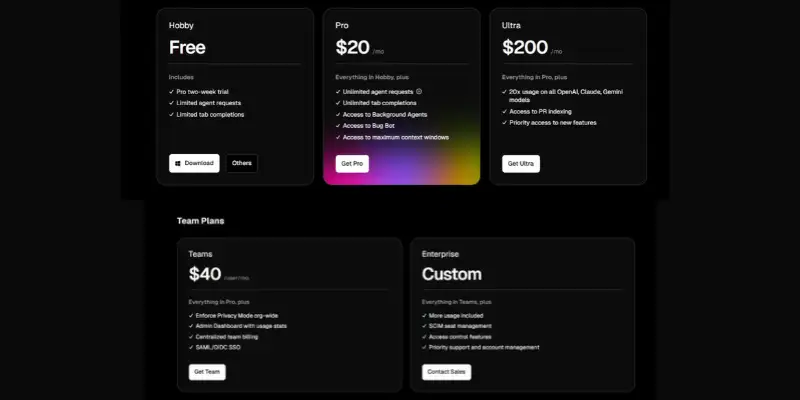
Many Cursor AI reviews published before mid-October still list Pro at $20. According to the October 12 announcement coverage and Cursor’s pricing documentation, the current individual plans are:
| Plan | Price | Included usage | Third-party models |
| Free | $0 | Limited | Not available |
| Plus | $8/mo | Base | Not available |
| Premium | $30/mo | 4x Plus | API list price, from prepaid credit |
| Super | $100/mo | 15x Plus | API list price, from prepaid credit |
| Ultra | $200/mo | 50x Plus | API list price, from prepaid credit |
| Teams | $30, $100 or $200 per seat | Matches seat tier | From team prepaid balance |
| Enterprise | Custom | Pooled | Custom |
Annual billing is $80 for Plus, $300 for Premium and $2,000 for Ultra. Plus only runs Cursor’s own models at fixed settings, with no Cloud Agents, Bugbot or your own API keys.
What changed for existing users. Legacy plans keep running for now, and switching is voluntary. Pro at $20 maps to Premium at $30. The SpaceXAI announcement says each new plan includes at least twice the coding usage with its own models as the comparable old Cursor plan. But the new plans no longer include a third-party model allowance. When you switch, the old plan is cancelled with a prorated refund. If you subscribed through the Apple App Store, you must handle that cancellation with Apple.
How the usage pool works. One weekly pool covers Cursor’s own models and is shared with the Grok apps. Third-party models are billed at API list price from the first request. As one example, Claude Opus 5.5 is listed at $4 per million input tokens and $20 per million output tokens.
What this means in dollars. The New Stack worked out that a month with $20 of Claude usage costs $50 on Premium: the $30 plan plus $20 in model charges. On legacy Pro, that usage was covered by the $20 plan.
Who gets good value:
- Trying it out: start with Free. Don’t pay until you hit its limits.
- Mostly Cursor’s own models: Plus or Premium looks reasonable.
- Mostly Claude or GPT: you pay the subscription plus API prices. Agent runs that read many files use a lot of input tokens, so watch your usage.
- Which tier: Cursor’s docs position Premium for new agent users, Super for daily users and Ultra for people running several agents. Upgrade only after you hit limits on the tier below.
If the new pricing doesn’t fit your budget, these Cursor AI alternatives charge differently.
Pros and Cons
Pros
- Strong multi-file agent workflows, the most consistent praise in reviews
- Choice of Cursor’s own, Claude, GPT and Gemini models
- Familiar VS Code feel with low switching cost
- Built-in PR review through Bugbot
- Weekly pool refresh, so one heavy day doesn’t use up a month
Cons
- Third-party models are billed at API list prices on the new plans
- The bill varies with how you use it
- Reported slowdowns in large repos
- AI changes need careful review, as my testing confirmed
- Privacy Mode must be on to keep your code out of training
- Pricing and ownership just changed, so the picture is still settling
Is Cursor Safe and Legit?
Safety questions come up in many Cursor AI reviews, but privacy often gets only a line. Here is what Cursor’s data use page says.
Legitimacy. Cursor is a real, well-funded product and is now a wholly owned SpaceX subsidiary. The company behind it changed, which is worth knowing even though the product is the same.
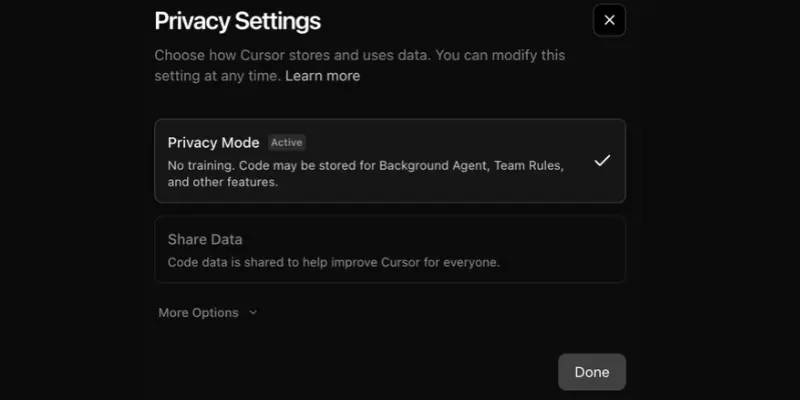
Does Cursor train on your code? With Privacy Mode on, Cursor says it doesn’t use your data for training and has zero-retention agreements with model providers. With Privacy Mode off, it may store and use your codebase data, prompts and editor actions to improve features and train models. Some inference providers may also temporarily access inputs and outputs. Even with your own API key, requests still go through Cursor’s servers.
What I couldn’t confirm. Cursor’s data-use page has been revised over time, and ownership has changed. Re-read it before using Cursor on client or employer code, and confirm Privacy Mode is on.
Billing and cancellation. I couldn’t verify cancellation steps for the new plans, so check them in your account before you subscribe.
Cursor vs GitHub Copilot (and VS Code)
Most Cursor AI reviews compare it with Copilot, for good reason.
| Cursor | GitHub Copilot | |
| Type | Standalone editor (VS Code fork) | Extension for several editors |
| Individual price | Plus $8, Premium $30 | Pro $10, Pro+ $39, Max $100 |
| Usage model | Weekly pool; third-party at API price | Monthly AI credits |
| Multi-file agent | Core feature | Available |
| Best for | Agent-heavy daily work | Staying in your current editor |
Copilot prices come from GitHub’s individual plans documentation. Check current sign-up status for Max before you plan around it.
On Cursor vs VS Code, the real choice is Cursor’s built-in AI versus VS Code with a Copilot extension. Cursor suits you if you want the agent at the center. Copilot suits you if you want a cheaper add-on to your existing setup.
Windsurf is the closest rival in design, and our Windsurf review looks at it on its own.
Who Should Use a Cursor?
These Cursor AI reviews and my own testing point to a clear split. Cursor fits:
- Developers who work across many files and use AI agents most days
- Freelancers and small teams who can budget for usage
- People who want to switch models depending on the job
- Teams that open many pull requests and want automated review
Who Should Not Use a Cursor?
- Non-coders. A prompt-to-app builder such as Lovable is a closer fit than a code editor.
- Light or occasional coders. The Free plan or a cheaper add-on may be enough.
- Anyone who needs a fixed monthly cost with Claude or GPT included. The new plans don’t work that way.
- Teams with strict code-privacy rules, until Privacy Mode and the post-acquisition terms are confirmed.
Is Cursor Worth It in 2026?
Yes, for developers who use the agent daily, and with conditions. After weighing Cursor AI reviews, the documentation and my own testing, my answer is: test it free, and pay once you regularly hit the Free limits.
- Price vs value: good on Cursor’s own models, less clear-cut on third-party ones.
- Free vs paid: the Free plan is enough to test your workflow. Paid plans matter once you rely on agents and cloud agents.
- Performance: strong on multi-file work, but it needs review and retesting.
- Skip it if: you code occasionally, want a flat fee, or can’t confirm your privacy settings.
The pricing changed about two weeks ago, so check the plans again before you buy.
Final verdict:
4 out of 5 (testing, documentation and public feedback)
If you take one thing from these Cursor AI reviews, make it this: test Cursor on the Free plan with your own repo, turn on Privacy Mode, and check what spend controls your account offers before you upgrade. For broader context, see our overview of AI coding tools.
Frequently Asked Questions
Yes. There’s a Free plan with limited usage. Paid plans start at $8 a month on The X Subscription.
It’s a legitimate product from a SpaceX-owned company. For code privacy, turn on Privacy Mode and re-read the data-use page.
Cursor says it may when Privacy Mode is off, and doesn’t use your data for training when it’s on.
Yes, through Bugbot. Check the docs for current usage terms.
Reviewers and my testing say it’s strong for multi-file work. You still need to review and test the code it writes.
Older reviews mention a Pro trial on the old Hobby plan. I couldn’t confirm one on the new Free plan, so check when you sign up.
Many were written before October 12. Check the publish date and look for the X Subscription plans (Plus, Premium, Super, Ultra).
It depends on what you dislike. If it’s price, look at Cursor alternatives that charge differently. If it’s switching editors, Copilot works inside your current one.






- Be Respectful
- Stay Relevant
- Stay Positive
- True Feedback
- Encourage Discussion
- Avoid Spamming
- No Fake News
- Don't Copy-Paste
- No Personal Attacks
- Be Respectful
- Stay Relevant
- Stay Positive
- True Feedback
- Encourage Discussion
- Avoid Spamming
- No Fake News
- Don't Copy-Paste
- No Personal Attacks
