How to Train AI the Smart Way A Beginner-Friendly Breakthrough
Published: 30 Dec 2025
People often think AI is too hard to understand or use when they first hear about it. It can be challenging to understand how to teach a machine to think and learn. But don’t worry! AI training is easy and doesn’t require much skill. We’ll show you how to train AI step by step in this guide. It will be easy to follow. We’ll make it easy for you to learn the basics, whether you’re just starting out or want to. By the end, you’ll know how AI works and how to start teaching it yourself. Let’s get started.
What Does “Training AI” Actually Mean?
Training AI means teaching a machine or computer to perform tasks, like recognizing pictures, understanding speech, or making decisions. Just like how we learn from practice, AI learns by looking at examples and improving over time.Here’s how training AI works:
How to Train AI: Making Predictions
- AI Learns from Patterns: By looking at lots of data, AI can learn patterns and use them to make predictions. For example, a weather app predicts if it will rain tomorrow based on past weather data.
- Uses Past Information: AI uses information from the past to guess what might happen next. For instance, a system that predicts stock market trends uses data from the past to guess what prices will be in the future.
- Improves with More Data: The more data AI has, the better its predictions become. For example, Netflix recommendations improve the more you watch and rate shows.
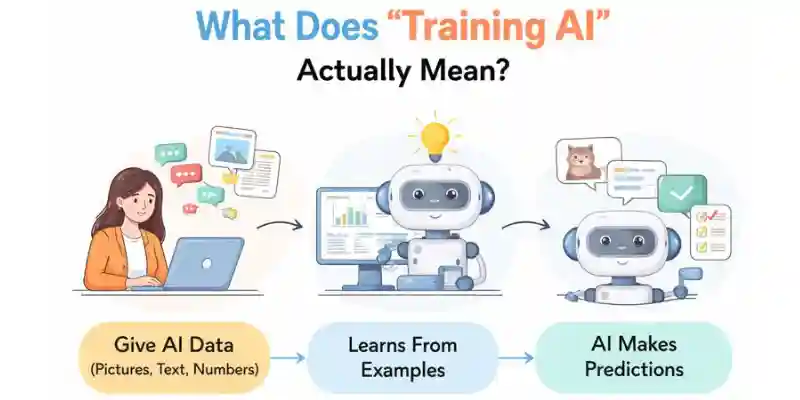
How to Train AI: Learning from Data
- Data is Key: AI needs lots of data to learn. For example, to teach an AI to recognize cats, you show it thousands of pictures of cats, telling it what a cat looks like.
- Example-Based Learning: The more examples AI sees, the better it gets at finding things. For example, your email’s spam filter gets better at telling the difference between spam and non-spam messages by looking at a lot of both.
- AI Recognizes Patterns: By learning from examples, AI can spot patterns in new data. For example, a speech recognition system improves as it learns to understand different accents and speech styles.
How to Train AI: Improving Over Time
- Learning from Experience: AI gets better over time as it learns from past mistakes. For example, a chatbot becomes better at answering questions after each interaction with users.
- Feedback Helps: AI improves by receiving feedback, just like how we learn from corrections. For example, a navigation system gets better at suggesting routes based on past trips.
- Continuous Practice: The more data AI gets, the more it can practice and improve. For example, an AI-powered game opponent gets harder as it learns from every match it plays.
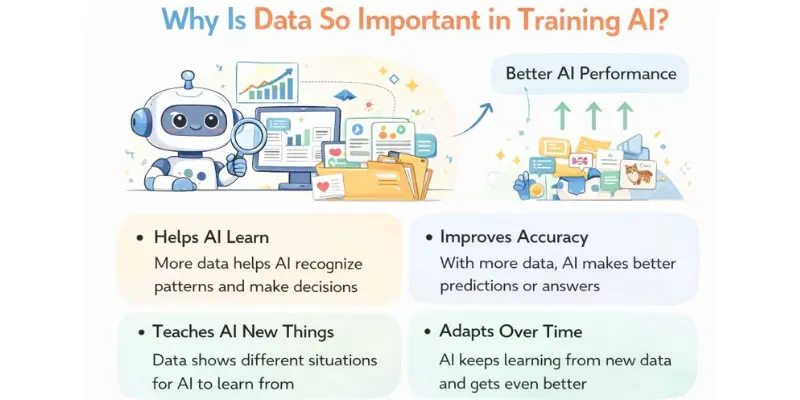
Why Is Data So Important in Training AI?
The key to enhancing AI’s intelligence and accuracy lies in data. AI cannot learn or improve its performance without sufficient data. For example, if you want to teach someone to recognize dogs in images, they must be exposed to numerous pictures of dogs to understand their appearance.
Here’s why data is crucial for training AI:
- Helps AI Learn: The more data AI gets, the better it can recognize patterns and make decisions.
- Improves Accuracy: With more data, AI can make more accurate predictions or answers.
- Teaches AI New Things: Data helps AI improve by giving it examples of different situations, allowing it to learn from experience.
- Adapts Over Time: As new data comes in, AI can keep learning and get even better at what it does.
Types of Learning Methods
When learning how to train AI, there are different methods that help teach AI how to perform tasks. These methods help AI learn from data, improve over time, and make smart decisions. The three main types of learning methods are: Supervised Learning, Unsupervised Learning, and Reinforcement Learning. Let’s break each one down in simple terms.
Supervised Learning
In supervised learning, AI learns from examples where the answers are already known. You give the AI lots of examples with the correct answers, and it learns from them.
Collect Data and Label It:
- Please gather the information and ensure you have the correct answer for each case. For example, if you want to teach AI to recognize pictures of dogs, show it images of dogs labeled with the word “dog.”
- Additionally, you can teach a chatbot to answer questions by supplying it with the correct answers.
Train the AI:
- Give the AI the data with the correct answers so it can learn the patterns.
- Example: Show AI pictures of dogs and cats, and tell it which is which.
Test the AI:
- After training, test the AI with new examples to see if it can make the right guesses.
- Example: Show the AI a new picture and check if it can tell if it’s a dog or a cat.
Improve the AI:
- If the AI makes a mistake, you can either fix the training or give it more examples to help it get better.
- For example, if the chatbot gives you the wrong answers, you can retrain it by giving it more correct ones.
Unsupervised Learning
Unsupervised learning is when the AI learns without any answers provided. Instead, it looks for patterns in the data by itself.
Collect Data:
- Gather a lot of information, but don’t tag it. You might have a list of customer information, but you might not know which group each person belongs to.
- For instance, collect many pictures and let AI figure out what’s in them.
Train the AI:
- Let the AI look at the data and find patterns or groups on its own.
- Example: The AI might group similar products on an online store without knowing what they are.
Find Patterns:
- The AI will sort the data into groups based on what it sees. These groups help AI figure things out.
- For example, the AI might observe that people often buy certain things together.
Improve the AI:
- After the AI groups the data, you can adjust things to make it better.
- Example: You might change the way AI groups customers to improve recommendations.
Reinforcement Learning
Reinforcement learning is when AI learns by doing things wrong and getting better, just like we do. The AI tries things, receives feedback, and becomes better over time.
Set a Goal:
- Define what you want the AI to achieve, like winning a game or solving a problem.
- Example: In a game of chess, the goal is to win by checkmating the opponent.
AI Takes Action:
- The AI tries different actions to reach the goal. At first, the actions might be random.
- Example: The AI plays a game and makes random moves to see what happens.
Get Feedback:
- After each action, the AI gets feedback. If it makes a good move, it gets a reward; if it makes a bad move, it gets a penalty.
- Example: The AI might get a reward for a good move and a penalty for a bad one.
Improve the AI:
- Over time, the AI learns from its mistakes and gets better at achieving its goal.
- Example: The AI playing a game learns which moves lead to winning and avoids losing moves.
By understanding these three methods Supervised Learning, Unsupervised Learning, and Reinforcement Learning you can better understand how to train AI for different tasks. Each method helps AI learn in different ways depending on the type of data and the task at hand.
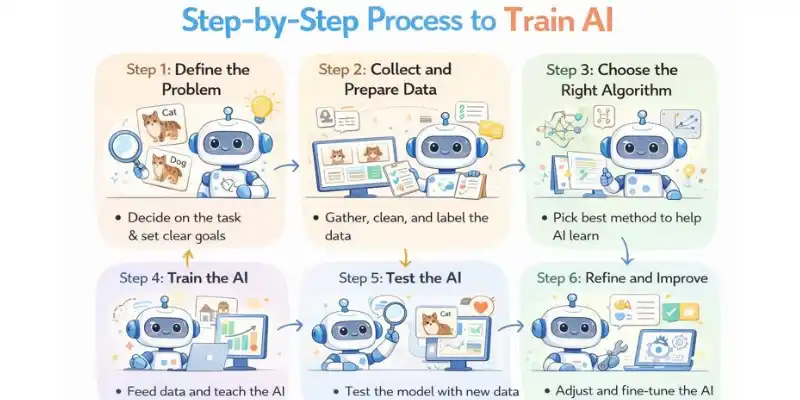
Step-by-Step Process to Train AI
Understanding how to train AI is important because it helps you teach the AI to do tasks, like recognizing pictures, understanding text, or making decisions. Here’s a simple, step-by-step guide to get you started, with examples to help you understand better.
Define the Problem
Before you start training AI, you need to decide what you want the AI to do. Having a clear goal makes the whole process easier.
- Choose the Task: For instance, you might want the AI to tell the difference between a cat and a dog in a picture.
- Set clear goals so you know what success looks like. In this case, success would mean that the AI can look at a new picture and tell you if it’s a cat or a dog.
- Example: If you want to make an AI that helps people find the best restaurants nearby, one of your goals might be to teach it to recommend the best restaurants based on what other people say about them.
Collect and Prepare Data
Training AI requires a lot of data. The more examples the AI has, the better it can learn.
- Collect Data: Gather pictures, text, or other data related to your task. For example, if you’re teaching AI to recognize cats and dogs, you would collect many pictures of both.
- Prepare the Data: Clean the data by removing any irrelevant or incorrect information. For example, remove blurry images or duplicates.
- Label the Data: Label each piece of data with the correct answer. For example, mark each image as either “cat” or “dog.”
Example: If you’re training AI to recommend restaurants, you would gather reviews, ratings, and information about each restaurant. You’d label each review based on whether the person gave a positive or negative review.
Choose the Right Algorithm
To train AI, you need to choose the right method, or algorithm, to help the AI learn.
- Pick a Learning Method: Decide whether you want the AI to learn from examples with answers (supervised learning) or learn from patterns in data (unsupervised learning).
Pick an Algorithm: Choose the algorithm that fits the problem. For example, you might use a decision tree, a neural network, or a support vector machine.
Example: You could use a convolutional neural network (CNN) to teach AI to tell the difference between cats and dogs. CNNs are a common way to recognize images
Train the AI Model
Now it’s time to train AI. This is where the magic happens!
- Feed the Data: Give the AI all the data you collected. The AI looks at the data and learns from it.
- Train the Model: As the AI goes through the data, it will start to find patterns and learn how to make decisions.
Watch the Progress: Monitor how well the AI is learning. If it’s not performing well, you may need to adjust the training.
Example: When training AI to recognize cats and dogs, the AI will see pictures of both and start learning what features (like ears, eyes, and fur) make a cat different from a dog.
Test the AI
Once you’ve trained AI, you need to test how well it performs.
- Test the Model: After you train the AI, supply it new data that it hasn’t seen before to see how well it works. This test shows how well the AI learned.
- Verify the results: If the AI makes a mistake, you can change the model or give it more data to learn from.
- Verify the Performance: Make sure the AI is doing what you want it to do. For instance, if you want the AI to be able to tell cats and dogs apart with 90% accuracy, see if it can do that
Example: You give the AI a new picture it’s never seen before. If the AI says it’s a dog when it’s actually a cat, you know it needs more training.
Refine and Improve
Even after training AI, it might need more work to get it just right.
- Re-train the AI: If it’s not doing well, provide it more data or change the way you train it.
- Make small changes: Make small changes to the model to make it more accurate. You might have to change how you label the data or add more examples.
- Repeat the process: Keep testing, changing, and retraining the AI until it does what you want it to do.
Example: After testing your AI on new pictures, you notice it gets confused with certain breeds of dogs. You can refine your training by adding more pictures of those specific breeds to help the AI learn better.
By following these simple steps for how to train AI, you can teach AI to perform different tasks, like recognizing images or recommending products. The more data you provide, the smarter the AI becomes!
Best Practices for AI Training
Following the best practices when training AI is crucial because it helps the AI learn better and faster. By doing things the right way, you can avoid mistakes, save time, and get better results. Let’s look at some simple tips for how to train AI successfully.
Use Good Quality Data:
The data you use to train the AI should be accurate and clean.
- Why it’s important: The AI will learn wrong patterns and make mistakes if the data is dirty or wrong.
- How to do it: Make sure the information you give the AI is accurate and helpful. Make sure the pictures are clear and labeled correctly, for example, if you’re teaching AI to recognize animals.
Keep the data balanced:
It’s important to have an equal amount of data for each outcome.
- Why it’s important: If your data is too one-sided, the AI may become biased and fail to work on less common cases.
- How to do it: Include examples of everything the AI needs to learn in your data. For instance, if you want AI to learn how to tell the difference between animals, show it the same number of pictures of cats, dogs, and other animals.
Start Simple and Build Up:
Begin with easy tasks and then make them more complex as the AI gets better.
- Why it’s important: The AI might not learn well if you give it too much information at once.
- How to do it: Begin with simple tasks, such as finding one item in a picture, and then make them harder as the AI learns. For instance, teach the AI to first recognize a cat and then add other animals.
Test the AI Regularly:
Keep checking how well the AI is doing while it’s training.
- Why it’s important: Why it’s important: The AI might not learn well if you give it too much information at once.
- .How to do it: Split your data into two parts: one for training and one for testing. After training, test the AI with new data to see how well it performs.
Make Adjustments and Improve:
Training AI takes time, so don’t be afraid to make changes along the way.
- Why it’s important: The AI might not get everything right the first time. Small changes can help make it smarter.
- How to do it: If the AI makes mistakes, fix the problem by adding more data or changing the way it’s trained.
Make Sure the AI Can Generalize:
The AI should be able to handle new situations, not just the examples it has already seen.
- Why it’s important: If the AI only works with the data it was trained on, it won’t perform well in the real world.
- How to do it: Use a variety of data and test the AI with new examples it hasn’t seen before. This helps the AI learn to handle different situations.
Common Challenges & Solutions
It can be fun to train AI, but it can also be hard. It’s important to know how to resolve these problems, whether they’re with data or slow training times. Let’s discuss some common problems and how to train AI to solve them.
Poor or Unbalanced Data
- What’s the problem?: Poor or unbalanced data leads to AI making incorrect predictions.
- Why it happens: If there are too many examples of one type of data and not enough of another, the AI might focus on the majority class.
Solution
- Make sure the data is clear and accurate.
- Ensure there are equal amounts of data for each outcome (e.g., equal pictures of cats and dogs).
- Clean your data by removing errors or irrelevant information.
Overfitting
- What is the problem?: Overfitting happens when AI learns the training data too well, including noise or extra information.
- Why It happens: The model becomes too focused on the training data and has trouble with new, unseen data.
Solution:
- Use more varied data during training.
- Split your data into training and testing sets.
- Apply techniques like cross-validation to prevent overfitting.
Lack of Sufficient Data
- What’s the problem? AI has a challenging time learning well when there isn’t enough data.
- Why it happens: The AI can’t make accurate predictions if it doesn’t have enough examples.
Solution:
- Use methods to add more data, like rotating or flipping images.
- Look for more data sources to add to your dataset.
- You might want to use pre-trained models and tweak them to fit your needs.
Choosing the Right Algorithm
- What’s the problem?: Picking the wrong algorithm can lead to poor performance in training AI.
- Why it happens: With so many algorithms to choose from, it can be tricky to find the best one for your task.
Solution:
- Start with simpler algorithms like decision trees or linear regression.
- Experiment with different algorithms based on the task (e.g., image recognition, text classification).
- Research which algorithm works best for your problem type.
Not Enough Computing Power
- Use methods like rotating or flipping images to add more data.
- Locate more sources of data to add to your dataset.
- You might want to use models that have already been trained and change them to fit your needs.
Solution:
- Use cloud-based platforms (e.g., Google Cloud, AWS) that provide on-demand computing power.
- Opt for simpler models if your hardware is limited.
Slow Training Time
- What’s the problem?: Training AI can take a long time, especially with large models and datasets.
Why it happens: The complexity of the model and the amount of data can slow down the training process.
Solution:
- Use mini-batch training, which processes data in smaller groups.
- To save time, use models that have already been trained.
- Make the model simpler so it takes less time to train.
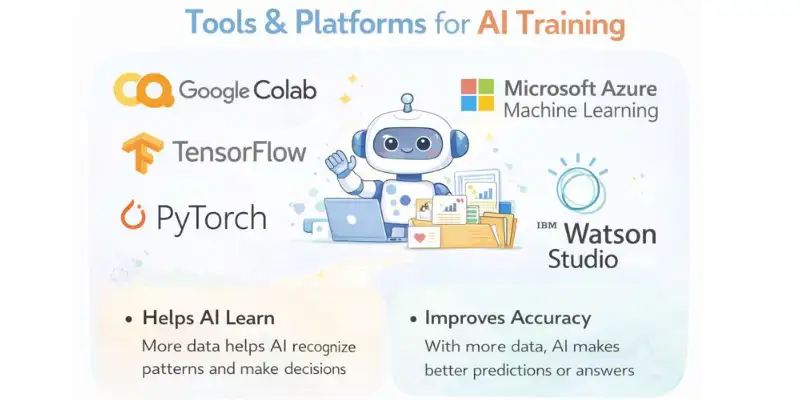
Tools & Platforms for AI Training
When you’re learning how to train AI, using the right tools and platforms is important. These tools help make the training process easier, faster, and more efficient. They give you everything you need to build, train, and improve AI models, from powerful computers to helpful code.
Google Colab
- What it does: Google Colab is a free platform that lets you run Python code and train AI models in the cloud. It also gives you access to powerful GPUs for faster training.
- How it helps: It’s great for beginners because it’s easy to use, and you don’t need your own computer power to train AI models.
TensorFlow
- What it does: TensorFlow is an open-source software library used for creating and training machine learning models, especially deep learning models.
- How it helps: It provides a flexible and easy way to build and train models for tasks like recognizing images or understanding language.
PyTorch
- What it does: PyTorch is another open-source tool used to build and train AI models. It’s known for being easy to use and great for research.
- How it helps: It’s beginner-friendly and makes it easier to test and train AI models with its simple code and flexible features.
Microsoft Azure Machine Learning
- What it does: Azure Machine Learning is a cloud platform that gives you the tools you need to build, train, and deploy AI models.
- How it helps: It helps you quickly train AI models and grow your projects, especially when you have a lot of data. It also has tools that can help you automate some parts of AI training.
Kaggle
- What it does: Kaggle is a place where you can practice training AI with real-world datasets and problems.
- How it helps: It’s a great place to learn by doing because it has many free datasets and code examples that can show you how to train AI well.
IBM Watson Studio
- What it does: IBM Watson Studio is a cloud-based platform that offers tools for creating and training AI models. It provides both coding and drag-and-drop options.
- How it helps: The platform includes visual tools that assist in model creation, making it easier to train AI, even for those without coding experience.
Amazon SageMaker
- What it does: Amazon SageMaker is a cloud service that makes it easy to build, train, and deploy AI models.
- How it helps: It makes training AI easier by giving you tools that are already set up to train, improve, and deploy AI models on a large scale.
These platforms and tools are perfect for learning how to train AI. They provide everything you need to get started, whether you’re a beginner or looking to improve your AI projects.
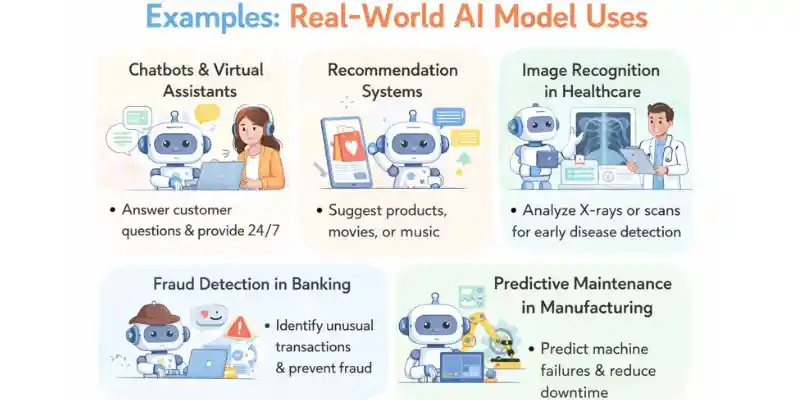
Examples: Real-World AI Model Uses
AI models are no longer limited to research labs; they are actively used across many industries to solve real problems and improve everyday experiences. Once you understand how to train AI, these models can be adapted to different tasks, from helping customers to making smarter business decisions.
Here are some common real-world examples of how AI models are used today:
- Chatbots & Virtual Assistants: AI models are trained to understand questions and respond like humans. They are used in customer support to answer FAQs, reduce wait times, and provide 24/7 help, improving customer satisfaction.
- Recommendation Systems: Platforms like online stores and streaming services use AI models to suggest products, movies, or music. The model learns from user behavior, which increases engagement and boosts sales.
- Image Recognition in Healthcare: AI models look at medical images like X-rays or scans to help doctors find diseases earlier. This makes it easier to make quick decisions about treatment and helps doctors get better at diagnosing.
- Fraud Detection in Banking: Banks use AI models to identify unusual transactions. By learning normal spending patterns, the model can quickly flag possible fraud and protect customers’ money.
- Predictive Maintenance in Manufacturing: AI models keep an eye on machine data to guess when things will break before they do. This cuts down on downtime, saves money, and makes everything work better
These examples show that when you know how to train AI properly, AI models can create real value across industries by saving time, reducing errors, and making smarter decision
Can Beginners Train AI?
Yes, even people who have never programmed or worked with data science before can teach AI. People of all skill levels can learn how to train AI much more easily and quickly thanks to new tools and learning materials. It’s critical to start small and learn at your own pace.
Here are some simple tips beginners can follow to begin their AI training journey:
- Start with the basics: Learn: what AI and machine learning are before jumping in. Understanding core ideas will make how to train AI feel less confusing.
- Use beginner-friendly tools: Many platforms have no-code or low-code options that make it easy for beginners to train AI models without having to write a lot of code
- Practice with small projects: Begin with simple tasks like classifying text or recognizing images. Small wins build confidence and make learning how to train AI more enjoyable.
- Learn from examples and tutorials: Follow step-by-step guides and videos created for beginners. These resources show practical ways of how to train AI using real data.
- Don’t fear mistakes: Errors are part of learning. Each mistake helps you better understand how to train AI and improve your models over time.
With patience and consistent practice, beginners can successfully learn how to train AI and gradually move toward more advanced AI projects.
Conclusion
By following this guide, you’ve learned how to train AI step by step from understanding the problem to training and improving a model. Even as a beginner, these steps help turn ideas into real AI solutions. Now try training a small model, test it with real data, and improve it over time. Keep practicing and exploring new tools, because learning how to train AI is a journey full of exciting opportunities.
Absolutely! Even without coding experience, beginners can start learning how to train AI using simple tools and tutorials. Start with small projects and easy datasets. Step by step, you’ll get the hang of it and gain confidence.
Not necessarily. There are plenty of beginner-friendly platforms that let you train AI models without coding. Learning how to train AI is more about understanding data and the process than writing complex code. Coding helps later, but it’s not required at fir
It depends on your project. Small experiments can work with just a few hundred examples. Learning how to train AI properly also means knowing how to clean and organize your data for best results. Quality beats quantity in most cases
You can start on a regular laptop for small projects. Larger models may need cloud services or GPUs. Beginners can still practice and learn how to train AI without expensive equipment.
Training time varies by project size. Small beginner projects might take minutes or a few hours, while big ones can take days. Focus first on learning how to train AI correctly rather than rushing through it.
Common mistakes include using messy data or trying projects that are too complex too soon. Another is skipping testing your model. Understanding how to train AI includes learning from mistakes and improving gradually
Once your model is trained, test it on new data and see how it performs. Try tweaking it or adding more data to improve results. Practicing how to train AI over time builds skills and confidence for bigger projects.
Training AI means teaching a computer program to recognize patterns or make decisions based on data. Learning how to train AI helps the model improve its predictions over time. It’s like showing examples until the model can handle new situations on its own. Beginners can start with simple projects to understand the process.
It depends on your project. Small projects may need just a few hundred examples, while bigger projects require thousands. Understanding how to train AI properly includes knowing how to organize and clean your data. Quality matters more than quantity.
Beginners often use poor or unorganized data or choose projects that are too difficult at the start. Many also skip testing, which leads to weak results. Learning how to train AI means understanding these common mistakes and avoiding them. Always start with simple projects, test your model regularly, and improve it step by step.



Good