Hammer AI Review 2026: Pricing, Safety, Login, and Is It Really Worth It?
Published: 26 Sep 2026
If you’ve landed on this Hammer AI review because the “completely free, no login” claim sounds too good to be true, here’s the short version. It mostly holds up, with real limits worth knowing before you start.
Hammer AI is a character chat and roleplay platform built and maintained by a single independent developer, not a company. Chatting on your own device (a local model) is free and unlimited on every plan, including the free one. The free plan’s cloud chat is generous too, but capped at 600 messages a day, per Hammer AI’s own pricing page.
What actually costs money: better cloud models, image generation, text-to-speech, and longer memory through bigger context windows.
It’s best suited to people who want creative freedom, don’t mind a slightly technical interface, and care about the option to run conversations entirely on their own hardware. It’s a weaker fit if you want a polished, beginner-friendly experience with zero learning curve. For that, a more mainstream option like Character AI or Replika will likely feel smoother.
Quick Verdict
Here’s the fast-scan version of this Hammer AI review, before we get into the details.
| Category | What the review found |
| Free tier | Unlimited local chat; 600 cloud messages/day |
| Privacy | Local mode keeps processing on the device, per Hammer AI’s own documentation |
| Features | Character creation, lorebooks, personas, group chats (up to 10 characters), and other customization |
| Ease of use | More technical than mainstream character-chat platforms, especially for local setup |
| Support | One independent developer rather than a funded team |
What Is Hammer AI?
Hammer AI is a platform for chatting with AI-created characters, writing collaborative stories, and building custom personas and worlds. You can talk to community-made characters spanning fantasy, anime, romance, and other genres, or build your own from scratch, one small corner of the much broader AI chatbot space, but a distinctive one.
What sets it apart from mainstream character-chat platforms:
- Two ways to chat. Locally on your own device, or through Hammer AI’s cloud servers.
- Local mode runs on Ollama. Hammer AI manages it for you behind the scenes; pick a model, it downloads, and it runs, no config file needed.
- One independent developer. Not a venture-backed company.
That last point cuts both ways: no aggressive upsell funnel, but support and polish move at one person’s pace rather than a funded team’s, worth knowing before you get into this Hammer AI review’s more technical sections.

Getting Started With Hammer AI
Setup is one of the more common sources of confusion in any Hammer AI review, mostly because there are genuinely two different products living under one interface.
- Cloud, no install. Go to hammerai.com, pick a character, and start chatting. No account, no download. You’re using Hammer AI’s cloud models, within the free tier’s 600-messages-a-day limit.
- Local, with a download. Grab the desktop app for Windows, macOS, or Linux, pick a local model, and let it download to your device. This is the free-forever, unlimited, fully offline version of the product.
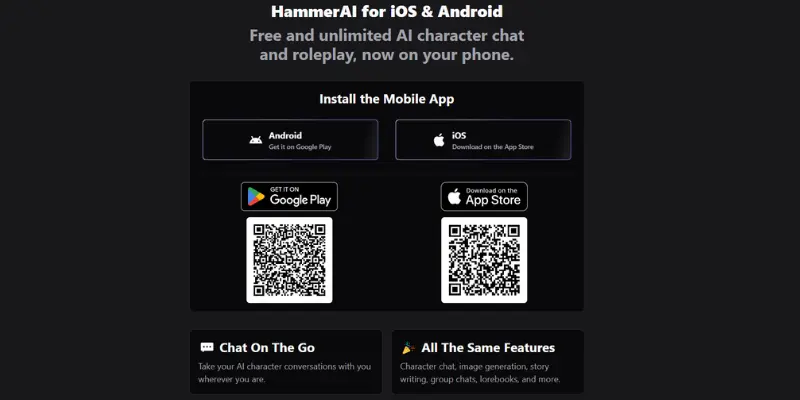
- Mobile. Official apps exist on both the App Store and Google Play, worth bookmarking directly, since a similarly named but unrelated app also exists (more on that below).
You don’t need to choose one path forever. Many users start on the free cloud tier to see if the characters and tone suit them, then move to a local model once they know they want to stick around.
Hammer AI Features
A few things come up constantly in any honest Hammer AI review, so here’s what each one actually does for you.
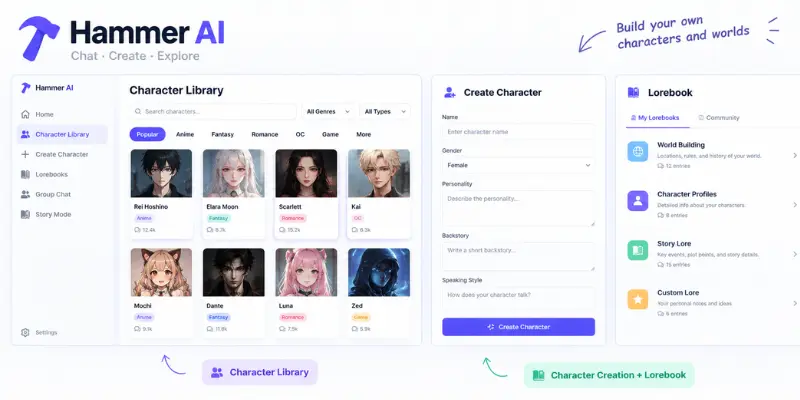
- Character library. Thousands of community-created characters across dozens of categories, filterable by genre, type, and source material
- Character creation. Build a custom character with your own personality, backstory, and speaking style, or import existing character cards
- Group chats. Up to ten characters in one conversation, interacting with each other and with you
- Story mode. Co-write an interactive story with the AI rather than chatting as yourself
- Lorebooks. A system for storing backstory, world rules, and relationship history that feeds back into the conversation automatically. This is what gives characters something resembling long-term memory
- Personas. Set up your own identity so characters address you consistently
- Image generation. Available across more than 20 image models, though it draws from a shared credit pool rather than being unlimited
- Text-to-speech. Hundreds of voices across dozens of languages, also credit-based
- Advanced model controls. Samplers like Temperature, Top-P, Top-K, and Repetition Penalty, for users who want to fine-tune exactly how a character writes
The credit system is worth understanding clearly, because it’s easy to misread. Chatting itself never costs credits, on any plan, including free. Credits only apply to image generation (10 credits per image) and text-to-speech (5 credits per generation). So a casual chatter can use Hammer AI indefinitely without ever touching a credit balance, while someone who wants a lot of generated images or spoken dialogue will burn through credits faster and may want a paid plan.
One power-user technique worth knowing is that Hammer AI lets you switch between different local or cloud models mid-session. Some users plan a scene or outline with a more logic-focused model, then switch to a more creative one to actually write the dialogue, carrying the conversation history across the swap. It’s not required, but it’s a useful trick once you’re comfortable with the basics.
Is Hammer AI Free?
This is the single most-searched question behind any Hammer AI review, and the marketing genuinely matches the product, with one distinction worth being precise about. Local models, run on your own device, are free and unlimited forever, no message cap, ever, no matter what plan you’re on. The free plan’s cloud chat is also usable without paying, but it’s capped at 600 messages a day rather than unlimited. There’s no forced upgrade wall blocking basic conversation, and no login requirement to get started.
Why is local chat free at all? Because every message on a cloud model costs Hammer AI actual server time; a message you run on your own hardware costs the company nothing, so there’s nothing for them to meter.
What you don’t get for free is faster or more capable cloud models beyond the two included on the free plan, image generation and text-to-speech credits, and the larger context windows that help characters remember more of a long conversation. If your use case is straightforward chatting and roleplay without images or voice, the free tier, local or capped-cloud, is a genuinely usable product on its own, not just a trial.
Hammer AI Pricing
Pricing is one of the parts of any Hammer AI review that goes stale fastest, so here’s what’s live on Hammer AI’s official pricing page as of this update.
| Plan | Price | Main Features | Limitations |
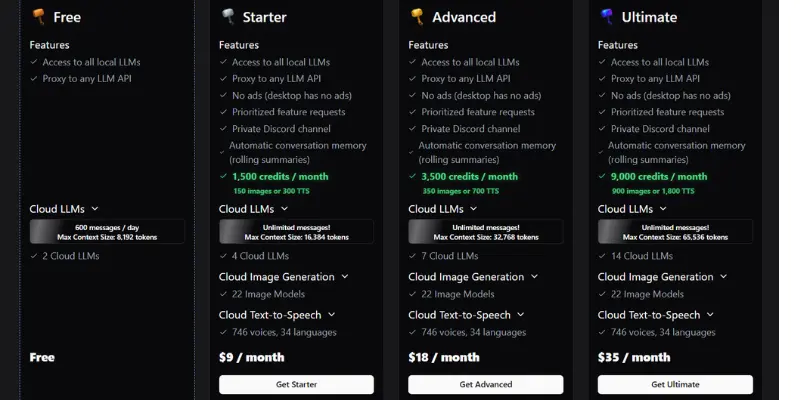
| Free | $0 | Unlimited local chat, 600 cloud messages/day, 2 cloud LLMs, group chats, lorebooks, personas, 8,192-token cloud context | No monthly credits for image generation or TTS; smallest cloud context window |
| Starter | $9/mo | Everything in Free, plus unlimited cloud messages, 1,500 monthly credits (approx. 150 images or 300 TTS clips), 16,384-token context, 4 cloud LLMs, cloud image generation and TTS | Credits are shared between images and voice, so heavy use of either drains the pool fast |
| Advanced | $18/mo | Unlimited cloud messages, 3,500 monthly credits, 32,768-token context, 6 cloud LLMs | Still a shared credit pool between images and TTS |
| Ultimate | $35/mo | Unlimited cloud messages, 9,000 monthly credits, 65,536-token context, 10 cloud LLMs | Priced closer to several premium companion apps combined |
One-time credit packs are also available separately, from $1.99 for 200 credits up to $99.99 for 20,000, for anyone who wants extra image or voice credits without upgrading their monthly plan. Purchased credits don’t expire, though monthly plan credits do reset each billing period without rolling over.
Hammer AI Performance & User Experience
Genuine, verifiable user feedback on Hammer AI’s own devlog comments points to a fairly consistent set of experiences:
- Occasional repetition. “Continue” or “regenerate” can repeat earlier text almost verbatim, and characters sometimes lose track of context in longer sessions, more common on smaller local context windows, less common on higher-tier cloud plans.
- A startup delay. Your device has to load the local model and generate the response itself, so the first reply (and sometimes each one) lands a beat slower than a cloud chatbot‘s near-instant response. That’s the tradeoff for the request never leaving your machine.
- Chat history isn’t saved by default. Persistence is part of what a paid plan (or a logged-in account) covers, and a few users have been surprised to lose history after closing the app.
- Hardware-dependent memory errors. Not enough RAM or VRAM for the chosen local model throws errors, fixed by switching to a smaller model or falling back to cloud. This is a normal local-model tradeoff, not something unique to Hammer AI.
Is Hammer AI Safe and Legit?
Safety is the other question that drives most Hammer AI review searches, so it’s worth answering in parts rather than with one blanket yes or no.
Is Hammer AI legitimate?
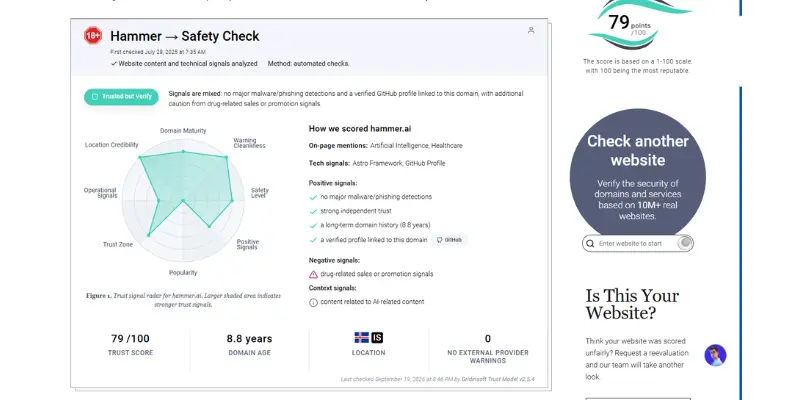
Automated checks from Gridinsoft put hammer.ai around an 79/100 trust score, based on:
- A roughly seven-to-eight-year domain registration history through Namecheap
- A valid SSL certificate
- No flagged phishing or malware patterns
- Site content partly flagged as AI-generated (a minor caution signal, not a red flag on its own)
That’s a meaningfully stronger signal than a brand-new, disposable domain, but it’s worth treating as a reputation snapshot from an automated scanner, not a certification of safety.
Is Hammer AI safe from a privacy standpoint?
It depends on which mode you use. Local models run entirely on your own device, and Hammer AI’s own documentation states those conversations are deleted once you close the app and never leave your computer. Cloud models process your messages on Hammer AI’s servers, a similar, standard tradeoff to the questions people already ask about whether ChatGPT is safe to use with sensitive information. If privacy is your top priority, sticking to local mode is the more conservative choice.
What about local vs. cloud, practically?
Local mode depends heavily on your own hardware. If your device doesn’t have enough memory for the model you pick, you’ll see errors and need to either switch to a smaller model or use the cloud option instead. Cloud mode sidesteps hardware limitations entirely, at the cost of processing happening on Hammer AI’s servers rather than your device, and a beat-faster response time than local models typically manage.
What about NSFW and content moderation?
Hammer AI allows uncensored roleplay, including NSFW content on certain models, and is transparent about this rather than hiding it. The app carries an 18+ age rating on the App Store, and the platform states outright that uncensored models are available for roleplay. This is a deliberate design choice, not a loophole. If you want a strictly moderated, all-ages chat experience, this isn’t the right platform, and Character AI applies much stricter content filtering by default if that’s what you’re after.
One safety note worth flagging directly
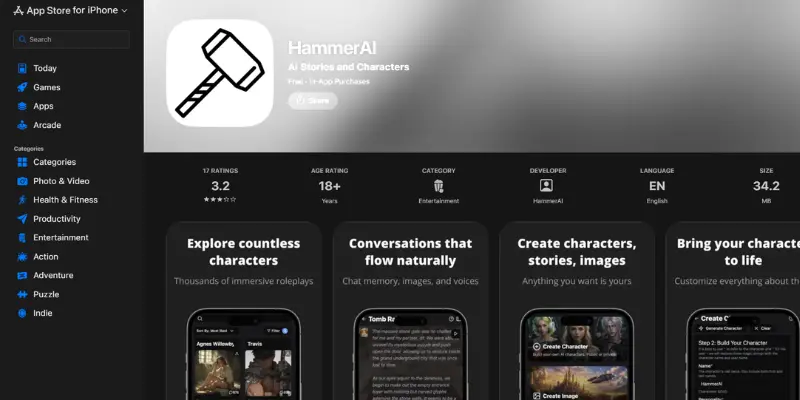
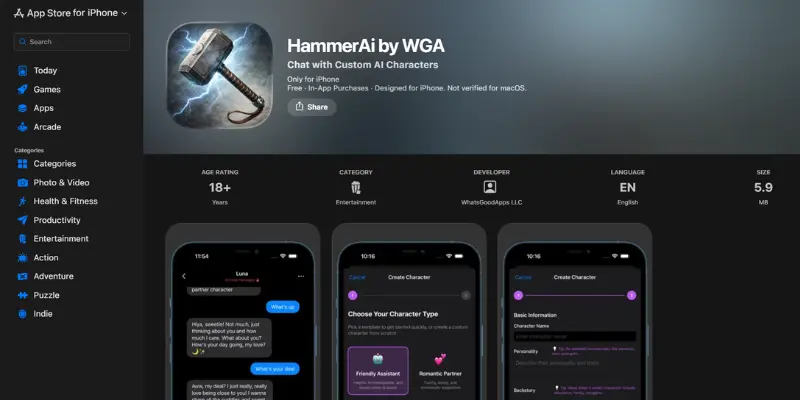
There’s a separate, unrelated iOS app called “HammerAi by WGA,” made by a company called WhatsGoodApps LLC, that has nothing to do with the official Hammer AI platform. It has its own in-app purchases and its own product. If you’re searching the App Store, make sure you’re downloading the official HammerAI app rather than this lookalike.
Common Mistakes New Users Make
A few avoidable habits come up repeatedly in Hammer AI review discussions and community threads.
- Assuming free-tier cloud chat is unlimited. It’s generous at 600 messages a day, but it’s not the same as local chat’s true no-cap access.
- Skipping lorebooks, then blaming the AI for “forgetting.” Long-term memory in Hammer AI mostly comes from lorebooks, not the base model. Set one up early for any character you plan to stick with.
- Running a large local model on modest hardware and assuming something’s broken. Slow or stalled responses on an underpowered device are a hardware mismatch, not a bug. Switching to a smaller model or the cloud tier usually fixes it immediately.
- Downloading from anywhere other than the official site or app stores. Given the lookalike app mentioned above, sticking to hammerai.com and the verified App Store/Google Play listings is the safest habit.
- Sharing identifying personal details in cloud chats. Cloud messages are processed on Hammer AI’s servers, so the same general caution that applies to any cloud AI service applies here too.
What Reddit and User Communities Say About Hammer AI
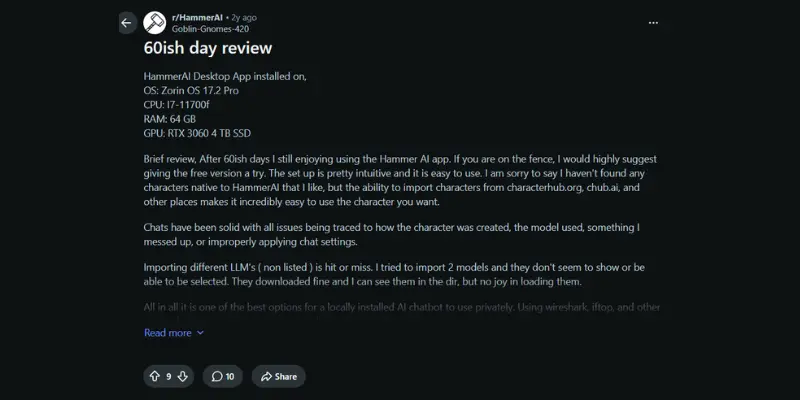
Direct, verifiable Reddit sentiment is genuinely thin in public search results, worth being honest about instead of inventing a fuller picture. One community thread the developer has pointed to describes Hammer AI as “one of the best options for a locally installed AI chatbot to use privately.” That’s a positive take on the local/private use case, but it reached us secondhand through the developer’s own citation, not a direct read of the thread. Readers who want to check the current temperature themselves can browse r/HammerAI directly.
More concrete, verifiable feedback comes from Hammer AI’s own devlog comment sections (not Reddit, but genuine first-hand user reports), where recurring themes include:
- Occasional repetition when using “continue” or “regenerate” in longer chats
- Confusion around the fact that saved conversation history is a paid-plan feature
- Local model performance depending heavily on the user’s own hardware, with memory errors resolved by switching models
None of this points to a scam or a broken product. It points to a small, one-developer platform with real usability rough edges that a bigger, better-funded competitor might have ironed out. Treat any single user’s account, including the one above, as one data point rather than a full picture of typical experience.
Hammer AI Pros and Cons
Pros
- Unlimited free local chatting on every plan, including the free tier, not a bait-and-switch trial
- Choice between fully local (private) processing and cloud-hosted models
- No account required to start chatting
- Lorebook system provides genuine persistent memory once set up
- Available on web, desktop (Windows/macOS/Linux), Android, and iOS
- Transparent, uncensored content policy rather than a hidden loophole
Cons
- Interface leans more technical than mainstream competitors
- Local responses are a beat slower than cloud apps, since your own hardware does the generating
- Conversation history isn’t saved by default unless you’re logged in or on a paid plan
- Local model performance is hardware-dependent and can hit memory errors on weaker devices
- Credits for images and voice are shared from one pool, which drains fast with heavy use of either
- One-developer team means slower fixes than bigger, funded competitors
- A confusingly similar but unrelated app exists on the App Store
Hammer AI vs. Character AI vs. Replika vs. Venice AI
| Factor | Hammer AI | Character AI | Replika | Venice AI |
| Free unlimited chat | Yes, locally on every plan | Limited without a subscription | Limited without a subscription | Capped, moderated on free |
| Runs on your own device | Yes | No | No | No (chats stay client-side, but generation runs on remote GPUs) |
| Account required | No | Yes | Yes | No |
| NSFW content | Yes, on certain models | No | Limited | None on paid plans |
| iOS and Android apps | Yes, both | Yes | Yes | Web-based |
| Best fit | Roleplay, on-device privacy, creative writing | Mainstream, moderated character chat | Daily emotional companionship | Browser-based privacy without local hardware |
There’s no universal winner here, it depends entirely on what you’re optimizing for.
- Privacy and unrestricted roleplay: Hammer AI has a real edge, especially if you’re willing to run models locally.
- Privacy without local hardware: Venice AI doesn’t require an account and keeps chat storage on your side, but the model still runs on a remote server, so it’s a lighter version of the same idea rather than the same thing.
- Polished, tightly moderated mainstream chat: Character AI is built around that instead.
- Daily emotional check-ins over roleplay depth: Replika or Nomi lean further into that use case.
Hammer AI Alternatives
If this Hammer AI review has you leaning toward a different platform, a few genuinely comparable options are worth knowing.
SillyTavern goes even further in the technical direction, trading a simpler interface for near-total control over models, prompts, and formatting, a natural next step for the kind of user who already likes Hammer AI’s local-model approach.
Venice AI keeps chats client-side and skips the signup requirement too, which makes it the closest thing to a privacy-first cloud alternative if you’d rather not manage local models and hardware yourself.
Janitor AI runs a different character ecosystem with its own moderation approach, useful for readers comparing uncensored roleplay platforms side by side.
Chai takes a lighter, more mobile-first approach with less configuration up front, which suits readers who found Hammer AI’s setup more involved than they wanted.
Candy AI, by contrast, folds most of its extras into a single subscription rather than a separate credit system, which some readers find easier to budget around.
CrushOn AI is another uncensored, character-first option worth a look if Hammer AI’s local-hardware requirement is the main thing holding you back.
Who Should Use Hammer AI?
Based on everything this Hammer AI review has covered so far, Hammer AI tends to fit well for the following readers.
- Readers who want unlimited local chatting without hitting a message cap or paywall
- Anyone who specifically wants the option to run conversations locally for maximum privacy
- People who enjoy building custom characters, worlds, and long-form roleplay
- Users comfortable with a moderately technical setup process
Who Should Avoid Hammer AI?
It’s a weaker fit for the following readers.
- Anyone who wants a fully guided, zero-learning-curve setup
- Readers who specifically want a heavily moderated, all-ages chat experience. The Character AI alternatives list is a better starting point for that
- Users who want consistently reliable long-session memory without paying for a higher context tier
- Anyone who’s not willing to trade a bit of response speed for on-device privacy
- People who want fast, well-staffed customer support rather than a one-person, independently run project
Is Hammer AI Worth It?
The core question behind this Hammer AI review is simple. Worth it for whom? That depends on which of these describes you.
- Just want free AI character chat. Yes. Local chat is a real, usable, unlimited product, and even the free cloud tier gives you 600 messages a day at no cost.
- Prioritizing privacy above all else. Yes. Local mode is close to the most private option available in this category, provided your device can handle it.
- Want advanced customization (lorebooks, personas, custom characters). Yes, this is one of Hammer AI’s clearer strengths.
- Want a native iOS experience. Yes. Hammer AI has an official iOS app, correcting an earlier gap in the platform’s mobile coverage.
- Want a highly polished, mainstream, zero-friction experience. Probably not. A more mainstream platform will likely feel smoother out of the box, and won’t ask you to think about hardware at all.
Conclusion
That’s the full picture behind this Hammer AI review. It backs up its “genuinely free” positioning better than most competitors in this category: unlimited local chat, no paywall on entry, and a real choice between private on-device processing and more capable cloud models.
Its weak points:
- A more technical setup than mainstream apps
- Local response times that trail cloud apps
- A credit system that takes a minute to understand
- A one-person team that moves slower on fixes than bigger, funded competitors
It suits privacy-conscious users, roleplay and creative-writing fans, and people who don’t mind a bit of a learning curve. It’s a weaker match for anyone who wants a fully polished, guided, all-ages experience with zero setup friction; for that reader, this Hammer AI review would point instead toward one of the more mainstream alternatives covered above.
Hammer AI Review FAQs
Yes. Local chat is unlimited on every plan, including free, at no cost. The free plan’s cloud chat is capped at 600 messages a day; paid plans remove that cap and add more cloud models, larger context windows, and credits for image generation and text-to-speech.
Yes, for local models. Once a model is downloaded to your device through the desktop app, it runs entirely without an internet connection, so you can disconnect Wi-Fi mid-conversation and keep chatting. Cloud models need a connection, since they run on Hammer AI’s servers.
Automated site checks from Gridinsoft show hammer.ai as an established, legitimately registered domain with an 80/100 trust score and no flagged security issues. Local mode keeps conversations on your device; cloud mode processes messages on Hammer AI’s servers, similar to other cloud-based chat platforms.
Yes, based on domain history, transparent release notes, an active developer presence, and a stated refund policy, reasonable trust signals for a project run by a single independent developer.
No. You can start chatting immediately without one. Creating an account (a feature added in a March 2026 update) lets you save and sync chats and characters across devices.
Yes, on certain models, and the platform is upfront about this rather than hiding it. It carries an 18+ age rating.
Yes. You can run models entirely on your own device through the desktop app or browser, keeping conversations off external servers.
It depends on how much you use image generation, voice, or want longer cloud conversation memory. If you’re happy with local chatting, or with the free cloud tier’s daily cap, you may never need to pay.





- Be Respectful
- Stay Relevant
- Stay Positive
- True Feedback
- Encourage Discussion
- Avoid Spamming
- No Fake News
- Don't Copy-Paste
- No Personal Attacks
- Be Respectful
- Stay Relevant
- Stay Positive
- True Feedback
- Encourage Discussion
- Avoid Spamming
- No Fake News
- Don't Copy-Paste
- No Personal Attacks
