Claude AI Review 2026: Pricing, Models, Strengths and Weaknesses
Published: 19 Sep 2026
Here’s what nobody tells you before you subscribe: Claude AI has one of the lowest Trustpilot ratings of any major AI tool, and yet its own users keep calling it the best assistant on the market in the very same review. That contradiction is the actual story, and it’s exactly what this Claude AI review is built to explain.
Claude AI is Anthropic’s AI assistant, free to start, with Pro running $17 to $20 a month for higher usage and the stronger Opus model. This Claude AI review is built on actual hands-on use, not secondhand impressions, and the short answer is that Claude earns its price for writing quality, careful reasoning, and genuinely useful coding help, though response speed and usage limits are the two things that trip people up daily. The rest of this Claude AI review covers what that looks like in practice, plus the current pricing, models, and honest user sentiment as of September 2026.
| Category | Rating |
| Writing quality | 4.7/5 |
| Coding and debugging | 4.6/5 |
| Reasoning and deep research | 4.8/5 |
| Response speed | 3.2/5 |
| Value for money | 4.2/5 |
| Ease of use | 4.5/5 |
| Billing and support | 2.1/5 |
| Overall | 4.1/5 |
Best for: writers, developers, and researchers who value output quality over speed
Not ideal for: anyone needing fast responses, native image generation, or predictable support
What Is Claude?
Claude is an AI assistant developed by Anthropic. It started as a conversational AI, but the product now covers much more than basic chat. You can use Claude for writing, research, coding, file work, and other multi-step tasks.
One thing that makes Claude different is Anthropic’s Constitutional AI approach. Anthropic uses a written set of principles to help guide how Claude is trained and how it should behave, with a focus on being helpful, honest, safe, and responsible.
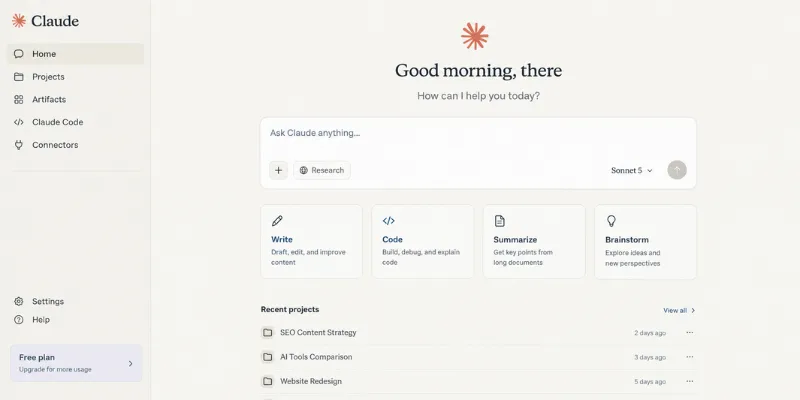
Claude is also built for longer workflows. Features such as Projects let users keep related chats, files, and instructions together, while Artifacts gives Claude a dedicated space for working with things like documents, code, graphics, and website designs.
For more advanced work, Claude also includes tools such as Claude Code for software development and Claude’s agentic features for handling tasks that can involve multiple steps.
So, Claude is no longer just a chatbot you use to ask questions. It is designed to work more like an AI workspace where you can start with a simple request and keep refining the work through the same conversation.
How I Tested Claude AI
This Claude AI review is based on hands-on use, not just reading other reviews. I’ve used Claude on the free plan and tested Opus specifically for heavier reasoning tasks, alongside regular use of ChatGPT and Gemini for comparison.
The first thing that stands out: Claude responds noticeably slower than ChatGPT or Gemini, especially on Opus. But the trade-off is real, the output quality is consistently better once it lands, particularly on anything that needs actual reasoning rather than a quick answer. Deep research is where this shows up most clearly. Ask Claude to research a topic properly and it comes back with something structured and genuinely useful, not a shallow summary stitched from the first few search results.
Coding is where Claude held up well in my own testing too. Claude Code reads, edits, tests, and debugs code directly, and the VS Code integration works cleanly in practice, it’s not a bolted-on extra. I also spent time in Artifacts, where Claude builds code, documents, diagrams, and even website designs and displays them in a dedicated workspace next to the chat instead of burying everything in plain text. That separation makes it easier to keep iterating on one piece of output while the conversation keeps going.
Once I moved to the paid plan, the difference was noticeable enough that I’d call it the real dividing line for anyone doing this professionally. Connecting Ahrefs and Google Drive through Connectors turned out to be genuinely useful rather than a nice-to-have, Claude could pull real data into a session instead of me copying it in manually, which matters a lot for SEO and content work specifically.
Claude AI Models: Which One Should You Actually Use?
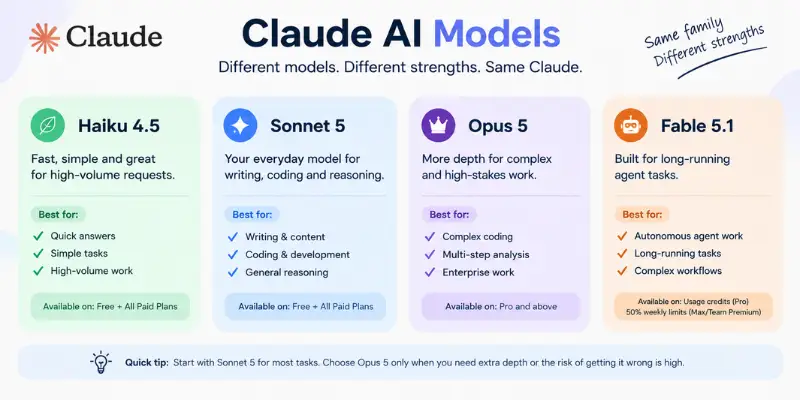
This trips up a lot of new users because the app surfaces model choice right in the chat window without much explanation. Here’s the practical breakdown:
| Model | Best for | Available on |
| Haiku 4.5 | Fast, simple, high-volume requests | Free and all paid plans |
| Sonnet 5 | Everyday writing, coding, and reasoning, the default for most tasks | Free and all paid plans |
| Opus 5 | Complex agentic coding, multi-step analysis, enterprise work | Pro and above |
| Fable 5.1 | Long-running autonomous agent tasks | Usage credits on Pro, 50% of weekly limits on Max/Team Premium |
| Mythos 5.1 | Anthropic’s tier above Opus | Not generally available, limited to Project Glasswing partner organizations |
A decent rule of thumb: start with Sonnet 5 by default, and only reach for Opus 5 when a task genuinely needs the extra depth or getting it wrong would actually cost something. Most day-to-day work never has to leave Sonnet.
On Mythos specifically, since it’s a keyword people are actively searching: it isn’t something you can sign up for. Access runs through a limited program for select organizations, so unless you’re already part of that program, this part of the lineup won’t show up in your account. Worth flagging for currency too: Anthropic briefly suspended access to the previous generation, Fable 5 and Mythos 5, for all users between June 12 and June 30, 2026, to comply with a U.S. export-control directive. Access to Fable was restored July 1. It’s a small footnote, but it’s the kind of regulatory exposure worth knowing about if your workflow leans on Anthropic’s top-tier models being consistently available.
Claude AI Pricing, Actually Explained
Free ($0): Sonnet 5 and Haiku 4.5, web search, memory across conversations, Artifacts, Connectors, up to 5 Projects. Usage resets on a rolling 5-hour window, and you’ll hit it fast in any real session.
Pro ($17/month billed annually, $20 month-to-month): meaningfully more usage, Claude Code, unlimited Projects, Opus access, Claude Design, and the Chrome and Microsoft 365 extensions.
Max (from $100/month): 5x or 20x Pro’s usage per session, higher output limits, priority access during traffic spikes. Not unlimited, weekly caps still apply on top of the session window.
Team ($20/seat/month annually for Standard, $100/seat/month annually for Premium): built for 2 to 150 people, central billing, SSO, admin control over connectors, mix and match seat types.
Enterprise ($20/seat/month billed annually, plus usage at API rates): SCIM, audit logs, a compliance API, custom data retention, HIPAA-ready offering. Total cost scales with actual usage, not just the seat price.
Why Claude AI Usage Limits Burn Faster Than You Expect
This is the single most repeated complaint across every Claude AI review on Trustpilot, Reddit, and G2, so it deserves a real explanation instead of just being listed as a con.
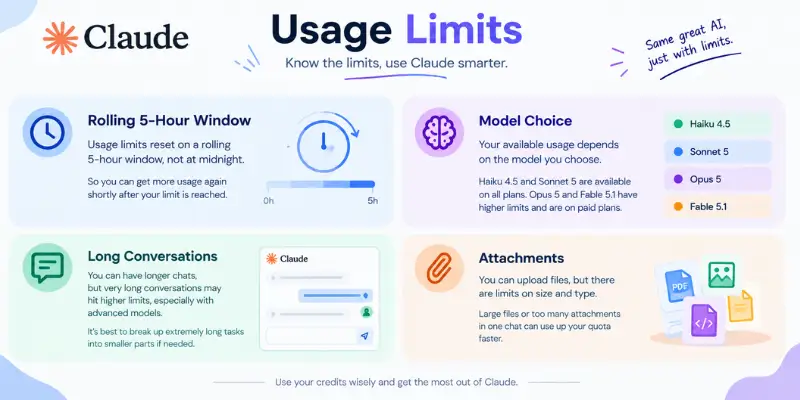
Every plan resets on a rolling five-hour session window, with weekly caps stacked on top for paid tiers. Three things drain that allowance faster than people expect:
- Model choice. Running a simple task through Opus instead of Sonnet burns through your window noticeably faster, since Opus is far more resource-intensive per response.
- Conversation length. A single long-running thread costs more than several short, separate ones, because the model reprocesses the full context on every message.
- Attachments. Uploading long documents or big batches of text for analysis draws down capacity faster than plain text back-and-forth.
When you do hit the limit, you get three options: wait for the reset, upgrade a tier, or turn on usage credits to keep working at standard API rates. That last option is exactly where a chunk of the billing complaints below come from, since credits can burn through unexpectedly fast on a heavy task.
Claude AI Strengths and Weaknesses
What Claude AI does well:
- Writing that holds tone across a long piece instead of drifting into generic, templated phrasing
- Multi-step reasoning and deep research that consistently outperform what ChatGPT or Gemini return for the same prompt, even with the slower response time
- A genuinely capable coding workflow, reading, editing, testing, and debugging in one place, with an IDE integration that doesn’t feel like an afterthought
- Artifacts, which gives code, documents, diagrams, and design work their own dedicated space instead of cluttering the chat
- Connectors that pull in outside tools like Ahrefs and Google Drive, useful for anyone running content or SEO workflows that depend on live data
- Long-document handling, up to 1M tokens depending on the model, roughly 750,000 words in one conversation
- A privacy-first posture, no model training on your content by default on paid plans
Where Claude AI falls short:
- Response speed, consistently slower than ChatGPT and Gemini, especially on Opus
- No native image generation
- Usage limits that matter more the heavier your use gets, particularly on Free and Pro
- Giving a coding agent file, shell, and network access carries real security tradeoffs, worth understanding before granting broad access
- A thinner third-party integration ecosystem outside of Connectors than some competitors, though the open MCP standard is closing that gap
- Billing and support friction disproportionate in general consumer reviews compared to developer-focused ones
Claude Code AI Review: Coding, Debugging, and PR Reviews
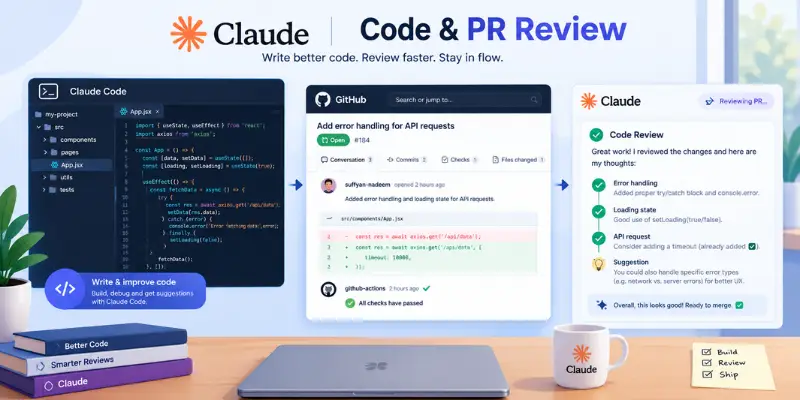
If you’re looking at Claude mainly for coding, there are two things to consider: writing code and reviewing code.
Claude Code works in your terminal, desktop app, or supported IDEs like VS Code and JetBrains. It can read a full codebase, edit multiple files, run tests, and work with Git using simple instructions. On a paid plan, it can handle larger coding projects instead of just helping with small code snippets.
There is also a security side to think about. Claude Code can access files, run shell commands, and make network requests when you give it permission. Anthropic uses sandboxing and permission controls to help limit this access. Still, it’s a good idea to understand what you’re giving Claude access to before using it with a production project.
One feature that many Claude reviews don’t talk about enough is automated pull request reviews. Claude can work with GitHub Actions to review a pull request when it is opened or updated. It checks the code changes and can leave its findings as a comment automatically.
This can help spot things like security issues, missing checks, or inconsistent error handling. It works best as a first layer of review that helps developers save time, rather than as a replacement for human code review. If you want to compare Claude with other options, you can also look at AI code review tools.
For a broader look at how Claude fits among coding assistants generally, see coding AI tools, and if your workflow is closer to a full IDE experience than a terminal agent, Cursor AI alternatives is the more direct comparison.
What Claude AI Reviews on Trustpilot and Reddit Actually Say
What Trustpilot Users Complain About
Claude AI’s Trustpilot rating sits around 1.4 out of 5 across well over a thousand reviews, which sounds disqualifying until you read what people are actually angry about. It’s almost never the model itself.
The complaints cluster into three things: usage limits burning faster than expected mid-session, usage credits vanishing within seconds of a top-up with no clear explanation, and support that’s largely AI-generated with no visible path to a human when a billing dispute needs one. One reviewer described paying for $6 in extra credits and watching the balance evaporate within seconds. Another waited over a month on a data-loss complaint with zero reply.
What Reddit Users Say About Claude
And in the same review threads, you get lines like “the product itself, when it works, is genuinely the best AI assistant on the market” and “I appreciate that it’s quick and concise, it helps with my business.” That contrast is the actual story.
Ratings also vary sharply by platform, and that’s not random: developer-focused communities like Reddit’s r/ClaudeAI and r/ClaudeCode skew toward praising technical depth and code quality, while general consumer review sites skew toward billing and cancellation complaints, simply because people motivated to warn others about a surprise charge are far more likely to leave a review than someone whose bug got fixed quietly.
What These Reviews Really Tell You
Claude AI’s technical output holds up. Its billing transparency and support infrastructure do not, and if you run long sessions, it’s worth setting a usage alert before you start one.
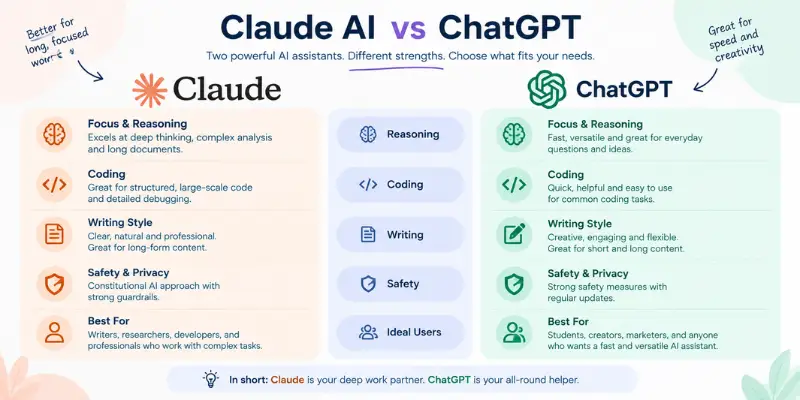
Claude AI vs ChatGPT
Claude tends to win on long-document work, coding accuracy, and writing that sounds like it has an actual point of view. ChatGPT’s advantages are breadth, native image generation, a more mature voice mode, and a wider out-of-the-box plugin ecosystem, even though Claude’s open MCP standard for connectors is arguably the better long-term architecture and is closing that gap.
Neither wins outright, and a lot of professional users run both, Claude for coding and long-form writing, something else for image generation or quick creative variation. Worth comparing directly at Claude AI alternatives or ChatGPT alternatives rather than assuming it’s a two-horse race, and if research depth specifically is your priority, it’s also worth weighing against a research-first tool like Perplexity AI.
Is Claude AI Good for Studying?
For students, Claude’s strengths line up well with actual coursework: it explains reasoning step by step instead of just handing over an answer, holds context across a long research session, and its 1M-token window means you can upload a full textbook chapter or a set of lecture notes without losing earlier context. Worth comparing against dedicated AI tools for students rather than defaulting to whichever assistant you already have open.
Is Claude AI Safe?
Constitutional AI training is Anthropic’s core answer here, meant to make the model refuse harmful requests while staying broadly helpful, and Anthropic treats safety and interpretability as a core part of its roadmap rather than an afterthought. Paid Team and Enterprise plans add SSO, audit logs, role-based access, and no model training on your content by default. That said, “safe” in the alignment sense and “reliable billing and support” are two different things, and the Trustpilot pattern above is really about the second one. If data handling specifically is your concern, it’s worth reading how the question plays out for ChatGPT as well, since the answer looks similar across most major providers: strong on the model side, weaker on billing transparency.
Who Should Use Claude AI, and Who Shouldn’t
A strong fit if:
- You write or code for a living and care more about output quality than raw feature breadth
- You regularly work with long documents, briefs, or research that needs to stay coherent start to finish
- You want a calm, focused interface over a dashboard full of tools you’ll never touch
- Data privacy and a safety-first company culture actually factor into your software choices
Worth reconsidering if:
- Native image generation is part of your regular workflow
- Your work involves long, frequent sessions where hitting a usage ceiling would genuinely disrupt things
- You depend on a wide third-party plugin ecosystem out of the box
- You need Claude wired directly into a helpdesk or CRM to take real actions rather than generate text, since that still requires third-party middleware
Final Verdict: Is Claude AI Worth It?
This Claude AI review comes down to one honest trade-off: Claude in 2026 is slower than ChatGPT and Gemini, but the output quality, especially on reasoning, deep research, and coding, holds up against anything on the market. Based on hands-on use across both the free plan and Opus, that trade-off was worth it more often than not. On Pro, it comfortably handles full coding builds and complete SEO content projects, not just fragments, Connectors to tools like Ahrefs and Google Drive add real value for content work, and the automated PR review feature is a genuinely underused strength for dev teams.
The pricing is fair once you understand the usage-limit mechanics. The Trustpilot score is real, but it’s measuring support and billing friction, not whether the model can do the work. Go in knowing that, expect to wait a bit longer than you would with ChatGPT or Gemini, and it’s worth the $17 to $20 a month for most writers, developers, and researchers.
This Claude AI review reflects pricing, models, and features as of September 2026. Anthropic updates pricing and plans periodically, always confirming current details on Anthropic’s official pricing page before subscribing.
Frequently Asked Questions
Reddit’s r/ClaudeAI and r/ClaudeCode lean positively on technical depth, developers specifically praise code quality and debugging help, while the recurring wish is for true persistent memory that doesn’t require manually re-explaining project context every session.
Yes, and it matters more than usual right now. Pricing, model names, and even which models are available at all (Fable and Mythos didn’t exist yet) shifted enough between late 2025 and September 2026 that a review written even a few months ago is likely citing outdated numbers.
Yes, through the official claude-code-action GitHub Actions integration, which reached general availability in spring 2026. It posts a structured review comment on every PR automatically, covering security patterns, missing error handling, and style consistency, without anyone triggering it manually.
Mythos is Anthropic’s tier above Opus. It isn’t generally available, access currently runs through a limited program for select trusted organizations called Project Glasswing, so most people researching a Claude AI review won’t be able to use it directly.
Plenty of creators publish hands-on walkthroughs, but pricing and model names in those videos age out fast given how often Anthropic updates the lineup. Cross-check anything you watch against Anthropic’s own pricing page before deciding.
The complaints are real and specific, mostly usage limits and billing transparency, not the model’s actual output quality. Read a handful of full reviews rather than trusting the star rating alone, since the low score reflects support experience more than product capability.
Yes, particularly for research-heavy coursework. Its deep research and long-context handling are strong even with the slower response time compared to ChatGPT or Gemini, and it explains its reasoning rather than just handing over an answer.
Yes on paid plans, no model training on your content by default, plus SSO, audit logs, and role-based access on Team and Enterprise. Free-tier data handling is more limited, so check Anthropic’s current privacy terms if that matters for your use case.






- Be Respectful
- Stay Relevant
- Stay Positive
- True Feedback
- Encourage Discussion
- Avoid Spamming
- No Fake News
- Don't Copy-Paste
- No Personal Attacks
- Be Respectful
- Stay Relevant
- Stay Positive
- True Feedback
- Encourage Discussion
- Avoid Spamming
- No Fake News
- Don't Copy-Paste
- No Personal Attacks
