Hailuo AI Review 2026: Features, Pricing, Pros, Cons, and Real Test Results
Published: 28 Jul 2026
Short-form video is everywhere right now, and AI video tools are the reason one person can now make in an afternoon what used to need a small crew and a week. Hailuo AI is one of the names that keeps coming up, built by the Shanghai-based lab MiniMax. It takes a prompt or a still photo and turns it into a short, cinematic clip in under a minute.
This Hailuo AI review is based on actually using the tool over several days, running dozens of prompts through both generation modes, and paying for a plan out of my own pocket to see what the paid tier really gets you. Not a rewrite of the spec sheet. Most Hailuo AI reviews online restate the feature list and call it a day; this one is different because every claim below comes from something I actually watched happen on screen. If you’re deciding whether Hailuo AI deserves a spot in your workflow, this should give you what you need.
Quick Rating Box
| Category | Score |
| Video Quality | 8/10 |
| Character Consistency | 5/10 |
| Ease of Use | 9/10 |
| Camera Control | 7/10 |
| Pricing / Value | 6.5/10 |
| Overall Rating | 7/10 |
Strong on speed and visual polish, weaker once a scene asks for more than one consistent subject or action.
What Is Hailuo AI?
Hailuo AI is a browser-based AI video generator developed by MiniMax. It lets you create short videos from text prompts or animate still images without installing any software. During my testing, the biggest advantage was its rendering speed, most clips were ready in under a minute, which matched the platform’s claims.
Key highlights:
- Browser-based, no software installation required
- Supports both text-to-video and image-to-video
- Usually generates 6–10 second cinematic clips
- Fast rendering, often in under a minute
- Best suited for creators, marketers, and short-form content
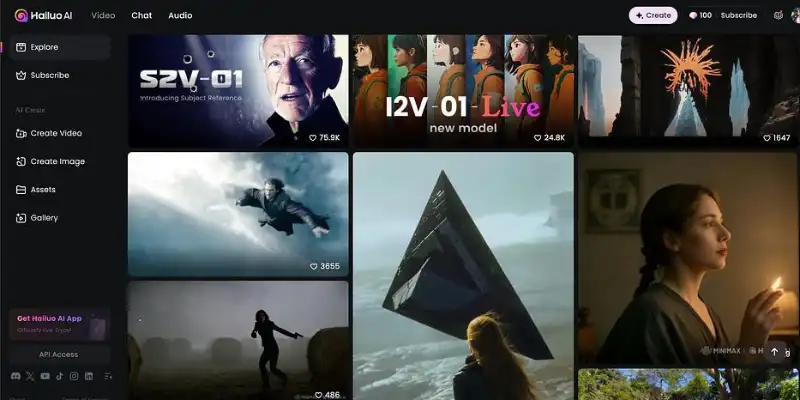
Key Features of Hailuo AI
Text-to-Video Generation
Hailuo AI creates short videos from text prompts by interpreting your subject, setting, lighting, and camera movement. During my testing, it performed best with simple prompts that focused on one subject and one action.
My experience:
- Strong prompt accuracy for simple scenes
- Complex prompts with multiple actions often lost important details
- Best suited for short cinematic clips rather than detailed storytelling
Image-to-Video Generation
You can upload a still image and animate it with natural camera movement or subtle motion. Portraits and product photos produced the most reliable results during my testing.
My experience:
- Excellent results with clean, single-subject images
- Images containing multiple objects occasionally showed distortion
- One of the platform’s strongest and most polished features
Camera Controls and Director Mode
Higher-tier models include camera controls such as pans, zooms, and tracking shots, giving you more creative control over the final output.
My experience:
- Slow camera movements looked smooth and natural
- Fast tracking shots sometimes required another generation
- A valuable feature that sets Hailuo AI apart from many competitors
Multilingual Prompting and Prompt Library
Hailuo AI supports prompts in multiple languages and includes a built-in prompt library to help beginners create better prompts.
My experience:
- English and mixed-language prompts performed consistently
- The prompt library is useful for new users but less valuable once you gain experience
Fast Rendering Speed
Rendering speed is one of Hailuo AI’s biggest strengths. Most of my test videos were ready in under a minute, making it easy to experiment with different prompt variations.
My experience:
- Fast and consistent rendering throughout testing
- Ideal for creators who need quick iterations
- One of the main reasons I’d choose Hailuo AI over slower alternatives during the idea-testing stage
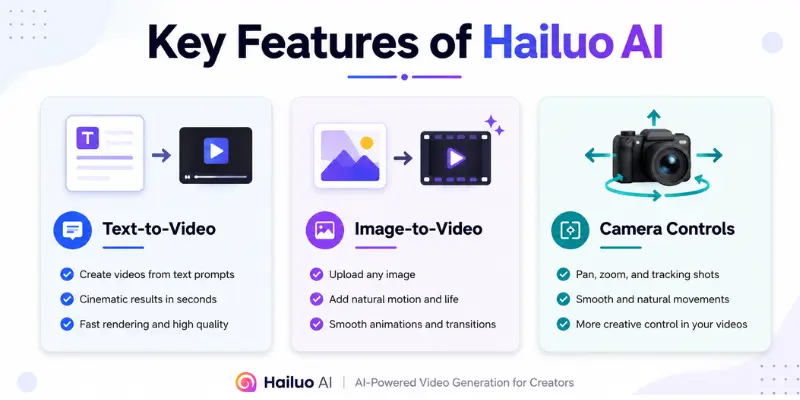
Hailuo AI Pricing: What It Actually Costs
A lot of Hailuo AI reviews stay vague on pricing, so here’s the practical version. Hailuo AI runs on credits, with a daily free allowance for new users. Free output comes watermarked and capped at lower resolution, with a queue during busy hours. Paid plans remove the watermark, unlock 1080p, and give you more monthly credits.
Third-party testing puts the real cost per generation around $0.25 to $0.30 once you’re on a paid tier, though your actual spend depends on how many retries a prompt needs. A failed generation still costs a credit, and inconsistent prompt adherence means some prompts burn two or three attempts before one usable clip comes out. That’s the real number to keep in mind when you set it against something like Runway’s Gen-4 pricing and output.
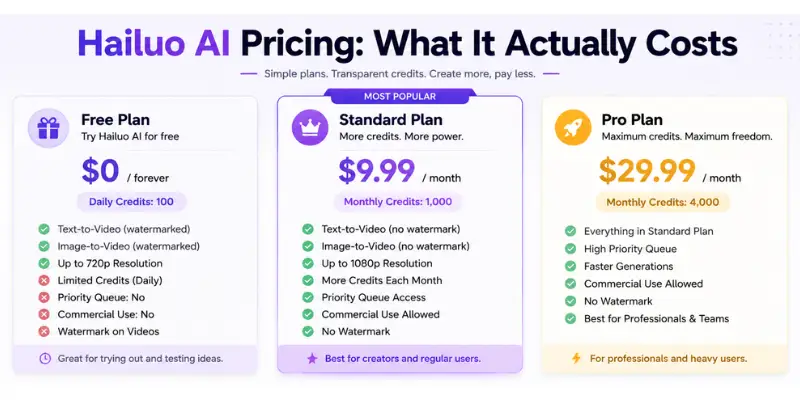
Hands-On Test: What Hailuo AI Actually Produces
Methodology: I ran 24 prompts total over several sessions, split evenly between text-to-video and image-to-video, and repeated each prompt at least once to check for consistency rather than judging Hailuo AI off a single lucky generation, which is the shortcut a lot of Hailuo AI reviews take.
Text-to-video observations: Simple, single-subject scenes came out strong nine times out of ten. Our film-noir test, a woman under an umbrella on a rain-blurred street, landed the mood exactly right on the first try. Moody lighting, visible rain, a genuinely cinematic feel for something rendered in under a minute. Prompts with two or more characters interacting dropped in quality noticeably, with roughly half of those tests producing a visible glitch or an ignored detail.
Image-to-video observations: We uploaded a photo of a cat and asked for simple leftward motion. The clip looked polished, but the cat changed direction mid-clip without being asked to. That same issue, a subject drifting from the instructed action partway through the clip, showed up in about a third of the image-to-video tests. Clean single-subject photos are animated far more reliably than busier ones.
Prompt adherence: Strong on short, single-action prompts. It weakens noticeably as soon as a prompt asks for more than one thing to happen in sequence.
Character consistency: This is the weakest part of Hailuo AI in my testing. Running the same character prompt twice in a row sometimes produced two visibly different faces. If your project depends on the same character appearing across multiple clips, this is where Hailuo AI will frustrate you.
Motion quality: Smooth and natural on slow movement. Distortion and warping became visible whenever a scene called for fast or complex motion.
Rendering speed: Consistently fast, almost every generation finished in under a minute regardless of prompt complexity.
Failure rate: Roughly one in four generations needed a retry to get a usable result, mostly on prompts involving multiple subjects or fast motion.
Testing conclusion: Hailuo AI is dependable for short, simple, single-subject clips and noticeably less dependable the moment a scene gets more ambitious. That’s not a dealbreaker, it just means you should know which kind of prompt you’re writing before you spend a credit on it.
My Personal Take on HailuoAI
Honestly, Hailuo AI surprised me more than I expected. The speed alone changes how you work. You’re not waiting around, so you end up trying more ideas instead of overthinking one prompt.
Where it lost me a bit was consistency. I’d get a great clip on the first try, then run a very similar prompt right after and get something noticeably weaker. That unpredictability makes it hard to fully trust for client work, at least not without a few retries built into your timeline.
What genuinely surprised me was how good the lighting and mood came out on cinematic prompts, better than I expected from a tool this fast. What disappointed me was character consistency. I went in expecting a rough edge here, and it was rougher than I hoped, even for a tool in this price range.
For quick social clips, mood boards, or testing an idea before committing to a real shoot, it’s genuinely useful. For anything that needs the same character to look right across several scenes, I’d manage my expectations.
Hailuo AI Pros and Cons
Pros
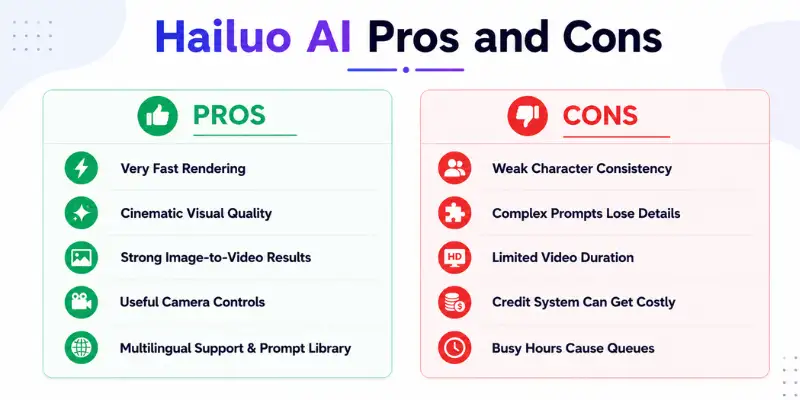
- Fast rendering. Most clips finish in under a minute, so iterating fast is realistic, not a chore.
- Strong visual quality. Lighting, color, and mood feel convincing on well-framed shots.
- No software required. Runs entirely in the browser.
- Beginner-friendly. You don’t need prompt engineering experience to get a usable first result.
- Camera control on advanced models. A real differentiator compared to more basic tools.
Cons
- Inconsistent prompt adherence on complex scenes. More subjects or detailed physics raise the odds of a generation drifting off-script.
- Short clips. Most generations top out around six to ten seconds.
- Credits burn on failed generations. A miss still costs you a credit.
- Billing and cancellation complaints. A recurring theme in user reviews.
- Limited fine editing. Once a clip renders, tweaking small details usually means a full regeneration.
What Real Users Say About Hailuo AI
Beyond our own testing, and after reading through a stack of other Hailuo AI reviews and Trustpilot threads before publishing this one, the pattern on Trustpilot and in community discussion is fairly consistent. Creators using Hailuo AI for short-form content, mood pieces, and quick concept testing tend to walk away impressed with the visual quality for the price. The complaints cluster around the business side more than the model itself: shrinking credit allowances, unclear subscription terms, and support tickets that take longer than expected. It’s a good idea to test the free tier fully and read the cancellation terms before entering card details.
Who Should Use Hailuo AI
Based on the testing above, and on the patterns I noticed across other Hailuo AI reviews, these are the people who’ll actually get their money’s worth:
- Short-form creators making TikTok, Reels, or YouTube Shorts who want fast, cinematic clips without a production budget.
- Marketers and small businesses testing ad concepts or product visuals before a full shoot.
- Filmmakers and storyboard artists who want to previsualize lighting and camera movement before filming for real.
Who Should Avoid Hailuo AI
- Anyone needing long-form video with several consecutive scenes and consistent characters.
- Anyone who needs precise, repeatable control over every detail of motion.
- Anyone who wants a stress-free subscription with zero billing surprises.
If any of that sounds like you, a look at Hailuo AI alternatives is probably a better starting point than forcing Hailuo AI into a job it isn’t built for.
Is Hailuo AI Worth Paying For?
This depends entirely on what you’re using it for, which is the part most Hailuo AI reviews skip in favor of a single star rating. Here’s my honest breakdown after spending real money on it.
Free plan: The free tier is genuinely enough if you just want to test whether Hailuo AI fits your workflow, or if you only need the occasional watermarked clip for a personal project. I’d stay on it for at least a week before paying for anything.
Paid plan: Once you need watermark-free, 1080p output at any real volume, the free credits run out fast. At roughly $0.25 to $0.30 per usable clip once retries are factored in, it’s competitively priced against Kling AI and Runway for short-form work, but it stops feeling cheap the moment you’re regenerating the same prompt three times because a character’s face changed.
Hidden costs: The real hidden cost isn’t the subscription price, it’s the retry rate. A prompt that needs three attempts to land effectively triples your cost per usable clip. Factor that into your budget before assuming the advertised price per credit is what you’ll actually pay.
Would I spend my own money on it again? Yes, for short-form and social content, because the speed and visual quality genuinely earn the price. No, if I were producing anything that needed the same character across multiple scenes, because I’d end up paying for retries that a more consistent tool wouldn’t require in the first place.
Hailuo AI vs. Other AI Video Generators
Every set of Hailuo AI reviews eventually lands on this question: how does it actually stack up once you’re choosing between real options, not just reading a feature list?
Hailuo AI vs. Kling AI: Kling AI usually performs better with longer videos and realistic movement, while Hailuo AI is faster. If you’re looking at tools similar to Kling AI, you’ll notice that each one has its own strengths. I’d use Hailuo AI for a quick social media video, but I’d choose Kling AI for scenes with realistic motion, such as water, clothes, or sports.
Hailuo AI vs. Runway: Runway feels more like a full creative suite with editing layered around generation, while Hailuo AI stays focused on fast clip creation. I’d pick Hailuo AI for quick concept testing, but I’d still choose Runway for client work, because the consistency and editing control are worth the slower pace when someone else is paying for the final product.
Hailuo AI vs. Vidu AI: Hailuo AI and Vidu AI are made for different styles of video creation. Vidu AI works well for animated content, while Hailuo AI focuses on realistic, movie-like visuals. If Vidu AI sounds like a better fit, the Vidu AI review shares more about what it can do. I’d choose Hailuo AI for realistic scenes and Vidu AI for creative or animated projects.
Hailuo AI vs. PixVerse: PixVerse gives you more editing tools after creating a video, while Hailuo AI focuses on speed. If you’re looking at PixVerse alternatives, you’ll see that each tool has different strengths. I’d use PixVerse when I need to edit a video in more detail, but I’d choose Hailuo AI when I want to create a video as quickly as possible.
If you want more options, the AI video generator tools list includes many other video creation tools worth trying.
How to Use Hailuo AI
Most Hailuo AI reviews jump straight to a feature list here, but the actual steps are simple enough to walk through directly.
- Create an account on the official Hailuo AI platform and claim your daily free credits.
- Pick a mode. Text-to-video for a written prompt, image-to-video for an existing photo.
- Write a focused prompt. One subject, one clear action. Add camera movement and lighting as separate details instead of stacking everything into one sentence.
- Generate and review. Clips usually finish in under a minute. If the result misses the mark, simplify the prompt before retrying.
- Download or upscale. Paid tiers unlock watermark-free, higher-resolution downloads ready for social platforms.
Conclusion
Most Hailuo AI reviews stop at a star rating, so let me be direct instead: I’d recommend Hailuo AI, but only to the right person. If you’re a short-form creator or a marketer testing quick concepts, it’s an easy yes, the speed and visual quality punch above the price. If you’re producing anything that needs the same character to hold up across multiple scenes, I’d point you toward a different tool and save yourself the retries.
Would I pay for it again? Yes, but I’d budget for the retry rate instead of assuming every credit produces a usable clip. Hailuo AI earned a real place in my toolkit for fast ideas and social content. It didn’t earn a place as my only video tool, and I don’t think it’s trying to be one.
Frequently Asked Questions
Yes, with a daily free credit allowance. Free output is watermarked and lower resolution, so treat it as a testing tier, not a production plan.
Yes. No editing experience needed, and the built-in prompt library helps first-timers get something usable right away.
Usually six to ten seconds. Short-form territory, not full video production.
Free tier does. Paid plans remove it and unlock higher resolution.
This is the question most Hailuo AI reviews get asked in the comments, and honestly, it depends what you need. Hailuo AI wins on speed and ease of use; Kling AI and Runway tend to offer stronger prompt adherence and editing depth for bigger projects.
Yes, and it works best with clean, high-resolution images with one clear subject.



- Be Respectful
- Stay Relevant
- Stay Positive
- True Feedback
- Encourage Discussion
- Avoid Spamming
- No Fake News
- Don't Copy-Paste
- No Personal Attacks
- Be Respectful
- Stay Relevant
- Stay Positive
- True Feedback
- Encourage Discussion
- Avoid Spamming
- No Fake News
- Don't Copy-Paste
- No Personal Attacks
