Vidu AI Review 2026: Is This Anime-Focused Video Generator Worth Your Credits?
Published: 23 Jul 2026
Vidu has quietly become one of the most talked-about names in AI video, mostly because of two things: a genuinely strong anime generation engine, and a Trustpilot page that tells a very different story than its G2 reviews do. Both of those things are true at the same time, and this Vidu AI review is going to walk through exactly why.
If you’ve been comparing AI video generators and keep seeing Vidu mentioned alongside Runway, Kling, and Sora, this review covers what the platform actually does, what it costs, what real users are saying, and who it’s genuinely a good fit for in 2026.
What Is Vidu AI?
Vidu is an AI video generation platform built by Shengshu Technology, a Beijing-based startup founded by Tsinghua University researchers and backed by Baidu and Ant Group. It turns text prompts, still images, or multiple reference images into short video clips, all from a browser, with no downloads or GPU required.
The platform runs on three core creation modes: text-to-video, image-to-video, and reference-to-video. With more than 10 million users across 200+ countries, this Vidu AI review sits at a point where the platform has clearly found its niche between premium tools like Runway and Sora and cheaper, less capable generators.
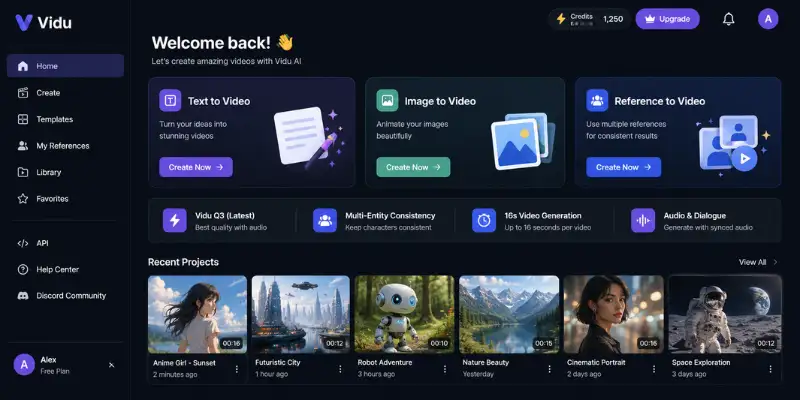
How Vidu AI Works
Getting a video out of Vidu follows a simple loop, whichever mode you’re using:
- Choose a mode: text-to-video, image-to-video, or reference-to-video.
- Write your prompt or upload your image and reference assets.
- Pick a model (Q3 for audio-synced storytelling, Q2 or Q1 for faster, cheaper generations).
- Generate. Vidu typically returns multiple output variants per run.
- Review the variants, download your pick, and save reusable characters to My References.
That “My References” library is worth knowing about early. It lets you save a character, prop, or background once and reuse it across future videos without re-uploading, which matters a lot if you’re producing a series rather than a one-off clip.
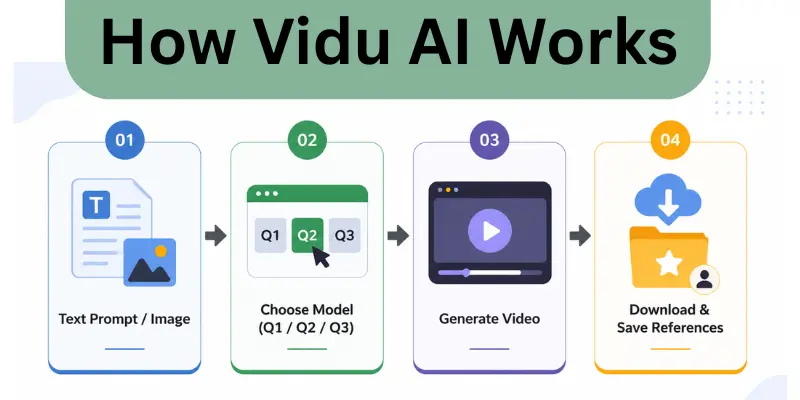
Vidu Q3 and the Multi-Entity Consistency Feature
Two things come up in nearly every Vidu AI review, and they’re both worth a closer look.
Multi-Entity Consistency:
upload 3–7 reference images of characters, objects, or scenes, and the AI keeps them all looking the same throughout the clip. Upload two characters and a background, and the output keeps those characters consistent from the first frame to the last, instead of faces drifting or morphing the way they often do on other platforms. For anyone producing a series of related videos, that’s a real problem solved, not just a marketing bullet point.
Vidu Q3:
the platform’s current flagship model, and the first to generate synchronized audio and video together in a single 16-second shot. Dialogue, lip movement, and atmospheric sound all come out of one generation instead of separate voiceover and syncing steps.
Multi-shot camera control:
also part of Q3, letting you describe several distinct camera angles in one prompt and get smooth transitions between them, instead of stitching separate clips together in an editor.
Independent benchmark results:
Artificial Analysis has placed Vidu’s Q2 Pro model in the top two globally, ahead of Runway Gen-4.5, Google Veo 3.1, and OpenAI Sora 2 Pro, a meaningful result for a platform that started out known mainly for anime content.
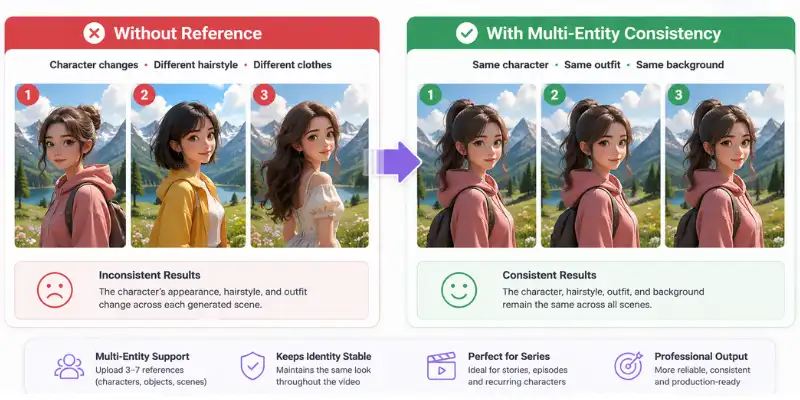
Where Vidu AI Genuinely Excels: Anime and Stylized Video
If there’s one thing every Vidu AI review agrees on, it’s this: Vidu’s anime generation is the best in its category. Character animation in anime style comes out fluid and natural in a way Runway and Sora simply don’t match. Community sentiment across creator forums backs this up consistently, not just Vidu’s own marketing.
Realistic human footage is a different story. Complex movements, overlapping limbs, and fast motion still produce visible artifacts, and testing on romantic or physically close scenes (a kiss, a hug) shows the same pattern repeatedly: bodies move naturally right up until the moment of contact, where lip movement, nose positioning, or hand placement tends to look stiff or slightly off. If your use case leans toward anime, product animation, or stylized content, that weakness barely matters. If you need convincing live-action human interaction, it’s worth setting expectations accordingly.
Vidu AI Pricing: What It Actually Costs
Since pricing is one of the most searched parts of any Vidu AI review, let’s start with the numbers. Vidu’s free plan includes bonus starter credits plus unlimited generation during off-peak hours, which is a genuinely generous way to test the platform before spending anything.
| Plan | Monthly Price | Credits | Roughly | Best For |
| Free | $0 | Starter credits + unlimited off-peak | Testing quality | Beginners, casual experimenters |
| Standard | $8–10/month | 800/month | ~200 videos | Independent creators |
| Premium | $28–35/month | 4,000/month | ~1,000 videos | Active creators, small teams |
| Ultimate | $79–99/month | 8,000/month | ~2,000 videos | High-volume professionals |
| Team | Starts around $2,999 | Shared credit pool | Custom volume | Agencies, production studios |
At roughly 4 credits per standard video, the Standard plan works out to some of the cheapest commercial-use AI video generation available right now, noticeably less than Runway’s entry tier or accessing Sora through ChatGPT Plus. Annual billing shaves a bit more off each tier if you’re planning to stick around.
There’s an important catch though: failed renders still consume credits. If your prompt is too complex and the output comes out unusable, those credits are gone regardless. The platform genuinely performs best with simple, focused prompts rather than long, heavily detailed ones, which is worth knowing before you burn through a chunk of your monthly allowance on one overly ambitious generation.

Is Vidu AI Safe and Legit?
Yes, Vidu is a legitimate platform, not a scam operation. It has millions of active users, a public pricing page, a documented API, an active Discord community, and backing from major investors including Baidu and Ant Group. Payments run through Stripe with standard subscription billing.
Since Vidu is developed by a China-based company, that’s worth flagging directly if data residency or regulatory compliance documentation matters for your organization; Vidu’s public security information is general rather than the kind of granular technical detail some enterprises require.
What Do Trustpilot Reviews Actually Say About Vidu?
This is the part most competitor reviews gloss over, and it’s genuinely important context. Vidu holds a strong 4.7 out of 5 on G2. On Trustpilot, the picture looks very different.
- G2 rating: 4.7 out of 5, mostly praising the video quality itself.
- Trustpilot rating: 2.0–2.8 out of 5, depending on which domain you check (vidu.studio versus vidu.com), with a heavy skew toward 1-star ratings.
- A common complaint: losing access to a paid subscription for days with no resolution and no refund.
- Another common complaint: disputes over creative work, with support going unanswered.
- The root cause, mentioned repeatedly: Vidu’s pricing page states plainly that refunds aren’t available, and that policy, combined with credits being consumed by failed renders, is where most of the frustration comes from.
So if you’re specifically looking for Vidu AI reviews before subscribing: the underlying video generation technology gets strong marks from people actually using it for content, while the billing and support experience gets consistently poor marks from people who ran into a problem and needed help. Both of those things can be true at once, and it’s worth going in with that expectation rather than being surprised by it later.
Vidu AI Pros and Cons
Weighing everything covered in this Vidu AI review so far, here’s how it breaks down:
Pros
- Best-in-class anime and stylized video generation
- Multi-Entity Consistency keeps recurring characters visually stable across clips
- Vidu Q3’s synchronized audio-video generation is a genuine technical leap
- Very competitive pricing, among the cheapest commercial-use tiers available
- Generous free tier with unlimited off-peak generation
- Ranked in the global top two on independent Artificial Analysis benchmarks
Cons
- Strict no-refund policy stated directly on the pricing page
- Failed renders still consume credits, even when the output is unusable
- Realistic human motion, especially close physical interaction, can look stiff
- Trustpilot sentiment is significantly worse than G2, mostly around billing and support
- No documented integrations with professional editing tools like Premiere or DaVinci Resolve
- Content moderation can feel strict, occasionally flagging prompts that aren’t actually violating anything
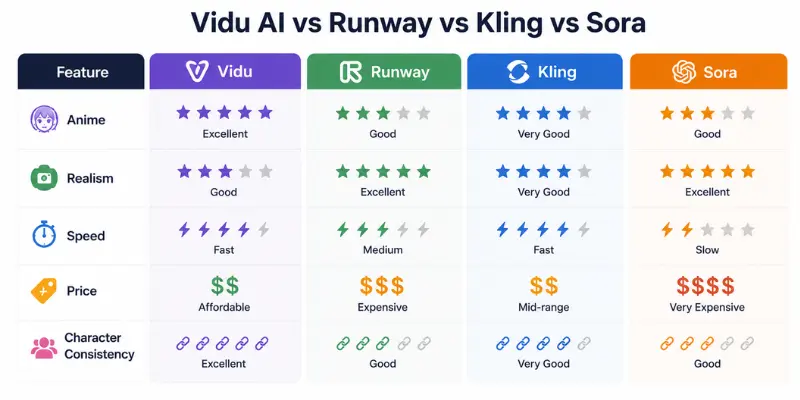
Vidu AI vs Runway, Kling, and Sora
Any honest Vidu AI review needs to place the platform next to what it’s actually competing against. Where Vidu sits depends entirely on what you’re trying to produce.
- Runway: strongest creative control and the most polished stylized output, but it costs more and generates more slowly.
- Sora (through ChatGPT Plus): the most convincing physics and realistic motion, but less control over generation parameters.
- Kling: renders the best human faces and supports clips over two minutes long, making it the better pick for longer-form content.
- Vidu: wins on speed, price, and anime capability, plus multi-reference consistency that none of the others currently match at the same level.
If you’re weighing broader AI video options before committing to any single platform, it’s worth putting a few AI video generator tools through the same test prompt so you can see the anime-versus-realism gap for yourself, rather than taking any single review’s word for it.
And if your project leans toward avatar-led, presenter-style content instead of stylized clips, comparing this against something built specifically for that, like Synthesia, will save you from forcing the wrong tool into the wrong job.
Common Mistakes That Waste Credits on Vidu
Most quality complaints about Vidu actually trace back to how the platform is being used, not a limitation in the model itself. A few patterns show up repeatedly:
- Writing vague prompts. “A person walking in a city” produces generic, forgettable output. Specifying the camera angle, lighting, time of day, and emotional tone gives the model something concrete to work with.
- Skipping reference images when consistency actually matters. If a specific character needs to look the same across a series, a text description alone won’t hold that consistency. Uploading a reference image from the start avoids a lot of wasted regenerations.
- Using Q3 for simple animation jobs. Q3 is built for audio-synced storytelling and multi-shot sequences; for a basic image-to-video animation with no dialogue, Q1 or Q2 is faster and burns fewer credits for the same result.
- Only reviewing the first output. Vidu usually returns multiple variants per generation, and the second or third result frequently beats the first. Downloading immediately without comparing options is one of the more common ways people end up unhappy with a result they didn’t need to settle for.
- Overloading a single prompt with too many instructions. Multi-element prompts with a long list of specific requirements are far more likely to fail outright, and a failed render still costs credits either way.
Beyond avoiding those mistakes, a simple prompt structure tends to get consistently better results: name the subject, the action, the visual style, the camera movement, and the mood or lighting, in that order. Something like “a cyberpunk woman walking through a rainy neon street, cinematic lighting, slow camera pan” gives the model far less room to misinterpret than a paragraph trying to cover five different things at once. It’s also worth generating a rough draft at basic settings first and only spending credits on a high-quality export once the direction actually looks right.
Who Should Use Vidu AI (and Who Shouldn’t)
The clearest way to close out this Vidu AI review is by matching the tool to the right kind of creator.
Vidu is a good fit if you’re:
- An anime creator or indie animator making short, stylized clips
- A social media producer who needs quick, short-form video content
- Building a project with recurring characters, where Multi-Entity Consistency actually saves you time
- A creator who wants to test cheaply first, since the pricing is low enough that trying it costs nothing but time
- Someone treating this as a possible income source, in which case it’s worth checking how realistic making money with AI video content actually is before you scale up to a paid tier
Vidu is a weaker fit if you:
- Need realistic human footage as your main output, not stylized or anime content
- Run commercial projects that can’t afford a billing dispute going unresolved
- Want a tool with strong customer support you can rely on if something breaks
If you fall into that second group, it’s worth putting a few Vidu AI alternatives through the same test prompts before committing to a paid plan you can’t get refunded.
Final Verdict
Vidu AI earns its reputation as one of the strongest anime and stylized video generators available in 2026, and the Q3 model’s audio-visual synchronization is a genuinely impressive technical achievement that few competitors currently match. The pricing is aggressive in a good way, and the free tier gives you real room to test before spending anything.
Where this Vidu AI review lands more cautiously is on the business side of the platform: a strict no-refund policy and a pattern of unresolved support complaints on Trustpilot are real enough that they shouldn’t be treated as isolated incidents. Use the free tier to genuinely stress-test your workflow, understand exactly what you’re committing to before upgrading, and go in knowing the video quality and the customer experience are, right now, telling two different stories.
Vidu AI Review: Frequently Asked Questions
Yes, partially. The free tier includes bonus starter credits plus unlimited generation during off-peak hours, which is enough to properly evaluate the platform before paying anything.
Yes. It’s backed by major investors, uses standard Stripe billing, and has millions of active users. The main caution isn’t safety, it’s the strict no-refund policy on paid plans.
Yes, it’s developed by Shengshu Technology, a China-based company. For most individual creators this makes no practical difference; enterprises with data residency requirements should review the privacy policy directly.
Paid plans start around $8–10/month for the Standard tier, scaling up to roughly $79–99/month for the Ultimate tier aimed at high-volume professional users.
Trustpilot scores for Vidu sit noticeably lower than its G2 rating, generally in the 2.0 — 2.8 range, with most negative reviews centered on refund disputes and slow customer support rather than the quality of the generated video itself.
For anime, stylized content, and short-form social clips, most reviewers say yes. For anyone expecting formal support responsiveness or a safety net if something goes wrong with billing, the Trustpilot pattern suggests going in cautiously and testing thoroughly on the free tier first.






- Be Respectful
- Stay Relevant
- Stay Positive
- True Feedback
- Encourage Discussion
- Avoid Spamming
- No Fake News
- Don't Copy-Paste
- No Personal Attacks
- Be Respectful
- Stay Relevant
- Stay Positive
- True Feedback
- Encourage Discussion
- Avoid Spamming
- No Fake News
- Don't Copy-Paste
- No Personal Attacks
