Adobe Photoshop Pricing 2026: Every Plan, Real Costs, and the Best Value Pick
Published: 1 Sep 2026
Adobe Photoshop pricing starts at $19.99 a month, but the number you actually pay depends entirely on which plan you choose. Photoshop is sold as a standalone app, bundled with Lightroom in the Photography plan, wrapped into the larger Creative Cloud suite, offered through Firefly Pro for AI-heavy users, discounted for students, and priced separately again for businesses.
This guide breaks down current Photoshop pricing plan by plan, shows exactly what you get for your money, flags the hidden costs most people miss, and tells you which plan actually makes sense for how you work. No guesswork, no outdated numbers, just a clear look at what Photoshop costs right now.
I compared every Adobe Photoshop plan, checked the latest pricing, renewal costs, AI credits, and storage to help you choose the right subscription without paying more than you need.
| Quick answer: |
|---|
|
Adobe Photoshop pricing starts at $22.99/month for the standalone plan. Most users get better value from the Photography Plan at $19.99/month, which includes Lightroom and 1TB of storage for less money. Read on for the full breakdown of every plan, hidden fees, and which one fits your workflow. |
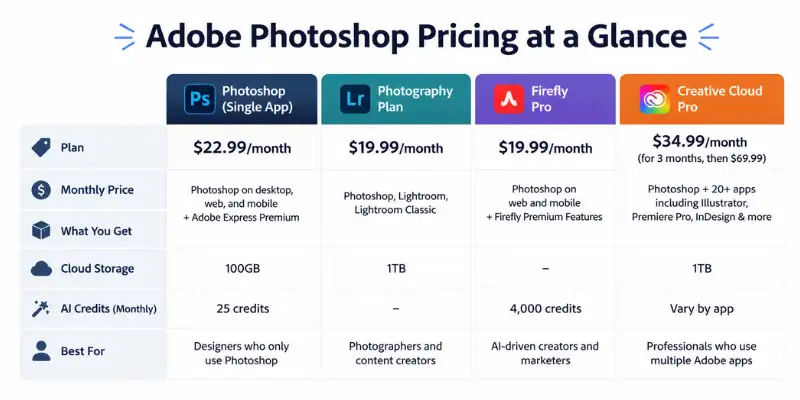
Adobe Photoshop Pricing at a Glance
Here’s the full picture of Photoshop pricing across Adobe’s current plans before we go deeper into each one.
| Plan | Monthly Price | AI Credits | What You Get |
| Photoshop (single app) | $22.99 | 25/month | Photoshop on desktop, web, and mobile, 100GB storage, 25 AI credits |
| Photography Plan | $19.99 | 1,000/month | Photoshop, Lightroom, Lightroom Classic, 1TB storage |
| Firefly Pro | $19.99 | 4,000/month | Photoshop on web/mobile, 4,000 monthly AI credits |
| Creative Cloud Pro | $34.99 for 3 months, then $69.99 | 4,000/month | Photoshop plus 20+ apps, AI credits, fonts, stock assets |
| Students & Teachers | $19.99 for the first year | 4,000/month | Photoshop plus the full Creative Cloud app collection |
| Photoshop for Teams | From $37.99 per license | 25/month | Photoshop with admin controls, 1TB storage, business support |
| Creative Cloud Pro for Teams | $99.99 per license | 4,000/month | 20+ apps, AI credits, centralized license management |
Prices are for US individual plans billed monthly under a 12-month commitment, which is Adobe’s default structure. If you only take one thing from this table, take this: the plan literally named “Photoshop” is almost never the cheapest way to actually get Photoshop.
How Adobe Photoshop Pricing Actually Works
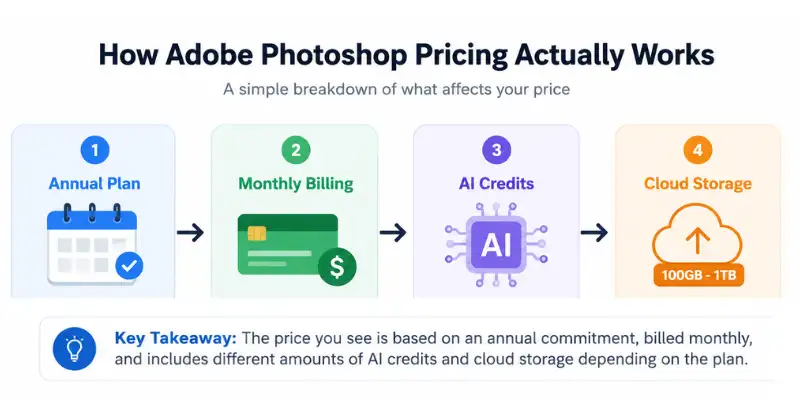
Adobe doesn’t price Photoshop as one fixed product. Photoshop pricing shifts depending on what’s bundled with it, how many generative AI credits are included, and whether you’re buying as an individual, a student, or a business. That’s why the standalone Photoshop plan can cost more than the Photography plan, even though the cheaper option throws in an entire second app.
A few terms explain most of the confusion around Photoshop pricing:
- Annual, billed monthly. Most plans show a monthly rate, but you’re actually locked into a 12-month term. Cancel early and Adobe usually charges a termination fee based on what’s left on the contract.
- Generative credits. These power Photoshop’s AI tools, like generative fill and object removal. Lower-priced plans include far fewer credits, so heavy AI users can burn through their monthly allowance fast.
- Cloud storage. Storage limits vary a lot between plans, from 100GB on the standalone Photoshop plan up to 1TB on the Photography plan.
| Billing Type | Meaning |
| Monthly | Cancel anytime |
| Annual billed monthly | 12 month commitment |
| Annual prepaid | Pay once |
Full Photoshop Plan Breakdown
Photoshop (Single App): $22.99/month
This is the plan most people click first, since it shares Photoshop’s name. It includes Photoshop across desktop, web, and mobile, plus Adobe Express Premium and 100GB of cloud storage.
The problem is value. At $22.99 a month, it costs more than the Photography plan below, despite offering less software. Unless you specifically don’t want Lightroom in your toolkit, this plan rarely wins on price for what it gives you. Many freelance designers who lean on AI tools for freelancers to speed up client work still pick this plan when Lightroom simply isn’t part of their workflow.
Best for: Designers who only touch Photoshop and have zero interest in Lightroom or the wider Creative Cloud lineup.
Photography Plan: $19.99/month
This is usually the smartest entry point into Photoshop pricing for photographers and hybrid creators. For $3 less than the Photoshop-only plan, you get Photoshop, Lightroom, Lightroom Classic, and a full 1TB of storage instead of 100GB.
If your work touches RAW editing, color correction, or photo organization on top of Photoshop compositing, this plan does more for less money.
Best for: Photographers and content creators who want Photoshop and Lightroom under one subscription.
Firefly Pro: $19.99/month
Firefly Pro trades some desktop editing depth for a much bigger pool of generative AI credits, 4,000 a month versus the standalone plan’s 25. It suits people who generate a high volume of AI images and only need lighter touch-ups, but it’s a poor fit if your work depends on advanced manual retouching or layered compositing.
Best for: AI-driven creators, marketers, and social content producers who care more about generative credits than deep desktop tools.
Creative Cloud Pro: Starts at $34.99/month, renews at $69.99/month
Creative Cloud Pro bundles Photoshop with more than 20 Adobe apps, including Illustrator, Premiere Pro, InDesign, and After Effects. The promotional starting price looks great, but budget for the higher renewal cost once the introductory window closes.
If Photoshop is the only app you’ll ever open, this plan is overkill. If you’re juggling video edits, page layouts, and photo work across several apps, it can beat paying for each one separately.
Best for: Creators and agencies who regularly use multiple Adobe apps beyond Photoshop.
Students and Teachers: $19.99/month for the first year
Verified students and educators get Photoshop and the entire Creative Cloud collection at a steep first-year discount, with pricing rising to the standard rate afterward. Adobe requires proof of enrollment or employment to qualify. Students stacking Photoshop with other AI tools for students for coursework often find the education bundle covers most of what a design or media class needs in one subscription.
Best for: Anyone with an active student or teacher email who wants the full Adobe suite without paying full price.
Photoshop for Teams: From $37.99/month per license
This is the business version of the standalone Photoshop plan. It adds admin controls, centralized billing, and 1TB of storage per user, but costs more per seat than the individual plan.
Best for: Small businesses or agencies managing Photoshop licenses across multiple employees.
Creative Cloud Pro for Teams: $99.99/month per license
The business equivalent of Creative Cloud Pro. Every team member gets the full 20+ app bundle along with license management and admin tools. Costs scale fast with headcount, so this only makes sense if staff genuinely use multiple Adobe apps day to day.
Best for: Design departments and agencies managing several creative disciplines under one roof.
Photoshop Annual Prepaid Pricing
Every Photoshop plan can also be paid upfront for the full year instead of monthly. Prepaying doesn’t change the total much, but it removes the risk of a mid-year price adjustment and, on some plans, shaves a small amount off the effective monthly rate.
| Plan | Annual, billed monthly | Annual, prepaid |
| Photoshop (single app) | $22.99/mo ($275.88/yr) | $263.88/yr (~$21.99/mo) |
| Photography Plan | $19.99/mo | $239.88/yr ($19.99/mo) |
| Creative Cloud Pro | $69.99/mo after intro period | Not offered; billed monthly only |
Prepaid plans still carry the same 12-month commitment as annual billed monthly plans. The difference is when Adobe collects the money, not whether you’re locked in.
What Does “Per License” Mean?
A license covers one person’s use of Photoshop and any apps included in their plan. That person can install Photoshop on more than one computer and stay signed in on up to two devices at once, but can only actively use the app on one machine at a time.
For teams, this means every employee needs their own paid license. A five-person team on Photoshop for Teams pays five separate license fees, not one shared company rate.
Has Adobe Photoshop Pricing Changed Recently?
Yes. In January 2025, Adobe restructured its entry-level photography pricing worldwide. The budget 20GB Photography plan, previously around $9.99 a month in the US, was phased out for new subscribers, effectively pushing the cheapest way to get Photoshop and Lightroom together up to the $19.99/month, 1TB plan that’s now standard. Similar increases landed in other markets: in Australia, the same 20GB plan rose from roughly A$14.29 to A$23.99 a month.
This is worth knowing if you’re comparing prices against an old screenshot, a forum post, or a review written before 2025. Every dollar figure in this article reflects Adobe’s current published pricing, not the pre-2025 structure.
Adobe Photoshop Pricing by Country
Adobe prices Photoshop separately for each region, and currency conversion alone doesn’t explain the gap. Here’s how the two most-searched plans compare outside the US.
| Country | Photoshop (single app) | Photography Plan |
| United States | $22.99/mo | $19.99/mo |
| United Kingdom | £21.98/mo | £19.97/mo |
| Australia | A$35.99/mo (A$431.88/yr) | A$30.99/mo (A$371.88/yr) |
| India | ₹733.96/mo | Sold as part of bundled/education offers |
Adobe runs regional promotions constantly, so introductory rates (often a discount for the first three to six months) show up on the pricing page more often than the standard rate shown above. Always check Adobe’s own regional pricing page before subscribing, since these numbers shift with currency and promotional cycles.
Photoshop on iPad: Is There a Separate Plan?
No. Photoshop for iPad is included in the same subscription as the desktop app, whichever plan you’re on: single-app Photoshop, Photography, Creative Cloud Pro, or the business equivalents. Signing in with the same Adobe ID syncs your files and presets between desktop, web, and iPad automatically, so there’s nothing extra to buy
Which Photoshop Plan Should You Choose?
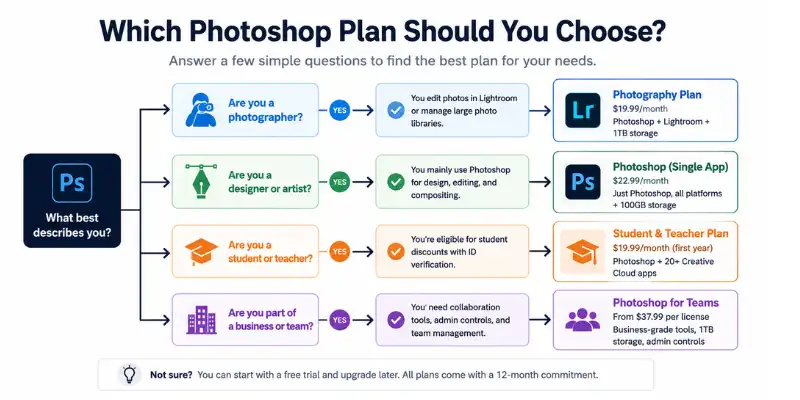
Photoshop pricing decisions usually come down to how many Adobe tools you actually use, not just how much you want to spend.
- You only edit photos and touch up images: Pick the Photography plan. It beats the standalone Photoshop plan on both price and features.
- You design graphics, thumbnails, or marketing visuals and never open Lightroom: The standalone Photoshop plan works, though it’s worth double-checking whether Photography still makes sense just for the extra storage.
- You generate a lot of AI images and only need light editing: Firefly Pro hands you far more generative credits for the same price as the standalone plan.
- You rely on Illustrator, Premiere, or InDesign too: Creative Cloud Pro often costs less than subscribing to each app individually, once you’re past the introductory pricing window.
- You’re a student or teacher: Always check eligibility first. The education discount is Adobe’s best deal by a wide margin.
- You manage a team: Business plans cost more per seat, but admin controls and centralized billing usually save time once you’re past a couple of users.
Hidden Costs in Adobe Photoshop Pricing
A few details catch people off guard after they subscribe.
Early cancellation fees. Annual plans billed monthly still lock you into a 12-month term. Cancel early and you may owe a percentage of what remains on the contract.
Promotional pricing resets. Creative Cloud Pro and similar bundles often advertise a lower rate for the first few months or first year. Read the fine print so the renewal price doesn’t surprise you later.
Per-seat business pricing. Team plans bill per license, so a five-person design team on Creative Cloud Pro for Teams pays five times the monthly rate, not one flat company fee.
Credit limits on cheaper plans. If you lean on generative AI features, the standalone Photoshop plan’s modest credit allowance may run out faster than expected, pushing you toward an upgrade you didn’t plan for.
Extra storage costs. If you go over your plan’s storage limit, Adobe charges $9.99/month for each additional 1TB of cloud storage.
Adobe Stock is a separate cost. None of the standard plans include Adobe Stock images. If you need stock photography inside Photoshop, that’s a separate subscription starting at $29.99/month.
If You Cancel Photoshop Early: The Exact Fee
Annual plans billed monthly come with a 12-month commitment, and Adobe enforces it. Cancel within the first 14 days of your first payment and you get a full refund with no penalty; that window counts as a trial period.
After day 14, canceling early triggers a fee equal to 50% of whatever remains on the contract. For example, on the $22.99/month Photoshop plan, canceling after 3 months means Adobe still charges roughly half of the remaining 9 months’ payments, around $103, on top of what you already paid.
Two ways to avoid the fee entirely: pick a true month-to-month plan where available, or prepay the full year upfront so there’s no remaining balance to owe.
Is Photoshop Free? What About a One-Time Purchase?
No, Photoshop is not permanently free. Adobe offers a short free trial so you can test the full app before committing, but once that trial ends, you need an active subscription to keep using it. There’s also no legitimate way to buy Photoshop as a one-time, perpetual license anymore, unlike the old CS6 era when a single purchase covered you for good. Photoshop Elements is the closest thing to a one-time purchase today, but it’s a scaled-down version missing several of Photoshop’s advanced tools.
Photoshop’s Real Cost Over Time
Photoshop’s monthly price looks manageable on its own, but it adds up fast against one-time-purchase alternatives.
| Timeframe | Photoshop (single app, $22.99/mo) | Affinity Photo (one-time) |
| 1 year | $275.88 | $69.99 (one-time) |
| 3 years | $827.64 | $69.99 |
| 5 years | $1,379.40 | $69.99 |
This doesn’t mean Photoshop isn’t worth it. Its AI tools, cloud sync, and constant updates justify the cost for many professionals. But if you’re on the fence, knowing the real 5-year number helps you decide whether you need Photoshop specifically or whether a cheaper alternative covers your actual workflow.
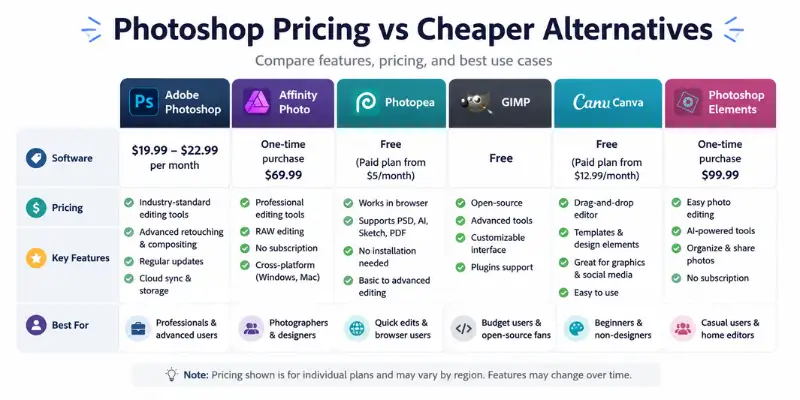
Adobe Photoshop Pricing vs Cheaper Alternatives
If your editing needs are occasional rather than professional, a few alternatives are worth weighing against Photoshop pricing. Free browser-based options like Photopea cover basic PSD editing, and if that still isn’t quite the right fit, several Photopea alternatives fill different gaps depending on whether you need offline access, more layers support, or a simpler interface.
| Tool | Pricing Model | Best For |
| Adobe Photoshop | $19.99–$22.99/month | Professional-grade editing, compositing, retouching |
| Affinity Photo | One-time purchase | A permanent license without a recurring subscription |
| Photopea | Free, with a paid tier | Browser-based PSD editing for quick tasks |
| GIMP | Free | Open-source editing for basic to intermediate work |
| Photoshop Elements | One-time purchase | Casual photo editing without the full Creative Cloud suite |
| Canva | Free / paid tier | Simple graphics and social content, not advanced photo editing |
None of these fully replace Photoshop for advanced masking, layer effects, or professional color work, but they can cut costs significantly if your editing needs are lighter.
How to Save Money on Adobe Photoshop
Paying less for Adobe Photoshop pricing is possible if you choose the right plan and take advantage of Adobe’s available discounts. Here are the best ways to save money.
Choose the Photography Plan
If you only need Photoshop for photo editing, the Photography Plan usually offers the best value. It costs less than the standalone Photoshop plan while including Lightroom and 1TB of cloud storage.
Use the Student Discount
Students and teachers can get Photoshop and the full Creative Cloud suite at a significantly lower price. You’ll need to verify your education status to qualify.
Watch for Black Friday Deals
Adobe often offers limited-time discounts during Black Friday, Cyber Monday, and other seasonal sales. These promotions can reduce your first-year subscription cost.
Start with the Free Trial
If you’re unsure whether Photoshop is right for you, begin with Adobe’s free trial. It lets you test the software before committing to a paid subscription.
Pay Annually if It Fits Your Budget
If you plan to use Photoshop long-term, an annual subscription can sometimes provide better overall value than switching plans frequently. Always compare the renewal price before subscribing.
Tip: For most users, the Photography Plan remains the best value because it combines Photoshop, Lightroom, and 1TB of storage at a lower monthly price than the standalone Photoshop plan.
Adobe Photoshop Pricing: Final Take
Adobe Photoshop pricing rewards a bit of research before you subscribe. The plan named “Photoshop” looks like the obvious pick, but it’s rarely the best value once you compare it against the Photography plan or Creative Cloud Pro. Match the plan to how you actually work, keep an eye on renewal pricing once any promotional period ends, and you’ll land on a Photoshop cost that fits your budget instead of one that surprises you later.
Frequently Asked Questions About Adobe Photoshop Pricing
The standalone Photoshop plan costs $22.99 a month. The Photography plan, which includes Lightroom, is cheaper at $19.99 a month.
The Photography plan usually offers the best value, since it bundles Photoshop and Lightroom together for less than the price of Photoshop alone.
No. Adobe no longer sells Photoshop as a one-time purchase. Every current version requires an active Creative Cloud subscription.
Yes, Adobe offers a short free trial of the full Photoshop app so you can try it before paying for a plan.
Yes. Eligible students and teachers get Photoshop and the full Creative Cloud suite at a discounted rate during their first year.
Adobe prices its bundles around who each plan is designed to attract, not strictly around feature count. The Photography plan targets photographers, so it’s priced lower even though it includes more software.
If you’re on an annual plan billed monthly, canceling before the year is up triggers an early termination fee equal to 50% of your remaining balance, unless you’re still inside the 14-day refund window.
Usually not, unless you also use other Adobe apps regularly. If Photoshop is the only tool you need, the single app plan or the Photography plan will cost far less.
Photoshop for Teams starts at $37.99 per license each month, while the full Creative Cloud Pro for Teams bundle runs $99.99 per license.
For professional or advanced editing work, most users find Photoshop’s monthly cost justified by the tools and updates included. For occasional or basic edits, a free alternative like GIMP or Photopea may cover your needs without the ongoing subscription.
Yes. Adobe restructured entry-level photography pricing worldwide in January 2025, phasing out the cheapest 20GB plan for new subscribers and pushing the effective entry price for Photoshop and Lightroom together up to $19.99/month in the US.






- Be Respectful
- Stay Relevant
- Stay Positive
- True Feedback
- Encourage Discussion
- Avoid Spamming
- No Fake News
- Don't Copy-Paste
- No Personal Attacks
- Be Respectful
- Stay Relevant
- Stay Positive
- True Feedback
- Encourage Discussion
- Avoid Spamming
- No Fake News
- Don't Copy-Paste
- No Personal Attacks
