Copilot AI: Guide to Features, Benefits & Use Cases
Published: 31 Dec 2025
Are you not sure how Copilot AI can help you? It might seem confusing, but don’t worry; we’ll explain it. We’ll show you how Copilot AI works like a “copilot,” which is an AI helper that makes things easier and faster for you. We’ll also explain why tools like Aisera are great for businesses because they can help them get more done by automating tasks. By the end, you’ll know how to use these tools to make your work a lot easier. Let’s get going.
What is copilot AI
Copilot AI is like a helpful assistant that works with you to make your tasks easier and faster. For example, if you’re writing an email, Copilot AI can suggest ways to improve your sentences or finish your thoughts. Copilot AI uses machine learning to get better over time and adjust to what you like, making it a powerful tool for boosting productivity
- minimizes routine tasks (like typing the same things over and over).
- Offers helpful suggestions (such as better word choices).
- Learn from your actions to improve over time.
- Can be used in writing, coding, and managing data.
- Increases productivity and reduces mistakes.
- Lets you focus on more important tasks.

What is Copilot
Copilot is a tool that helps you get your work done faster and with less effort. It’s like having a smart assistant that gives you helpful tips and suggestions along the way.
- Improves writing: For instance, if you’re writing a message, Copilot can help you find better ways to say things or correct mistakes.
- Reduces the need to repeat tasks: Copilot can handle routine activities, such as sending the same emails, so you can avoid doing them manually.
- Gives you good advice: It helps you come up with better words or ideas to make your work stand out.
- Helps you get more done: Copilot helps you get more done, whether you’re writing, coding, or managing data.
- Learns and changes: As time goes on, Copilot gets better at understanding how you work and gives you even more constructive advice.
What is Copilot AI in Outlook?
Copilot AI in Outlook is a smart tool that helps you stay organized by helping you with emails, scheduling, and managing your calendar. It acts like a personal assistant, making your job easier and more productive.
Organizing Emails with Copilot AI
- Organizes your inbox: Copilot AI can automatically sort your emails into folders, which makes it easier to find important messages and stay organized.
- Flags important emails: This feature can help you keep track of important emails so you don’t miss anything that needs your attention right away.
- Capilot AI can group together all of your meeting invites so you can easily find them
Scheduling Meetings with Copilot AI
- Suggests meeting times: Copilot AI checks your calendar and suggests the best times for meetings, avoiding double bookings.
- Automatically finds open slots: It helps you find free time in your schedule to set up meetings without manually checking.
- Example: If you need to schedule a meeting with a colleague, Copilot AI can suggest a time that works for both of you based on your available slots.
Managing Your Calendar with Copilot AI
- Reminds you of appointments: Copilot AI sends you reminders for upcoming meetings or tasks so you never miss them.
- Schedules events for you: It can quickly add events to your calendar with just a few clicks.
- Example: If you have a meeting at 3 PM, Capilot AI will remind you 30 minutes before, keeping you on track.
How Copilot AI Works
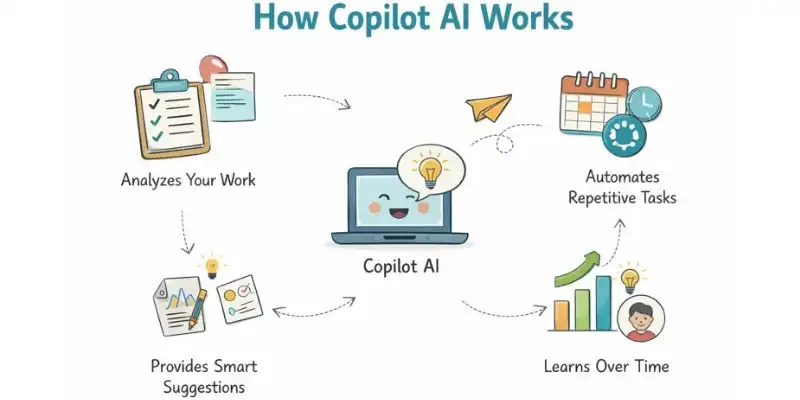
Copilot AI makes it easier and faster to get things done by automating simple tasks and giving you smart suggestions. It works with you and learns from what you do to help you get more done. This is how it works:
- Look at Your Work: Copilot AI knows what you’re doing, whether it’s writing an email, making a report, or looking at data. It looks at your actions to give you helpful advice.
- Gives Smart Suggestions: It tells you how to improve your work, like correcting grammar, suggesting better word choices, or pointing out useful data insights.
- Automates Repetitive Tasks: AI Copilot takes care of things you do a lot, like setting up meetings, sorting emails, or summarizing reports, so you don’t have to do them by hand.
- Works with Apps: AI Copilot works with Microsoft Word, Excel, and Outlook, among other tools, so you can easily switch between tasks without losing any work.
- Learn Over Time: The more you use Copilot AI, the better it gets at understanding how you like to work and what you want, so it can give you better suggestions.
AI Copilot is designed to make your tasks easier by automating the routine stuff and providing helpful ideas along the way.
What is Microsoft Copilot Used For?
Microsoft Copilot is a tool that helps you get more done when you use Microsoft 365 apps like Outlook, Word, Excel, and PowerPoint. It automates repetitive tasks and gives you AI-driven insights to speed up and improve your work.
General Purpose of Microsoft Copilot
- Boosts productivity: Copilot helps you save time by automating tasks and offering suggestions to make your work easier.
- Provides smart insights: It uses AI to analyze your work and suggest ways to improve or simplify tasks.
Email Assistance in Outlook
- Organizes emails: Copilot can help you clean up your inbox, flag important emails, and keep things in order.
- It helps you avoid double-booking and suggests the best times for meetings.
- For example, if you get many emails, Copilot can group them by type and help you find the ones that are most important.
Document Drafting in Word
- Helps with writing: Copilot can help you draft documents by suggesting ideas or improving your sentences.
- Formats documents: It automatically formats your document, saving you time on styling.
- Example: If you’re writing a report, Copilot can help you create headings, bullet points, or even summarize sections.
Data Analysis in Excel
- Automates data entry: Copilot can quickly fill in data or suggest formulas for your spreadsheets.
- Analyzes data: It can find patterns or trends in your data and suggest how to present them.
Example: Copilot can make graphs or charts to help you see the trends if you’re keeping track of sales numbers.
Presentation Creation in PowerPoint
- Designs slides: Copilot helps you design and organize your slides, making your presentation look professional.
- Suggests content: It can recommend text or images to improve your slides.
- Example: If you’re making a presentation about a project, Copilot can help you structure your slides and add key points.
Enhancing Productivity and Improving Workflow
- Saves time: By automating tasks like data entry, email management, and document formatting, Copilot lets you focus on more important work.
- Reduces mistakes: Copilot helps avoid errors by offering suggestions that improve your work quality.
- Example: If you’re preparing for a meeting, Copilot can make sure your presentation is ready and your calendar is organized.
Microsoft Copilot is all about improving how you work in Microsoft 365, making tasks like email management, writing, data analysis, and presentations faster and easier.
Features of Microsoft AI Copilot
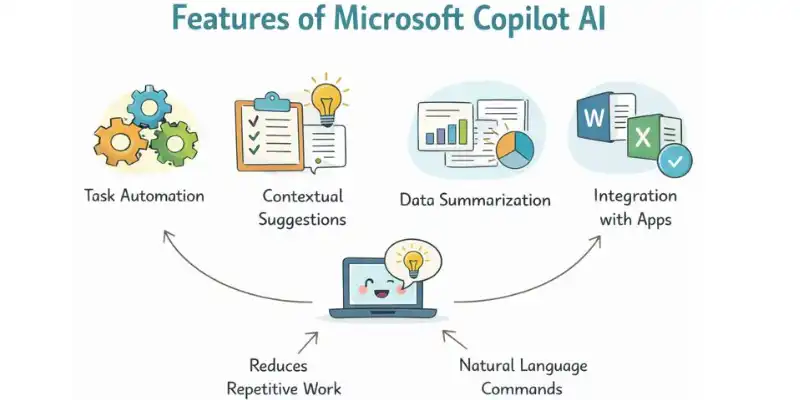
Copilot AI offers a range of robust features designed to enhance productivity across various applications. AI’s Copilot goal is to make work easier and more productive by automating tasks, giving contextual insights, and summarizing data. Below, we list the main features of Copilot AI and provide examples of their use.
Copilot in Microsoft 365
Contextual Suggestions & Insights
- Copilot provides recommendations based on the context of your work. Whether you’re writing a document in Word, analyzing data in Excel, or preparing a presentation in PowerPoint, Copilot understands what you’re doing and offers helpful tips.
- Example: In Word, if you’re drafting a report, Copilot might suggest adding headings or summaries based on the content you’ve already written.
Task Automation
- Copilot organised routine tasks, allowing you to focus on more important work. This includes creating reports, formatting documents, and setting up meetings.
- Example: In Excel, Copilot can automatically fill in data or apply the correct formulas, saving you time on manual entry.
Data Summarization
- Copilot can quickly sum up a lot of data, making it easy to understand by turning complicated information into short summaries. This is a very useful feature for programs like Word and Excel.
- For instance, if you’re looking at a lot of data in Excel, Copilot can make a summary report or pull out important information from the data
Natural Language Commands
- You can interact with Copilot using simple, everyday language. Just tell Copilot what you need, and it will help you complete the task.
- Example: In Word, you can say, “Write a paragraph about the benefits of AI,” and Copilot will create the content for you.
integration with Microsoft Apps
- You can switch between tasks without losing effectiveness thanks to Copilot’s easy compatibility with programs like Outlook, Word, Excel, and PowerPoint.
- Example: Copilot can help you schedule a meeting in Outlook and then automatically pull relevant documents from Word or Excel to share during the meeting.
Copilot in Outlook
Email Management
- Copilot helps you keep track of and organize your emails. It can sort emails, mark important ones, and even suggest quick replies.
- If your inbox is full, Copilot can group similar emails together or suggest quick answers to common questions.
Schedule Management
- Copilot organizes scheduling tasks by suggesting times for meetings based on your calendar and email conversations.
- Example: If you’re trying to set up a meeting, Copilot can find an open slot that works for everyone involved without you needing to check each person’s calendar manually.
Task Management
- Copilot helps keep you on track by setting reminders, tracking deadlines, and organizing tasks within Outlook.
- Example: Copilot can remind you of upcoming meetings or tasks based on the content of your emails.
Enterprise AI Copilot
Customer Service Automation
- .Aisera’s Copilot helps companies automate customer service tasks by quickly answering common questions and requests from customers.
- For instance, if a customer asks about a product, Copilot can give them an instant answer with information about it, how to fix it, or how to ship it.
Business Process Automation
- Aisera’s Copilot can automate business processes like handling service requests, managing support tickets, and keeping internal systems up to date
- .For example, Aisera can automatically log a service request in the system after getting a question from a customer and then send it to the right team.
Data-Driven Insights
- Aisera’s Copilot uses AI to provide insights into customer behavior and trends, helping businesses make informed decisions.
- Example: Copilot can analyze customer support interactions and suggest areas for improvement based on common issues or feedback trends.
How These Features Help Users
- Better productivity: Copilot helps users focus on more important tasks by automating repetitive tasks, giving context-based suggestions, and making workflows more efficient.
- Faster Decision-Making: Copilot’s data insights and summarization tools help you quickly understand complicated information.
- Better Workflows: Connecting with Microsoft apps and enterprise systems makes sure that tasks can move smoothly between different platforms, which saves users time and effort.
Overall, AI Copilot across different platforms (Microsoft 365, Outlook, and enterprise solutions like Aisera) helps users work smarter, automate routine tasks, and stay organized. It makes the daily work process more efficient, freeing up time for more important decisions and tasks.
Benefits of Using Copilot AI
Copilot AI offers several benefits that help users work more efficiently, make better decisions, and save time. Here’s how it can make a difference:
Increased Productivity
- Faster Task Completion: AI Copilot helps people finish tasks faster by automating steps that are the same every time and giving them smart suggestions
- Real User Value: You can spend less time on manual tasks and more time on more important ones, like coming up with new ideas or making plans for the future.
- For example, AI Copilot can help you write reports or speed up presentations by automatically creating content or formatting documents.
Time-Saving
- Organizing Routine Tasks: AI Copilot takes care of things like setting up meetings, sorting emails, and making reports.
- Real User Value: This saves you time so you can spend it on more important or difficult tasks.
- For instance, AI Copilot can automatically set up meetings based on your calendar, so you don’t have to worry about checking to see if you’re free.
Enhanced Accuracy
- Reduces Mistakes: Copilot AI provides data-driven suggestions that help you make fewer errors, whether it’s in writing, data analysis, or scheduling.
- Real User Value: You can trust Copilot AI to catch small mistakes, improving the overall quality of your work.
- Example: If you’re drafting an email, Copilot AI can suggest edits to make sure your message is clear and professional.
Improved Decision Making
- Gives You Insights: Copilot AI looks at data and gives you insights that help you make decisions faster and better.
- Real User Value: You can speed up better decisions when you have accurate, useful information at your fingertips.
- For example, Copilot AI can help you speed up decisions by showing you trends or suggesting ways to show data in Excel.
Seamless Integration
- Works Well with Microsoft 365 Apps: Copilot AI integrates smoothly across Microsoft apps like Word, Excel, PowerPoint, and Outlook.
- Real User Value: This makes it easy to move between different tasks and applications without losing efficiency or context.
- Example: If you’re working on a document in Word and need to add data from Excel, Copilot AI can help you transfer information quickly and accurately.
Ease of Use
- Commands in Simple, Natural Language: Copilot AI lets people give commands in everyday language, so anyone can use it, even beginners.
- Real User Value: You don’t have to be good with computers to use AI Copilot . The interface is easy to use, so anyone can get started.
- For example, you could just say, “Can you make a summary of this report?” and Copilot AI will write the content for you.
Real-Life Use Cases of Copilot AI
Copilot AI simplifies everyday tasks, helping users save time, stay organized, and work more efficiently. Here are some real-life examples of how Copilot AI benefits users in different tasks:
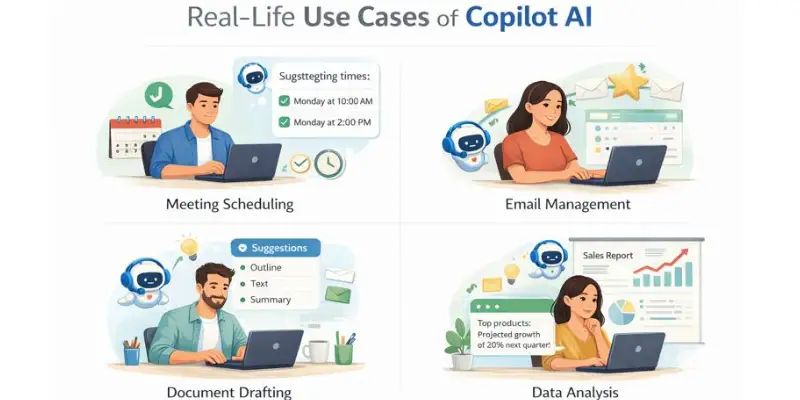
Email Management
- Automatically Organizes and Prioritizes Emails: Copilot AI can help you keep your inbox neat by putting similar emails together, marking important ones, and deleting emails that aren’t as important.
- Real User Value: This helps you focus on the most important messages without wasting time on irrelevant ones.
- Example: AI Copilot can automatically organize your inbox and highlight emails from key clients, so you can respond to them first.
Meeting Scheduling
- Checks Calendars and Finds Available Slots: Copilot AI automatically looks at everyone’s calendar and suggests the best available times for meetings.
- Sends Invites: After finding the right time, AI Copilot can send out meeting invitations without any manual effort.
- Real User Value: .You don’t have to send emails back and forth to find a time to meet, which saves you precious time and cuts down on scheduling problems.
- Example: If you need to set up a team meeting, AI Copilot checks everyone’s schedule and sends invites for a time that works for all.
Document Creation
- Suggests Content and Organizes Text: Copilot AI helps you draft documents or reports by suggesting text, improving grammar, and organizing content.
- Automatically Formats Content: It can format your document, add headings, and even generate summaries.
- Real User Value: This reduces the time spent on creating, formatting, and editing content, allowing you to focus on the more important aspects of your work.
- Example: If you’re writing a report, AI Copilot can suggest key points to include and automatically format the document to make it look professional.
Data Analysis
- Analyzes Large Datasets in Excel: AI Copilot can quickly process large amounts of data, find patterns, and provide actionable insights.
- Improves Decision-Making: By suggesting trends or creating charts, Copilot helps users make informed decisions faster.
- Real User Value: This makes it easier to understand complex data and draw conclusions, saving time and improving decision-making.
- Example: Copilot AI can find the best-selling products and make a chart to show the trends if you’re keeping track of sales data.
Customer Support
- Handles Basic Customer Queries: Copilot AI can automatically respond to common customer questions, providing instant answers based on a knowledge base.
- Saves Time for Human Agents: It handles simple inquiries, allowing human agents to focus on more difficult issues.
- Real User Value: This speeds up response times for customers and helps businesses manage support more efficiently.
- Example: If a customer asks about delivery times, AI Copilot can instantly provide the information, freeing up support staff to handle more detailed requests.
Copilot AI vs. Traditional Assistants
Copilot AI brings several advantages over traditional assistants, helping users save time, increase productivity, and work more efficiently. Here’s how they compare:
Task Automation
- Copilot AI does things like automatically making reports, scheduling meetings, and summarizing emails. This means that people have less work to do
- People who work as traditional assistants often have to do more hands-on work, like setting up meetings or writing emails by hand.
- Benefit: Copilot AI frees up time and gets rid of boring tasks, letting users focus on more important work.
Context Understanding
- Copilot AI: Understands the context of your work, offering relevant suggestions based on what you’re doing at the moment.
- Traditional Assistants: May struggle to understand the context and require more explicit instructions or information.
- Benefit: AI Copilot provides smarter, more personalized help, making suggestions that fit your current task.
Tool Integration
- Copilot AI works perfectly with Microsoft apps like Word, Outlook, and Excel, so you can easily switch between tasks and apps.
- Traditional Assistants: They don’t always work well with certain tools, so you have to do extra steps to switch between platforms or get data.
- Advantage: Copilot AI makes workflows easier, so you can work efficiently across different apps without losing track of what you’re doing.
Data Insights
- Copilot AI: Can analyze large data sets in Excel, identify patterns, and provide actionable insights to help users make informed decisions.
- Traditional Assistants: May struggle to handle or analyze large amounts of data, offering basic responses without much depth.
- Benefit: Copilot AI helps users make data-driven decisions quickly and accurately, improving overall decision-making.
User Interaction
- Copilot AI lets you talk to it in plain, everyday language. Just tell it what you need, and it will respond.
- Traditional Assistants: They often need more structured commands or specific phrases to understand and carry out tasks.
- Benefit: Copilot AI is easier to use and more accessible, so anyone can use it without having to learn complicated commands.
Real-Life Examples of How Copilot AI Can Be Used
AI Copilot helps users in many everyday tasks by automating processes and providing smart assistance. Here are some examples:
Email Management
- Sorts and Prioritizes Emails: AI Copilot automatically sorts your inbox by grouping similar emails and flags important ones, helping you focus on urgent messages.
- Example: If you’re managing a busy inbox, Copilot AI can automatically highlight emails from your manager or key clients, so you don’t miss any important communication.
Scheduling Meetings
- Finds Available Times: Copilot AI looks at your calendar and suggests the best time for meetings that won’t get in the way of other things.
- Sends Calendar Invites: Once a time is chosen, Copilot AI can send calendar invites to all participants without you needing to manually check schedules.
- Example: If you’re setting up a meeting with your team, AI Copilot can find a time when everyone is free and send the invites, saving you time on scheduling.
Document Creation
- Drafts and Edits Documents: AI Copilot helps with creating reports, presentations, or any other documents by suggesting content, improving grammar, and organizing information.
- Example: If you’re writing a report, AI Copilot can suggest key points to include or help you format the document, speeding up the writing process.
Data Analysis in Excel
- Analyzes Large Datasets: Copilot AI can quickly process large amounts of data, identify patterns, and generate insights, even for users without advanced data analysis skills.
- Example: If you’re tracking sales numbers, AI Copilot can find trends, create charts, and provide a summary of the key insights, making it easy for you to present the data.
Customer Support Automation
- Helps Customers: AI Copilot can do simple customer service tasks like answering common questions or providing details about products and services.
- Faster Response Times: Automating routine questions helps businesses respond to customers more quickly, which cuts down on wait times.
- For instance, if a customer asks about shipping times, Copilot AI can give them the answer right away so that human agents can deal with more complicated issues.
Pros and Cons of Using Copilot AI
Pros
- More efficient: Organising repeated tasks makes things like managing email and making documents faster.
- Better accuracy: Reduces mistakes by giving you better content and data-driven suggestions.
- Saves time by organizing tasks like making plans and writing summaries, which allows you more time to do more important things.
- Seamless Integration: Works well with Microsoft 365 apps, which makes it easier to use all of your tools.
Cons
- Learning Curve: Some users may need time to get used to how Copilot AI works and customize it to their needs.
- Dependence on Technology: Relying too much on Copilot AI might reduce human involvement and judgment.
- Privacy Concerns: Potential privacy issues when processing sensitive data, especially in business settings.
- Limited Scope: Copilot AI may not handle every task and may struggle with complex, specialized scenarios.
Future of Copilot AI
The future of Copilot AI looks exciting, with many improvements on the way that will make it even more helpful. Here’s what we can expect:
Key Developments for the Future
- Better Integration: AI Copilot will be able to work with even more apps and tools, making it easier for users to get things done on different platforms without having to switch between them.
- Personalized Help: It will learn more about your likes and dislikes over time and give you better suggestions.
- Better Suggestions: Copilot AI will get to know your work better and give you even more useful help, which will make it easier for you to stay on track.
- More Automation: It will take care of more things, like managing projects and helping customers, so users can focus on more important things. Teamwork: Copilot AI could help teams work together in real time by giving them ideas, data, and help with making decisions.
Impact on Users
- More Productivity: As AI Copilot automates more tasks and integrates better with other tools, users will save more time and get more done.
- Easier to Use: Copilot will keep getting easier for everyone to use, no matter their experience level, making it helpful to more people.
- Smarter Decisions: With better data insights, Copilot AI will help users make quicker and better decisions, using real-time information.
The future of Copilot AI is all about making work simpler, faster, and more efficient. As it keeps improving, it will play an even bigger role in helping us with our everyday tasks.
Coclusion
This guide has shown you how Copilot AI can help you get more done, from automating tasks like making appointments to giving you smart writing suggestions. We’ve also talked about how it works perfectly with programs like Word, Excel, and Outlook to make your life easier. I highly recommend trying Copilot AI if you want to save time, make fewer mistakes, and stay organized. It can really help you get more done. Okay, everyone, keep looking around and stay tuned for more useful tips!
Copilot AI is meant to help you get more done in less time. It helps with things like keeping track of emails, making documents, and setting up meetings. It takes care of boring tasks for you so you can focus on more important things.
Copilot AI speeds up your work by doing the same tasks over and over and giving you useful tips. It works with Microsoft programs like Word, Excel, and Outlook to make it easier to switch between tasks. This helps you stay organized and saves you time.
Yes, Copilot AI can sort your emails, highlight important ones, and even suggest replies. It helps you stay on top of your inbox without having to go through everything manually. This makes managing emails much quicker and easier.
AI Copilot works well with Microsoft 365 apps like Word, Excel, PowerPoint, and Outlook. It helps you with writing, organizing data, creating presentations, and managing emails. This makes it easier to use across different tasks.
AI Copilot can automatically find free time in your calendar and suggest the best times for meetings. It sends out invites and updates your calendar, so you don’t have to do it manually. This saves time and avoids scheduling mistakes.
AI Copilot can analyze data in Excel and give you insights. It helps spot trends and create reports from your data, even if you don’t have advanced skills. This makes data analysis faster and easier.






Nice