Flint AI Review 2026: Is This the AI Tutor Schools Have Been Waiting For?
Published: 1 Oct 2026
Search for Flint AI and you’ll land on three different products: a school AI platform, a dating-chat helper app, and a customer-service tool for businesses. This Flint AI review is about the first one, Flint K12, the platform schools use to give students an AI tutor that teachers control.
If you’re a teacher, tech coordinator, or school leader deciding whether Flint is worth adopting, the short answer is yes for many schools. It’s free for up to 80 users, and the paid plans are cheap per head. It’s a harder sell if you want something for home use, or if your teachers won’t spend time building activities.
Below you’ll find what Flint does, what it costs, how safe it is, and how it compares with MagicSchool.
A quick note on methods. This review draws on Flint’s official pricing and security pages, funding coverage, school help pages, and independent reviews. It isn’t based on a hands-on classroom pilot, so the text says who is making each claim.
| Rating | 4 out of 5 (based on documentation and third-party reports, not a classroom pilot) |
| Best for | K-12 schools and teachers who want student AI use they can see and control |
| Biggest strength | Teachers set the AI’s rules and can read every student conversation |
| Biggest weakness | It only works as well as the activities teachers build, and it isn’t sold to individual families |
| Value for money | Strong. Free up to 80 users, then $1.08 to $1.67 per user per month on the listed plans |
Short verdict: Flint is one of the more school-friendly ways to put an AI tutor in front of students. The teacher controls and the free tier are the reasons to try it. The setup work and the school-only model are the reasons some people will skip it.
What Is Flint AI?
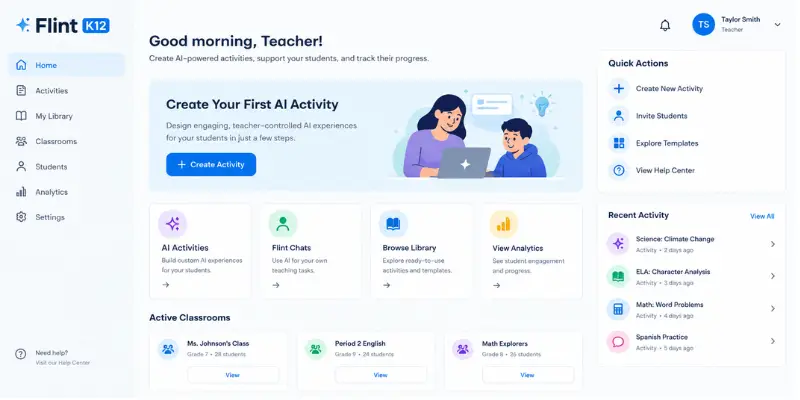
Flint is a web platform for K-12 schools. Teachers use it in two ways. Flint chats work like a personal assistant for your own tasks, such as drafting materials or writing feedback. Flint activities are AI experiences you design for students, like problem-solving, language practice, or a debate with an AI.
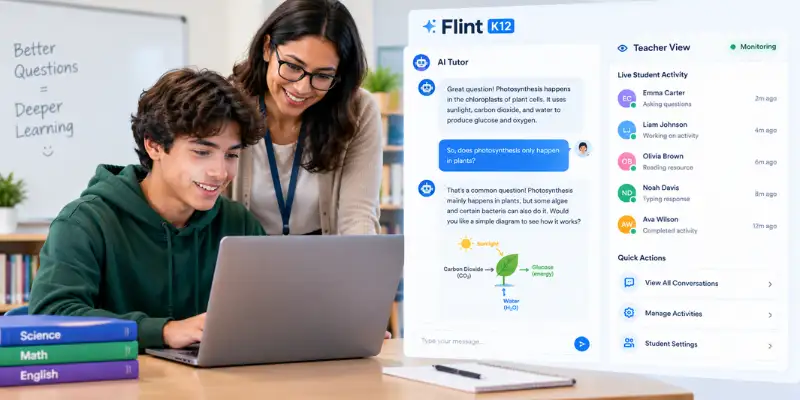
The pitch is that the AI seeks answers with students instead of just giving them. According to Flint’s security details, the AI guides students toward an answer unless the teacher turns that off.
Flint was founded in 2023 by Sohan Choudhury and Jinseo Park and is backed by Y Combinator. Students sign in with school accounts, and the teacher decides what each activity can and can’t do.
Flint AI Rizz and Other Apps With the Same Name
Two other products use the name, and they have nothing to do with schools.
Flint AI Rizz Wingman, from IMHIM Limited, is a consumer app that reads screenshots of chats and suggests replies for dating apps and DMs. You can find it on the App Store. UseFlint AI is a separate business tool for managing AI agents that handle customer conversations.
If you searched for the Flint AI app to help with texting, this review isn’t about that one. Everything below is about Flint K12.
What Schools and Teachers Say About Flint
I didn’t run a classroom test, so this part of the Flint AI review separates what’s verified from what’s reported.
Verified from Flint’s own documentation: Teachers can preview an activity two ways before students see it. An automated preview generates a sample conversation. A manual preview lets you type as a student and watch how the AI responds. You can then ask Flint to edit the activity.
Reported by teachers: Flint’s testimonials are full of praise, including a teacher who said nearly every student chose the optional Flint review before a unit test and scored noticeably higher than in past years. Flint picks these quotes, so they’re worth reading but they aren’t a neutral sample.
A more mixed signal: A teacher-led survey at The Kinkaid School in fall 2024 found 25% of teachers wanted to use Flint and 50% said maybe. Adoption there grew mostly through word of mouth, according to Flint’s own write-up of the rollout. That’s a normal pattern for classroom tech. Interest is real, but plenty of teachers wait to see it working first.
Limits others have pointed out: The Learning Standard’s Flint review says results depend on the quality of the prompts and materials a teacher provides, and that the text-chat format suits middle and high school better than early elementary. One independent listing also mentions a learning curve when setting up custom tutors and occasional technical glitches.
My take: The design makes sense. Tying the AI to teacher materials and showing teachers every chat solves the two biggest worries schools have. What I couldn’t find is an independent study measuring learning gains. The test score claims come from teachers, not researchers.
Flint AI Reddit: What to Expect
Teacher discussion of Flint is scattered rather than concentrated in one big thread. I couldn’t verify a large Reddit discussion, so I won’t quote one. Teacher comments on education blogs describe using Flint activities where students ask the AI for advice on a problem instead of asking for the answer. These are individual anecdotes. If you look on Reddit yourself, treat threads as small samples, and compare them with school reports and Flint’s documentation.
Flint AI Features: What Do You Actually Get?
Student activities. This is the core feature. A teacher describes what they want, uploads material like a rubric, vocab list, or textbook chapter, and Flint builds an AI activity. It’s useful for review sessions, writing feedback, and role-play. The catch is that quality depends on how much detail you give it.
A teaching assistant chat. Separate from student activities, you can chat with Flint to draft materials and feedback. It works fine, but this is where Flint overlaps with every other teacher AI tool. It isn’t the reason to choose Flint.
Full conversation visibility. Teachers and administrators can see student interactions with the AI. Flint’s teacher materials also say messages involving things like violence, threats, self-harm, or sexual content are flagged automatically for administrator review. Conversations can be printed or exported as PDFs.
Analytics and rostering. Paid plans add school-wide analytics and SIS/LMS integration. Flint lists support for Canvas, Schoology, Google Classroom, PowerSchool, Blackbaud, and Veracross, among others. If you don’t need automatic rostering, you may not miss this on the free plan.
Free teacher tools. Flint offers over a dozen free generators and templates on its tools page, including a 5E lesson plan builder, a survey creator, and a PLC agenda generator. Nice extras, but not unique.
AI literacy and training. Flint has a free AI literacy course for teachers, and paid licenses include unlimited professional development sessions.
Flint AI Language Support
Flint says activities can run in any language. Third-party listings give different numbers, from 50+ languages to 200+, and one mentions speaking practice aligned to ACTFL or CEFR standards. I couldn’t confirm the speaking practice details from Flint’s own pages. If language teaching is your main use case, ask for a demo and test it in your target language.
How Does Flint AI Perform?
Accuracy. Flint lets the AI pull from materials the teacher supplies, which cuts down on made-up answers. It doesn’t remove them. Flint runs on third-party AI models, so errors can still happen, and someone should spot-check what students see.
Consistency. The preview modes help here. You can test an activity yourself before class and fix odd behavior. A bad activity usually traces back to thin instructions, not the platform.
Speed and reliability. I couldn’t find independent speed or uptime data, so I won’t guess. Any school pilot should test this on real classroom Wi-Fi.
Real-world usefulness. Flint fits best where students benefit from a patient one-on-one partner: reviewing for a test, practicing a language, working through a concept, or getting feedback on a draft. It fits less well where you need a simple worksheet or a big library of ready-made teacher documents.
Is Flint AI Easy to Use?
Flint AI login. Go to app.flintk12.com and use the sign-in page. Most schools have people sign in with their school email or Google account. One school’s help page confirms students and teachers use their school Google accounts. Access depends on your school’s setup.
Setup. You build an activity by chatting with Flint, adding materials, then previewing it. It’s more like directing an assistant than filling in forms. Some teachers will love that. Others will find it slower than a template.
Flint AI app. I didn’t find a separate student app. Flint runs in the browser, which means no installs but also no offline use.
Age fit. Flint says students of any age can use it, and schools typically start in grade 3 and up. In practice, younger kids may struggle with the reading and typing the chat format demands.
Support. The pricing FAQ lists live chat from 9 AM to 9 PM U.S. Eastern Time. Schools outside North America should ask how that works for their hours.
Flint AI Pricing: Is It Free, and Is It Worth Paying For?
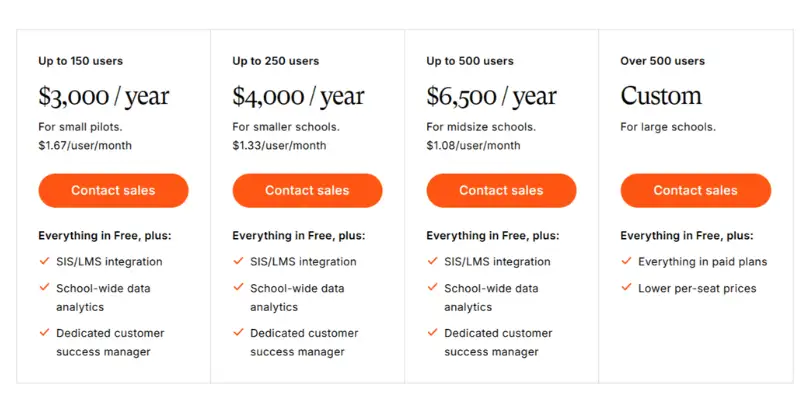
Flint’s current pricing is simple. It’s free for up to 80 users, and those users can be teachers, students, or administrators. One catch: Flint’s FAQ says to email sales or book a demo to get that free trial, so it isn’t a self-serve signup.
| Plan | Users | Price | Per user |
| Free | Up to 80 | $0 | $0 |
| Small pilots | Up to 150 | $3,000 per year | $1.67 per month |
| Smaller schools | Up to 250 | $4,000 per year | $1.33 per month |
| Midsize schools | Up to 500 | $6,500 per year | $1.08 per month |
| Large schools | Over 500 | Custom | Lower per-seat rates |
Paid plans add SIS/LMS integration, school-wide analytics, and a dedicated customer success manager. Plans can be annual or month-to-month, and Flint says it will prorate if your user count changes. Schools can also ask about paying with Title IV funds.
Watch for outdated prices. Some directories list Flint plans at $19, $39, and $79 per month, or a premium plan at $10 per month per teacher. Older 2023 listings show a $10 teacher plan and an $80 department license. None of those appear on Flint’s current pricing page, so don’t budget around them.
Is upgrading worth it? For a small pilot, the free plan may be all you need. The paid tiers make sense once you want automatic rostering and school-wide data, or when you pass 80 users. At $1.08 to $1.67 per user per month, that’s roughly $13 to $20 per student per year, which is low next to most school software.
One caution when comparing prices. Flint counts every user, students included. Some competitors charge per teacher seat, so the numbers aren’t a direct match.
Flint AI Pros and Cons
Here are the main pros and cons that came out of this Flint AI review.
Pros
- Teachers control the AI’s role, rules, and knowledge with their own materials
- Every student conversation is visible to teachers and administrators
- Free for up to 80 users through a trial or pilot
- Student data isn’t used to train AI models, per Flint’s security page
- Students under 13 can use it, with parental consent and school involvement under COPPA
- Paid plans cost about $1 to $1.67 per user per month
- Works in any subject and, according to Flint, any language
Cons
- Built for schools, so parents and individual families can’t just sign up for home use
- Getting started with the free tier means contacting Flint, not just signing up
- Activities take teacher time to build and improve
- Text-chat format is a weaker fit for early elementary grades
- Support hours are limited to U.S. business-day hours in Eastern Time
- Pricing above 500 users is quote-only
- I found no independent research on learning results
- Students should know teachers can read their chats, which limits how freely some kids will use it
Compared with alternatives, Flint isn’t the broadest toolkit, and that’s the main takeaway of this Flint AI review. It’s the more focused choice for student-facing AI.
Is Flint AI Safe and Legit?
Yes, it’s a legitimate company, with the usual caveats for AI in schools.
Privacy and data. Flint says it follows FERPA, GDPR, and DSA requirements, and that student data isn’t shared with third parties. Each school’s data is kept separate, and it isn’t accessible to AI providers like OpenAI. Flint’s data protection assessment also lists COPPA. It lists signed agreements covering schools in Illinois, Massachusetts, Maine, New Hampshire, New York, Rhode Island, and Vermont. Read the privacy policy before rollout.
One claim to double-check. Another review says Flint is “SOC 2 certified.” I couldn’t find that on Flint’s security page, which describes its framework as “FERPA-aligned.” That isn’t the same as being certified. If your district requires SOC 2, ask for the report directly.
Student safety. Teachers set boundaries, the AI redirects off-topic questions, and flagged messages go to administrators. That’s a stronger setup than handing students an open chatbot. If you’re comparing options, it’s also worth knowing how safe ChatGPT is before students use general chatbots on their own.
Billing and cancellation. The pricing FAQ says plans can be annual or monthly and can be prorated. It doesn’t spell out a cancellation process, so ask about that before you sign.
Who Is Behind Flint AI? Funding and Revenue
Flint AI funding. Flint Inc. is a New York-based startup founded in 2023 and backed by Y Combinator. It announced a $15M Series A on November 6, 2025, co-led by Basis Set Ventures and Patron. AlleyWatch’s interview with the CEO puts total funding at $16.7M, while CB Insights lists $15.5M. Figures vary by source.
Users and reach. Flint has reported 400,000+ users in the AlleyWatch interview, and its Y Combinator profile now says 500,000+ educators and students. It also said it partnered with Cognita to reach 95,000 students across 110 schools. These are company numbers, not audited ones.
Flint AI revenue. Flint hasn’t published revenue figures that I could find. Treat any specific revenue number online as unverified.
RELATED POSTS
Best AI Tools for Students : Complete Guide to AI Learning, Study & School Success
Flint AI vs MagicSchool
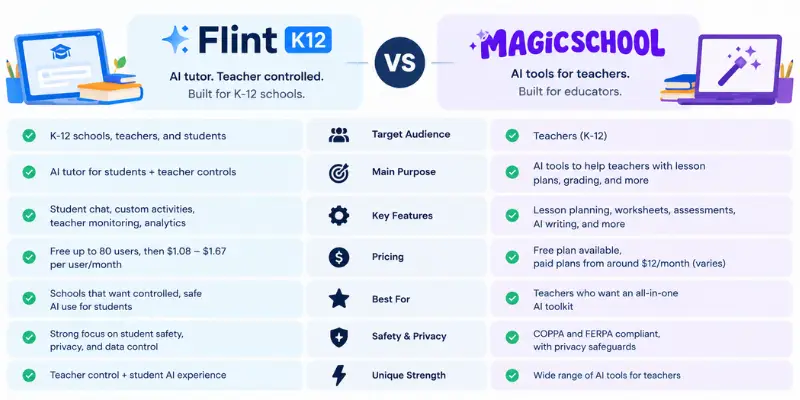
MagicSchool is the most common comparison in any Flint AI review because both target K-12 teachers. They lean in different directions .
| Flint | MagicSchool | |
| Main strength | Student-facing AI activities with teacher control | Large library of teacher tools |
| Free plan | Free for up to 80 users | Free plan for individual teachers |
| Paid pricing | $3,000 to $6,500 per year by user count | Plus reported at $8.33 per month billed annually; custom Enterprise |
| Best for | Schools that want visible, controlled student AI use | Teachers who want lesson plans, IEP tools, and communication drafts |
| Setup | More hands-on per activity | Faster for one-off tasks |
MagicSchool’s plans are outlined on its pricing page. Reported prices for Plus vary by billing period, so confirm the current number before budgeting.
Which to choose: Pick Flint if your main goal is putting a guided AI tutor in front of students and seeing exactly how they use it. Pick MagicSchool if you mostly want to save time on planning and paperwork. Many schools could reasonably use both.
Who Should Use Flint AI?
- Middle and high schools that want student AI use with clear teacher oversight
- Teachers of languages, humanities, and writing who want feedback and practice tools
- Schools piloting AI with a small group, since 80 free users covers a department
- International schools, given the GDPR and multi-language support
- Districts that need a data processing agreement before approving a tool
If you’re following how AI is showing up in more classrooms, Flint is one of the tools built with schools in mind rather than adapted from a consumer chatbot.
Who Should NOT Use Flint AI?
- Parents looking for a tutor for home use
- Teachers who want ready-made worksheets with no setup
- Early elementary classrooms where students can’t read and type comfortably
- Schools that need SOC 2 proof and can’t get it
- Anyone expecting proven learning gains, since independent research is thin
- Buyers outside U.S. time zones who need round-the-clock support
Is Flint AI Worth It in 2026?
Yes, Flint is a real company, and this Flint AI review found nothing to suggest otherwise. Still, use AI in schools with care.
The free tier removes most of the risk. You can run a real pilot with up to 80 people before spending anything, so the worst case is a few hours of teacher time. If it works, the paid plans run about $13 to $20 per student per year.
Flint’s best selling point is teacher control and visibility. That’s what lets a school say yes to student AI use without handing kids an open chatbot. Where it falls short is setup effort and the lack of independent proof that it improves results.
Compared with alternatives, Flint isn’t the broadest toolkit. It’s the more focused choice for student-facing AI.
Flint AI Review: Final Verdict
Rating: 4 out of 5
Biggest reason to use it: Teachers control what the AI does and can see every student chat, and you can start free.
Biggest reason not to: It needs teacher time to work well, and it’s not for home use.
I recommend it to: Middle and high schools, language and humanities teachers, and any school running a first AI pilot.
I don’t recommend it to: Families, teachers who want zero-setup tools, and early elementary classrooms.
Is Flint AI worth it? Yes, if your school wants guided, visible student AI use. Start with the free plan, run a small pilot, and only pay once you need rostering and analytics.
If you’re also weighing other AI tools students already use, keep in mind that Flint solves a different problem. It’s built for the school, not the individual student.
Frequently Asked Questions
Partly. Flint is free for up to 80 users, and those can be teachers, students, or administrators. To get started, you email Flint’s sales team or book a demo. Paid plans start at $3,000 per year for up to 150 users.
Flint says activities work in any language. Third-party listings report anywhere from 50+ to 200+ languages, and one mentions speaking practice. Ask for a demo if language teaching is your priority.
Flint has more safeguards than a general chatbot. Teachers control the AI’s behavior, administrators can review flagged messages, and Flint says it doesn’t use student data to train models. Schools still need to review the privacy policy and sign the right agreements.
Yes. It’s a funded startup backed by Y Combinator, with a $15M Series A announced in November 2025 and adoption at hundreds of schools, according to the company.
Go to app.flintk12.com and sign in with your school email or school Google account. Access depends on your school’s setup.
Not a separate one that I found. Flint K12 runs in a web browser. Apps like Flint AI Rizz Wingman and UseFlint AI are different products.
Basis Set Ventures and Patron co-led the $15M Series A. Y Combinator, Afore Capital, USC Viterbi, and AME Cloud Ventures also took part, according to AlleyWatch.
Flint hasn’t published revenue figures that I could find. Treat any specific revenue number you see online as unverified.
I couldn’t verify a large Reddit discussion of Flint K12. Teacher comments exist in scattered places, but they’re small samples. Compare any thread you find with school reports and Flint’s own documentation.
Not directly. Flint is sold through schools. Parents can ask their child’s school whether it uses Flint.
MagicSchool is the most common alternative for teachers who want a larger set of planning tools. Khanmigo and SchoolAI also target the same audience.





- Be Respectful
- Stay Relevant
- Stay Positive
- True Feedback
- Encourage Discussion
- Avoid Spamming
- No Fake News
- Don't Copy-Paste
- No Personal Attacks
- Be Respectful
- Stay Relevant
- Stay Positive
- True Feedback
- Encourage Discussion
- Avoid Spamming
- No Fake News
- Don't Copy-Paste
- No Personal Attacks
