Best Gamma AI Alternatives in 2026 (Free & Paid Presentation Tools Compared)
Published: 15 Feb 2026
Feeling confused about which tool to use for making slides quickly and easily? Don’t worry, you’re not alone. In this guide, we will walk you through the top Gamma AI alternatives, show their features, pricing, and free options, and help you find the one that fits your needs. By the end, you’ll know exactly which tool to pick for fast, polished, and professional presentations.
Whether you are a student, teacher, or professional, finding the right tool can feel tricky. Some tools are free, others require subscriptions, and each comes with different templates and features. This guide will simplify all of that for you. You’ll also learn which tools are best for creating real PowerPoint files and which ones save the most time. With these insights, choosing the best Gamma AI alternatives becomes easy, and you can start making slides confidently
What Is Gamma AI? (With Gamma AI Alternatives)
Gamma AI is a smart online tool that helps you build beautiful presentations fast. It works in your web browser and uses artificial intelligence to turn simple text into clean slides.
If you need quick presentations with little effort, Gamma AI is a good choice. Later, we’ll also look at Gamma AI alternatives you can try.
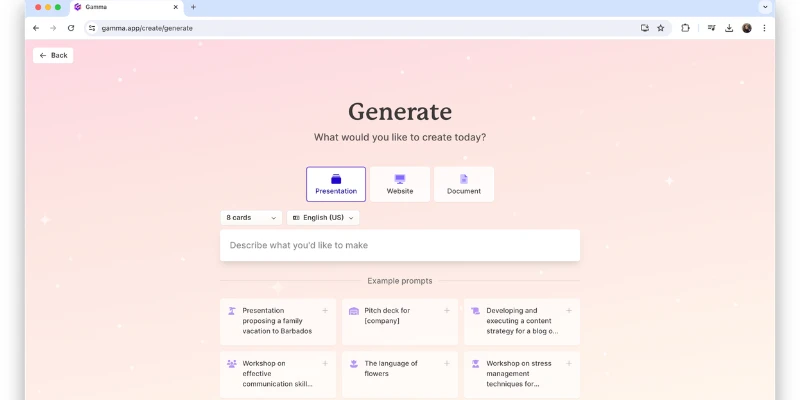
What is a Gamma App?
Gamma AI is a web-based app. You open it on your browser and start creating slides.
It is made for:
- Students
- Teachers
- Business owners
- Content creators
For example, if you need a school project tomorrow, Gamma AI can build your slides in seconds.
What Does Gamma AI Do?
Gamma AI turns your ideas into ready slides.
You can:
- Type a topic
- Paste notes
- Add a short prompt
Gamma AI will create:
- Headings
- Bullet points
- Clean layouts
- Images
It saves time. It removes hard design work.
How Gamma AI Works
Gamma AI uses artificial intelligence. AI means a smart system that understands text and creates content.
Here is how it works:
- You enter a topic.
- Gamma AI reads your input.
- It creates structured slides.
- You edit and customize them.
Simple and fast.
Gamma AI Features
Gamma AI gives many helpful tools:
- Smart slide generation
- Auto design layouts
- Easy editing
- Image suggestions
- Share with a link
- Export as PDF or PPT
These features make Gamma AI perfect for quick presentations.
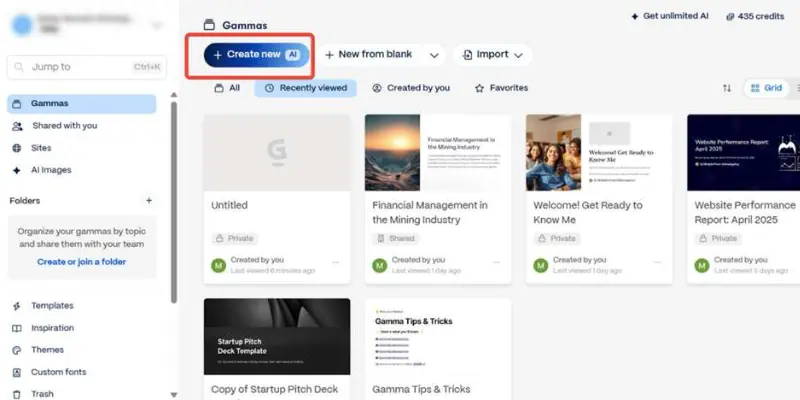
Gamma AI Website Overview
The Gamma AI website is clean and simple. You see a “Create” button on the homepage.
It shows:
- Templates
- Examples
- Pricing plans
- Login option
Everything is easy to find.
Gamma AI Login & Dashboard
To use Gamma AI, you must sign up. After login, you see your dashboard.
The dashboard shows:
- Your saved projects
- Create new option
- Templates
- Settings
It looks simple. No confusion.
Gamma Slide Maker Explained
The Gamma slide maker builds slides automatically.
You just:
- Enter your topic
- Choose a style
- Click generate
For example, type “Social Media Marketing Tips.” Gamma AI creates a full slide deck in seconds.
Gamma AI Presentation Generator
The Gamma AI presentation generator is its main tool.
- Creates structured slides
- Adds visuals
- Organizes content clearly
You can edit text, change colors, and add images.Need a quick business pitch? Gamma AI makes it easy.
If you compare it with Gamma AI alternatives, some tools might offer video slides or more animation effects.
Why Do People Look for Gamma AI Alternatives?
Many users start with Gamma AI. It looks simple and smart. But after some time, they search for Gamma AI alternatives.
1. Pricing Feels High for Some Users
Gamma AI offers paid plans. Some users feel the price is not budget-friendly. For example, a student may not want to pay monthly just to make school slides.
Is Gamma AI Really Free?
Yes, Gamma AI has a free plan. But it comes with limits.
You may get:
- Limited AI credits
- Restricted exports
- Fewer design options
When users hit these limits, they look for Gamma AI alternatives that give more freedom.
Free Trial Restrictions
The free version does not unlock everything. Some advanced features stay locked. Imagine you create a full presentation, but export options are limited. That can feel frustrating. So users start comparing Gamma AI alternatives to find fewer limits.
Watermark Concerns
Some tools add branding on free exports. Users want clean slides without logos. For business use, watermarks look unprofessional. That is another reason people search for Gamma AI alternatives.
Limited Customization Options
Gamma AI focuses on speed. But some users want deep design control.
They may want:
- Custom fonts
- Detailed animations
- Advanced layout control
Not Ideal for PowerPoint Users
Many offices use Microsoft PowerPoint daily. If exporting or editing in PowerPoint feels tricky, users may switch.
Gamma vs Canva Confusion
Some users compare Gamma AI with Canva.
Canva offers:
- More templates
- Social media designs
- Broader design tools
If someone needs more than presentations, they may prefer Canva over Gamma AI. That pushes them toward Gamma AI alternatives.
Gamma vs Beautiful AI Comparison Gap
Another comparison happens with Beautiful.ai. Beautiful.ai focuses strongly on:
- Smart design automation
- Business-ready templates
Best Gamma AI Alternatives
If Gamma AI doesn’t fit your needs, there are several great Gamma AI alternatives to try. These tools offer different features, pricing, and flexibility so you can pick the one that works best for you.
Presentations.AI
Key Features:
- AI-powered slide creation from text
- Templates for business and education
- Export to PowerPoint and PDF
- Brand customization options
Pricing:
- Free plan available with limited features
- Paid plans start around $20/month
Free plan? ✔ Yes
Best for:
- Professionals who need quick, polished business presentations
Pros & Cons:
- Pros: Fast slide generation, brand support
- Cons: Premium templates are behind a paywall
Why better than Gamma:
It offers more brand control and export flexibility than Gamma AI, making it ideal for business users.
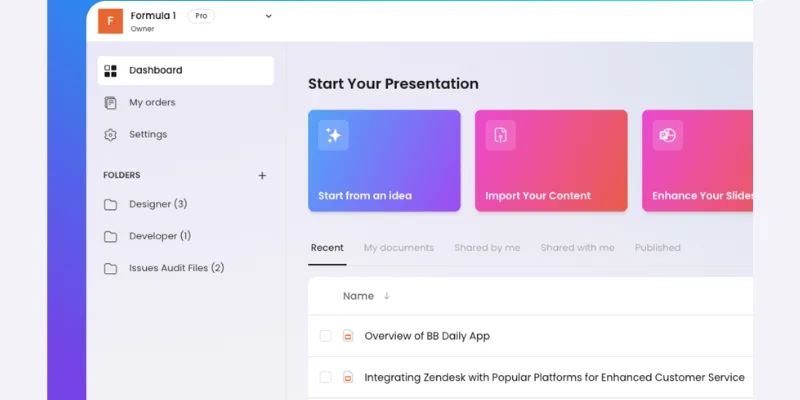
Beautiful.ai
Key Features:
- Automatic smart slide layouts
- Easy-to-use design rules
- Team collaboration features
Pricing:
- Paid plans start from $12/month
- No permanent free plan, but trial available
Free plan? ❌ Trial only
Best for:
- Teams that need consistent, professional slide designs
Pros & Cons:
- Pros: Auto-design keeps slides neat, easy collaboration
- Cons: Limited creative customization
Why better than Gamma:
Beautiful.ai maintains consistent design automatically, saving time for teams who want polished slides.

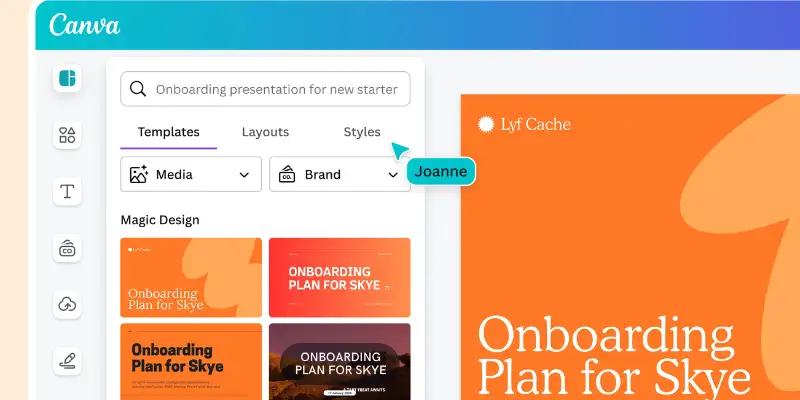
Canva
Key Features:
- Huge library of templates
- Drag-and-drop editor
- AI design suggestions for slides, posters, and social media
Pricing:
- Free plan available
- Pro plan around $12.99/month
Free plan? ✔ Yes
Best for:
- Users who want versatility across presentations and other design projects
Pros & Cons:
- Pros: Very flexible, lots of templates
- Cons: AI-generated slides are basic compared to dedicated AI tools
Why better than Gamma:
Canva is a full design platform, so it’s not limited to slides alone. Perfect if you need a multi-purpose tool.
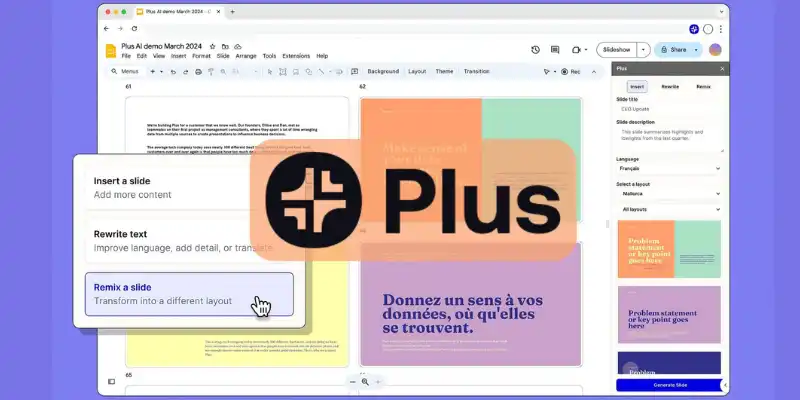
Plus AI
Key Features:
- Integrates directly with Google Slides
- Converts text or outlines into slide decks
Pricing:
- Trial available
- Paid plans start around $15/month
Free plan? ✔ Trial only
Best for:
- Google Workspace users who want AI inside Slides
Pros & Cons:
- Pros: Works within familiar Google Slides interface
- Cons: Less standalone functionality
Why better than Gamma:
You stay inside Google Slides while generating AI slides, no need to switch platforms.
Tome
Key Features:
- Narrative-style slide generation
- AI visuals and layout suggestions
- Story-focused presentation creation
Pricing:
- Free plan with limited credits
- Paid plans $7–$10/month
Free plan? ✔ Yes (limited)
Best for:
- Creative or story-driven presentations
Pros & Cons:
- Pros: Unique narrative style, creative visuals
- Cons: Not ideal for standard business slides
Why better than Gamma:
Tome emphasizes storytelling and visuals, giving more creative freedom than Gamma AI.
Slides AI
Key Features:
- Turns text into slides quickly
- Compatible with Google Slides and PowerPoint
- Simple AI-assisted slide design
Pricing:
- Free plan with limited usage
- Paid plan around $8–$10/month
Free plan? ✔ Yes
Best for:
- Users who want fast text-to-slide conversion inside standard editors
Pros & Cons:
- Pros: Affordable, easy to use
- Cons: Requires manual adjustments for detailed slides
Why better than Gamma:
SlidesAI works directly in Google Slides/PowerPoint, so no extra platform is needed.
Pitch
Key Features:
- Modern templates for professional decks
- Team collaboration tools
- Analytics for slide performance
Pricing:
- Free basic tier
- Paid plans start $8/month
Free plan? ✔ Yes
Best for:
- Teams and businesses creating sales or project presentations
Pros & Cons:
- Pros: Strong team collaboration, easy-to-use templates
- Cons: Some advanced features require payment
Why better than Gamma:
Pitch is better for collaborative work with real-time team editing, something Gamma AI lacks.
Google Slides AI Tools
Key Features:
- Free Google Slides editor with AI add-ons
- Real-time collaboration
- Works with Google Workspace
Pricing:
- Free basic version
- Paid Google Workspace adds advanced features (~$7/month)
Free plan? ✔ Yes
Best for:
- Collaboration-focused presentations on a budget
Pros & Cons:
- Pros: Excellent teamwork support, free option
- Cons: AI features are basic compared to dedicated AI tools
Why better than Gamma:
If you value team editing and budget-friendly options, Google Slides AI tools are a solid choice.
This full comparison shows several strong Gamma AI alternatives for different users from students to creative teams to professional businesses.
Gamma vs Competitors
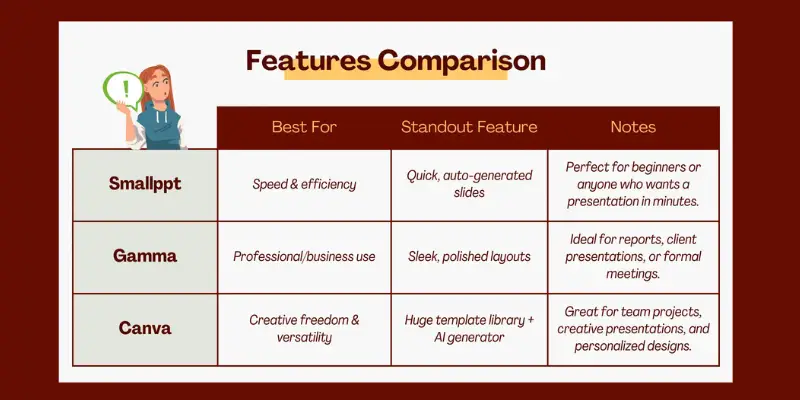
When users explore Gamma AI alternatives, they often compare features, pricing, and ease of use. This section shows how Gamma AI performs against top competitors on key points like design flexibility, AI automation, pricing, ease of use, and PPT export quality.
Gamma vs Beautiful.ai
Design Flexibility
- Gamma: Simple layouts, easy-to-use templates.
- Beautiful.ai: Offers structured slide rules for uniform design.
Winner: Beautiful.ai
AI Automation
- Gamma: Auto-generates slides from your input.
- Beautiful.ai: AI keeps slides consistent.
Winner: Tie
Pricing
- Gamma: Free tier + paid plans.
- Beautiful.ai: Paid plans only (trial available).
Winner: Gamma
Ease of Use
- Gamma: Very beginner-friendly.
- Beautiful.ai: Slight learning curve.
Winner: Gamma
PPT Export Quality
- Gamma: Clean but basic slides.
- Beautiful.ai: Polished, professional export.
Winner: Beautiful.ai
If you want consistent design and high-quality export, Beautiful.ai shines. For simplicity and cost-effective options, Gamma AI alternatives like Gamma itself are ideal.
Gamma vs Canva
Design Flexibility
- Gamma: Limited themes and layout choices.
- Canva: Extensive templates, fonts, and color options.
Winner: Canva
AI Automation
- Gamma: Automatically generates slide structure.
- Canva: AI assists with design suggestions but needs manual adjustments.
Winner: Gamma
Pricing
- Gamma: Free + paid plans.
- Canva: Free + Pro plan.
Winner: Tie
Ease of Use
- Gamma: Extremely easy for beginners.
- Canva: More tools can overwhelm new users.
Winner: Gamma
PPT Export Quality
- Gamma: Good exports with basic transitions.
- Canva: Smooth export with professional design flow.
Winner: Canva
Gamma vs ChatGPT
Design Flexibility
- Gamma: Prebuilt slide templates.
- ChatGPT: Generates text only; needs manual slide creation.
Winner: Gamma
AI Automation
- Gamma: Fully automated slide decks.
- ChatGPT: Only text, requires copying to slides.
Winner: Gamma
Pricing
- Gamma: Free + paid plans.
- ChatGPT: Free tier + subscription for GPT‑4.
Winner: ChatGPT (for text generation value)
Ease of Use
- Gamma: Click and generate slides.
- ChatGPT: Extra steps to make slides.
Winner: Gamma
PPT Export Quality
- Gamma: Ready-to-use slide exports.
- ChatGPT: No slide export.
Winner: Gamma
For AI-powered presentations, Gamma is superior. But ChatGPT can be a Gamma AI alternative for idea generation and content drafting.
Gamma vs Presentations.AI
Design Flexibility
- Gamma: Fewer template options.
- Presentations.AI: More templates and business-oriented layouts.
Winner: Presentations.AI
AI Automation
- Gamma: Auto-generates slides from text.
- Presentations.AI: Converts text to slides similarly.
Winner: Tie
Pricing
- Gamma: Affordable tiers.
- Presentations.AI: Higher cost for full features.
Winner: Gamma
Ease of Use
- Gamma: Very simple interface.
- Presentations.AI: Slight learning curve.
Winner: Gamma
PPT Export Quality
- Gamma: Clean export.
- Presentations.AI: Professional PPT export.
Winner: Presentations.AI
Presentations.AI is better for business-ready templates, but for budget-friendly, simple slides, Gamma AI alternatives like Gamma itself remain strong.
Gamma vs Plus AI
Design Flexibility
- Gamma: Standalone templates.
- Plus AI: Uses Google Slides layouts more flexibility.
Winner: Plus AI
AI Automation
- Gamma: Generates full slides automatically.
- Plus AI: Suggests content inside Google Slides.
Winner: Gamma
Pricing
- Gamma: Free + paid options.
- Plus AI: Subscription after trial.
Winner: Gamma
Ease of Use
- Gamma: One-click slide generation.
- Plus AI: Familiar interface, but extra clicks needed.
Winner: Gamma
PPT Export Quality
- Gamma: Clean exports.
- Plus AI: Uses Google Slides export (high quality).
Winner: Plus AI
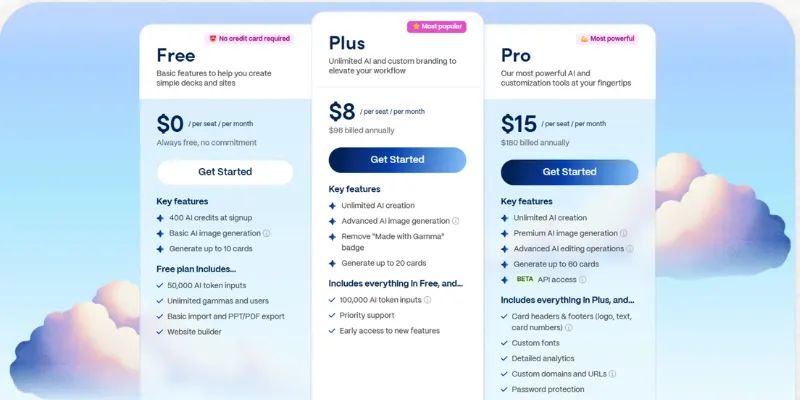
Gamma AI Pricing Explained
Understanding pricing helps you decide if Gamma AI is right for you. Many users also compare it with other Gamma AI alternatives to see which offers the best value. Below is a clear breakdown.
Gamma Free Plan
What you get:
- Limited AI slide generation
- Basic templates
- Save and share simple slides
Good for:
- Beginners, students, or occasional creators
Limitations:
- Some features locked
- Limited AI usage
- Fewer templates
Many people start with the free plan to test Gamma before upgrading or trying Gamma AI alternatives.
Gamma Pro
What’s included:
- Full AI-powered slide creation
- Advanced templates and layouts
- PowerPoint & PDF export
- Priority support and faster processing
Best for:
- Professionals, teachers, or frequent presentation creators
Why upgrade:
- You get more slides, richer designs, and better export options than free users.
- Some users switch to other Gamma AI alternatives if they want even more flexibility or pricing options.
Gamma Subscription Cost
- Free Plan: $0 (limited features)
- Pro / Paid Plan: Subscription-based, monthly or yearly
Paid plans give access to everything. Compared to some Gamma AI alternatives, Gamma’s pricing is reasonable for full AI-powered slide creation.
Is Gamma AI Worth It?
Ask yourself:
- Do you create presentations often?
- Do you want AI to generate slides fast?
- Do you need clean, professional designs?
If yes, Gamma AI can be worth it. The free plan is a safe way to test it. If you need more features, you can also explore other Gamma AI alternatives to see if they better match your needs.
Gamma AI Cost vs Competitors
Here’s how Gamma compares with other Gamma AI alternatives:
- Canva Free: Lots of templates, but AI slide generation is limited
- Beautiful.ai: Professional designs, paid only more expensive than Gamma
- Google Slides AI: Free, great for teamwork, but less AI automation
- SlidesGPT / Presentation: Free options, but setup or manual steps required
Insight: Gamma offers AI slide generation with simple pricing, while free Gamma AI alternatives might lack some automation.
Gamma AI Free Trial Details
Gamma AI provides a free plan or trial:
- Try AI slide creation
- Explore templates
- Test exports
Bottom Line:
- A free plan is enough for casual users.
- Paid plan unlocks full AI power.
- Comparing Gamma with other Gamma AI alternatives helps you find the best tool for your style, budget, and needs.
Best AI Tools for PowerPoint (If You Want Real PPT Files)
Looking for AI tools that generate real PowerPoint slides? Here are the top Gamma AI alternatives to create editable PPT decks fast.
Plus AI
- Converts text into Google Slides
- Smart slide suggestions
- Best for: Google Slides users
- Why a Gamma AI alternative: Quick PPT generation for easy editing
Presentations.AI
- AI creates slides from text
- Export directly to PowerPoint
- Best for: Professionals needing polished decks
- Why a Gamma AI alternative: More templates and ready-to-export slides
Beautiful.ai
- Smart layouts and automatic formatting
- Professional templates
- Best for: Teams needing consistent design
- Why a Gamma AI alternative: Creates polished slides quickly
Canva
- Drag-and-drop editor
- Export editable PowerPoint slides
- Best for: Beginners and multi-purpose design
- Why a Gamma AI alternative: Free or low-cost versatile slide creation
These tools are the best Gamma AI alternatives if you want real, editable PowerPoint slides fast.
Gamma AI Pros and Cons: Strengths, Weaknesses & Who Should Use These Gamma AI Alternatives
Thinking about Gamma AI? Compare it with other Gamma AI alternatives to see if it fits your needs.
Strength
- AI-powered slide generation
- -Easy for beginners
- -Clean templates and export options
- -Free plan available
Weaknesses
- Limited design flexibility
- Some templates behind paid plan
- Free plan has usage limits
- Not ideal for complex presentations
who should use Gamma
- Students and beginners
- Professionals needing quick slides
- Anyone exploring Gamma AI alternatives
Who should avoid Gamma
- Users needing full creative control
- Teams needing advanced collaboration
- Designers wanting high-end visuals
How to Choose the Best Gamma Alternative
Choosing the right tool is easier if you compare important features. Here’s how to pick the best Gamma AI alternatives for your needs:
Key Factors to Consider:
- Budget: Check free plans, monthly subscriptions, and value for money. Some Gamma AI alternatives offer generous free plans while others require paid subscriptions.
- Team Collaboration: If you work in a team, make sure the tool supports multiple users, real-time editing, and sharing.
- PPT Compatibility: Ensure the AI can export editable PowerPoint slides if you need them for meetings or reports.
- AI Automation Level: Look for tools that automatically generate slides, suggest layouts, and speed up your workflow.
- Branding Control: Choose alternatives that let you apply brand colors, logos, and fonts consistently.
- Templates: Check if the tool has enough templates for your style business, education, or creative presentations.
- API Availability: Some Gamma AI alternatives allow API integration for developers or automated workflows
Conclusion
Guys, in this guide we explored Gamma AI alternatives, covering their features, pricing, pros and cons, free options, and the best tools for PowerPoint presentations. We compared top choices like Canva, Beautiful.ai, Presentations.AI, Plus AI, and SlidesGPT, so you know which one fits your needs.
If I were to recommend, check your priorities first whether you want free options, powerful slide automation, or full design flexibility. Picking the right Gamma AI alternative can save you time, make your slides look great, and help you present confidently.
So buddies, try a few of these tools, see what works best for you, and keep learning to make your presentations shine!
Gamma AI is an AI tool that helps you create slides and presentations quickly.
Yes, Gamma AI offers a free plan with limited features.
Top Gamma AI alternatives include Canva, Beautiful.ai, Presentations.AI, Plus AI, and SlidesGPT.
Yes, free Gamma AI alternatives include Canva Free, Google Slides AI, SlidesGPT, and Presenton.
Plus AI, Presentations.AI, Beautiful.ai, and Canva are the best AI tools for creating real PPT files.





- Be Respectful
- Stay Relevant
- Stay Positive
- True Feedback
- Encourage Discussion
- Avoid Spamming
- No Fake News
- Don't Copy-Paste
- No Personal Attacks
- Be Respectful
- Stay Relevant
- Stay Positive
- True Feedback
- Encourage Discussion
- Avoid Spamming
- No Fake News
- Don't Copy-Paste
- No Personal Attacks
