How AI Automation Is Changing Work and Business
Published: 19 Dec 2025
Are you struggling to keep up with the pace of your work or business in today’s fast moving world? With the constant pressure to do more, faster, it can feel stressful. But what if there was a way to work smarter, not harder? This is where AI automation comes in. In this guide, we’ll explore how AI automation can boost productivity, reduce errors, and free up your time for more important tasks. Whether you’re running a business or just trying to stay ahead in your career, AI automation can make a real difference. Ready to see how it works? Keep reading to discover practical ways Artificial Intelligence can transform your daily life.
What is AI Automation
AI Automation helps make tasks quicker and more efficient by using machine learning, a type of smart technology that can learn from data. Unlike traditional methods, AI doesn’t just follow strict rules; it adapts and improves over time by learning from past experiences.”
- Manual work: Requires people to do tasks step-by-step, which can be slow and prone to errors.
- Basic automation: Speeds up repetitive tasks but doesn’t adjust to new situations or learn on its own.
- AI automation: Learns from past data and gets better at handling tasks without human help. For example, AI can recommend products based on your shopping history.
Real-life Example:
- Online shopping: AI automation in e-commerce suggests items you might like, saving you time and making the shopping experience smoother
- Companies like Wells Fargo and JPMorgan Chase in the U.S. are using AI to improve fraud detection systems and streamline customer service processes. Similarly, in healthcare, Mayo Clinic is using AI automation to assist doctors with faster diagnosis, ultimately improving patient care.”
How AI Automation Works
AI automation makes everyday tasks faster and easier by doing them automatically. In this section, we’ll break down how AI steps in to handle tasks, and how it helps in real life situations.
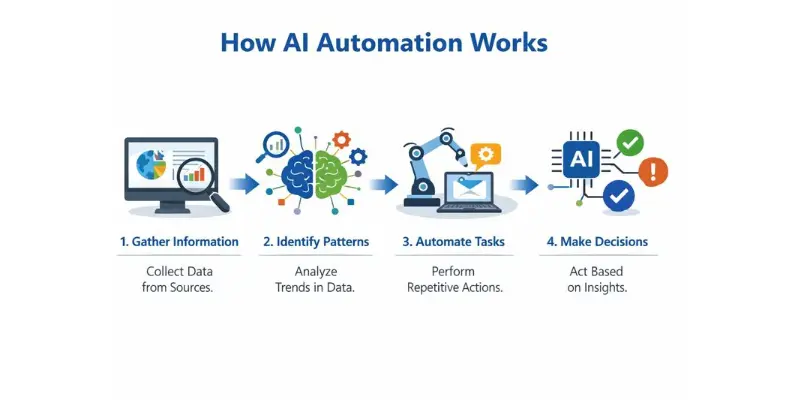
- Gather Information
AI collects data from different sources, like websites, apps, or user actions.
Example: An online store tracks which products you browse or buy. - Identify Patterns
AI looks at the data to find patterns or trends. It learns what people like or need.
Example: If you often shop for workout gear, AI might suggest new sports-related products. - Automate Repetitive Tasks
AI handles tasks that repeat over and over, like answering questions or processing orders.
Example: AI-powered chatbots on websites help customers by answering common questions automatically. - Improve with More Data
The more data AI gets, the smarter it becomes. It gets better at predicting what’s needed next.
Example In the U.S, Netflix and Spotify use AI to predict the next show or song based on user data. In healthcare, Kaiser Permanente uses AI to predict patient needs, improving efficiency and reducing wait times.” - Make Smart Decisions
AI uses what it’s learned to make decisions and take actions automatically.
Example: Banks use AI to spot unusual spending patterns that could indicate fraud. - Use Regression for Predictions AI uses a method called regression to make predictions based on past data. It looks at trends and predicts what will happen next
Example: Based on your past purchases, AI might predict that you’ll be interested in buying more fitness gear as the season changes.
AI automation helps businesses and people save time, reduce mistakes, and improve efficiency. By taking care of repetitive work, it makes life easier for everyone.
AI Automation in Context — Why It Matters Now
AI automation is becoming a big part of how businesses work today. Many companies use it to save time, cut costs, and make smarter choices. This section shows real numbers and real benefits so you can see why it matters now.
- Industry Adoption Stats
78 % of companies worldwide use some form of AI in their business work. Many use it for automation tasks like data handling and customer support. These numbers show that AI automation is not rare anymore but common in business today. - ROI and Cost Savings
Companies say they get about $3.70 back for every $1 they spend on AI automation. Some see big gains in productivity and cost cuts within the first year of use. - Real-Life Examples
In the USA, banks have doubled productivity in some operations by using automation to speed up work and reduce errors. Many small online stores use automation to answer customer questions quickly and free up staff for more complex tasks - Practical Benefits
AI automation helps teams finish repetitive tasks faster and with fewer mistakes. This gives workers more time to focus on creative and important work. It also improves the customer experience by making services faster and more consistent. - Competitive Edge
Businesses that use AI automation often grow faster than those that stick with manual methods. They can handle more work with the same staff, reduce delays, and make smarter decisions based on real data.
“According to Gartner, 30% of U.S. businesses have already implemented some form of AI to automate processes, with 70% of business leaders saying they plan to expand their use of AI in the next few years.”
How to Choose the Best AI Automation Tools
Choosing the right automation tools matters because not all tools make work easier in real life. The right set of tools can save time, cut costs, and boost productivity. The wrong choice can waste money and slow your team down.
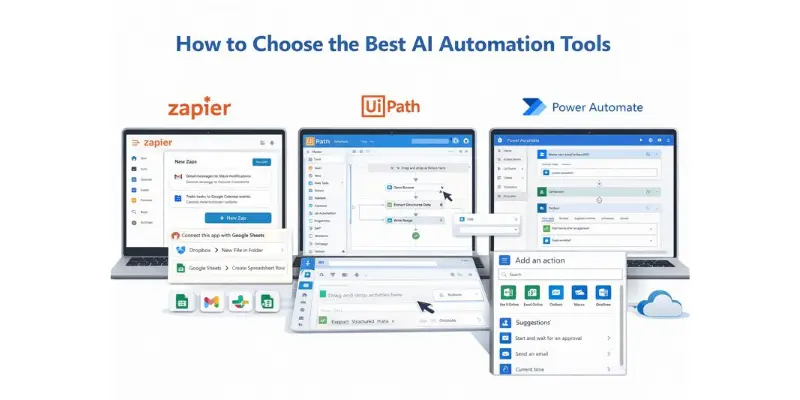
Here are top AI automation tools with real ratings, pros and cons, and recommended stacks you can use today:
Zapier (9/10)
Best for: Simple task automation across many apps.
Pros:
• Very easy to use with no tech skills needed.
• Connects to thousands of apps and services.
• Good for marketing emails, notifications, and data sync.
Cons:
• Pricing grows fast if you automate many tasks.
• Not ideal for complex business logic.
Recommended Stack:
• Zapier + Google Sheets + Slack for team alerts and task updates.
UiPath (8.5/10)
Best for: Deep business process automation.
Pros:
• Handles complex, rule‑based tasks.
• Scales well for medium to large teams.
Cons:
• Needs some training to set up flows.
• Not as easy for beginners.
Recommended Stack:
• UiPath + internal databases to automate reporting and data entry.
Microsoft Power Automate (8.5/10)
Best for: Teams that use Microsoft tools.
Pros:
• Works well with Outlook, Teams, and Office apps.
• Many templates start quickly.
Cons:
• Works best in the Microsoft ecosystem.
• Some automation can get slow if tasks are very large.
Recommended Stack:
• Power Automate + Outlook + SharePoint for workflow approvals.
Make (formerly Integromat) (8/10)
Best for: Visual workflow builders and multi‑step automations.
Pros:
• Very flexible automation design.
• Good for complex logic between apps.
Cons:
• Visual interfaces can seem busy at first.
Recommended Stack:
• Make + CRM + email tools to automate sales funnels.
n8n AI.5/10)
Best for: Custom and self‑hosted automation.
Pros:
• Highly flexible and open‑source.
• Good for teams that want full control.
Cons:
• Requires tech setup or help from a developer.
Recommended Stack:
• n8n + internal APIs to automate complex internal workflows.
Practical Benefits You Can Expect
- Faster work: Tools handle repetitive tasks for you.
- Fewer errors: Tools follow set rules without mistakes.
- Better decisions: Automation gives timely data for decision‑making.
How to Choose the Right Stack
- Pick Zapier if you want simple and quick wins.
- Use UiPath or Power Automate when tasks are big or complex.
- Try Make or n8n if you need highly flexible workflows.
These tool stacks deliver real ROI in everyday business life by saving hours of manual work and helping teams do more with less effort
Real Business Use Cases & Examples
Seeing AI automation in action helps readers understand its real value. Many corporate pages just talk about marketing benefits, but they don’t show what it actually does for businesses. Real examples make it clear how companies save time, reduce costs, and boost productivity.
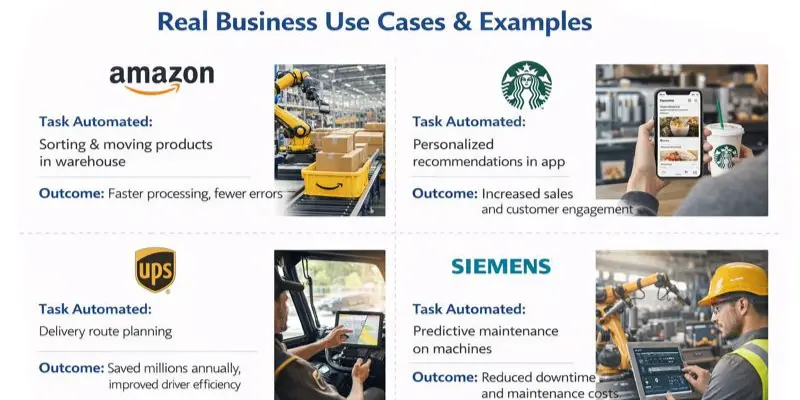
| Company | Task Automated | Outcome | Impact |
| Amazon | Sorting &moving products in the warmhouse. | Faster processing, fewer errors | Millions of items handled daily with minimal human work |
| Starbucks | Personalized recommendations in app | Increased sales and customer engagement | Higher ROI through targeted marketing |
| Ups | Delivery route planning | Increased sales and customer engagement | Saved millions annually, improved driver efficiency |
| Siemens | Predictive maintenance or machines | Reduced downtime and maintenance costs | Smoother operations, higher production output |
| Airbnb | Fraud detection on accounts | Improved safety and trust | Lowered risk, enhanced platform reliability globally |
What You Can Learn
- AI automation solves real business problems rather than just offering theoretical benefits.
- Companies using AI gain measurable results, like cost savings, faster operations, and higher customer engagement.
- Small, medium, and large businesses can apply similar strategies to improve efficiency and ROI.
Combine insights from multiple tools and examples. For instance, a business could use n8n for custom workflows, Zapier for simple integrations, and AI-based predictive maintenance to maximize results.
Benefits of AI Automation & Manual Work
Many businesses still rely on manual work because it feels familiar. But manual processes are slow, costly, and hard to scale. AI automation changes how work gets done by saving time, reducing mistakes, and improving results across teams and industries.
| Area | Manual Work | Ai Automation |
|---|---|---|
| Speed | Tasks takes hour or days | Tasks finish in minutes |
| Accuracy | High chance of human error | Lower long term operating cost |
| Scalability | Hard to scale with growth | Easy to scale as demand grows |
| Productivity | Limited by human capacity | Based on data and patterns |
| Cost | Ongoing labour cost | Lower long term operating term |
| Decision Support | Based on guess work | Based on data and patterns |
| Customer Experience | Slower response time | Faster and personalized responses |
Why AI Automation Delivers Better Results
- Faster operations: Businesses process orders, data, and requests much quicker.
- Lower costs: Less time spent on repetitive work means lower expenses.
- Better accuracy: Fewer mistakes compared to manual handling.
- Higher employee value: Teams focus on creative and strategic work.
- Improved customer satisfaction: Faster service leads to happier customers.
What This Means for Your Business
If your business still depends on manual work, growth will feel slow and stressful. AI automation helps you move faster, compete better, and deliver consistent results. Companies in the USA and around the world now see automation as a necessity, not a luxury.
Manual work helps you survive.
AI automation helps you scale.
AI Automation Challenges
AI automation brings real benefits, but it is not perfect. Businesses need to understand the challenges before getting started. Knowing these issues early helps teams plan better and avoid mistakes.
- Initial Setup and Learning Curve
Setting up AI automation takes time. Teams need to learn new tools and workflows. This can slow things down at first.
How to manage it: Start small. Automate one simple task first. Train teams step by step.
Example:A recent survey from PwC found that 50% of U.S. companies are concerned about the initial cost and learning curve of AI automation. However, those that invest in proper training and infrastructure see a 20-30% increase in productivity within the first year.
- Cost Concerns for Small Businesses
Some tools can feel expensive, especially for small teams. Monthly plans and setup costs add up.
How to manage it: Use low-cost or open-source tools. Focus on tasks that save the most time or money. - Data Quality and Accuracy Issues
AI automation depends on good data. Poor or messy data leads to wrong results.
How to manage it: Clean data regularly. Review outputs often, especially in the early stages. - Integration with Existing Tools and Systems
Not all tools work smoothly together. Old systems may cause delays or errors.
How to manage it: Choose tools that support popular apps like Google Workspace, Microsoft, or Slack. - Trust, Control, and Human Oversight
Teams may not fully trust automated decisions. Blind trust can cause problems.
How to manage it: Keep humans in control. Review key actions before final approval. - Resistance to Change from Teams
Employees may fear job loss or feel uncomfortable with new systems. This slows adoption.
How to manage it: Show how automation helps people, not replaces them. Focus on saving time and reducing stress.
Why This Matters:
AI automation works best when challenges are handled with planning and patience. Businesses that prepare early see better results, smoother adoption, and higher long-term value
Application
AI automation is transforming how businesses and employees work every day. It’s not just for tech giants, companies of all sizes use it to save time, reduce errors, and improve efficiency. Here’s a look at practical applications across industries:
Business and Office Work
- Task Automated: Scheduling meetings, sending reminders, and organizing documents.
- Real-Life Impact: Tools like Microsoft Power Automate or Zapier help US companies streamline office workflows. Employees spend less time on repetitive tasks and more on strategic work.
Customer Support
- Task Automated: Answering common customer questions and ticket routing.
- Real-Life Impact: Companies like Slack and Zendesk use AI bots to handle initial queries. Customers get faster responses, and support teams focus on complex issues.
Marketing and Sales
- Task Automated: Sending personalized emails, tracking leads, and analyzing campaigns.
- Real-Life Impact: Brands like Starbucks and Amazon automate recommendations and promotions. Marketing teams save time and see higher engagement.
Finance and Accounting
- Task Automated: Invoice processing, expense tracking, and reconciliation.
- Real-Life Impact: Firms like Intuit or American Express automate repetitive finance tasks. This reduces errors and speeds up reporting.
Healthcare
- Task Automated: Scheduling appointments, patient follow-ups, and data entry.
- Real-Life Impact: Hospitals in the US use AI tools to manage patient flow and reminders. Staff spend more time on patient care.
E-commerce
- Task Automated: Inventory management, order tracking, and product recommendations.
- Real-Life Impact: Companies like Shopify stores or Walmart automate stock updates and suggest products to shoppers. This improves efficiency and customer satisfaction.
Manufacturing
- Task Automated: Predictive maintenance, quality checks, and assembly line monitoring.
- Real-Life Impact: US manufacturers like Siemens or GE use AI to prevent equipment failure. This reduces downtime and boosts production.
Daily Workplace Tasks
- Task Automated: Data entry, report generation, and email sorting.
- Real-Life Impact: Employees across industries spend less time on mundane tasks. Tools like n8n or Zapier help teams focus on higher-value work.
AI automation is not limited to tech-heavy tasks. Businesses in all sectors from retail and finance to healthcare and manufacturing are already using it to save time, reduce errors, and improve results. By imagining how these applications fit into their own work, teams can quickly gain productivity benefits.
AI Automation Best Practices
AI automation works best when it is planned the right way. Many businesses rush into it and face problems later. Following simple best practices helps you get real results without stress or waste.
- Start Small and Clear
Begin with one simple task. Choose something repetitive, like data entry or email sorting. This helps teams learn without feeling overwhelmed. - Fix the Process First
Don’t automate a broken workflow. Clean up steps before automation. A clear process gives better results and fewer errors. - Use Clean and Reliable Data
AI automation depends on data quality. Wrong or messy data leads to wrong outcomes. Always check data before using it. - Keep Humans in Control
Automation should assist people, not replace judgment. Review results regularly. Human oversight builds trust and avoids mistakes. - Train Your Team Early
Show employees how the system works. Simple training reduces fear and resistance. Teams adopt faster when they understand the value. - Choose Tools That Fit Your Needs
Don’t chase popular tools. Pick tools that match your business size and goals. Small teams often succeed with simple tools like workflow automation platforms. - Measure Results Often
Track time saved, cost reduction, and error rates. This shows real ROI. It also helps justify further investment. - Improve Step by Step
AI automation is not a one-time setup. Review performance often. Make small improvements instead of big risky changes.
Future Trends in AI Automation
AI automation is changing fast. Companies that keep up with new trends can work smarter and faster. Here are some of the main trends to watch:
Personalized Experiences
- AI will help businesses give each customer a unique experience.
- Example: Amazon and Nike suggest products based on what you like.
Smarter Workflows
- AI will handle more complex tasks, not just simple ones.
- Example: Banks and hospitals can use AI to process claims or approve loans automatically.
AI Tools for Teams
- AI will help with writing, scheduling, and managing projects.
- Example: Microsoft 365 Copilot and Slack GPT make teamwork easier and faster.
Predicting Trends
- AI will help businesses see what’s coming and plan ahead.
- Example: UPS and FedEx use AI to plan delivery routes and manage stock efficiently.
Example:In the U.S., AI tools like Microsoft 365 Copilot and Slack GPT are becoming increasingly popular for improving team collaboration and automating time consuming administrative tasks
Chat and Voice Support
- AI chatbots and voice assistants will answer customer questions quickly.
- Example: Airbnb and Delta Airlines use AI to help customers online or over the phone.
Eco-Friendly Automation
- AI will help companies save energy and reduce waste.
- Example: Factories in the US and Europe use AI to monitor energy use and lower their carbon footprint.
Conclusion
In this article, we’ve shown how AI automation saves time, reduces mistakes, and makes work easier. Start small with simple tasks like reminders, reports, or data entry, then gradually expand. Experiment, learn, and use the tools that fit your workflow. Take the first step today to work smarter, reduce stress, and enjoy your day more.
Anyone from small business owners to large companies can use AI automation tools. Even individual workers can automate daily tasks. Many beginner-friendly apps make it easy to start without technical skills.
AI automation tools range from free plans to paid subscriptions. Small businesses can start with free or low-cost options like Zapier or n8n. Over time, the saved time and reduced mistakes make it cost-effective.
No, AI automation handles repetitive tasks, not creative or strategic work. It helps employees focus on higher value tasks. Most companies use AI automation to support staff, not replace them.
Start by listing tasks you repeat daily, like sending emails or generating reports. Choose an easy-to-use tool and automate one task at a time. As you get comfortable, expand to more complex workflows
Industries like finance, healthcare, e-commerce, manufacturing, and customer support use AI automation heavily. In the USA and globally, businesses rely on it to save time and reduce errors. It’s useful wherever repetitive tasks exist.
Not at all. Many AI automation tools are designed for beginners and don’t require any coding. Advanced features might need some learning, but you can start with simple automations immediately.
Absolutely. Even simple automations, like follow up emails or reminders, save hours every week. Small teams can work more efficiently and focus on growing their business
It completes repetitive tasks quickly and accurately, freeing employees to focus on creative or strategic work. Teams can achieve more in less time using smart automation tools




- Be Respectful
- Stay Relevant
- Stay Positive
- True Feedback
- Encourage Discussion
- Avoid Spamming
- No Fake News
- Don't Copy-Paste
- No Personal Attacks
- Be Respectful
- Stay Relevant
- Stay Positive
- True Feedback
- Encourage Discussion
- Avoid Spamming
- No Fake News
- Don't Copy-Paste
- No Personal Attacks
