Visme AI Review 2026: Is It Really Worth Your Money?
Published: 3 Aug 2026
You have probably seen Visme AI pop up while you searched for a presentation tool. Maybe a friend told you it beats Canva. Maybe an ad promised you a full deck in two minutes. So now you are here, and you want one simple answer: does Visme AI actually work, or is it just another overhyped design tool?
I get it. Nobody wants to sign up, add a card, and then find out the free plan barely lets you download anything. So our team spent real hours inside Visme AI, testing the AI Design Generator, the image tool, the templates, and every pricing tier, to give you a Visme AI review that goes past the marketing page.
This Visme AI review is built on real, hands-on testing, not a rewrite of the official website. By the end of this Visme AI review, you will know exactly what it does well, where it falls short, what it costs, and whether it fits your work. Let’s get into it.
Visme AI Rating Breakdown
| Category | Rating |
| Ease of Use | ⭐⭐⭐⭐⭐ (4.6/5) |
| AI Features | ⭐⭐⭐⭐ (3.9/5) |
| Templates & Design | ⭐⭐⭐⭐⭐ (4.7/5) |
| Pricing Value | ⭐⭐⭐ (3.5/5) |
| Customer Support | ⭐⭐⭐⭐ (4.1/5) |
| Overall Score | ⭐⭐⭐⭐ (4.2/5) |
In short: Visme AI is a strong all-in-one visual content tool for presentations, infographics, and social graphics. It suits solo creators, marketers, and small teams who want fast, good-looking designs without hiring a designer. The AI draft is a starting point rather than a final deck, and the free plan feels more like a demo than a usable tier.
Why We Rated Visme AI 4.2/5
Here is a quick breakdown of the thinking behind each score in this Visme AI review.
- Ease of Use (4.6/5): The drag-and-drop editor feels intuitive from the first project, with almost no learning curve for non-designers.
- AI Features (3.9/5): The AI Design Generator saves real time, but the output is a draft, not a finished deck, and regenerations cost credits fast.
- Templates & Design (4.7/5): The template library is deep and genuinely well designed across presentations, infographics, and social content.
- Pricing Value (3.5/5): Solid features once you upgrade, but the free plan feels too restrictive and the paid tiers cost more than close competitors.
- Customer Support (4.1/5): Response times were quick during testing, and most user reviews echo that experience.
What Is Visme AI?
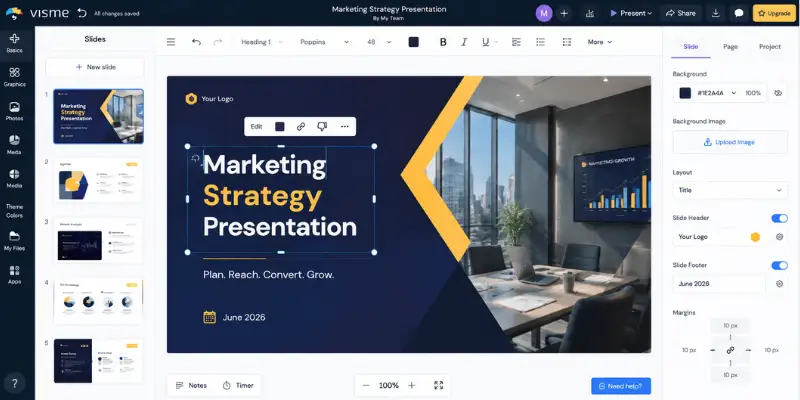
Visme AI is an AI-powered visual content platform that helps you create professional designs without starting from scratch. Just describe what you need, and the tool generates a ready-to-edit draft that you can customize in its drag-and-drop editor.
Key Highlights
- Creates presentations, infographics, reports, documents, social media graphics, and short videos.
- Uses AI to suggest layouts, colors, fonts, and visuals based on your prompt.
- Includes a beginner-friendly drag-and-drop editor, so every design stays fully editable.
- Works well for marketers, educators, businesses, and content creators who need fast visual content.
- Produces a strong first draft, but you still need to refine the messaging and slide flow for the best results.
How We Tested Visme AI for This Review
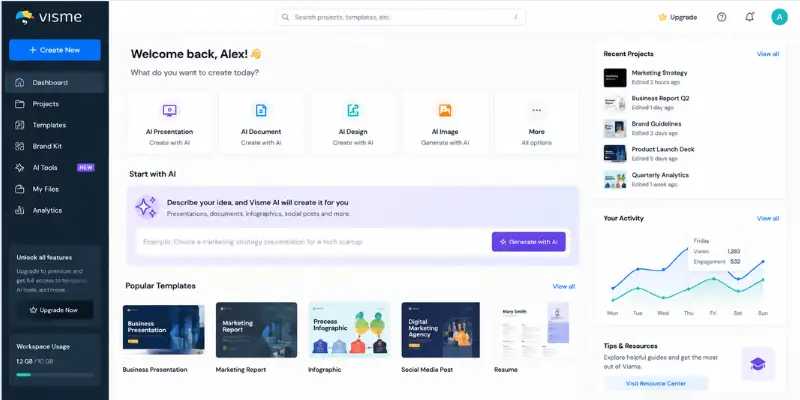
Before writing this Visme AI review, our team created several projects inside Visme AI, including a business presentation, a data-heavy infographic, a chart built from an uploaded spreadsheet, and a social media carousel. We tracked how long each one took, checked how much manual editing was needed after the AI draft, and compared the output against tools like Canva and Gamma.
We also applied the Brand Wizard to see how well it held colors and fonts across new projects, tested the regeneration limit on the AI Design Generator, and read through hundreds of verified reviews on G2, Capterra, and Trustpilot to see if real customer experience matched what we saw during testing. This mix of hands-on use and outside feedback is what shapes every rating in this Visme AI review.
The AI Design Generator produced a full ten-slide draft in under two minutes each time we tested it, and the AI Image Generator was the feature that impressed us most for how usable the first result usually was. Data visualization needed the most manual work, especially once a chart carried more than a handful of data points.
What Surprised Us During Testing
- The AI generated cleaner, more balanced layouts than we expected from a prompt-based tool.
- The Brand Wizard picked up our logo and brand colors more accurately than most brand-kit tools we have tested.
- Free plan restrictions were stricter than expected, since you cannot download a single project without upgrading.
- Charts became genuinely hard to read once we passed fifteen data points, with the legend overlapping the plot area.
- The AI Writer produced usable first drafts, but every piece of copy still needed a manual edit pass before it felt publish-ready.
- Regenerating a design ate through AI credits faster than we expected, especially while testing the Basic plan.
Visme AI Features
Here is what actually matters when you open Visme AI for the first time.
AI Design Generator
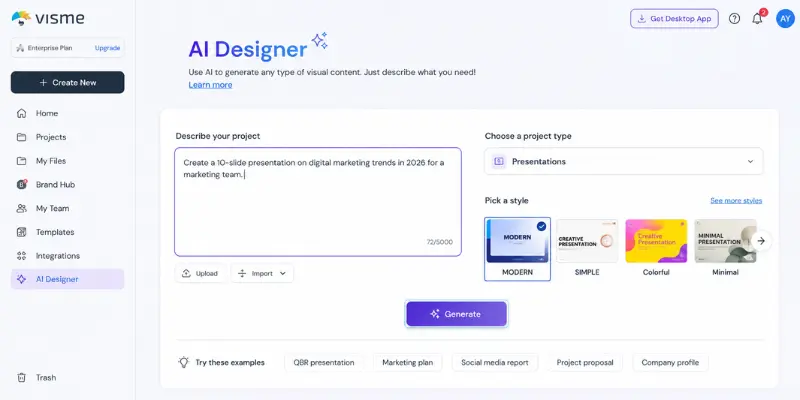
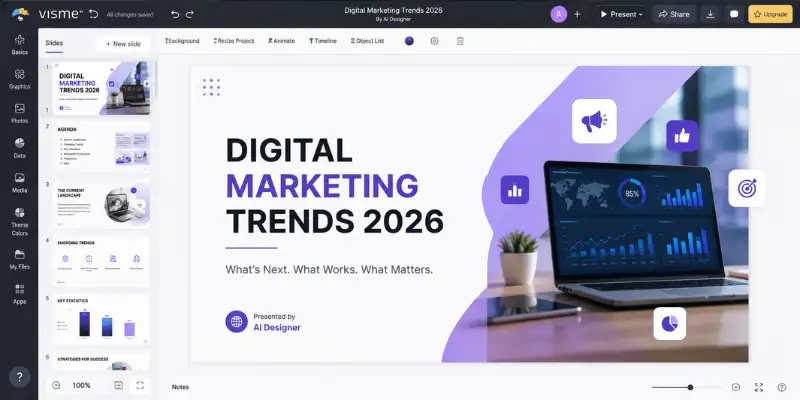
Describe your project in a text box, pick a style, and Visme AI builds a complete draft in about two minutes. A marketing deck prompt returned a ten-slide draft with matching fonts, color themes, and stock photos already placed. Regenerating a design uses up your monthly AI credits fast, especially on the Basic plan, and fixing the slide order still means going slide by slide yourself.
AI Image Generator
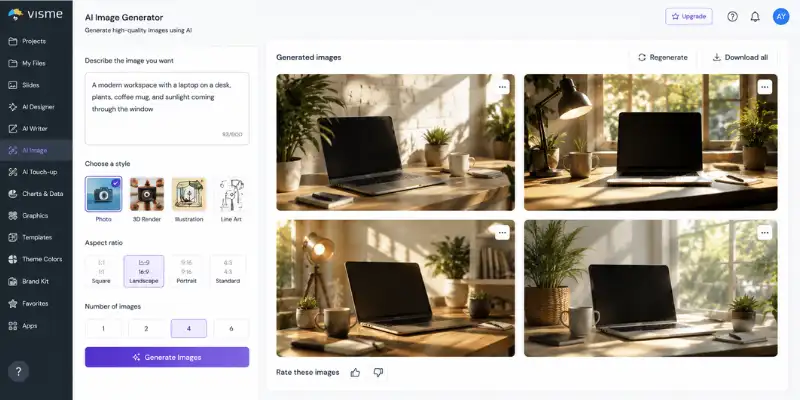
Type a description and Visme AI generates original images in styles like photos, illustrations, and 3D art. It works well for blog headers and social posts, though very specific prompts sometimes need a few tries.
AI Writer and Text-to-Speech
The built-in AI Writer helps you draft slide copy, headlines, or captions right inside the editor, so you rarely need a separate AI writing tool. Text-to-speech turns your written content into narration with multiple voice options.
AI Touch-Up and Resize Tools
Remove objects or swap backgrounds without a separate photo editor. AI Resize automatically reshapes a design for different platforms, like turning a slide into an Instagram-ready graphic.
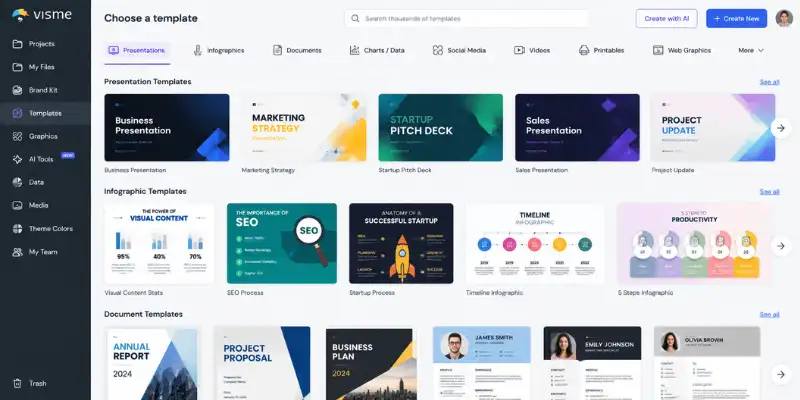
Templates and Design Library
Thousands of templates cover presentations, infographics, resumes, reports, and social graphics, and every template stays fully editable once the AI generates it. Pair Visme AI with a dedicated data analysis tool if you work with a lot of raw numbers.
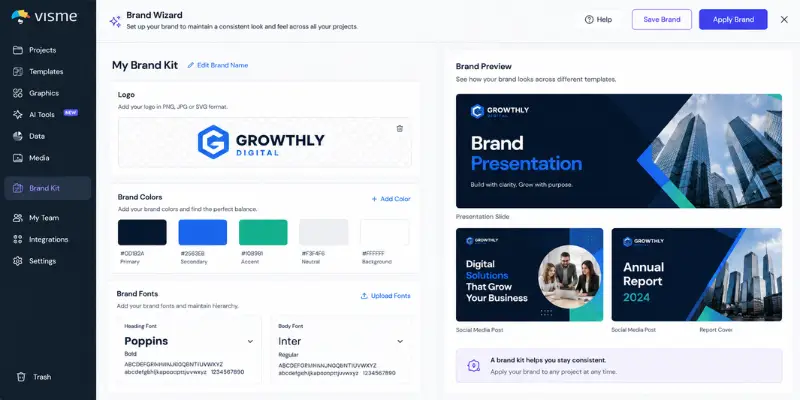
Brand Wizard
Enter your website URL and Visme AI pulls your logo, brand colors, and fonts automatically. It applies these well on the first project, but it does not lock the settings, so a teammate can still pick a different color on a later design.
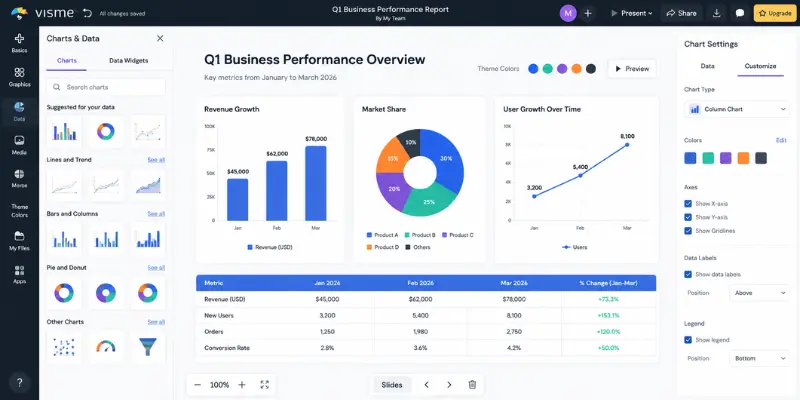
Data Visualization and Charts
Paste raw data or connect Google Sheets, Excel, and Google Analytics to build charts and animated data widgets. Once a chart passes fifteen data points, the legend gets crowded, and Visme AI does not choose the chart type for you.
Presenter Studio and Engagement Tracking
Record your screen, voice, and camera together for async pitches or training content, then track who opened your presentation and how long they spent on each slide.
Interactive and Web-Style Presentations
Add clickable menus, embedded videos, and interactive hotspots so viewers click through content like a small website instead of just flipping slides.
Collaboration Tools
Comment, edit, and review projects together in real time, even on the free plan, with feedback attached to specific slides instead of scattered across email threads.
Export, Import, and Integrations
Download in PDF, JPG, PNG, PPTX, and HTML5, and connect Google Drive, Salesforce, Slack, Mailchimp, and HubSpot. You can import an existing PowerPoint file too, though transitions and animations may not carry over cleanly into an exported PPTX.
Visme AI Pricing
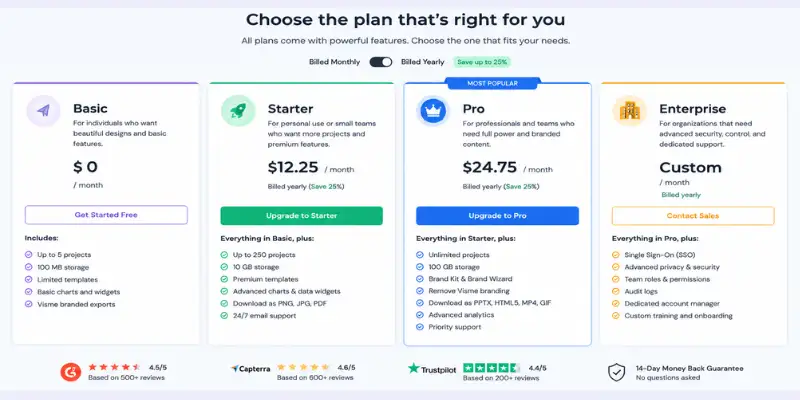
We cover the full pricing breakdown in this Visme AI review because cost is usually the deciding factor. Visme AI pricing runs on four tiers, and each plan includes a set number of monthly AI credits for features like the image generator and design regeneration.
| Plan | Price (Billed Annually) | AI Credits | Storage | Best For |
| Basic | $0/month | 10 | 500MB | Trying out the editor |
| Starter | $12.25/month | 200 | 1GB | Solo creators and freelancers |
| Pro | $24.75/month | 500 | 10GB | Small teams and businesses |
| Enterprise | Custom pricing | Unlimited | 25GB per user | Large organizations |
A few things worth knowing before you pick a plan. The free Basic plan does not let you download your projects at all, and every design carries a Visme watermark, so it is really only good for testing the editor. You need at least the Starter plan for basic PDF, JPG, and PNG downloads, and the Pro plan for PowerPoint or HTML5 exports along with the Brand Wizard and analytics.
If you pay monthly instead of yearly, expect to pay noticeably more per month, since the numbers above reflect annual billing. Compared with tools like Canva, Visme AI does sit on the pricier side, but the AI features, Presenter Studio, and template depth help justify the gap for teams that publish content often.
Visme AI Pros and Cons
Pros
- Fast AI draft generation, often under two minutes per project
- Huge and genuinely well-designed template library
- Real-time collaboration works even on lower-tier plans
- Presenter Studio and engagement tracking are rare at this price point
- Supports far more content types than a typical presentation tool
- Strong integration list, including Google Sheets, Salesforce, and HubSpot
- Interactive, clickable presentations that work like mini websites
Cons
- The free plan blocks all downloads and adds a watermark to every project
- Pricing is higher than close competitors like Canva
- Regenerating an AI draft eats into your monthly credit allowance quickly
- Charts get messy once you pass around fifteen data points
- Brand Wizard applies brand assets but does not strictly enforce them
- Some animated elements do not survive a PowerPoint export
- Mobile experience is limited compared to the desktop editor
Visme AI Ratings: What Real Users Say
What Real Users Say in G2, Capterra, and Trustpilot Reviews
We checked ratings across the biggest review platforms to see how Visme AI holds up outside our own testing.
- G2: 4.5 to 4.6 out of 5
- Capterra: 4.5 out of 5
- Trustpilot: Around 3.1 out of 5
That gap between G2 and Trustpilot tells a story worth mentioning in this Visme AI review. On G2 and Capterra, reviewers mostly rate the product itself, and Visme AI scores well for ease of use, templates, and design quality. One marketing manager on G2 described the AI tools as a genuine time-saver for data-heavy presentations, while a small business reviewer praised how the platform helps keep a consistent look across every piece of content they publish.
Trustpilot reviews, on the other hand, lean more toward the buying and support experience, and a chunk of the lower scores there point to billing confusion and trouble canceling subscriptions. A few G2 reviewers also flagged practical friction points during editing, such as the chart editor shifting the view when you open it, and legend readability issues once a bar graph passes fifteen data points, both of which matched what we saw in our own testing.
So if you plan to subscribe, read the cancellation policy carefully before you enter your card. The product experience seems to satisfy most users, but the account side has room to improve.
Common praise across reviews includes the template variety, the drag-and-drop editor, and how quickly non-designers can produce something that looks professional. Common complaints focus on pricing compared to Canva, limited free-plan downloads, and occasional lag on data-heavy projects.
Visme AI vs Canva: Which One Wins?
No Visme AI review is complete without a Canva comparison, since these two tools get compared constantly, here is a quick side-by-side.
| Feature | Visme AI | Canva |
| Free Plan Downloads | Not available | Available with watermark |
| AI Design Generator | Yes | Yes (Magic Studio) |
| Content Types | 100+ project types | Similarly broad |
| Data Visualization | Advanced charts and widgets | Basic charts |
| Presenter Tools | Presenter Studio with recording | Limited |
| Starting Price | $12.25/month | Free, Pro from $12.99/month |
| Best For | Data-heavy, branded content | General social and marketing design |
If your work leans toward reports, dashboards, and data-driven presentations, Visme AI usually wins. If you mostly need quick social graphics and want a completely free path, Canva may fit better. If your priority is a fast, clean AI video generator instead of static slides, that is a separate category worth checking too.
How to Create a Presentation With Visme AI
- Go to the Visme website and create a free account, no credit card required.
- Click “Create,” then choose “Presentations” from the top panel.
- Pick “Generate with AI Designer” instead of starting from a blank page or template.
- Type a detailed prompt describing your topic, audience, tone, and any sections you need, such as a timeline or call to action.
- Preview the style options Visme AI suggests and select the one that fits your brand.
- Click “Edit this design” to fine-tune colors, images, and text inside the editor.
- Use the Brand Wizard if you want your logo, fonts, and colors applied automatically.
- Upgrade to Starter or Pro when you are ready to download, since the free plan only allows sharing a link.
A tip from our testing: Visme AI works best when your prompt describes the content slide by slide instead of giving one broad topic, since that gives the AI clearer structure to follow.
Who Should Use Visme AI
As this Visme AI review has shown so far, Visme AI fits well if you are a marketer, small business owner, educator, or content creator who needs professional visuals without hiring a designer. It also works nicely for small teams that want one platform for presentations, reports, and social content instead of juggling separate tools like PowerPoint, Canva, and a chart maker.
If you already rely on other AI tools for SEO or content production, Visme AI slots in easily as the visual layer of that workflow, turning your written content into shareable graphics and decks. It is also a solid pick for educators and students, similar to how dedicated AI tools for students simplify assignments and presentations.
Who Should Skip Visme AI
Visme AI may not be worth it if you only need occasional, simple slides and do not want to pay a subscription. It also is not the strongest option if you need strict, automated brand governance across a large team, or if you build very complex, animation-heavy presentations meant for a live PowerPoint export, since some effects do not carry over cleanly.
Visme AI Alternatives Worth Checking
If Visme AI does not feel like the right fit, a few other tools are worth a look depending on what you need.
- Canva is the closest comparison, with a more generous free plan and a simpler design experience, though it offers less depth for data visualization and presenter tools.
- Gamma focuses purely on AI-generated presentations and documents, and it tends to produce a more polished first draft for text-heavy decks.
- Beautiful.ai builds slides around smart layout rules that auto-adjust as you edit, which suits people who want less manual formatting.
- Pitch is built for teams that need fast collaboration and clean, business-style decks rather than the wider mix of content types Visme AI covers.
For a lighter, slide-focused AI generator, Gamma AI alternatives cover several strong options. For quick, prompt-based diagrams and visual notes, Napkin AI alternatives round out a few lighter picks. And if you already lean on ChatGPT for content and want to compare broader AI options before adding a design tool, our ChatGPT alternatives roundup is a useful starting point.
Biggest Drawback We Found
If we had to point to one thing that held Visme AI back during testing, it is the combination of the free plan and the credit system. The Basic plan will not let you download a single project, so you cannot really judge the finished output without paying first. On top of that, every regeneration on the AI Design Generator eats into a small monthly credit pool, which means experimenting with a few different drafts can use up your allowance faster than you would expect, especially if you are still on the Starter plan. Neither issue is a dealbreaker, but both make the free trial feel more limited than it first appears.
Final Verdict: Our Visme AI Review Conclusion
After testing every major feature for this Visme AI review, Visme AI earns a solid 4.2 out of 5. It genuinely speeds up the design process, the template library beats most competitors, and features like Presenter Studio and engagement tracking are rare extras at this price. The AI draft is a starting point rather than a finished deck, the Brand Wizard does not strictly enforce consistency, and the free plan feels more like a demo than a usable tier.
Buy it if you regularly build presentations, reports, or branded graphics and want speed over pixel-perfect control. Skip it if you only need the occasional simple graphic or you are not ready to pay before you can download anything. We landed on 4.2 out of 5 because Visme AI delivers real time savings and a genuinely strong design library, even though the free plan and credit limits keep it from scoring higher.
Frequently Asked Questions About Visme AI
Yes, Visme AI offers a free Basic plan. However, you cannot download or export any projects on this plan, and every design carries a Visme watermark, so it works best just for testing the editor and templates.
Yes. The drag-and-drop editor and AI Design Generator make it simple for anyone to build professional visuals, even with zero design experience.
Paid plans start at $12.25 per month for Starter, billed annually, and go up to $24.75 per month for Pro. Enterprise pricing is custom based on team size.
Yes, but note that some animations and transitions created inside Visme AI may not carry over correctly into the PPTX file.
Not strictly. The Brand Wizard applies your logo, colors, and fonts to new projects, but it does not lock those settings, so teammates can still change them on individual designs.
It depends on your needs. Visme AI offers stronger data visualization, presenter tools, and a deeper template library, while Canva offers a more generous free plan and slightly lower pricing.
Visme AI works through a mobile browser, but the full editing experience is noticeably better on desktop.



- Be Respectful
- Stay Relevant
- Stay Positive
- True Feedback
- Encourage Discussion
- Avoid Spamming
- No Fake News
- Don't Copy-Paste
- No Personal Attacks
- Be Respectful
- Stay Relevant
- Stay Positive
- True Feedback
- Encourage Discussion
- Avoid Spamming
- No Fake News
- Don't Copy-Paste
- No Personal Attacks
